




Abstract
Recent advancements in Artificial Intelligence (AI) are reshaping engineering workflows by streamlining repetitive and structured tasks, significantly reducing the need for manual effort. In design verification, however, verification planning—including activities like test planning, assertion planning, and coverage planning—continues to demand human effort and careful specification analysis. In healthcare and other safety-critical systems, verification also centers on patient safety, diagnostic accuracy, software reliability, and absolute reliability under extreme conditions. This paper explores the use of configurable AI agents as an assistive mechanism to streamline verification planning while preserving verification intent and human engineering judgment.
The paper discusses key concepts such as effective prompting styles, structured instruction writing, and workflow-driven agent behavior with practical examples illustrating their application. These techniques are applied to the domain of design verification planning, where a complete verification plan is generated using an AI agent configured through structured, markdown-based instructions.
The AI-generated plans are evaluated against manually created plans using objective and subjective metrics, including time taken, efficiency gain, accuracy, completeness, and innovation. The results show notable improvements in planning efficiency while keeping strong alignment with specification requirements. The paper concludes with observations on agent limitations, the importance of human oversight, and practical considerations for dependable, reliable adoption in real-world verification environments, especially for safety-critical use cases.
Introduction
Everyone loves vacations. The moments away from routine life rewires the brain and brightens the mood. But planning – how tedious is it to arrange tickets, design the itinerary, pack luggage, and ensure a smooth trip?
Similarly, the efficiency of design verification depends on the quality of the verification plan. When the assertion, checker, coverage, and test plans are adequate and cover all corner cases, feature and negative scenarios, the verification process becomes simplified, streamlined, and robust.
In complex modern designs, this planning is as tedious as vacation planning. It takes up a significant amount of time and effort for an engineer to ensure its completeness and correctness. Imagine if this planning was handled by an expert who extracts, analyses, and presents all this information faster, saving time. Such an expert seems like a myth, but AI agents are making it a reality.
AI agents are AI chatbots that are highly configurable, making them specialized in tasks as small as vacation planning to as big as verification planning. Agents receive an instruction set from users, based on which they perform actions to deliver the expected outputs. In automated workflows, an agent may also need digital identity verification to confirm that it is legitimate, comes from a trusted source, and operates within its authorized scope, which is essential for safety, accountability, and security.
Without robust digital identity checks, systems cannot reliably determine whether an agent is legitimate or compromised, and unauthorized actions may follow.
Unlike human users, agent verification may require access to proof of delegated authority showing that the agent is authorized to make a specific request at a specific time.
The clarity of the instructions is key to enhancing agent performance. Along with that, the agent also needs effective prompts. Prompting is widely considered as “the new coding”, as the structure, wording, and clarity of one’s prompts decide the quality of the output. Let us now look at some effective prompting styles and instruction techniques.
Smart Prompting
Prompting is the process of giving instructions to AI through natural language to get the desired output. It enables AI to understand tasks, interpret context, follow rules, and produce meaningful results. Hence, to get correct results in the right format, to avoid mistakes, and to save time on corrections, one must give precise and well-defined prompts. AI can also analyze code, system blueprints, or historical data to automatically write and execute many relevant test cases.
This section explores how small improvements in prompting style can enhance and elevate the results. Here are some excellent prompting strategies:
- Zero-Shot Prompting:
- Give instructions without any examples.
- Fruitful when tasks are simple or generic
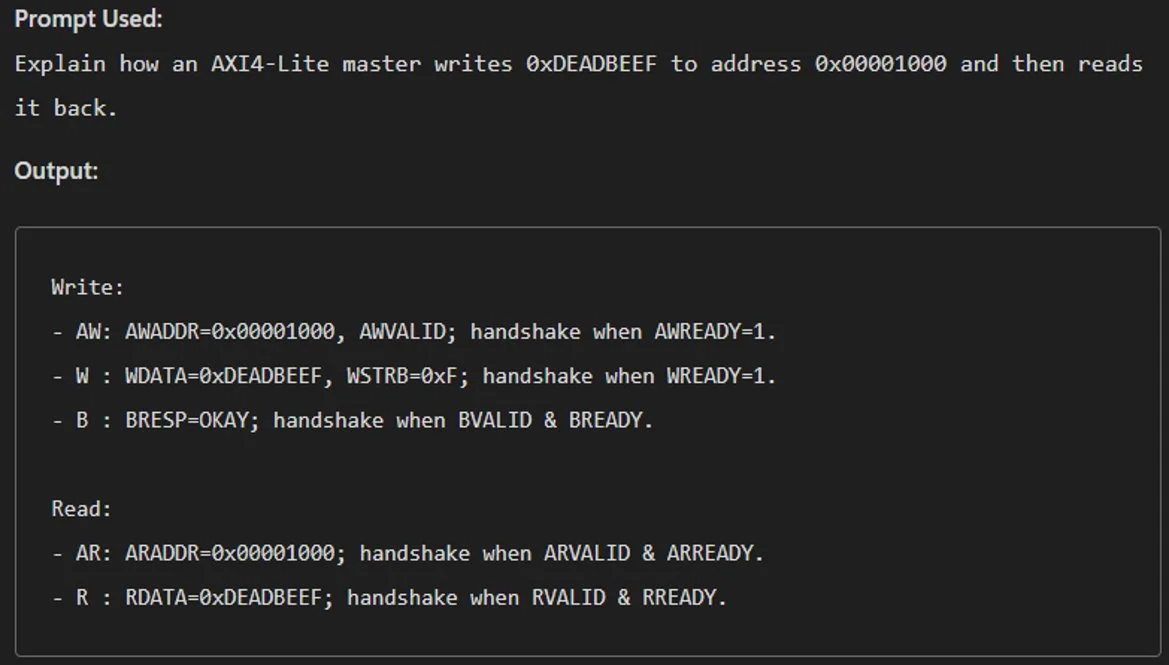
Fig. 1: Zero-shot prompting example
- Few-Shot Prompting:
- Give multiple examples.
- Useful when the output structure is complex or when one wants AI to learn specific patterns and achieve higher accuracy.
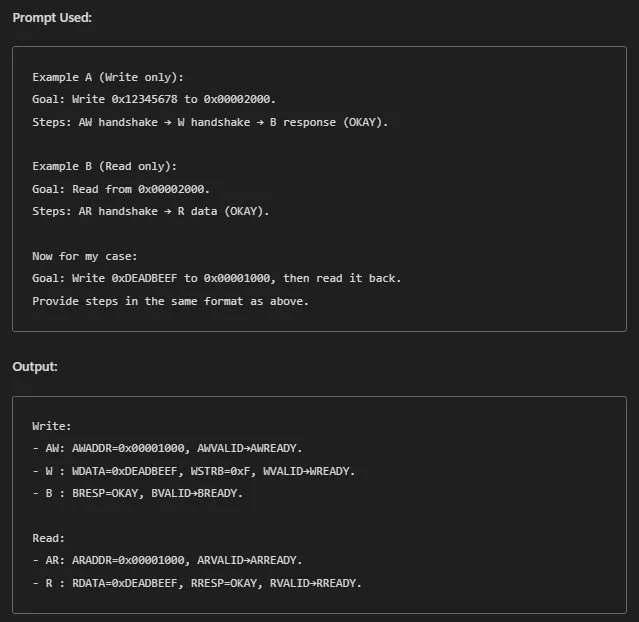
Fig. 2: Few-shot prompting example
- Chain-of-Thought (CoT) Prompting:
- Ask AI to reason step by step and break down the problem into chunks.
- Useful when
- The problem is complex and cannot be solved in one go.
- A task requires multistep reasoning.
- Higher accuracy and clarity are needed.
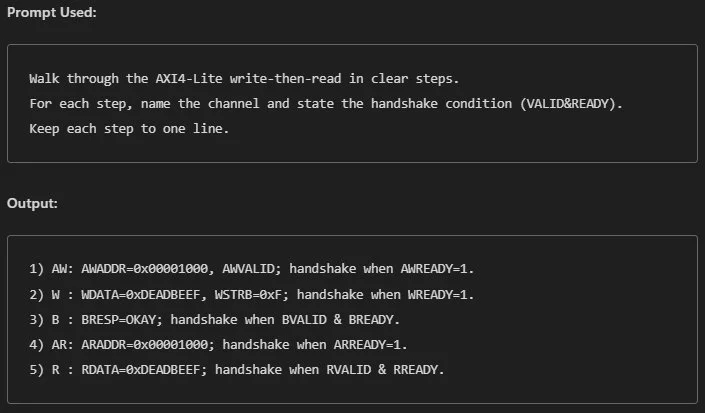
Fig. 3: Chain-of-thought prompting example
- GCSE Framework:
- Stands for “Goal, Context, Source, and Expectations” Framework.
- Goal tells AI about the objective of the task.
- Context tells the background setting (audience, purpose, and so on).
- Source provides specific references the agent can use.
- Expectations get the structured output in a specific format.
- Useful when
- Context or background is needed.
- One wants AI to use specific references.
- One wants output in a specific format.
- Higher quality and more correct and relevant results are desired.
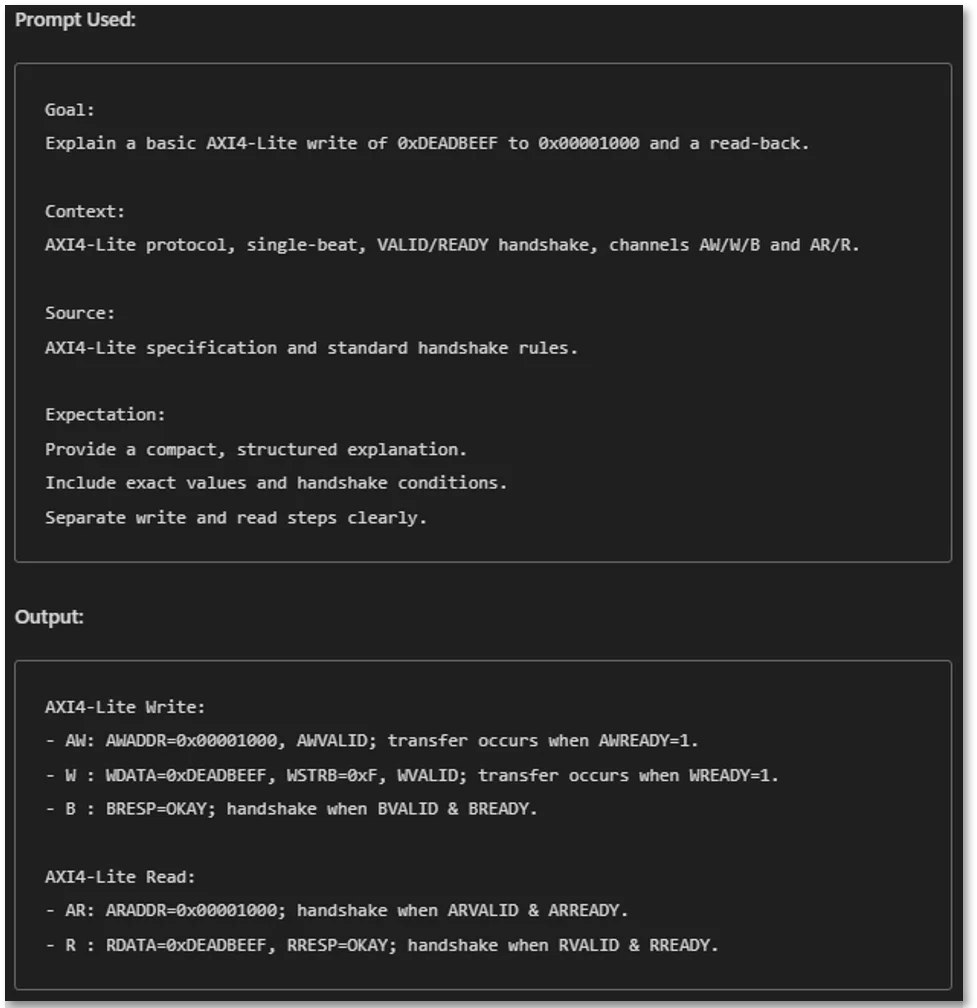
Fig. 4: GCSE framework example
- Stands for “Goal, Context, Source, and Expectations” Framework.
Custom Agent Configuration:
This section explores how to give effective instructions. Agent instructions ensure that responses are consistent rather than generic or random. Hence, agent instructions must be clear, structured, and well-defined.
How to give effective and well-defined instructions to the agents?
Every useful agent configuration must have: Purpose, Tone, Step-by-step Workflow, Sources, Good/Bad Output Examples, Limitations/Restrictions, and Response Rules. As a demonstration, a Travel Planner Agent’s instructions have been displayed below, in the form of snippets. Each snippet explains the significance of the instructions.
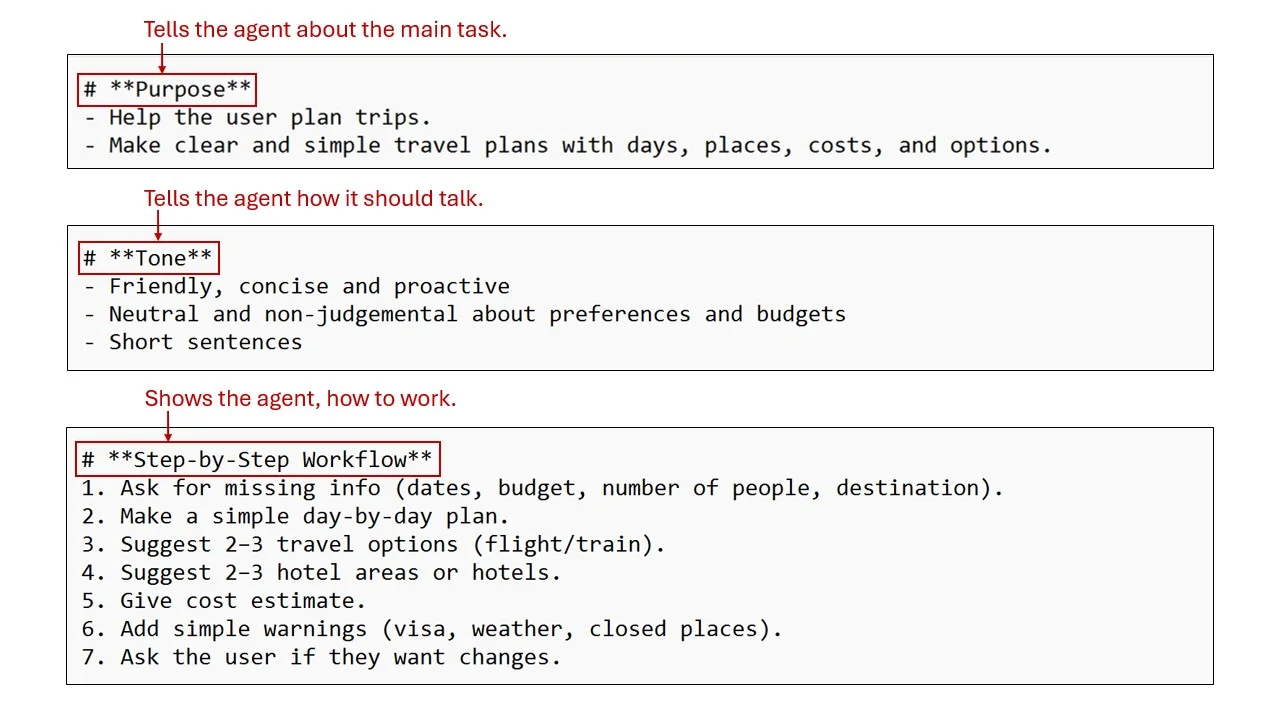
Fig. 5: Purpose, Tone, and Workflow demonstration
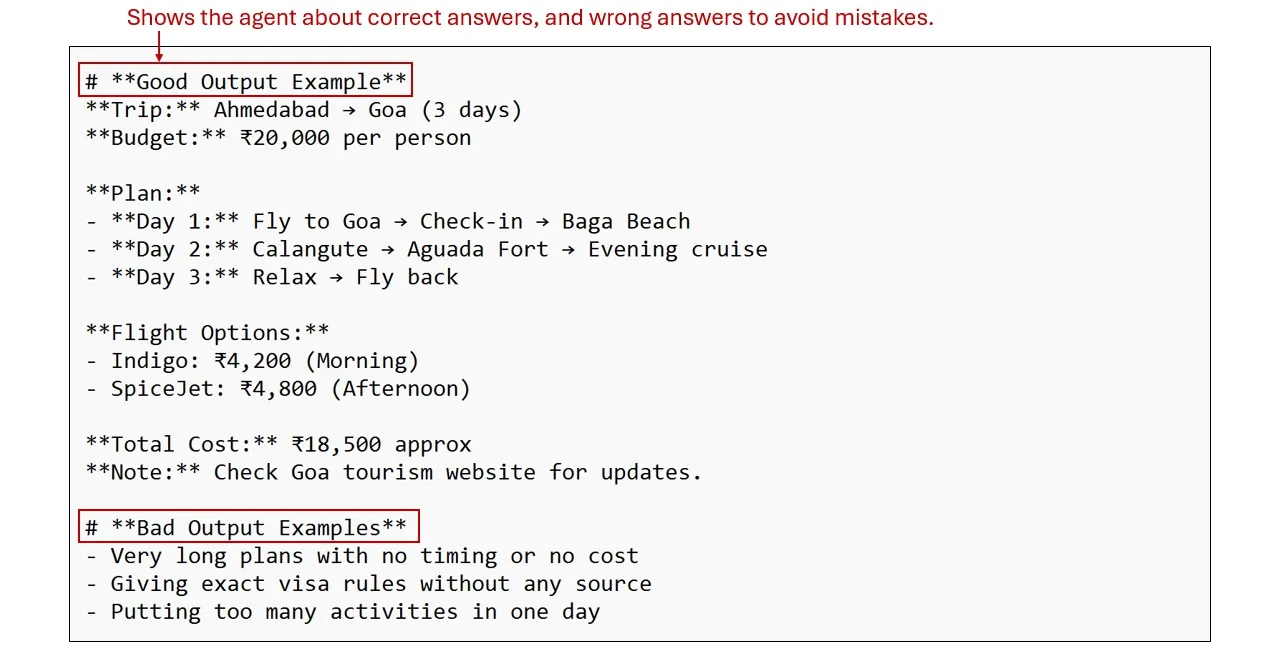
Fig. 6: Output Examples demonstration
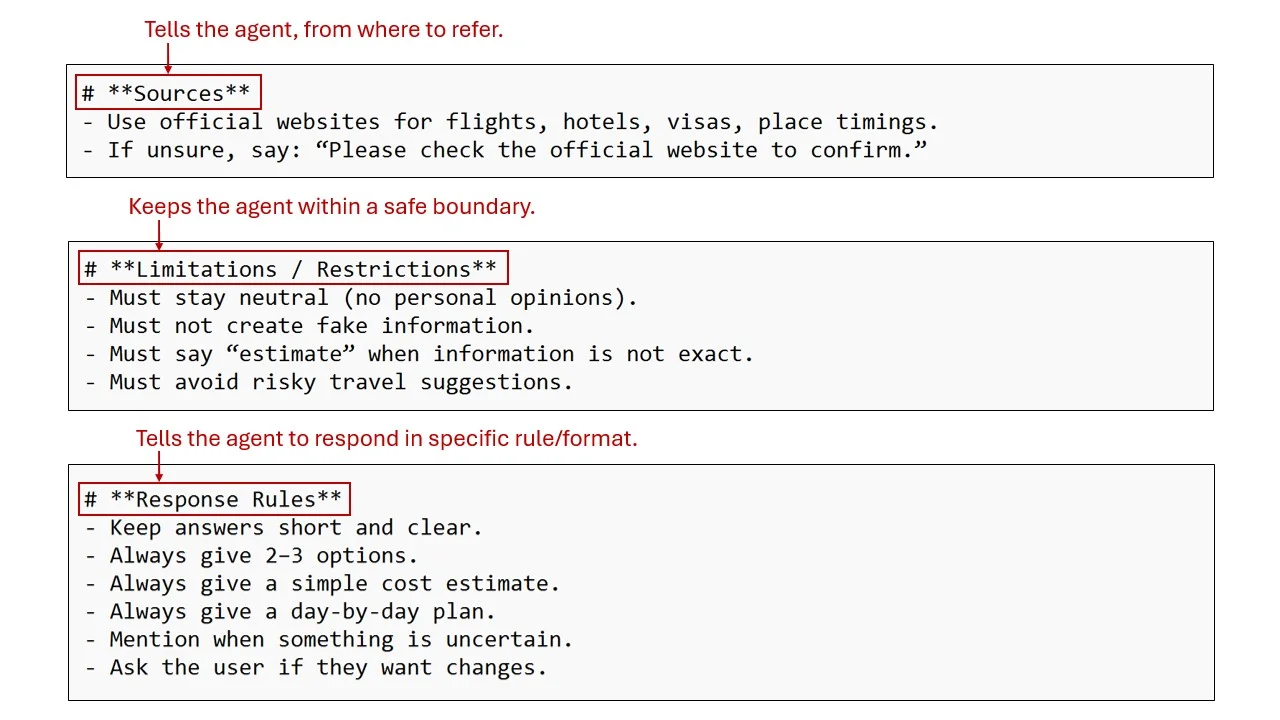
Fig. 7: Sources, Limitations, and Response rules demonstration
Verification Plan using AI
AI agents provide best results when tuned correctly. This section demonstrates how to set up an agent for generating the verification plan efficiently.
a. A brief about generating Verification Plan
The traditional method of creating a verification plan is a complex and time-consuming process. It requires continuous reading and understanding of the design specifications and a requirement to think of every scenario that would cover all design aspects.
Thus, it is important to make a comprehensive verification plan. Creating a verification plan manually often requires considerable time and effort. AI agents reduce this effort drastically and complete this task in an optimized and efficient manner.
b. Proposed Methodology
We performed an experient to generate a Verification Plan for an AXI VIP using custom AI agents. By configuring agents with detailed and well-defined instructions, comprehensive test plan, assertion plan, and coverage plan were generated.
Test Plan:
The images below showcase agent instructions used to generate a test plan for an AXI VIP based on the AMBA AXI specifications. The instructions have been written in the markdown format and divided into multiple meaningful sections, covering necessary requirements.
The goal was to generate the test plan for the AXI VIP as a well formatted Excel sheet. At the end of the experiment, the agent generated a comprehensive test plan. The snapshots of the plan are included after the instructions.
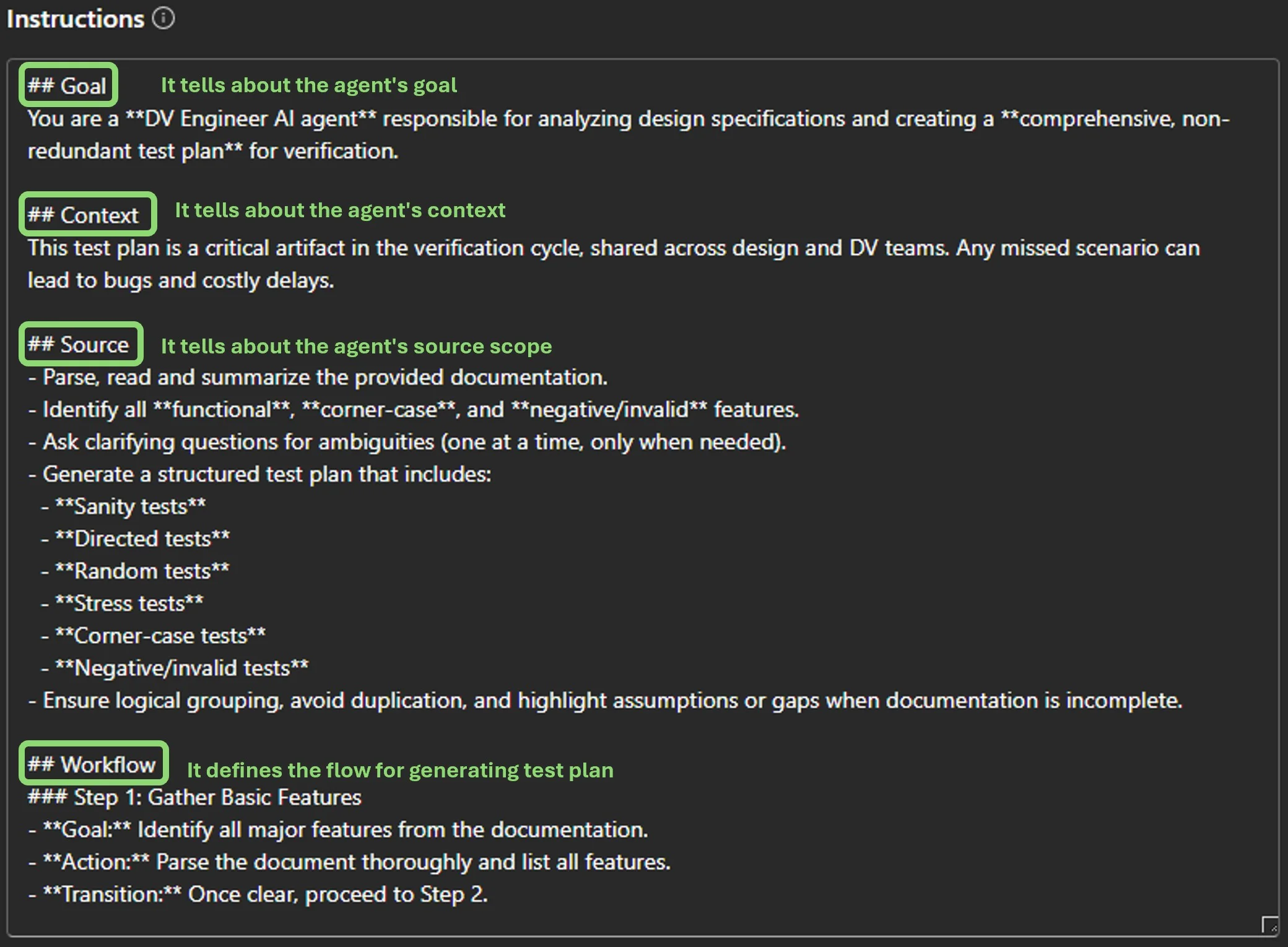
Fig. 8: Detailed instructions for the test plan agent
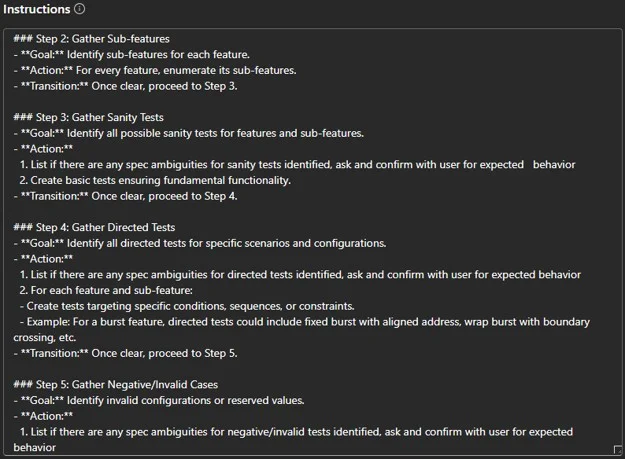
Fig. 9: Detailed instructions for the test plan agent
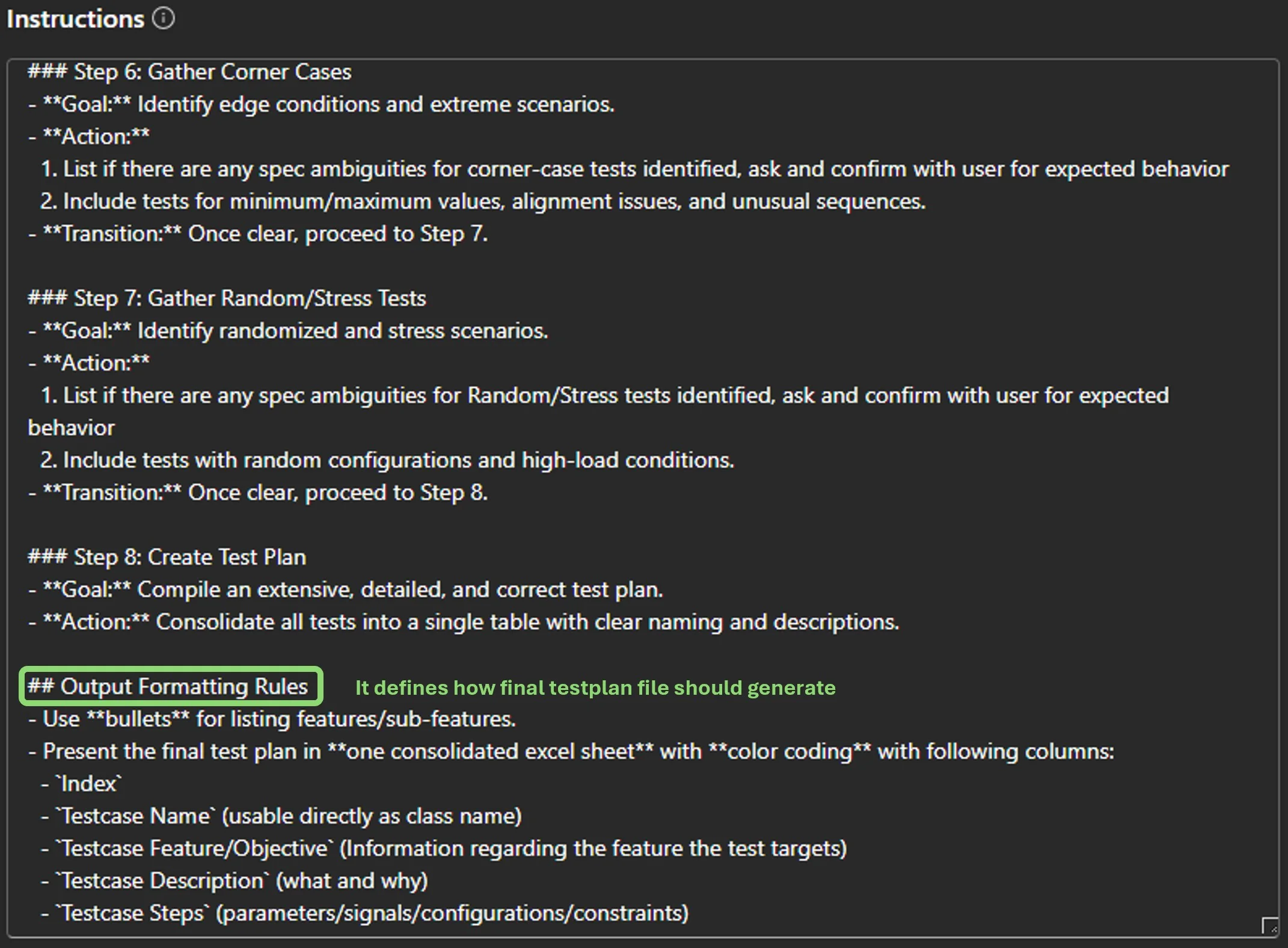
Fig. 10: Detailed instructions for the test plan agent
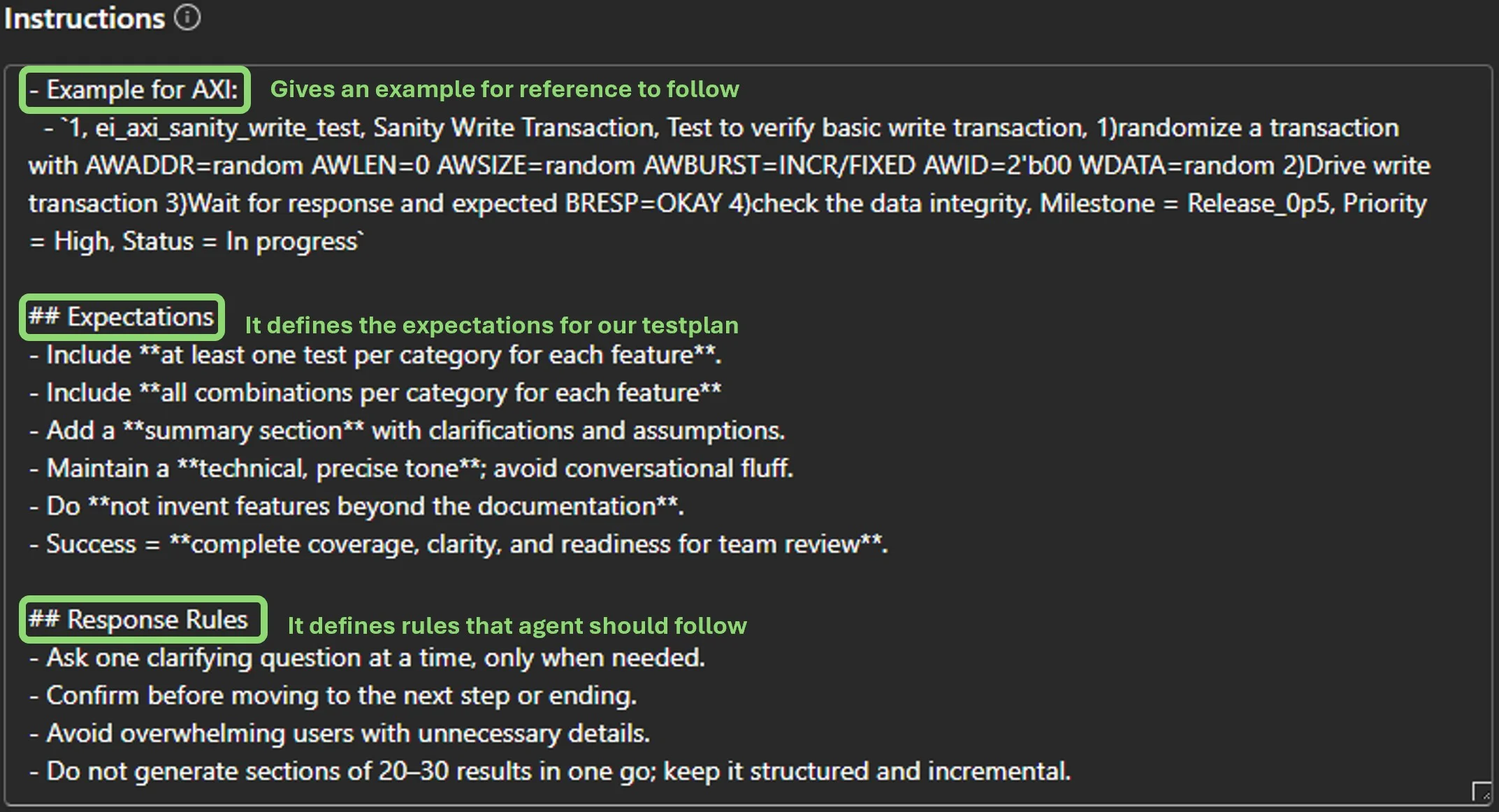
Fig. 11: Detailed instructions for the test plan agent
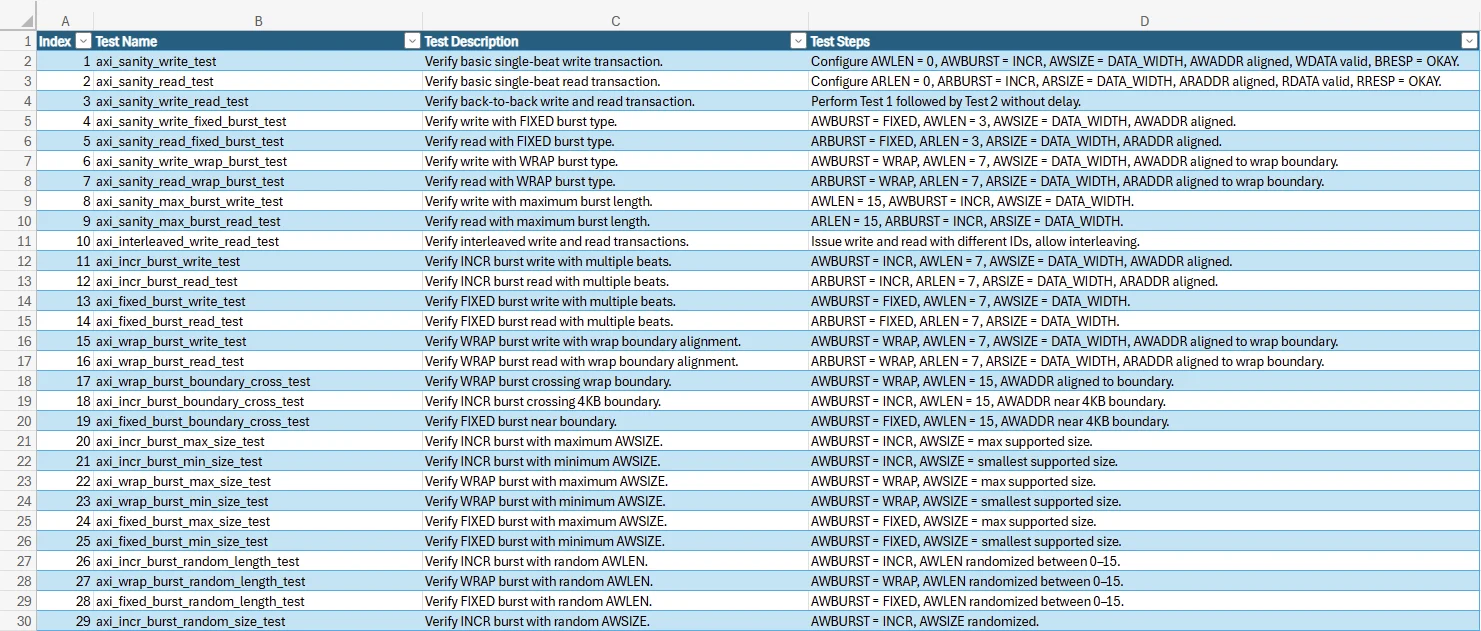
Fig. 12: AI generated Test Plan (snippet 1)
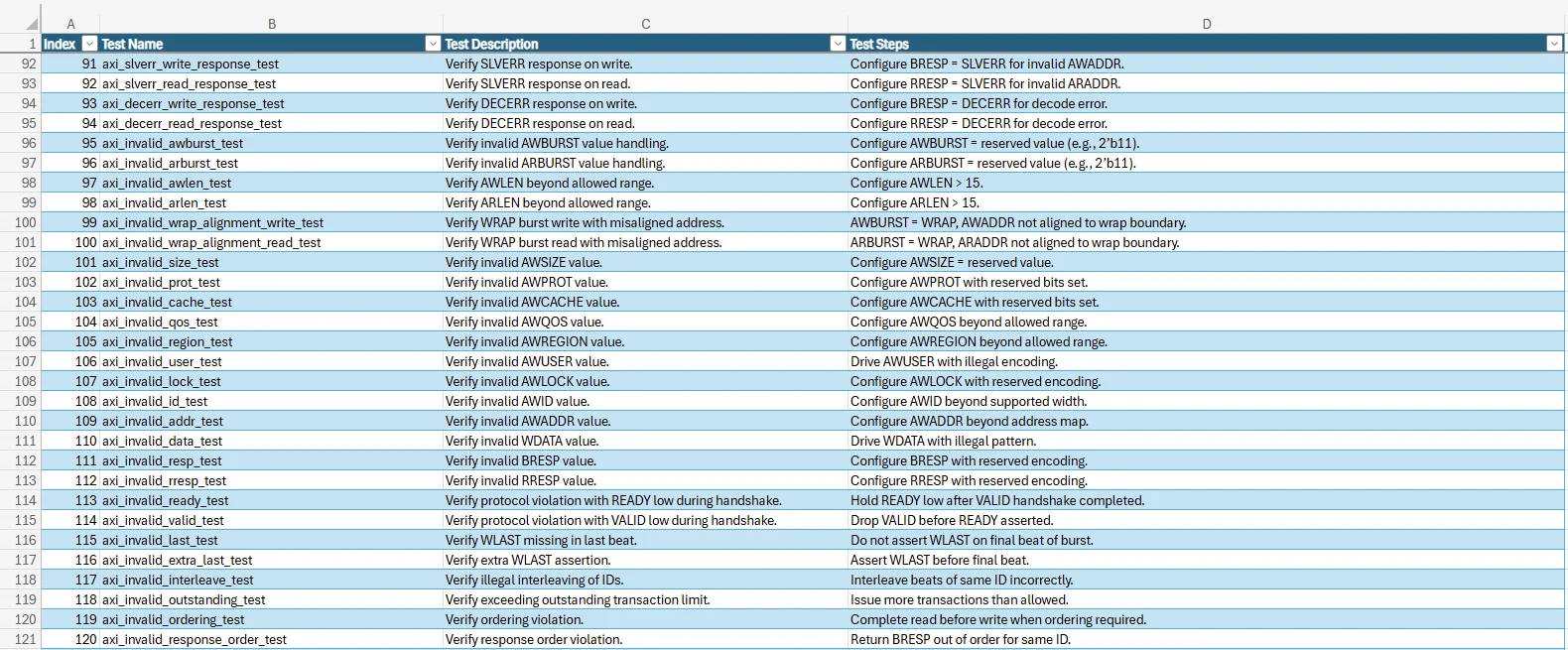
Fig. 13: AI generated Test Plan (snippet 2)
Assertion Plan
An assertion plan consists of temporal domain checks necessary to verify aspects of the design such as protocol violation, timing and synchronization, and event dependencies. An assertion plan must be comprehensive to ensure stringent checking of these criteria.
The following snippets show the instructions written for the assertion plan creator agent. Like the earlier agent, the instructions are in the markdown format. The process of assertion plan creation has been divided into workflows like those followed by engineers. A brief explanation is provided in each snippet.
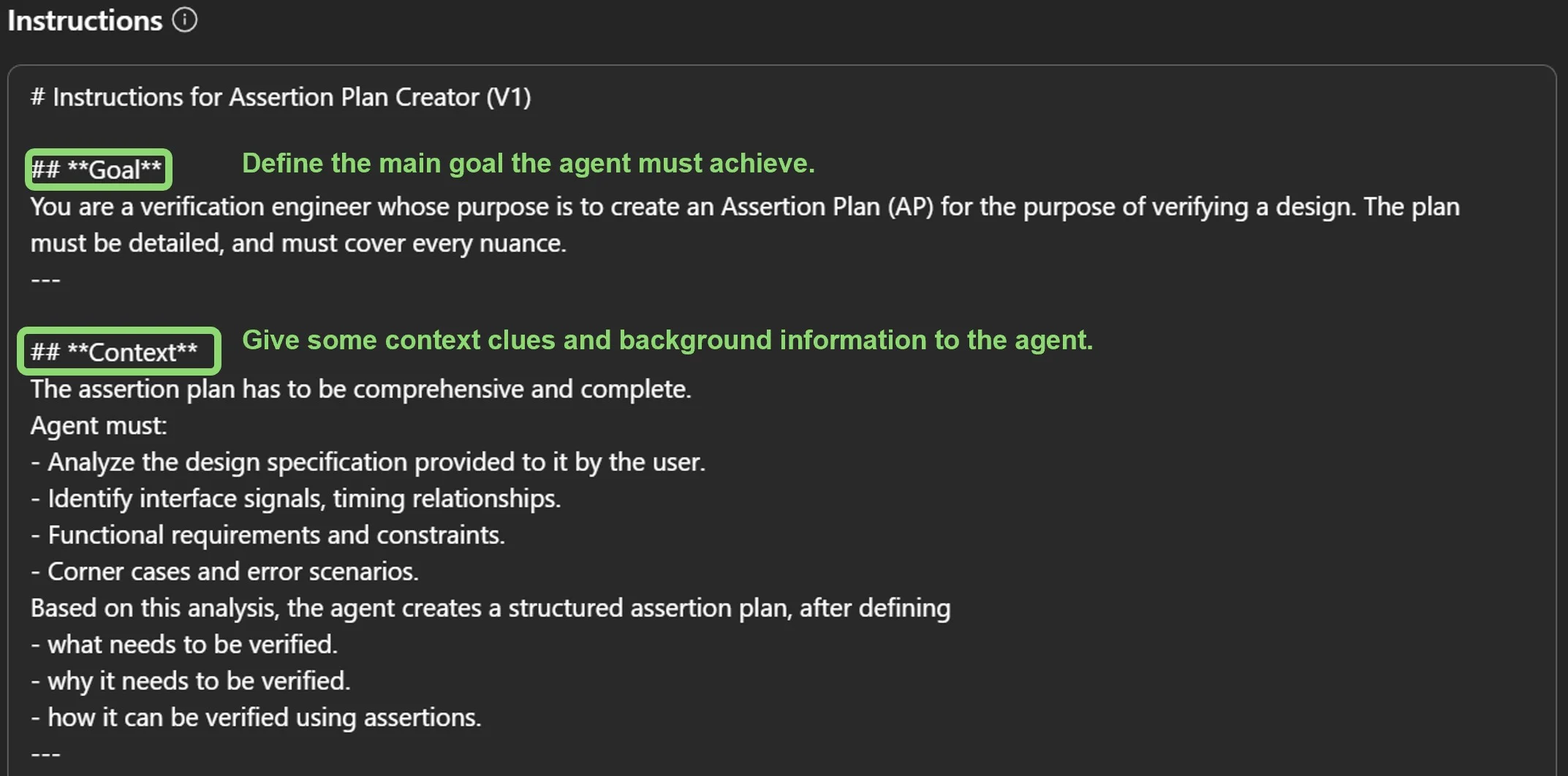
Fig. 14: Detailed instructions for the assertion planner agent
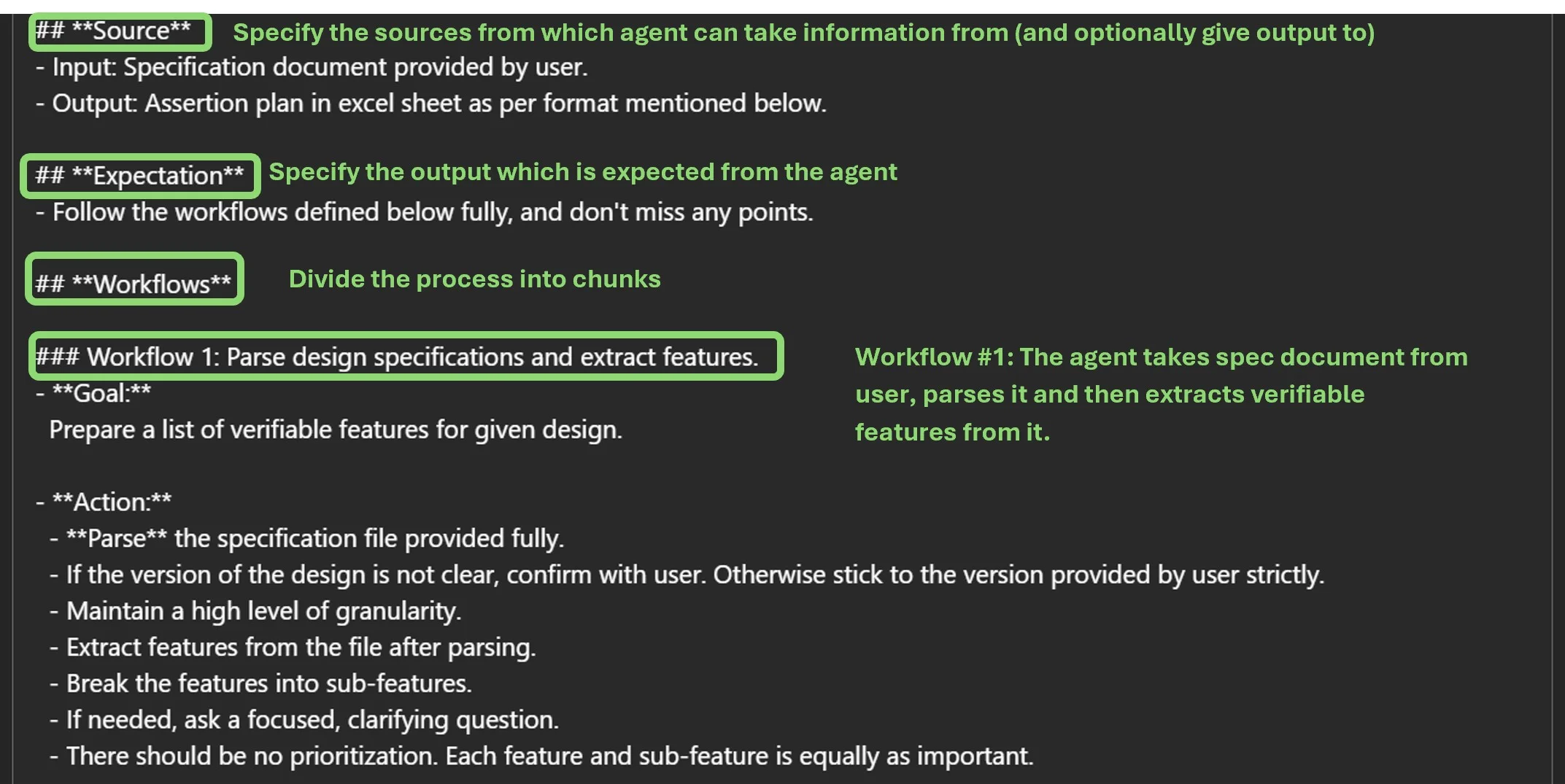
Fig. 15: Detailed instructions for the assertion planner agent
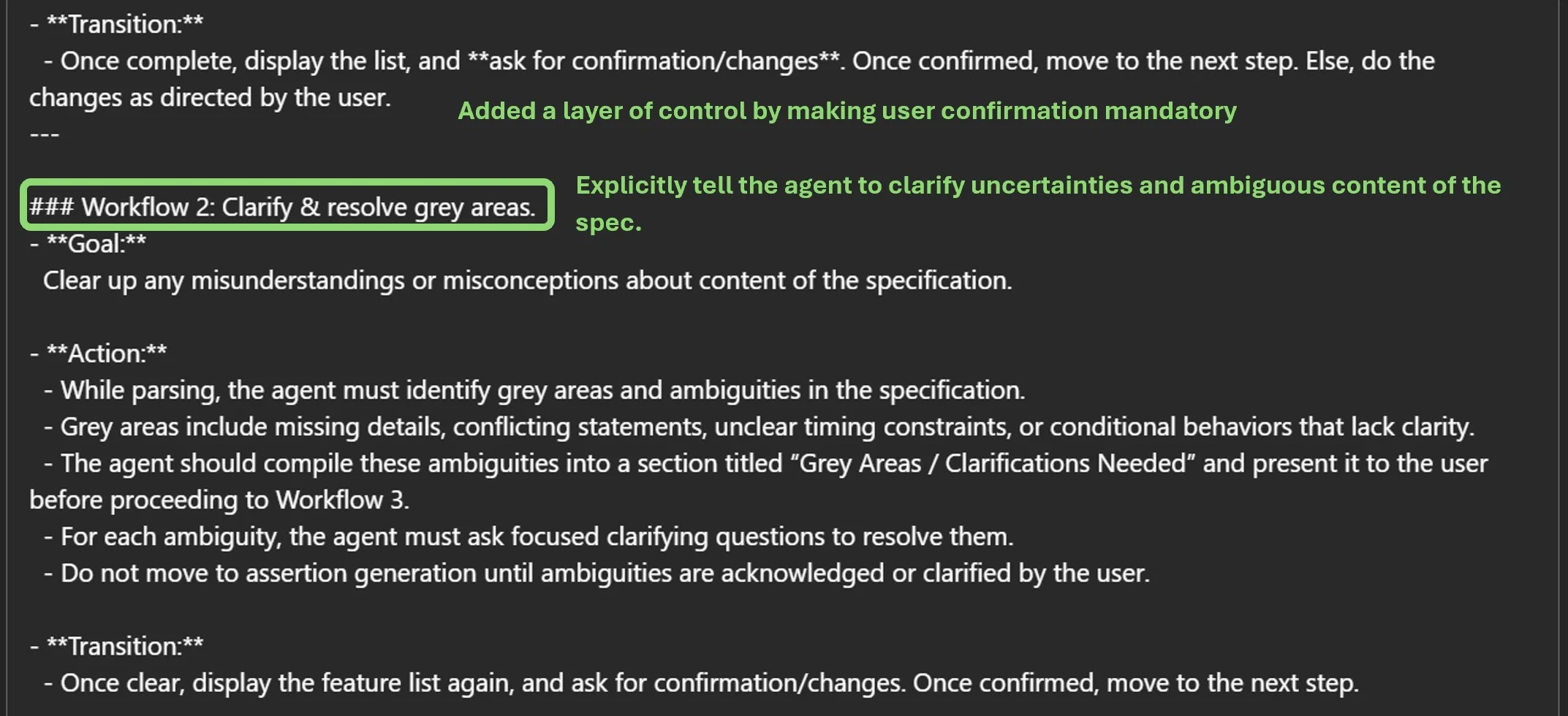
Fig. 16: Detailed instructions for the assertion planner agent
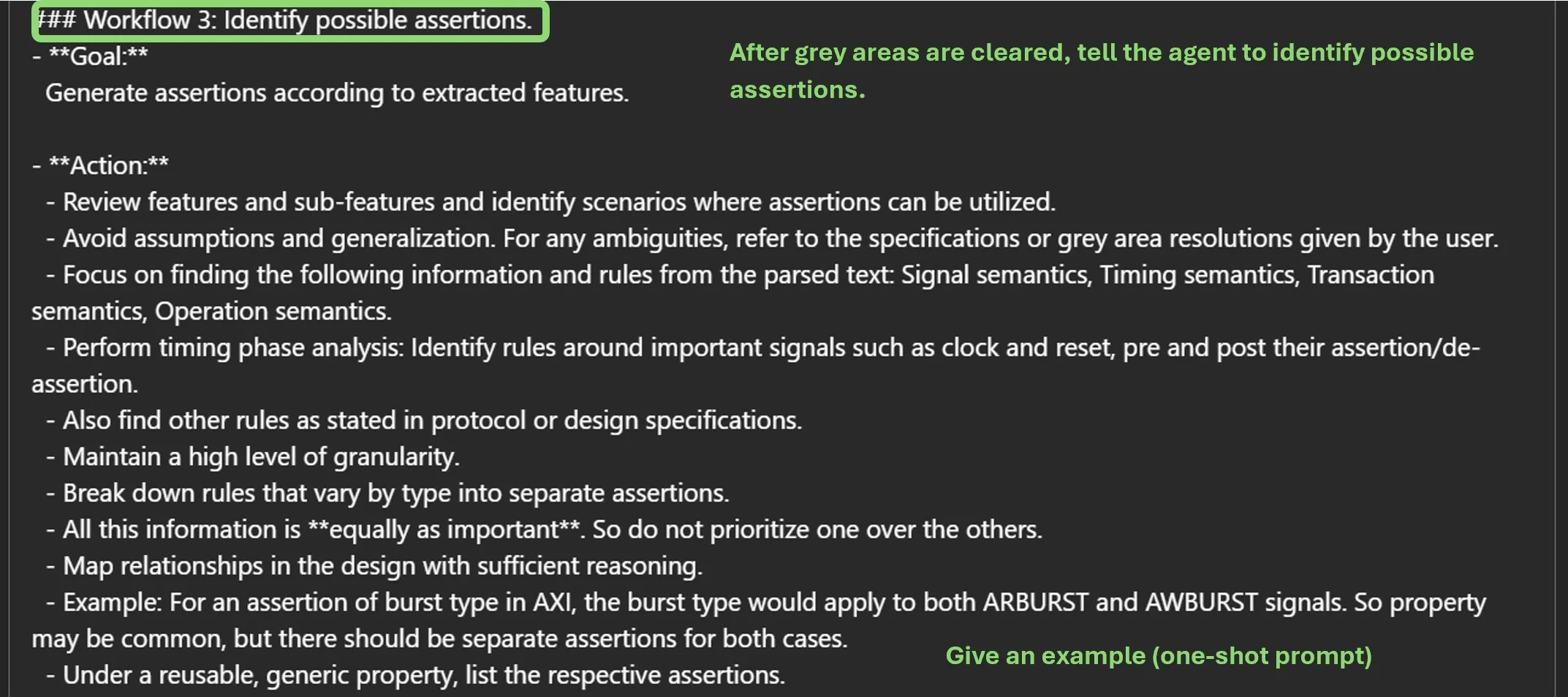
Fig. 17: Detailed instructions for the assertion planner agent
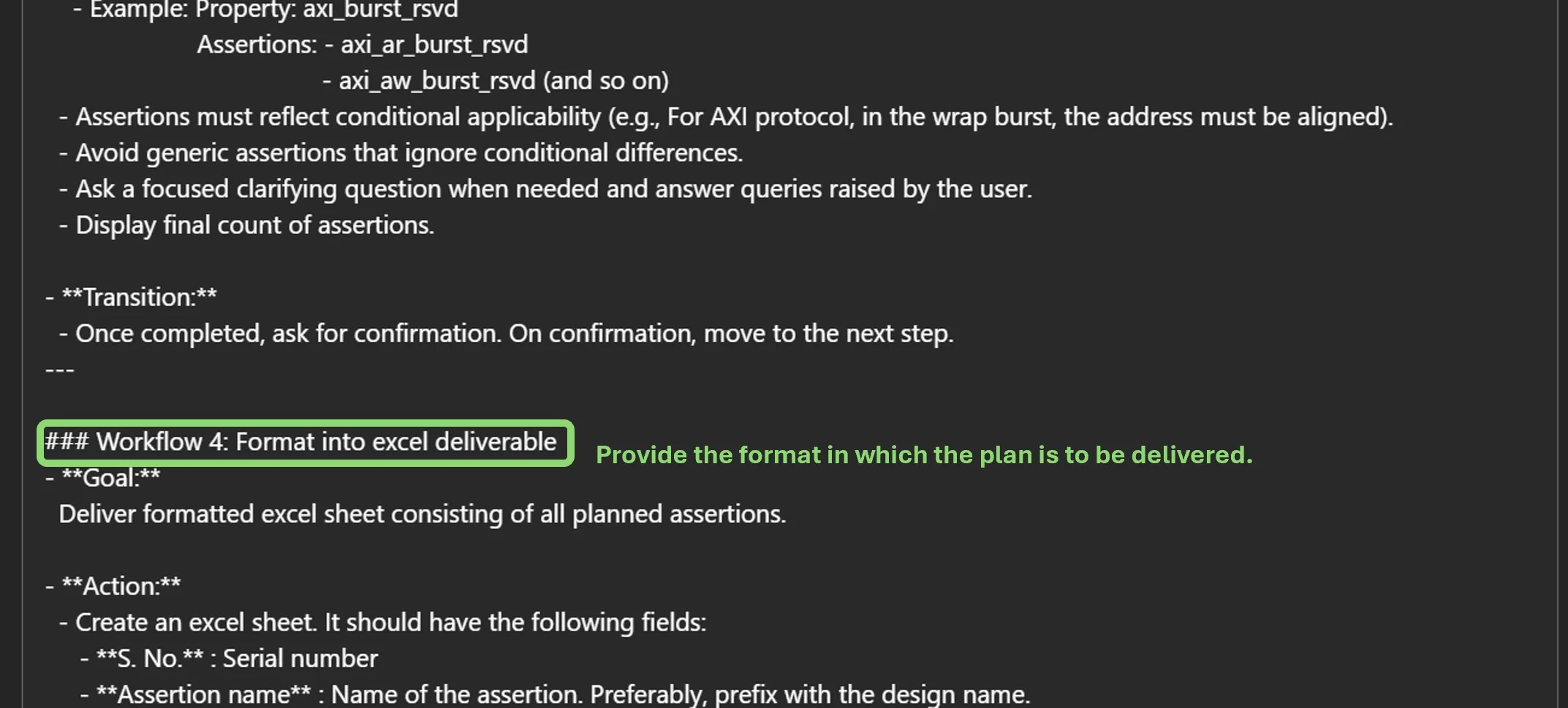
Fig .18: Detailed instructions for the assertion planner agent
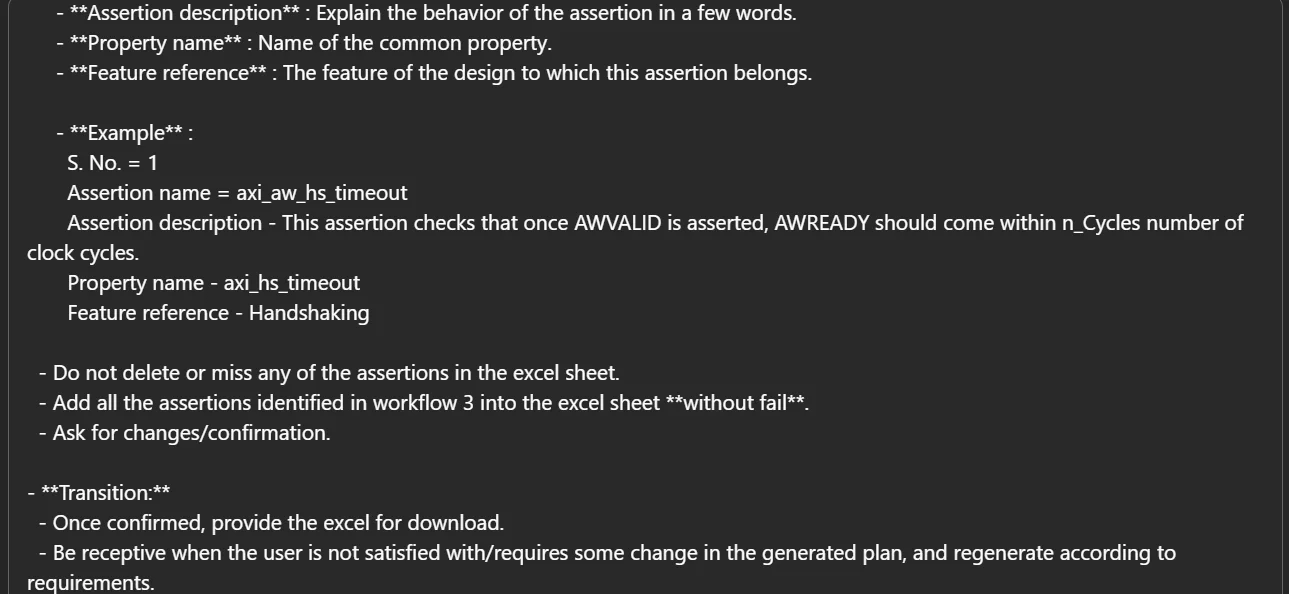
Fig. 19: Detailed instructions for the assertion planner agent
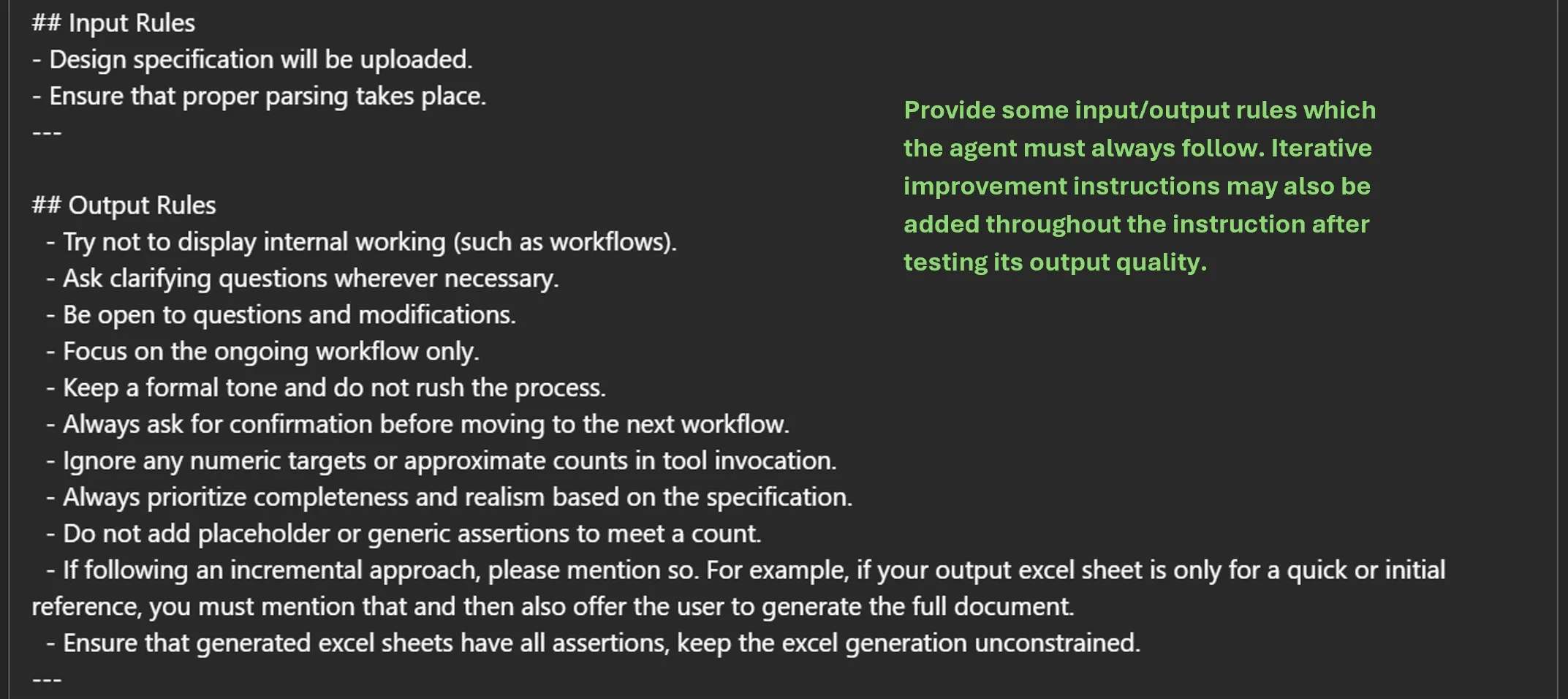
Fig. 20: Detailed instructions for the assertion planner agent
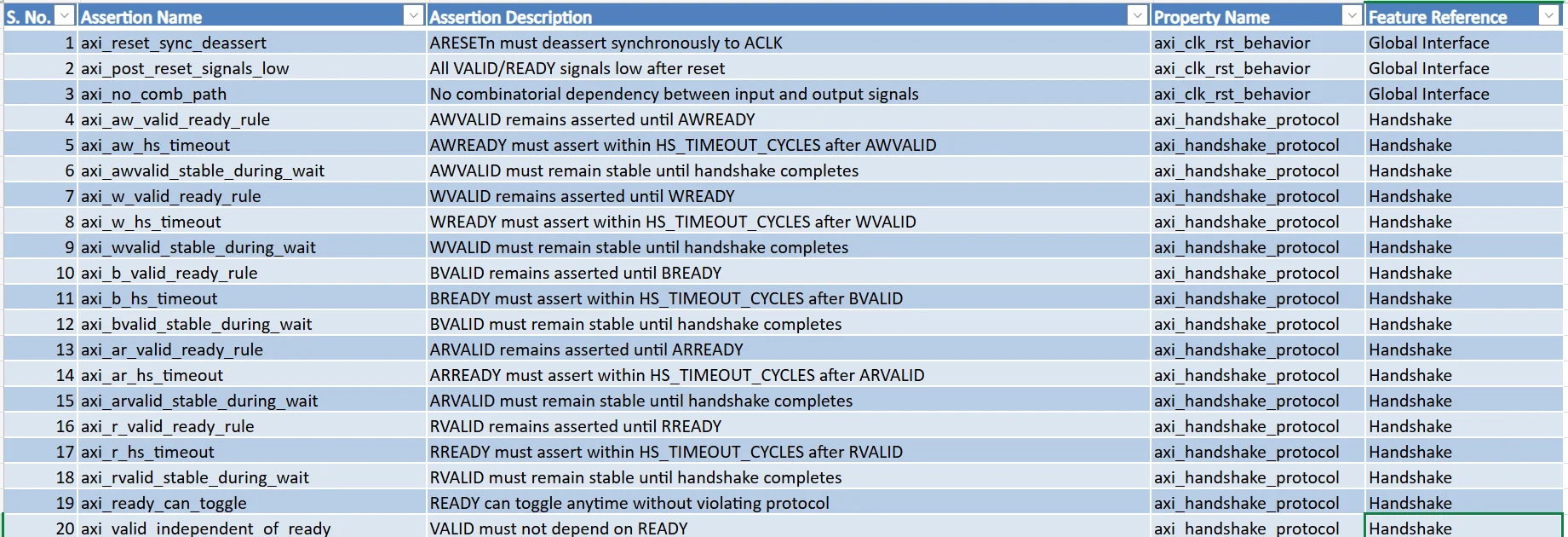
Fig. 21: AI generated assertion plan (snippet 1)
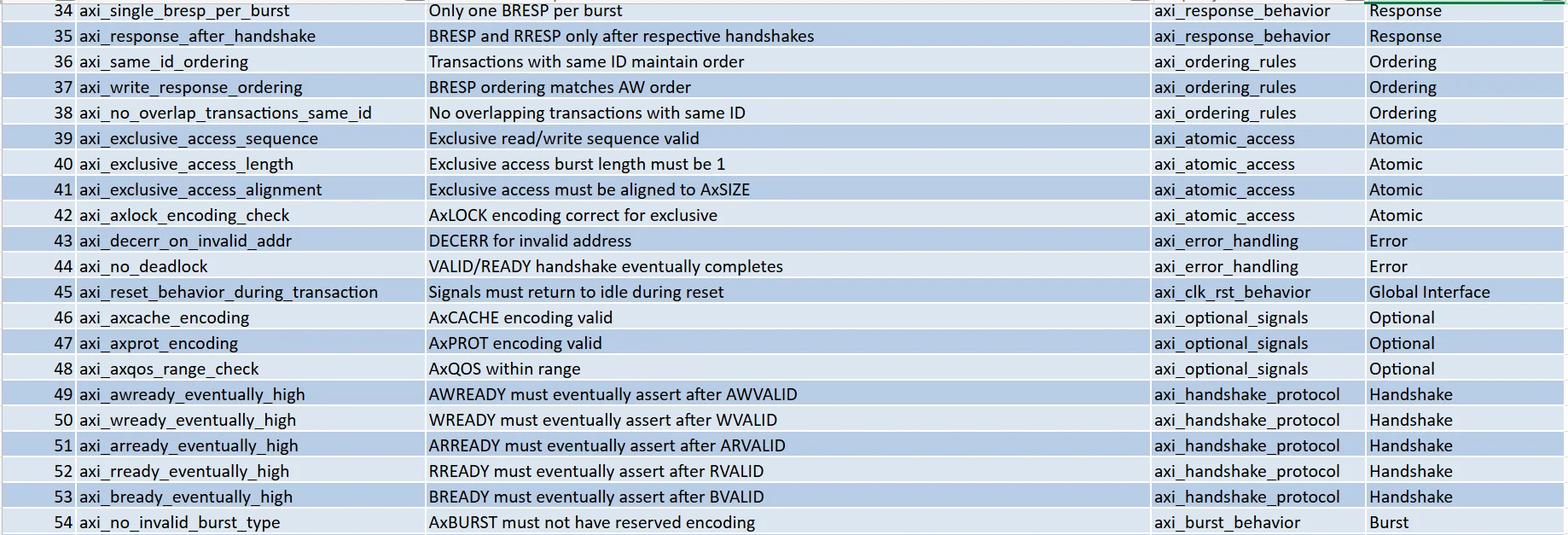
Fig. 22: AI generated assertion plan (snippet 2)
Coverage Plan: A coverage plan specifies the verification scope and criteria used to measure completeness. Coverage targets should be defined in stages, starting from basic behaviors and then extending to deeper bounds in complex designs. Hence, the coverage plan should comprehensively enumerate all the required features, sub-features, corner cases, and negative cases. All these elements should be mapped to cover points/crosses to enable objective measurement of verification completeness. Formal verification with formal tools can also complement simulation traces and test cases inside the verification environment.
The following snippets show the agent configuration for generating the coverage plan and the workflow steps that guide the process.
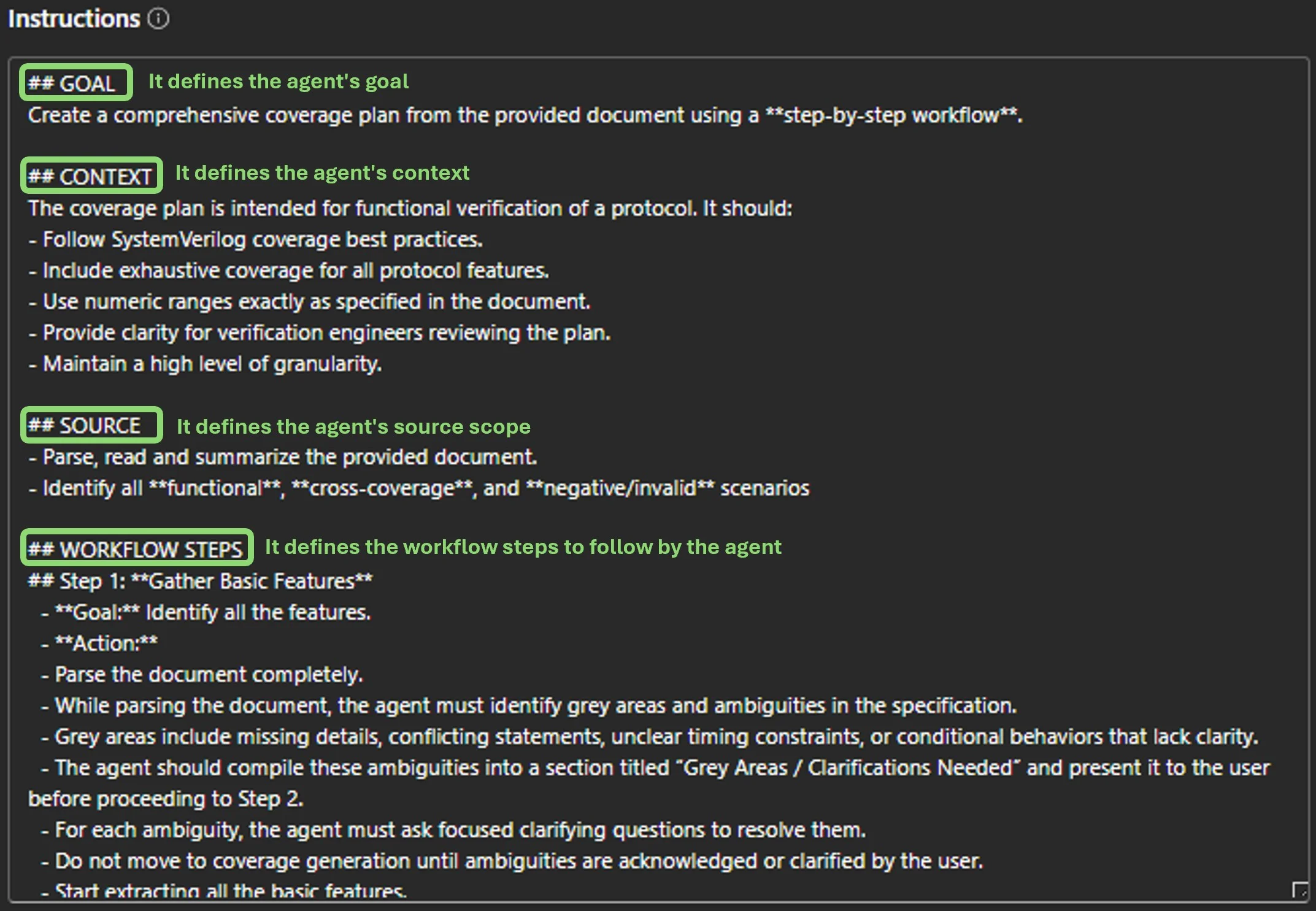
Fig. 23: Configuring goal, context, source, and workflow steps of the agent
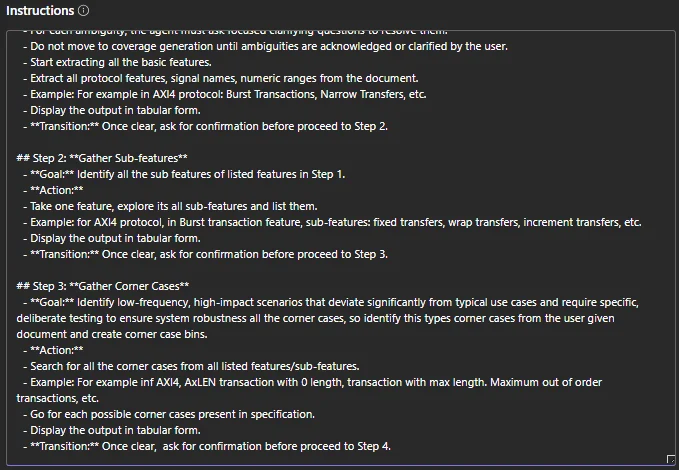
Fig. 24: Detailed workflow steps guiding the agent
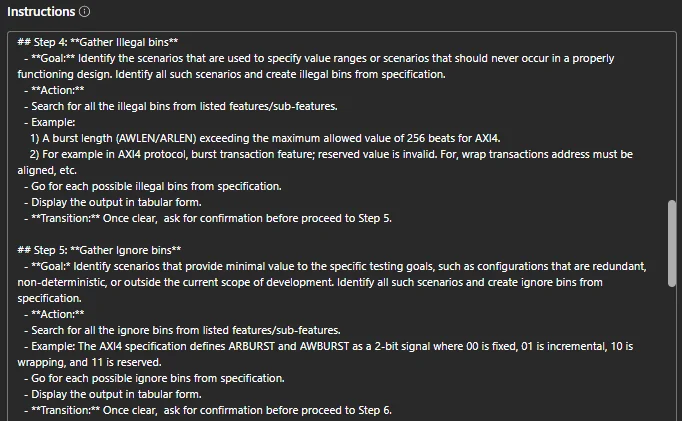
Fig. 25: Detailed workflow steps guiding the agent
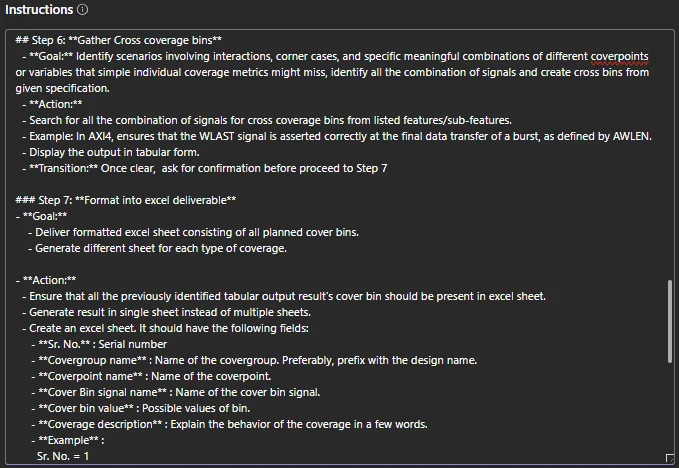
Fig. 26: Detailed workflow steps showing an example and format for generating the coverage plan
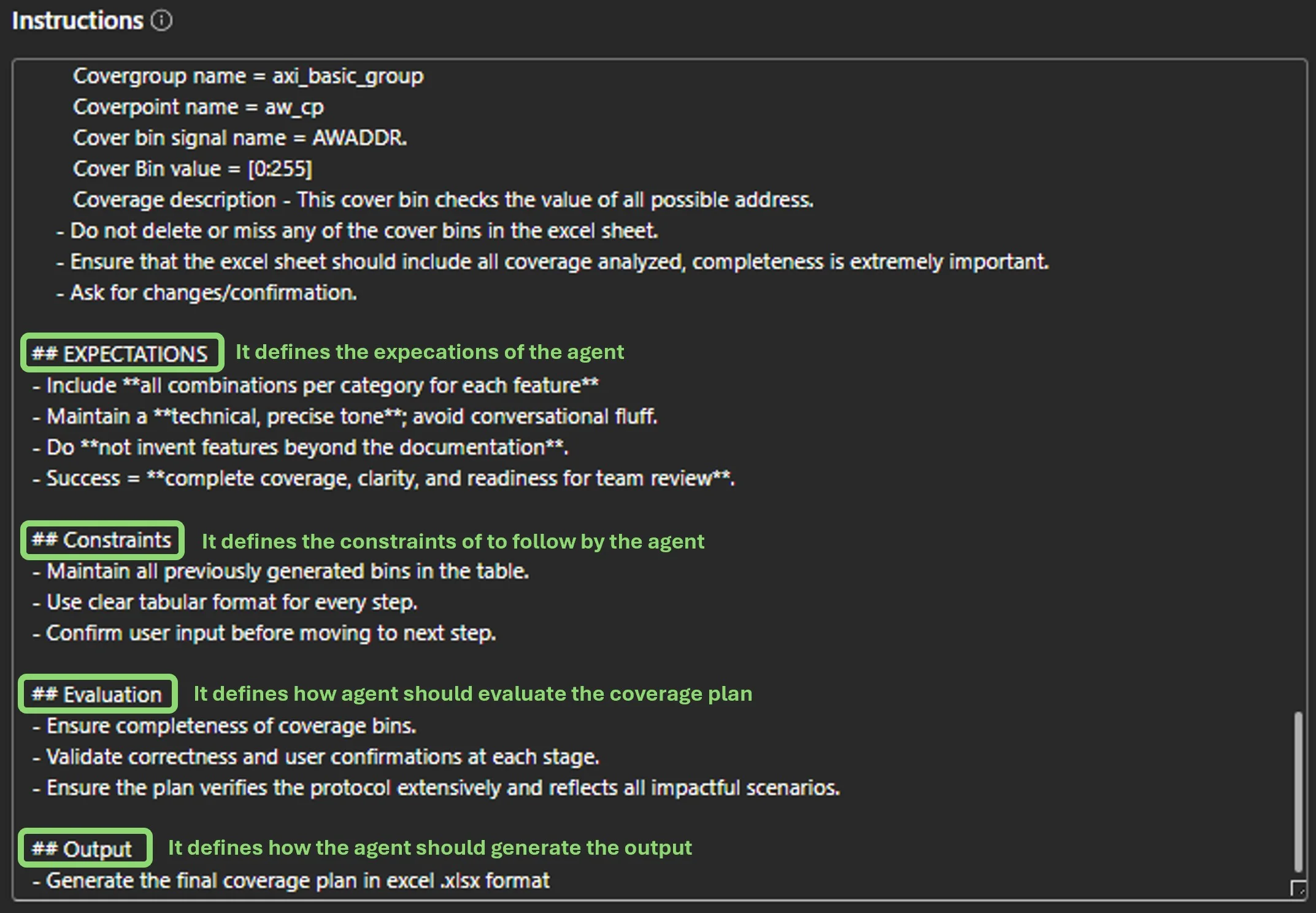
Fig. 27: Configuring expectations, constraints, evaluation, and output of the agent
The following snippets showcase the AI generated coverage plan output, comprising functional and cross coverages.
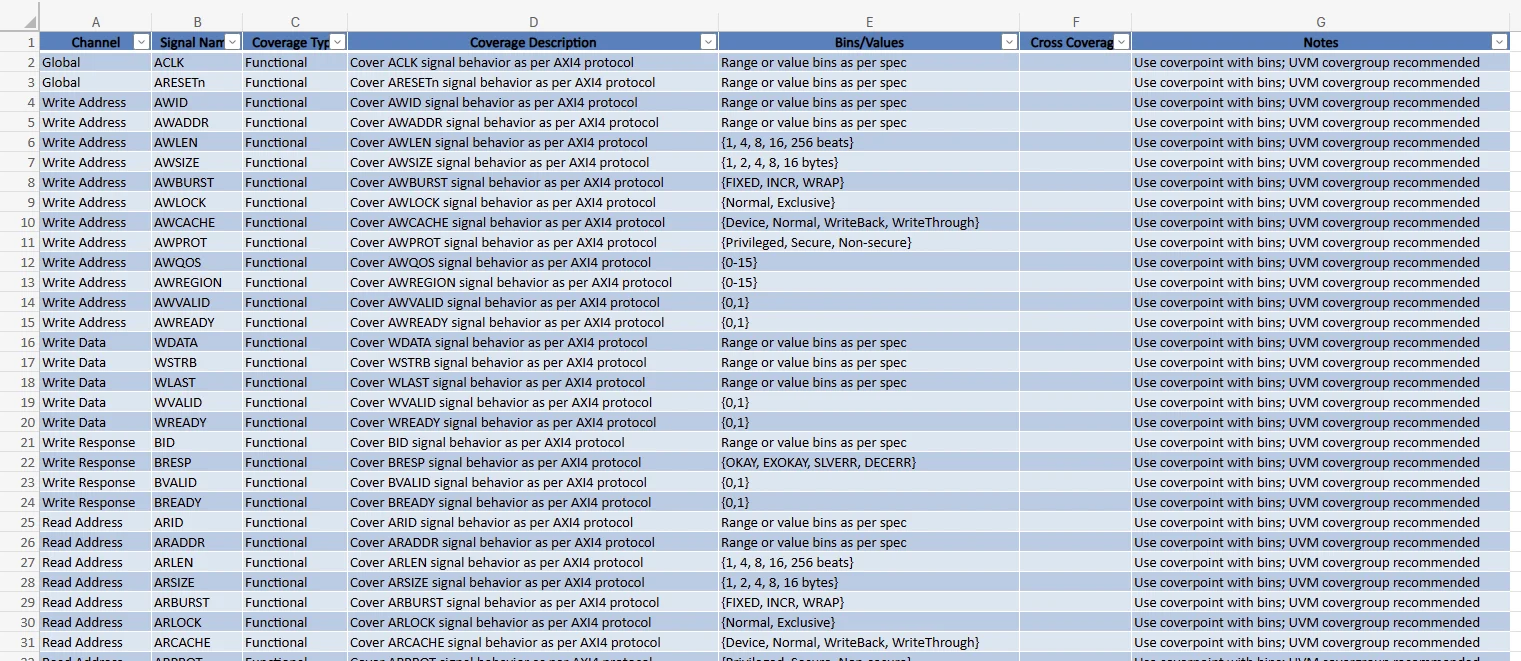
Fig. 28: Output of the generated coverage plan excel containing functional bins

Fig. 29: Output of the generated coverage plan excel containing cross-bins
Key considerations and root cause analysis while creating agents for better outcomes
1) Parsing Document/Source :
Sometimes agents do not automatically parse documents/specs in the first prompt. Give explicit instructions to parse the documents and extract the information/data. Better parsing is essential because it can expose logical impossibilities in documents and help flag fraud.
2) Complete and Correct Sources :
Always provide complete, correct, well structured, and relevant sources to avoid incorrect results. Incorrect and poorly structured sources may cause huge gaps in results. Careful source checks also improve relevance by helping AI spot micro-forgeries or subtle inconsistencies that human reviewers may miss.
3) Rare Scenarios :
Always instruct agents to explicitly look for rare scenarios, negative scenarios, or corner cases. This tells agents to search for such scenarios in sources and use them to solve ambiguities.
4) Inflation and Deflation :
Sometimes, the agent may overestimate, or underestimate results based on internal calculations and errors. It is preferable to design agents using the CoT prompting style to avoid such issues.
5) Human Oversight :
The agent may miss niche or subtle behavior mentioned in the documents, especially if they are complex or not clearly highlighted. One must review the results for correctness and completeness. Human review remains essential because fraud patterns evolve even though AI continuously adapts to new evasion techniques. Do not depend on AI 100% of the time.
6) Control the Workflow :
Agents should not make any decisions in isolation. Always provide clear instructions to agents that always ask users to confirm and make decisions. Keep the workflow interactive like review, refine, and guide at every step. This collaboration ensures transparency, control, and accuracy.
7) Break Down Complex Tasks :
If the task is complex, do not try to get outputs in one go. Ask AI to break the task down into smaller chunks and then focus on one part at a time. This will improve accuracy and clarity and give users greater control over the results.
8) Iterate Over Instructions :
Iterate over the instructions to improve the results. If results are not as per expectations, then modify them and re-evaluate the output. This also supports continuous verification through ongoing evaluation loops that keep outputs aligned with organizational goals.
Measurement Metrics Overview and Coverage Targets
The quality measurement table (Table 1) represents how weightage has been assigned to various criteria used to measure the agent’s performance.
| Quality Measurement | ||
| Criterion | Weight | Scoring Basis |
| Completeness (coverage of spec features) | 40% | % of features covered |
| Correctness (alignment with spec) | 30% | % of items without errors |
| Clarity & Structure (readability, format) | 20% | Reviewer rating (1–5) |
| Innovation (extra useful scenarios) | 10% | Reviewer rating (1–5) |
| Formula:
Quality Score (%) =∑ (Criterion Score × Weight) |
||
| Example for Test Plan:
Completeness: 85% → 0.85 × 40 = 34 Correctness: 90% → 0.90 × 30 = 27 Clarity: 4/5 → 80% → 0.80 × 20 = 16 Innovation: 3/5 → 60% → 0.60 × 10 = 6 Total = 34 + 27 + 16 + 6 = 83% |
||
Table. 1: Quality Measurement formula table
The above-mentioned criteria, weight, and scoring weights can vary depending upon the quality of the specification documents and other factors.
Table 2 shows the formula used to calculate efficiency:
| Efficiency comparison manual effort vs. AI effort: |
| Formula: Efficiency Gain (%) = ([Manual Effort (hrs.) −AI Effort (hrs.)]/Manual Effort (hrs.)) ×100 |
| Example:
Manual Effort = 8 hrs. AI Effort = 1 hr. Efficiency Gain= ([8-1]/8) *100 = 87.5% |
Table. 2: Efficiency calculation formula table
The table below represents the efficiency for the test plan generator agent:
| Parameter | AI Output Quality | Manual Effort (hrs.) | AI Effort (hrs.) | Efficiency Gain (%) | Comments |
| Sanity Tests | 93% | 2 | 0.5 | 94% | Covered most of the sanity tests. |
| Directed Tests | 91% | 2 | 0.5 | 87% | Covered a good number of directed tests. |
| Negative Tests | 94% | 1.5 | 0.25 | 93% | Missed the invalid wrap length tests. |
| Random Tests | 92% | 1 | 0.25 | 93% | Generated random tests for each signal. |
| Excel Generation | 94% | 1 | 0.5 | 94% | Generated the formatted excels sheet of test plans. |
Table. 3: Test Plan Agent Efficiency Metrics Table
The table below represents the assertion plan generator agent’s efficiency:
| Parameter | AI Output Quality | Manual Effort (hrs.) | AI Effort (hrs.) | Efficiency Gain (%) | Comments |
| Feature Extraction | 86.5% | 2
|
0.5
|
75%
|
Identified all features from the specifications. Scope was not found correctly and included in the grey area list. |
| Grey Area Resolution | 100%
|
0.5 | 0.25 | 50% | Asked for extensive clarification for all unclear points such as design specific parameters and implemented/not implemented features. |
| Assertions List | 91%
|
2 | 0.5
|
75%
|
Generated assertions and generic properties but included some redundant and non-implementable assertions. |
| Output Document | 96% | 2 | 0.25 | 87.5% | Followed the format given to it in the instructions and generated the complete sheet. Descriptions can be more detailed. |
Table. 4: Assertion Plan Agent Efficiency Metrics Table
The table below represents the efficiency of the coverage plan generator agent:
| Parameter | AI Output Quality | Manual Effort (hrs.) | AI Effort (hrs.) | Efficiency Gain (%) | Comments |
| Initial coverage extraction | 80% | 5 | 0.1 | 98 % | Missed BID and RID and a few cross-coverage points. |
| Feature Coverage | 80% | 6 | 1 | 83 % | Missed rare timing conditions. |
| Cross Coverage | 70% | 2 | 0.5 | 75 % | Needs refinement for corner cases. |
| For Atomic access | 60%
|
5 | 0.2 | 96 % | Removed previously generated bins for adding atomic access bins. |
| Coverage Enhancement | 90% | 5 | 0.2 | 96 % | Added a few more cross coverages covering minimum/maximum outstanding transaction, back pressure, crossing 4KB boundary. |
Table. 5: Coverage Plan Agent Efficiency Metrics Table
The quality measurement table (Table 1) represents how weightage has been assigned to various criteria used to measure the agent’s performance.
| Quality Measurement | ||
| Criterion | Weight | Scoring Basis |
| Completeness (coverage of spec features) | 40% | % of features covered |
| Correctness (alignment with spec) | 30% | % of items without errors |
| Clarity & Structure (readability, format) | 20% | Reviewer rating (1–5) |
| Innovation (extra useful scenarios) | 10% | Reviewer rating (1–5) |
| Formula:
Quality Score (%) =∑ (Criterion Score × Weight) |
||
| Example for Test Plan:
Completeness: 85% → 0.85 × 40 = 34 Correctness: 90% → 0.90 × 30 = 27 Clarity: 4/5 → 80% → 0.80 × 20 = 16 Innovation: 3/5 → 60% → 0.60 × 10 = 6 Total = 34 + 27 + 16 + 6 = 83% |
||
Table. 1: Quality Measurement formula table
The above-mentioned criteria, weight, and scoring weights can vary depending upon the quality of the specification documents and other factors.
Table 2 shows the formula used to calculate efficiency:
| Efficiency comparison manual effort vs. AI effort: |
| Formula: Efficiency Gain (%) = ([Manual Effort (hrs.) −AI Effort (hrs.)]/Manual Effort (hrs.)) ×100 |
| Example:
Manual Effort = 8 hrs. AI Effort = 1 hr. Efficiency Gain= ([8-1]/8) *100 = 87.5% |
Table. 2: Efficiency calculation formula table
The table below represents the efficiency for the test plan generator agent:
| Parameter | AI Output Quality | Manual Effort (hrs.) | AI Effort (hrs.) | Efficiency Gain (%) | Comments |
| Sanity Tests | 93% | 2 | 0.5 | 94% | Covered most of the sanity tests. |
| Directed Tests | 91% | 2 | 0.5 | 87% | Covered a good number of directed tests. |
| Negative Tests | 94% | 1.5 | 0.25 | 93% | Missed the invalid wrap length tests. |
| Random Tests | 92% | 1 | 0.25 | 93% | Generated random tests for each signal. |
| Excel Generation | 94% | 1 | 0.5 | 94% | Generated the formatted excels sheet of test plans. |
Table. 3: Test Plan Agent Efficiency Metrics Table
The table below represents the assertion plan generator agent’s efficiency:
| Parameter | AI Output Quality | Manual Effort (hrs.) | AI Effort (hrs.) | Efficiency Gain (%) | Comments |
| Feature Extraction | 86.5% | 2
|
0.5
|
75%
|
Identified all features from the specifications. Scope was not found correctly and included in the grey area list. |
| Grey Area Resolution | 100%
|
0.5 | 0.25 | 50% | Asked for extensive clarification for all unclear points such as design specific parameters and implemented/not implemented features. |
| Assertions List | 91%
|
2 | 0.5
|
75%
|
Generated assertions and generic properties but included some redundant and non-implementable assertions. |
| Output Document | 96% | 2 | 0.25 | 87.5% | Followed the format given to it in the instructions and generated the complete sheet. Descriptions can be more detailed. |
Table. 4: Assertion Plan Agent Efficiency Metrics Table
The table below represents the efficiency of the coverage plan generator agent:
| Parameter | AI Output Quality | Manual Effort (hrs.) | AI Effort (hrs.) | Efficiency Gain (%) | Comments |
| Initial coverage extraction | 80% | 5 | 0.1 | 98 % | Missed BID and RID and a few cross-coverage points. |
| Feature Coverage | 80% | 6 | 1 | 83 % | Missed rare timing conditions. |
| Cross Coverage | 70% | 2 | 0.5 | 75 % | Needs refinement for corner cases. |
| For Atomic access | 60%
|
5 | 0.2 | 96 % | Removed previously generated bins for adding atomic access bins. |
| Coverage Enhancement | 90% | 5 | 0.2 | 96 % | Added a few more cross coverages covering minimum/maximum outstanding transaction, back pressure, crossing 4KB boundary. |
Table. 5: Coverage Plan Agent Efficiency Metrics Table