


What is WPF?
The Windows Presentation Foundation (WPF) is one of the development frameworks used to make desktop applications for Windows. WPF is a computer software framework developed by Microsoft for building Windows desktop applications. WPF is included in the .NET framework, which is also developed by Microsoft. The WPF’s vector-based (digital images created using points, lines, and curves defined by mathematical equations), resolution-independent (elements are displayed at a consistent physical size regardless of the screen’s resolution) rendering engine makes it easier to work with contemporary graphics hardware. The C# programming language is used to write the application logic in this framework, while Extensible Application Markup Language (XAML) is used to develop the user interface.
Advantages of WPF
- Recently developed, WPF is a modern platform for desktop application development that utilizes the current desktop application development standards.
- WPF’s XAML makes it simple to construct and modify user interface and enables the development effort to be divided between a designer (XAML) and a programmer (C#). This separation of concerns makes the framework more appealing to developers.
- Data and layout are neatly separated through the usage of data binding.
- Effectively utilizes hardware to enhance performance by drawing the user interface.
- It is utilized to create user interfaces for Windows applications.
Introduction to Model-View-ViewModel (MVVM)
User interface development frameworks like WPF, Silverlight, and Xamarin are the applications that use the Model-View-ViewModel (MVVM) design pattern. It divides the data representation, user interface, and application logic into three discrete parts: Model, View, and ViewModel. The above separation enhances the maintainability, testability, and scalability of the application.
What is MVVM Architecture?
The MVVM is an application development architecture that helps separate an application’s User Interface (UI) from its back-end or business logic. The MVVM architecture is designed by Ted Peters and Ken Cooper. John Gossman, a Microsoft WPF and Silverlight architect, announced the MVVM pattern on his blog in 2005. The fundamental objective of MVVM is to ensure that the view remains fully independent from the application logic, making development, testing, and maintenance simpler and more efficient.
Key Components of MVVM
The core components of MVVM are the Model, View, and ViewModel. Each plays a fundamental role in data collection, management, and the overall sustainability and integration of the system.
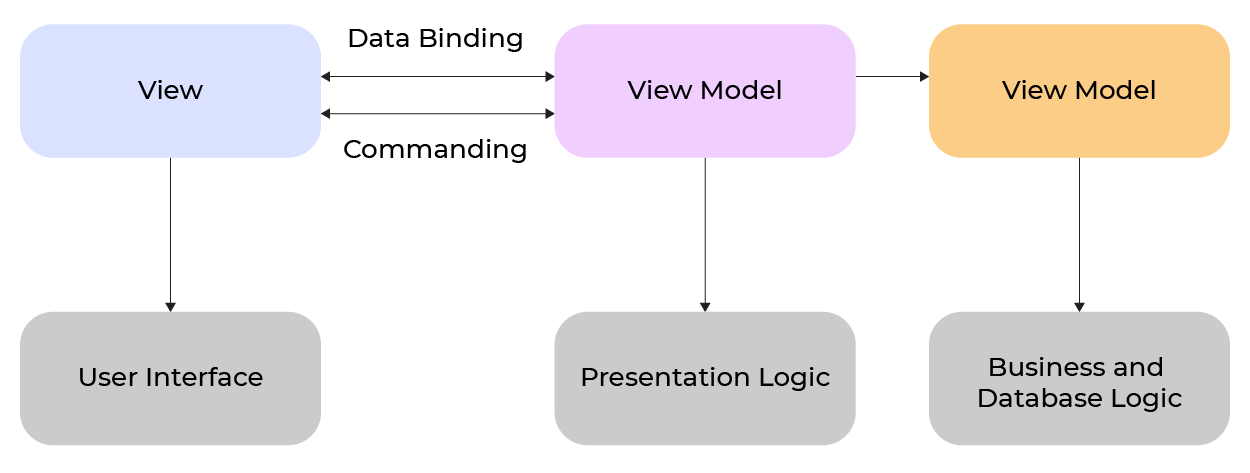
Model
- The Model represents the application data and the business logic.
- Responsibility:
- The Model separates the business logic from the application’s user interface and ensures each operates independently without any overlap.
- It is responsible for all data management tasks like updating, storing, and retrieving information from the database.
- The Model is independent from the View and ViewModel. This separation helps reuse models on different applications.
- Example:
- Classes like Product, Order, Customer, Sale, and Purchase are part of the Model for the shopping application.
- Each of the classes mentioned above implements its own set of methods to perform the standard CRUD (Create, Read, Update, Delete) operations.
View
- The View is none other than the UI of the desktop application.
- Responsibilities:
- The main responsibility is how the data is represented to the user.
- The View determines what the user sees and is responsible for the display of data on the screen.
- Defines the layout and structure of the UI.
- With the help of data binding, the View connects seamlessly with the ViewModel, ensuring that any updates in the ViewModel are automatically reflected in the UI.
- The View does not have any business logic.
- Example:
- Shopping applications have an Order View that includes various buttons, text boxes, and data grids.
ViewModel
- The view model acts as a mediator between the View and Model, encapsulating presentation logic and managing data binding between the UI and the model.
- Responsibilities:
- It gets the necessary data from the Model for the View to interpret and utilize effectively.
- The view model exposes data and logic that the View can bind to and display, handling presentation logic and data conversion as needed.
- It defines commands and properties that enable the View to interact with the application’s core logic.
- It manages user input, interacts with the model based on that input, and provides the necessary output to the user interface.
- It also notifies the View about any updates in the data with the help of INotifyPropertyChanged interface.
Example:
- Suppose there is a shopping application that has different UI controls (button, check box, list box, combo box) on View, with the help of those controls, the users can interact with the application.
Benefits of MVVM Architecture
Separation of Concerns
- MVVM splits the code in such a way that each part has a distinct responsibility.
- Model: Handles the core data and business logic.
- View: Manages the user interface.
- ViewModel: Works as the bridge between Model and View.
- All three layers operate independently, so changes in one layer do not affect other layers.
- This architecture setup keeps the codebase cleaner, and it is easier to maintain.
Enhanced Testability
- The ViewModel does not have any direct references to the View, because it can be tested directly without any UI interaction.
- Writing unit testing is quite easy because the separation of the UI related code is in a different file. You need to focus only on core logic.
- It helps ensure your business logic is solid and reliable.
Two-Way Data Binding
- MVVM supports two-way data binding.
- Two-way data binding ensures any changes on the UI automatically reflect on ViewModel and vice versa.
- This kind of binding cuts down on repetitive code and keeps your UI and data in sync.
Component Reusability
- ViewModels are designed to be independent.
- This independence allows developers to reuse ViewModels across multiple Views without code duplication.
- As a result, code can be reused, and duplication is reduced—especially in projects that share similar UI elements.
Scalability
- MVVM architecture is suitable for large-scale projects as it organizes the code in different layers.
- It is quite easy to add new features or scale the application without affecting the existing functionality.
Enhanced Maintainability
- MVVM establishes clear boundaries between the Model, View, and ViewModel that simplifies debugging and maintenance of the application. There are less chances of changes in one layer impacting other layers, streamlining ongoing development and support.
Implementing MVVM Architecture
Define the Model:
- With the help of different classes or structures to define your application’s data structure.
- Implement different methods to retrieve and update data from the database.
Create the ViewModel:
- We can use DataContext property to bind the View with the ViewModel.
- Create observable properties in the ViewModel to provide and retrieve data from the View.
- Manage user actions in the View and based on the action, change the data in the Model.
- MVVM reduces the need for code behind, which tightly couples UI controls and business logic, resulting in better separation of concerns and easier maintenance.
Design the View:
- Create the property in the ViewModel and link it with UI elements using data-binding techniques.
- When the data of ViewModel is changed, ensure the UI reflects the updated values.
Establish Communication:
- Use data-binding frameworks to bind the View and ViewModel.
- Verify that when the Model data updates, the ViewModel is also updated simultaneously.
Best Practices for MVVM
Leverage Data Binding:
- MVVM and related best practices are examples of design patterns that help structure WPF applications, making them modular, maintainable, and testable.
- Data binding is used to bind the property and command of the ViewModel to the View, avoiding repetitive code and handling updates automatically.
- Bind UI controls like the button and text fields to the ViewModel property using frameworks such as WPF or Xamarin.Forms.
- There is no need for manual synchronization between the View and the ViewModel -data binding handles it automatically.
Use Observable Collections:
- Use the ObservableCollections properties in the ViewModel that reflects the changes in the View automatically. ObservableCollections has built-in notification support for changes like adding, removing, and updating the collection.
- Provide the dynamic and reactive UI experience by using the ObservableCollections property.
Commands for User Interaction:
- Implement the commands (ICommand) in the ViewModel. Bind the commands with the button, radio button, and check box UI elements.
- While creating RelayCommand, pass two actions in the parameter- execute and canExecute.
- It can also be useful to enable/disable the UI controls based on the current state of the application.
Dependency Injection:
- Dependency Injection (DP) helps avoid tight coupling into the ViewModel.
- With this approach, we can simplify the testing and make the application more maintainable.
Error Handling and Validation:
- Ensure that the ViewModel handles errors and validates inputs, as this improves the overall quality and reliability of the View.
- It enhances the user experience and secures the application’s data integrity.
Common Challenges with MVVM
Overhead in Small Projects:
- For small projects, the MVVM architecture can be overengineered. It demands separation into Model, View, and ViewModel although a small project scale does not justify it.
- The developer spends most of the time structuring the code, managing the bindings, and maintaining MVVM architecture.
Data Binding Issues:
- It is extremely hard to debug silent failures in data binding.
- It can be frustrating if the errors are not always clearly reported.
- Developers often need to trace through bindings line by line to identify and resolve issues.
ViewModel Complexity:
- If a ViewModel has too many functions, methods, and commands, it can become bloated and difficult to maintain.
- When it happens, it violates the solid principle and reduces the code quality.
Challenging Learning Curve:
- The MVVM architecture is challenging for beginners because of its complexity.
- It is hard to learn the roles of Model, View, and ViewModel as well as how they interact with each other.
- The complexity leads to confusion, slowing down the learning process, and making it hard for beginners.
Prism Framework
Introduction to Prism Framework
- Modern world applications generally contain rich user experience, data visualization and multiple screens, displaying significant presentation and business logic. These applications generally cooperate with numerous back-end systems and services and are layered using proper architecture and arranged across multiple tiers. A common expectation for these types of applications is that they should be able to grow and evolve over their lifetime by accommodating additional requirements and business logic.
- Prism is one of the leading MVVM frameworks for WPF and XAML-based applications. Prism provides great support for these characteristics of the application. Prism library provides numerous features to build complex and scalable applications across XAML platforms, providing tools and patterns to tackle common challenges in application development.
Features Provided by Prism Framework
Dependency Injection
- Prism has always been built around Dependency Injection (DI). Prism fits in easily with popular DI containers, allowing for easy registration and resolution of dependencies, simplifying the management of object lifetimes, and promoting a modular architecture. DI also helps manage resources such as services and components efficiently within the application.
Key features of DI:
Container:
- Prism can be integrated with various DI containers. These containers are used to manage the creation and lifetime of objects and their dependencies within the application. Meanwhile, the Unity container has legacy support for WPF applications.
Bootstrapper:
- The entry point for the Prism framework integrated application is Bootstrapper class that is used to configure DI container and register the application’s components and services. This can also be used to define various components of the application and retrieved it whenever needed in the application.
Service Location:
- This is the alternative of the DI that supports Service Locator pattern to resolve the application’s main window and other startup components.
Modular Architecture:
- Implementation of the DI pattern is necessary to achieve the modular architecture that Prism promotes. Each module can register their specific services and components within the container that can be used by other parts of the application without direct coupling.
Registering Types:
- Registering types means registering interfaces and their concrete implementations within the DI container, defining their lifetime (such as singleton or transient). This is useful in injecting the correct instance when specific dependencies are requested.
- Note that some advanced features or libraries in Prism may require special access or licensing to use within enterprise applications.
Event Aggregator
- Prism library provides an event mechanism to enable communications within the loosely coupled components of the application. This mechanism inherits the event aggregator service that allows the publisher and subscribers to communicate with each other without having direct reference to each other.
IEventAggregator:
- Using the IEventAggregator interface, the EventAggregator class can be retrieved to locate or build events and preserve them as a collection in the system
PubSubEvent:
- PubSubEvent class connects publishers and subscribers. This is the only implementation of EventBase class available in the Prism library.
Creating an Event:
- Any specific or custom events must be inherited from PubSubEvent< TPayload> base class. TPayLoad is the event’s payload, which is later passed to the subscribers once the event is published.
Publishing an Event:
- To publish an event, it must be retrieved from the EventAggregator and then you must invoke the Publish method call.
- Below is the sample code to publish an event:_eventAggregator.GetEvent<LogInSuccessEvent>().Publish(“User Name”);
Subscribing to Event:
- Invoke the Subscribe method call from the EventAggregator class to subscribe to the events.
- Below is the sample code to subscribe to the event:
public class UserAccessControlViewModel{
public UserAccessControlViewModel(IEventAggregator _eventAggregator)
{
_eventAggregator.GetEvent<LogInSuccessEvent>().Subscribe(OnLogInSuccess);
}
void OnLogInSuccess(string userName)
{
//implement business logic here
ShowMessage(“Welcome” + userName);
}
}
- The following ways can be used to subscribe to the PubSubEvents:
- If there is a requirement to perform UI related tasks or update UI elements when an event is raised, there is provision to subscribe to the receiving event on the UI thread instead of the background thread, which is the default behaviour.
- If there is a need to filter an event, then use a filter delegate when subscribing.
- To improve or maintain the application performance, consider using strongly referenced delegates when subscribing and then manually unsubscribe the event when the event need is fulfilled.
Unsubscribing from an Event:
- It is necessary to unsubscribe from an event when it is no longer needed to maintain application performance. This can be done by invoking the Unsubscribe method call on the specific event.
Navigation
- An enterprise level application consists of multiple views and managing these views is a complex task. Navigating from one page to another page, maintaining state for each page requires extra efforts.
- To overcome these scenarios, the Prism framework provides two separate ways to handle the navigation. One is View-based navigation, and another is Region-based navigation.
View-based navigation:
- In this approach, the Prism directly loads the specified view on the screen and displays it to the user. It relies on the View and the ViewModel where each view is mapped with ViewModel. A limitation of this approach is that it does not maintain a journal for back/forward navigation.
Region-based Navigation:
- Here, each part of the screen is divided into a region and user controls are directly loaded into the specified region using the IRegionManager interface. During navigation, the view is instantiated, via the container, along with its specified ViewModel and the other related services and components. Once the view is instantiated, it is then added to the specified region and activated.
- The RequestNavigate method of the RegionManager is used to navigate, allowing it to specify the name of the region to be navigated, the URI for the navigation, and a callback method upon navigation completion.
private void OnLogInSuccessful(object sender, EventArgs e){
regionManager.RequestNavigate(RegionNames.MainRegion, “HomePage”, OnNavigationCompleted);
}
private void OnNavigationCompleted(NavigationResult result)
{
//Perform tasks on navigation completion
}
ViewModel Participation in Navigation:
-
- ViewModel can also participate in the navigation process by implementing the INavigationAware interface. Here, the INavigationAware.OnNavigatedTo() method is called when navigating to the View and the INavigationAware.OnNavigatedFrom() method is called when navigating away from the View.<div
//AddStudentViewModel is associated with AddStudentView// Implementing INavigationAware in a ViewModelpublic class AddStudentViewModel : INavigationAware{
// Invoked when navigating to view
public void OnNavigatedTo(NavigationContext navigationContext)
{
var value = navigationContext.Parameters[“key”];
}
// Invoked when navigating away from view
public void OnNavigatedFrom(NavigationContext navigationContext)
{
//CLeanUp Logic
}
}
- ViewModel can also participate in the navigation process by implementing the INavigationAware interface. Here, the INavigationAware.OnNavigatedTo() method is called when navigating to the View and the INavigationAware.OnNavigatedFrom() method is called when navigating away from the View.<div
Modularity
- Using a Prism library, one can develop enterprise applications that can be divided into different manageable modules that are developed, tested, and deployed independently. Dynamic module loading and dependency management are also supported by the Prism library.
Creating a Module:
- A module can be created by implementing the IModule interface provided by Prism. A package is identified as a module that contains a class to implement the IModule interface.
- There are two methods in the IModule interface, named OnInitialized and RegisterTypes. The reference of a dependency injection container is passed as a parameter to both the methods. The RegisterTypes method is invoked first when a module is loaded in the application, and it is used to register any functionality or services that the module implements. After that, the OnInitialized method is invoked that is used to register a view or to initialize any other module.
Module Lifecycle:
- Prism provides the sequence listed below to load a module:
Module Creation:
- Any class can implement IModule interface to create a module.
Module Discovery:
- Modules are loaded at runtime and defined in a module catalog. This catalog holds the information modules to be loaded with its order of loading.
Module Loading:
- The packages that contain modules are loaded into the memory.
Module Initialization:
- In the end, modules are initialized by creating the instance of the module class and calling RegisterTypes and OnInitialized methods.
Module Catalog:
- Information of all the modules that are used by the application is present in the ModuleCatalog, which is a collection of ModuleInfo classes. The ModuleInfo class is defined for each module that comprises a record of name, type, location, and other attributes of the module.
Net Framework and WPF
The .NET Framework serves as the backbone for many Windows desktop applications, and Windows Presentation Foundation (WPF) is one of its most powerful components for building rich, interactive user interfaces. WPF leverages the capabilities of the .NET Framework to enable developers to create visually compelling applications that are both scalable and maintainable. By using WPF, application developers can take advantage of advanced features such as data binding, templating, and a wide range of customizable UI elements and controls.
A key aspect of WPF application development is the adoption of the Model-View-ViewModel (MVVM) pattern. The MVVM pattern is designed to separate the user interface (View) from the business logic and data (Model), with the ViewModel acting as an intermediary. The ViewModel exposes public properties and commands that the View can bind to, allowing for a clean separation between the presentation layer and the underlying logic. This structure not only simplifies the codebase but also makes it easier to test and maintain different components of the application.
In a typical WPF project, the ViewModel is responsible for handling the application logic, processing user input, and communicating with the data source or model. By binding UI elements directly to the ViewModel’s properties and commands, developers can ensure that the user interface automatically reflects changes in the underlying data. This approach strongly encourages a clear division of responsibilities, enabling developers to focus on implementing robust business logic while the ViewModel manages the communication between the model and the user interface.
Overall, the combination of the .NET Framework, WPF, and the MVVM pattern provides a flexible and efficient framework for building modern Windows applications. It empowers developers to create applications with a clean structure, responsive UI, and maintainable code, making it a preferred choice for enterprise-level software development.
Demo Application
Introduction to application
- To provide a better understanding of all these concepts and how it can be implemented into any enterprise application, we have created a demo application. This demo application is for healthcare domain where we can manage patients, capture data for patients, and analyze that data further.
Use Case of Modularity:
- A demo application consists of three separate modules including the Patient module, Acquisition module, and the Analysis module. Each module can be developed and tested independently. Let us learn more about the Patient module.
namespace MVVM_Prism_Demo.PatientManagement{
public class PatientModule : IModule
{
private readonly IRegionViewRegistry RegionViewRegistry = null;
private readonly IUnityContainer UnityContainer = null;
private readonly IRegionManager _regionManager = null;
public PatientModule(IRegionViewRegistry regionViewRegistry, IUnityContainer unityContainer, IRegionManager regionManager)
{
this.RegionViewRegistry = regionViewRegistry;
this.UnityContainer = unityContainer;
_regionManager = regionManager;
}
public void Initialize()
{
//// Register ViewModel this.UnityContainer.RegisterType<IPatientDetailsViewModel,PatientDetailsViewModel>();
this.UnityContainer.RegisterType<IShowPatientDetailsViewModel, ShowPatientDetailsViewModel>(new ContainerControlledLifetimeManager());
this.UnityContainer.RegisterType<IAddPatientViewModel, AddPatientViewModel>(new ContainerControlledLifetimeManager());
UnityContainer.RegisterTypeForNavigation<PatientDetailsView>(ViewNames.PatientDetailsView);
//// Register view with region using View Discovery
this._regionManager.RegisterViewWithRegion(RegionNames.PatientDetailsRegion, typeof(ShowPatientDetailsView));
this._regionManager.RegisterViewWithRegion(RegionNames.PatientDetailsRegion, typeof(AddPatientView));
_regionManager.RequestNavigate(RegionNames.MainDetailsRegion, ViewNames.PatientDetailsView);
_regionManager.RequestNavigate(RegionNames.PatientDetailsRegion, ViewNames.ShowPatientDetailsView);
}
}
}
- Here, the Patient module is defined by implementing the IModule interface provided by prism. It provided the initialization method to register the views with their respective viewmodels and regions. The Acquisition and Analysis modules are also defined in the same manner.
Use Case of Dependency Injection:
- We have used the Unity container to manage and resolve the dependencies in the project. While initializing the module, we have registered the ViewModels. These ViewModels can be injected into the code wherever needed, and it is possible due to the dependency injection feature provided by Prism.
public class PatientDetailsViewModel : BindableBase, IPatientDetailsViewModel, INavigationAware{
#region Constructor
public PatientDetailsViewModel(IRegionManager regionManager,IShowPatientDetailsViewModel showPatientDetailsViewModel,IAddPatientViewModel addPatientViewModel,IEventAggregator eventAggregator)
{
Patients = DataHelper.Patients;
this._regionManager = regionManager;
this._showPatientDetailsViewModel = showPatientDetailsViewModel;
this._addPatientViewModel = addPatientViewModel;
this._eventAggregator = eventAggregator;
//Register Events
_eventAggregator.GetEvent<AddPatientEvent>().Subscribe(AddPatient);
_eventAggregator.GetEvent<EditPatientEvent>().Subscribe(EditPatient);
}
#endregion
}
Use Case of Event Aggregator:
- This feature enables communication between modules that are loosely coupled.
- In the below example of the event aggregation, an event is created to publish the newly added patient details. In other classes, same event can be subscribed to get notify when any new patient details are added.
Step 1: Created PubSub event to notify that patient needs to be addedpublic class AddPatientEvent : PubSubEvent<Patient>
{
}
Step 2: Publish the events to indicate that patient can be added
public class AddPatientViewModel : BindableBase, IAddPatientViewModel
{
private IRegionManager _regionManager;
private IEventAggregator _eventAggregator;
public AddPatientViewModel(IRegionManager regionManager,IEventAggregator eventAggregator)
{
this._regionManager = regionManager;
this._eventAggregator = eventAggregator;
}
private Patient _patientToAdd;
public Patient PatientToAdd
{
get
{
return _patientToAdd;
}
set
{
SetProperty(ref _patientToAdd, value, nameof(PatientToAdd));
}
}
private RelayCommand _savePatientCommand;
public RelayCommand SavePatientCommand;
private bool SavePatientCommandCanExecute(object arg);
private void SavePatientCommandExecute(object obj)
{
PatientToAdd.IsSelected = true;
_eventAggregator.GetEvent<AddPatientEvent>().Publish(PatientToAdd);
}
}
Step 3: Subscribe the event and proceed to add a patient
public class PatientDetailsViewModel : BindableBase, IPatientDetailsViewModel, INavigationAware
{
#region Constructor
public PatientDetailsViewModel(IRegionManager regionManager,IShowPatientDetailsViewModel showPatientDetailsViewModel,IAddPatientViewModel addPatientViewModel,IEventAggregator eventAggregator)
{
Patients = DataHelper.Patients;
this._regionManager = regionManager;
this._showPatientDetailsViewModel = showPatientDetailsViewModel;
this._addPatientViewModel = addPatientViewModel;
this._eventAggregator = eventAggregator;
//Register Events
_eventAggregator.GetEvent<AddPatientEvent>().Subscribe(AddPatient);
_eventAggregator.GetEvent<EditPatientEvent>().Subscribe(EditPatient);
}
#endregion
private void AddPatient(Patient patient)
{
if (Patients.Any(x => x.PatientID == patient.PatientID))
{
int index = Patients.IndexOf(patient);
Patients.RemoveAt(index);
Patients.Insert(index, patient);
}
else
{
Patients.Add(patient);
}
SelectedPatient = patient;
}
}
Use Case of Navigation:
- Here, we have implemented the region-based navigation. Firstly, the View is registered with a specific region using the IRegionManager instance; while initializing the module. Later, using the button command action, we can request navigation using the IRegionManager instance.
public void Initialize(){
//// Register ViewModel
this.UnityContainer.RegisterType<IPatientDetailsViewModel,PatientDetailsViewModel>();
this.UnityContainer.RegisterType<IShowPatientDetailsViewModel, ShowPatientDetailsViewModel>(new ContainerControlledLifetimeManager());
this.UnityContainer.RegisterType<IAddPatientViewModel, AddPatientViewModel>(new ContainerControlledLifetimeManager());
UnityContainer.RegisterTypeForNavigation<PatientDetailsView>(ViewNames.PatientDetailsView);
//// Register view with region using View Discovery
this._regionManager.RegisterViewWithRegion(RegionNames.PatientDetailsRegion, typeof(ShowPatientDetailsView));
this._regionManager.RegisterViewWithRegion(RegionNames.PatientDetailsRegion, typeof(AddPatientView));
_regionManager.RequestNavigate(RegionNames.MainDetailsRegion, ViewNames.PatientDetailsView);
_regionManager.RequestNavigate(RegionNames.PatientDetailsRegion, ViewNames.ShowPatientDetailsView);
}
private RelayCommand _PatientLoadedCommand;
public RelayCommand PatientLoadedCommand
{
get
{
if (_PatientLoadedCommand == null)
_PatientLoadedCommand = new RelayCommand(PatientLoadedCommandExecute, PatientLoadedCommandCanExecute);
return _PatientLoadedCommand;
}
}
private bool PatientLoadedCommandCanExecute(object obj)
{
return true;
}
private void PatientLoadedCommandExecute(object obj)
{
_addPatientViewModel.PatientToAdd = null;
_showPatientDetailsViewModel.SelectedPatient = this.SelectedPatient;
_regionManager.RequestNavigate(RegionNames.PatientDetailsRegion, ViewNames.ShowPatientDetailsView);
}
Conclusion
Prism is a perfect framework to develop enterprise level WPF applications that require modularity and maintainability. Using MVVM with Prism guarantee a robust and testable codebase. One can also use features like Event Aggregator and Region Management to tackle the complex UI scenarios and develop enterprise level applications.