
Architecture Overview for Live Streaming
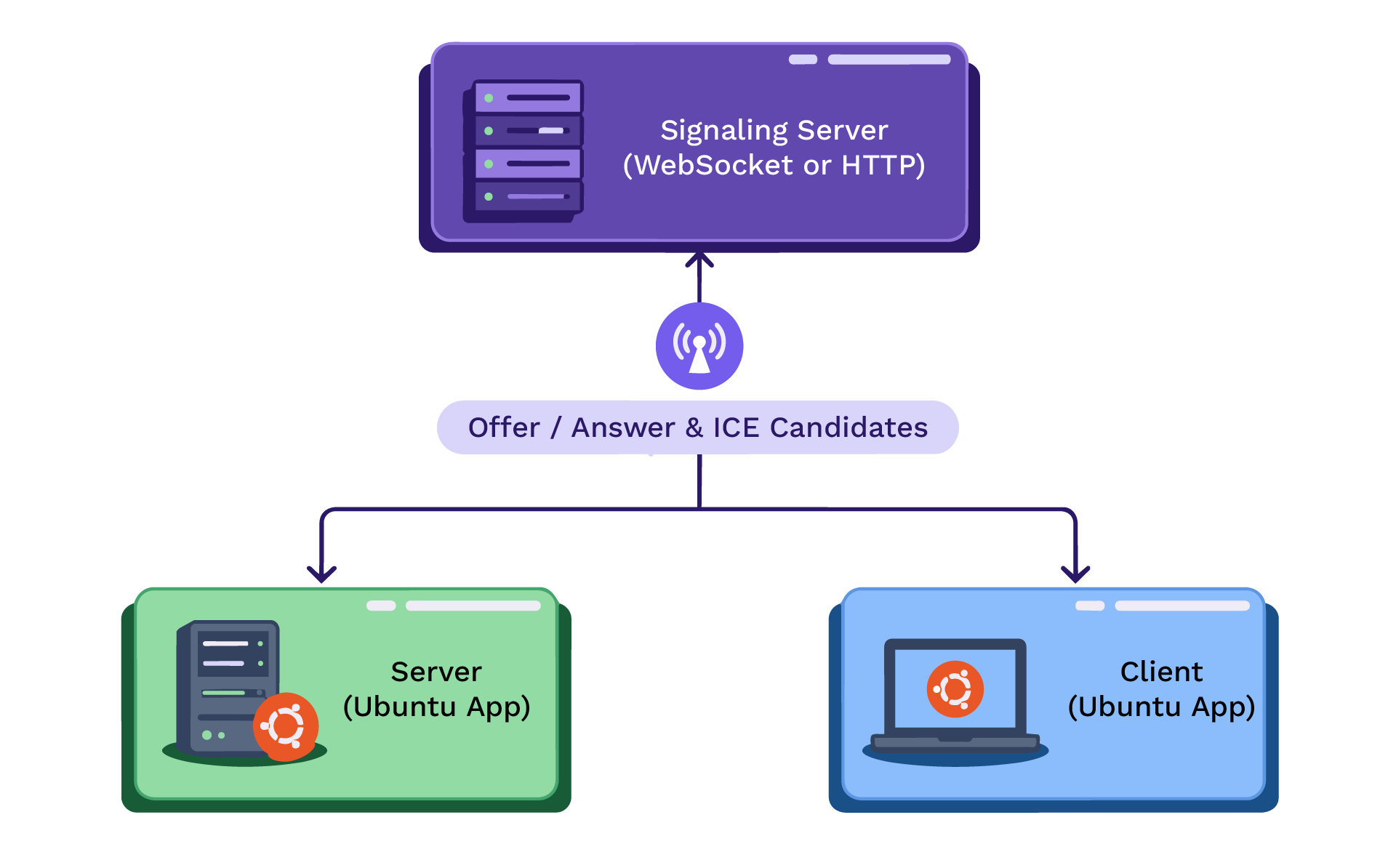
There are three key components here. The server application’s job? It streams out the media. The client application sits on the other end, ready to receive and play it, which in real-time video streaming means transmitting video and audio content over the internet as it happens so viewers can watch instantly. Then there’s the signaling server that handles the WebRTC connection setup behind the scenes, so the other two can start communicating. The server generates a WebRTC offer and a data channel for media. The client answers the offer, and both peers exchange network information (ICE candidates) with the help of the signaling server to establish a WebRTC peer-to-peer connection. Once connection is established, the server streams fMP4 media chunks over the data channel to the client to play in real-time, with live streaming typically capturing, processing, and distributing content with only a few seconds of delay. The signaling server is used only for the control handshake, while all actual media data flows directly between the server and the client.
WebRTC handshake and data channel setup
The server initiates by transmitting an SDP (Session Description Protocol) offer through the signaling server. The client responds with an SDP answer. After this offer/answer exchange, both ends begin sharing ICE candidates to find the most efficient peer-to-peer connection, and latency at this stage can also vary with the WebRTC technology stack used. Once negotiation wraps up, there’s a P2P WebRTC data channel available, but setting it up first requires establishing peer connections before the fMP4 data can be sent directly.
Here’s how the signaling and data channel process looks
- The server generates a WebRTC offer (SDP) with a data channel specified. This gets sent to the signaling server (via WebSockets / MQTT) that forwards it to the client.
- The client receives that offer, prepares its own SDP answer (agreeing to the data channel), and sends it back—through the signaling server.
- Next, both peers exchange ICE candidates; this is how they discover possible network paths to connect, again assisted by the signaling server.
- Once the offer/answer and ICE exchanges are done, a secure peer-to-peer connection is established. Now, the server and the client have a dedicated WebRTC data channel for media transfer. This data channel runs over SCTP (Stream Control Transmission Protocol) / DTLS (Datagram Transport Layer Security) within the PeerConnection. It is designed to be reliable and ordered, much like TCP (Transmission Control Protocol), but with tuning for low-latency, real-time delivery; actual latency depends on the underlying technology and, on fast networks such as 5G, can be as low as 35 milliseconds.
Overall, this setup streams fragmented MP4 data from server to client over a secure WebRTC channel with good efficiency, ensuring accurate audio-video synchronization with minimal overhead.
As soon as the data channel is established, the system is set up for streaming both video and audio. Next, we design the media pipeline that feeds data into this channel on the server side and play it on the client side.
Media Pipeline Design (fragmented mp4 fMP4 over Data Channel)
Rather than using WebRTC’s built-in RTP (Real-time Transport Protocol) media tracks, we send the media as fragmented MP4 data over the data channel. Fragmented MP4 (fMP4) is an ISO base media file format that can be split into an initialization segment (moov atom with codec info) and successive media fragments (moof/mdat atoms containing encoded media samples). This format is commonly used in streaming protocols like MPEG-DASH and HLS (HTTP Live Streaming) for low-latency chunked streaming. Here, we use it for real-time delivery over WebRTC data channel.
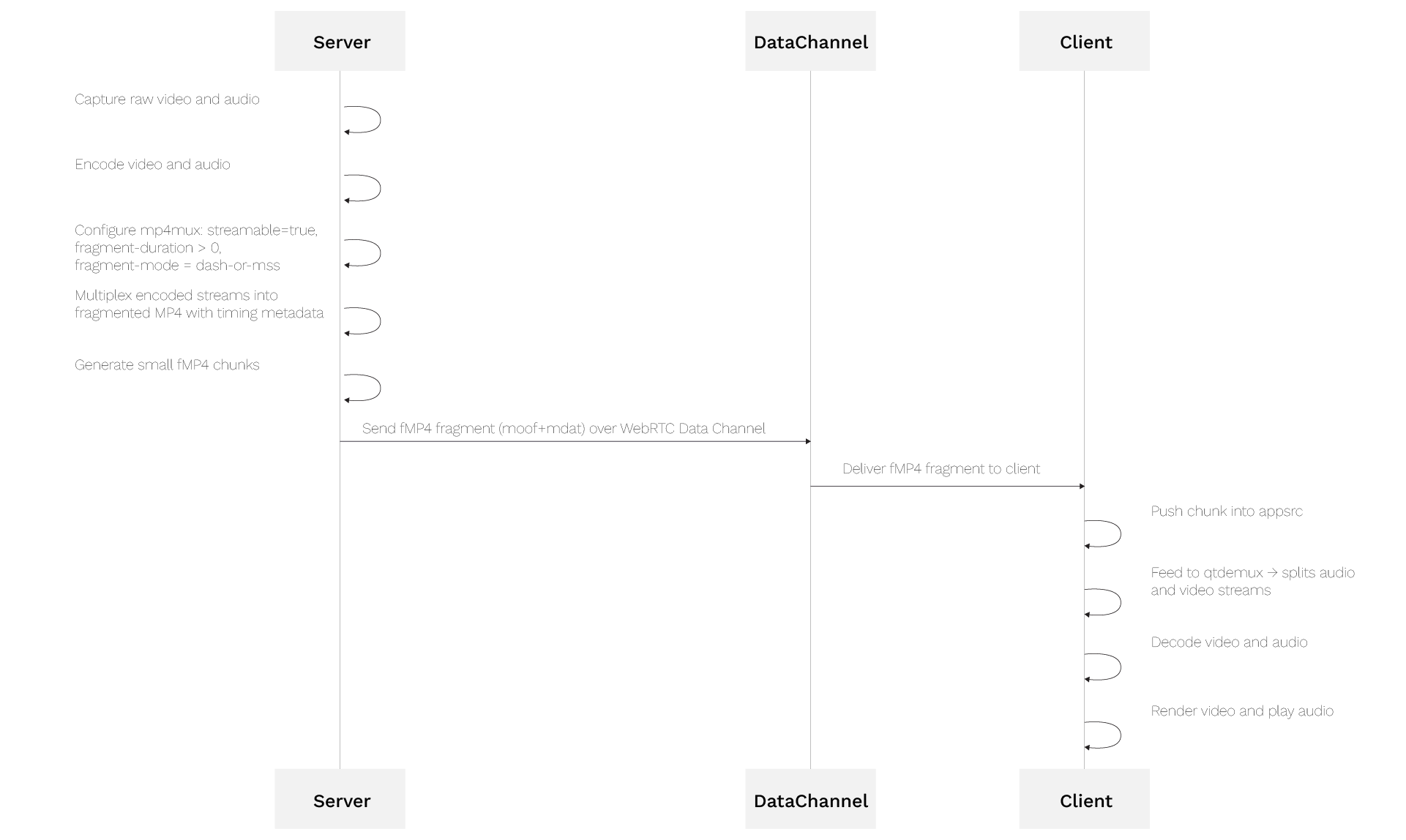
Below is an overview of the end-to-end media pipeline that denotes full process starting from server’s capture to the client’s playback:
Server Pipeline (Capture → fMP4)
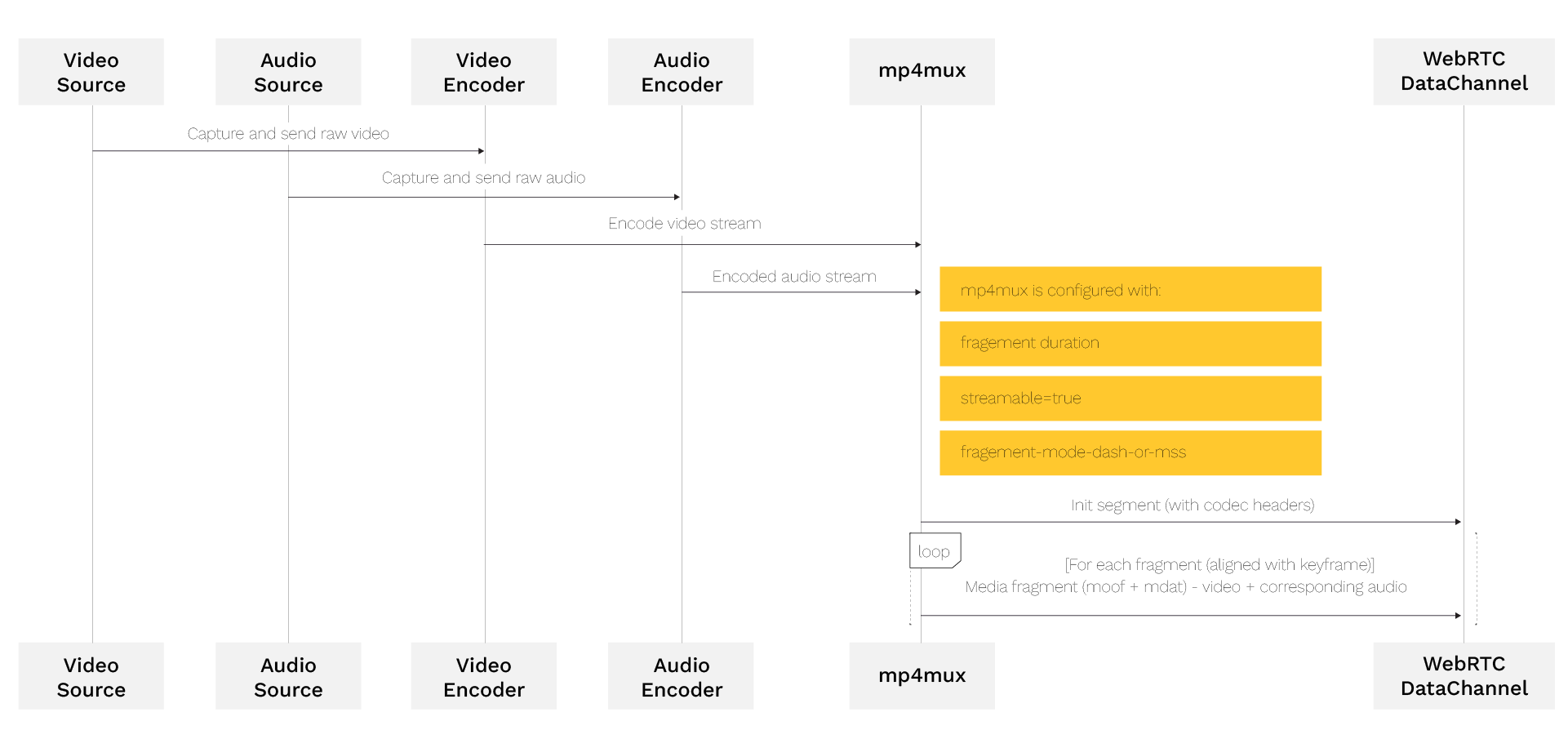
The GStreamer pipeline at the server side takes raw, uncompressed video and audio inputs from a video source (a camera / test pattern) and an audio source (microphone / test tone) before the server pipeline processes them. These are encoded to H.264/H.265 video and Opus audio respectively, with the raw input compressed by the encoder using standards such as H.264 or H.265 to reduce file size while preserving quality and improving efficiency, then connected to the mp4mux element. The muxer produces a fragmented MP4 byte stream on its source pad. We configure the mp4mux element to produce frequent fragments for low latency, splitting the encoded video into tiny, consecutive chunks only a few seconds long so the client can play them without waiting for the entire file or a full download, even as frames arrive continuously. The muxer outputs an init segment (with codec headers) followed by ongoing media fragments. We pipe the fMP4 byte stream through a WebRTC data channel. The data channel acts like a bidirectional reliable pipe between the two apps. GStreamer’s webrtcbin element is used to negotiate and manage this channel (via SCTP), but we manually push our fMP4 data into it. On the sending side, we retrieve fMP4 chunks from GStreamer (using an appsink) and call the WebRTC data channel API to send those bytes.
Client Pipeline (fMP4 → Playback)
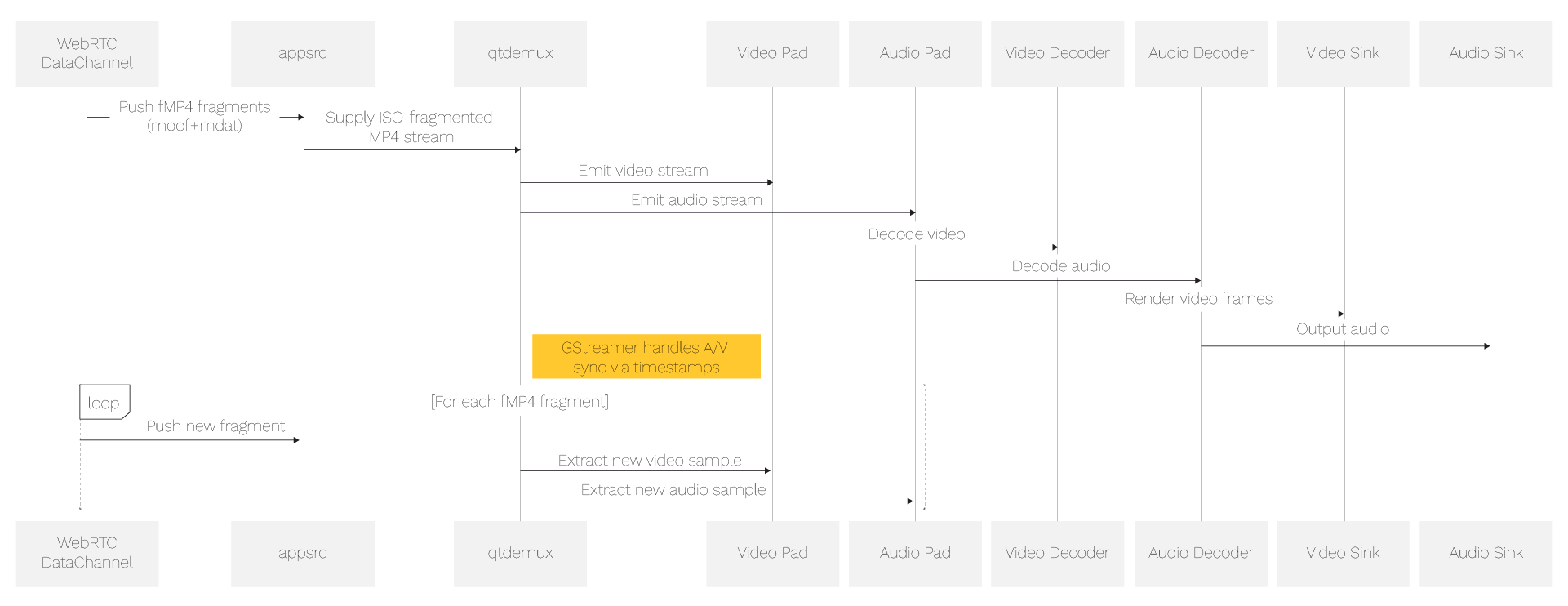
On the client side, the GStreamer pipeline starts with an appsrc element that receives raw fMP4 bytes from the data channel. appsrc is set up with video/quicktime, variant=iso-fragmented caps to indicate the input is fragmented MP4, and it feeds into qtdemux for parsing. qtdemux exposes two output pads: one for the video stream (H.264 or H.265) and one for the audio stream (Opus). The video pad is connected to avdec_h264 or avdec_h265 depending on the codec, and the audio pad is connected to opusdec. Finally, the video decoder is linked to xvimagesink or glimagesink, and the audio decoder is linked to a suitable audio sink; playback stays in sync using the timestamps embedded in the stream. A player can continuously monitor the viewer’s internet speed and adjust quality to prevent buffering based on the current device and network conditions. In adaptive setups, fragmented MP4 supports the ability to switch between versions of each chunk at different resolutions for smoother delivery of video content, though this example focuses on receiving and playing a single incoming fragmented MP4 stream.
In summary, we are running GStreamer pipelines at both ends, with the WebRTC data channel in the middle handling all media transport.
Server-Side Implementation
On the server side, the application must perform several tasks: capture and encode media, fragment and mux into fMP4, establish a WebRTC PeerConnection with a data channel, and send the fMP4 data over that channel; in larger deployments, this server-side flow can be adapted to support broader delivery workflows, compatibility across clients, and CDN-based distribution, since many streaming platforms use a Content Delivery Network (CDN) to cache video segments on edge servers worldwide for scalable delivery without lagging. We break this down into the GStreamer pipeline setup and the WebRTC signaling/datachannel setup, then show how to tie them together. For clarity, here’s an example pipeline string that achieves our goal, and the same approach can be implemented with different software and hardware combinations depending on performance goals:
x264enc tune=zerolatency bitrate=1000 speed-preset=ultrafast ! video/x-h264,stream-format=avc,alignment=au ! \
queue ! mux. \
audiotestsrc is-live=true wave=sine ! audioconvert ! audioresample ! \
opusenc bitrate=64000 ! queue ! mux. \
mp4mux name=mux streamable=true faststart=true fragment-duration=500 ! \
appsink name=media_sink sync=false
Note: The above pipeline uses test sources for simplicity. In a real setup, replace videotestsrc with v4l2src (for a webcam) and audiotestsrc with an actual audio source. Ensure that the encoders (x264enc/x265enc and opusenc) are installed.
Any preprocessing in the pipeline should preserve codec compatibility with H.264, H.265, or AV1 and existing encoder workflows, with support for both paths where needed.
Client-Side Implementation
The client application’s role is to receive the fMP4 stream over the data channel, feed it into a GStreamer pipeline for demuxing/decoding, and render the audio/video output, whether the client is a native app or a web-based player depending on playback requirements. Additionally, the client must handle the WebRTC signaling, including receiving the offer, generating an answer, and exchanging ICE candidates. The client pipeline mirrors the server’s pipeline in reverse. It starts with an appsrc for input, followed by qtdemux to parse the MP4, then decoders and sinks. Browser-based playback depends on compatibility across browsers, and most browsers typically need media source extensions instead of direct native handling for this pipeline. An example pipeline string for the client might be:
appsrc name=media_src format=bytes caps=”video/quicktime, variant=(string)iso-fragmented” ! \
qtdemux name=demux \
demux.video_0 ! queue ! decodebin ! videoconvert ! autovideosink sync=true \
demux.audio_0 ! queue ! decodebin ! audioconvert ! autoaudiosink sync=true
Signaling Server
You can use a simple WebSocket signaling server to facilitate the exchange. Adaptive packaging workflows often involve creating a media playlist for each rendition and a master playlist that references them. This kind of playlist creation is common in apple HLS delivery, especially when packaging segments for adaptive streaming and optional encryption as a feature. GStreamer’s example gstwebrtc-demos provides a simple JSON-based protocol and even a public test server wss://webrtc.nirbheek.in. For production or custom setups, you can implement a minimal server that does:
On client connect, assign an ID.
When a message comes from one peer (offer/answer/candidate), forward it to the other peer (assuming you pair them with an agreed mechanism, e.g., a predefined room or ID exchange).
The specifics of signaling are flexible – it doesn’t matter how you send the SDP and ICE, if both sides receive the necessary messages. For development, using the public test signaling server or a known example can speed things up.
Conclusion
We built a real-time streaming system using GStreamer for media processing and WebRTC data channels for reliable transport. The server encodes video (H.264/H.265) and audio (Opus), then segments them into fragmented MP4 (fMP4) chunks sent over the data channel. On the client side, these fragments are demuxed and played with minimal delay, enabling fine-grained control over media handling without relying on RTP. The setup supports multiple codecs and is suitable for use cases where standard WebRTC media paths aren’t ideal. The architecture can be extended with features like separate data channels, client-to-server streaming, or browser playback via media source extensions. Latency is tunable via fragment size, and playback starts quickly with low startup delay.
Frequently Asked Questions- Real-Time Video Streaming via WebRTC Data Channel
- Why does this approach send fMP4 over a WebRTC data channel instead of using WebRTC’s built-in RTP media tracks?
Sending fMP4 fragments over a WebRTC data channel gives the pipeline the flexibility of a standard, self-contained container format, rather than relying solely on native RTP media tracks. Because fMP4 follows the same ISO base media file structure used in MPEG-DASH and HLS, any MP4-aware demuxer, including GStreamer’s qtdemux, can parse the incoming stream with familiar, well-supported tooling. This also makes it straightforward to support multiple codecs, such as H.264, H.265, and AV1, within the same pipeline and to reuse established fragmentation and packaging techniques from other streaming formats. The result is a media transport that combines WebRTC’s low-latency, peer-to-peer delivery with the flexibility and broad compatibility of a standard container format. - How does streaming fMP4 over a WebRTC data channel achieve such low latency?
Because the WebRTC data channel connects server and client directly over a secure peer-to-peer link, fMP4 fragments are pushed to the viewer the moment they’re muxed, without waiting on HTTP polling cycles. This direct path allows the system to achieve latencies as low as 35 milliseconds on fast networks like 5G. Tuning the mp4mux element to produce smaller, more frequent fragments shortens that delay further, since the client can start rendering a fragment as soon as it arrives, rather than waiting for a larger file. For broader, large-scale distribution, this same server-side pipeline can also be extended with CDN-based delivery, matching the setup to audience size. - Can this fMP4-over-data-channel stream be played back in a web browser?
Yes. Browser-based playback is achievable using Media Source Extensions (MSE), which let a web page append incoming fMP4 fragments directly to a video element’s buffer as they arrive over the data channel. This mirrors the same appsrc-to-decoder flow used in the native GStreamer client, just implemented in JavaScript instead of a native pipeline. Because MSE is widely supported across modern browsers, this opens the door to lightweight, install-free viewing experiences alongside native desktop or mobile clients. As with any browser-based media feature, testing across target browsers is a good practice to confirm consistent codec support and smooth playback. - Does the WebRTC data channel’s reliable, ordered delivery help keep playback smooth?
Yes. Since the data channel runs over SCTP/DTLS with reliable, ordered delivery by default, fMP4 fragments arrive complete and in the correct sequence, which is exactly what a demuxer like qtdemux needs to parse the stream correctly and keep audio and video in sync. This reliability, combined with careful tuning of fragment size and encoder bitrate, keeps the system’s overall latency low while guaranteeing data integrity. For use cases with different priorities, WebRTC data channels can also be configured for partial reliability, giving teams the flexibility to fine-tune the balance between delivery guarantees and speed.