
OpenCL: An Overview
OpenCL (Open Computing Language) is an open and royalty-free standard for cross-platform parallel programming in heterogeneous systems, developed and maintained by the Khronos group (https://www.khronos.org/api/opencl). It enables developers to leverage the computing power of modern systems, including GPUs, DSPs, FPGAs, and hardware accelerators.
OpenCL speeds applications by offloading their most computationally intensive code onto accelerator processor or devices.
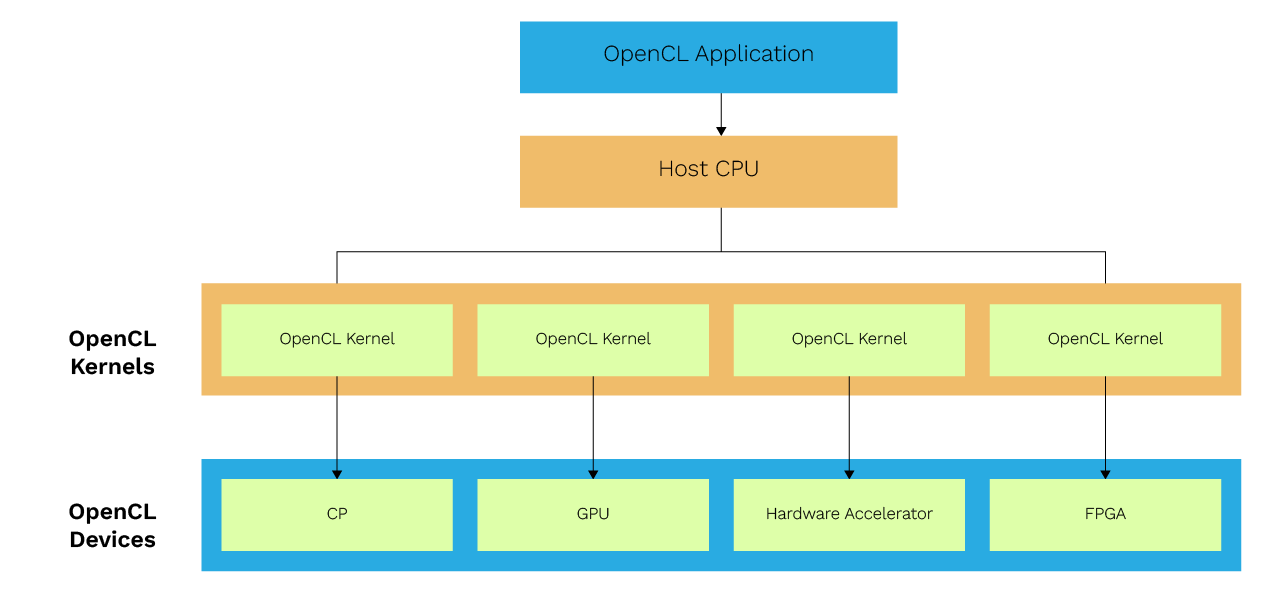
This figure shows a typical heterogeneous system that supports OpenCL. In this system, there are three parts:
- A host CPU that is a master that manages and controls the application.
- OpenCL devices can be GPU, DSP, FPGA, and any other hardware accelerator.
- OpenCL kernel is the code that is compiled and uploaded by the host to OpenCL compatible devices to execute.
For the user, OpenCL is yet another technique which makes their software run faster.
OpenCL API Functions
The OpenCL API functions are broadly categorized into two layers: the platform layer and the runtime layer. The following tables provide a high-level summary of the functionality offered by each layer.
OpenCL Platform Layer Functionality
| Functionality | Details |
| Platform Discovery | It is to check that “Is there an OpenCL platform available?” OpenCL is an open standard maintained by the Khronos Group, ensuring broad industry support. |
| Discover OpenCL devices | Detects available OpenCL-compatible devices like GPU, CPU, or another device. OpenCL follows the OpenCL standard, which defines the programming model and API for heterogeneous computing. |
| Query OpenCL Device Information | Global memory size, local memory size, maximum workgroup size, etc. Different OpenCL versions exist, and developers should verify the OpenCL version supported by their hardware for compatibility. |
| Context | Context management, such as context creation, retain, and releases.
|
OpenCL Runtime Layer Functionality
| Functionality | Details |
| Create and build OpenCL programs and kernels | In OpenCL applications through the API, a program is created using a defined kernel string and then a kernel is created from the program. The OpenCL compiler is responsible for compiling the kernel code for the target device, and the compiler output, such as build logs, can be queried (e.g., using clGetProgramBuildInfo) for debugging and optimization. It is important to check whether the kernel is loaded and built successfully. |
| Prepare data for the kernel to execute, create memory objects, and initialize them | What memory flag is to be used? Is there a way to execute a zero-copy memory object creation? |
| Create a kernel call and submit it to the compute device | What workgroup size is to be used? Note that an OpenCL device is divided into multiple compute units, each of which contains several processing elements or compute elements. These processing elements are responsible for executing instructions in parallel, and may correspond to the device’s cores depending on the hardware architecture. |
| Synchronization | Memory consistency |
| Resource management | Deliver results and release resources. The OpenCL context manages resources for one or more devices, including memory objects and command queues, and is essential for kernel execution. When building and running programs, ensure that compatible OpenCL drivers and the OpenCL library are present for the target hardware. |
OpenCL Portability and Backward Compatibility
- OpenCL has good program portability, and its applications are portable across platforms if they do not use vendor-proprietary platform-specific extensions. Many hardware vendors and operating systems support OpenCL, making it a widely compatible solution.
- OpenCL performance is not portable, if it varies across platforms due to difference in architecture. Applications optimized for one platform may require fine-tuning for others.
- OpenCL is widely adopted and well supported across most vendors. Developers should check for support for OpenCL on their target operating system and hardware.
In this article we are focusing on its support for Qualcomm chipset.
1 OpenCL on Snapdragon
Snapdragon is one of the leading mobile platforms in today’s Android operating systems and the Internet of Things (IoT) market. Snapdragon is a multiprocessor system that includes components such as a multimode modem, CPU, GPU, DSP, location/GPS, multimedia, etc.
2 OpenCL Application Development
An OpenCL application is typically divided into two main components, which are part of the same program file:
1. OpenCL Kernel
The kernel is a function written in OpenCL C that runs on the OpenCL device (e.g., GPU, CPU, or other accelerators). It contains the code that performs the computation or operation, such as processing data or performing mathematical calculations.
2. Host-side Program
The host-side program is written in a standard programming language like C, C++, or Python. It runs on the host (CPU) and is responsible for managing the OpenCL environment. This includes tasks such as initializing the OpenCL platform, creating contexts, compiling kernels, setting up memory buffers, and enqueuing kernel execution.
Here is a description with sample code snippets of basic OpenCL program which performs a file copy operation.
• OpenCL Kernel
Code that gets executed on an OpenCL device is called an OpenCL kernel.
Here is the kernel of a program:
{
uint a = get_global_id(0);
destination[a] = source[a];
}
Kernel Description
- “__kernel”: It is a term to identify the kernel.
- “Copy” is the name of a kernel.
- Its written type is always void.
- It can have the arguments, here it has two char* arguments
- __global: It says that this uses the global memory space of the device.
- get_global_id will return for unique ID for work item.
- A work-item represents the smallest unit of parallel execution.
This is a simple kernel that copies each byte from source to destination.
Many instances of the kernel are executed in parallel, each processing a single work item. Multiple work items are executed together as part of a work group. Inside a work group, each kernel instance can communicate with other instances.
• Host-side Program
Platform and Device Discovery
Finds an OpenCL platform (e.g., Qualcomm, Intel. AMD) and selects a device (CPU, GPU, etc.) to run the kernel.
clGetPlatformIDs(1, &platform_id, nullptr);cl_device_id device_id = nullptr;
errcode = clGetDeviceIDs(platform_id, CL_DEVICE_TYPE_GPU, 1, &device_id, nullptr);
Context and Command Queue
Once a device is selected one needs to create a context which manages the resources and a command queue which executes the command.
cl_command_queue command_queue = clCreateCommandQueueWithProperties(context, device_id, nullptr, &errcode);
From here on, it is important to also check for errors. Every function that can fail in OpenCL returns an error code, via an output parameter.
Resources like the context must be cleaned up later, by using the appropriate release method.
Create Program, Kernel, and Buffer
The downside is that one must move data from the host to the device and back. This is necessary so that the device can use a different memory space. GPUs for instance have an on-board memory which is separate from the host memory.
The Process
Allocate the device memory, copy the data from the host to the device, set up a kernel, and copy the results back. Allocating memory is easily done using the buffer API.
context,
CL_MEM_READ_ONLY | CL_MEM_USE_HOST_PTR,
buffer_size,
input_buffer.data(),
&errcode);
Multiple kernels can be present in a single source file, called a program.
The next step is to create a program from OpenCL source code and then create the kernel from it.
Here the PROGRAM_SOURCE is the whole kernel as a string.
Then create the kernel:
The kernel is now ready to be used; all that is left is to bind the arguments to it. This is done using clSetKernelArg
errcode = clSetKernelArg(kernel, 1, sizeof(destination_buffer), &destination_buffer);
clEnqueueNDRangeKernel enqueues the kernel for execution to the specified command queue.
Finally, we need to get the results back, which is done using clEnqueueMapBuffer.
• nullptr, &errcode));
Profiling functions can be used to derive the execution time of the program.
Associate them with the event and that event can be set as the argument to the clEnqueueNDRangeKernel.
Build the OpenCL Application
- Download the OpenCL SDK provided by Qualcomm. Another prerequisite is the setup of Android Open-Source Project (AOSP) compilation setup for any Qualcomm platform.
- (Download Ninja), or another build tool which the CMake can use to build for Linux and add its binary directory to the system’s ‘PATH.’
- Using libs and headers in the SDK Package.
- Add the following CMake variables before asking CMake to configure:
‘CMAKE_TOOLCHAIN_FILE=/path/to/android-sdk/ndk//build/cmake/android.toolchain.cmake’
‘ANDROID_PLATFORM=31’
‘ANDROID_ABI=arm64-v8a’ - Select a generator capable of building for Linux, such as Ninja.
- Set the following CMake variable
‘CLSDK_OPENCL_LIBRARY=/path/to/sdk/libs/Android/libOpenCL.so’
- Build on the command line: ‘make –build /path/to/build/directory’
For our example CMakeLists.txt contains below binary generation line.add_executable(cl_sdk_hello_world src/examples/basic/hello_world.cpp)
target_link_libraries(cl_sdk_hello_world PRIVATE cl_sdk_OpenCL)So the generated binary name is cl_sdk_hello_world.
Execute the binary by pushing it to the Qualcomm platform.
On execution, its output will be:
Copied “<input file>” to “<output file>”.
When a use case demands using both DSPs and GPUs within an OpenCL application, it is supported if OpenCL support has been implemented by the hardware vendor. The following is the high-level approach for it:
- For device discovery, first discover the platform and then use clGetDeviceIDs to enumerate the available devices specifying CL_DEVICE_TYPE_GPU and CL_DEVICE_TYPE_ACCELERATOR (which includes DSPs). While creating context include both the desired GPU and DSP devices. Multiple devices can be specified when creating a context.
- The code is for multiple kernels hence dedicated kernels can be compiled and executed for the specific architectures of the devices from the context.
- Create a separate command queue for both the devices (here GPU and DSP).
- Enqueue kernels to appropriate device.
- Manage data transfer between devices and host.
Overview of Performance Optimization
OpenCL application’s performance is not portable across different platforms. So, the best practices of the other OpenCL vendors may not apply to Adreno GPUs. However, at a high level the optimization techniques are applied to both host code and kernels to maximize the performance. Here we are referring to the standard optimization techniques.
Kernel Optimization
• Memory Access:
Use __local memory for data which gets accessed frequently within the work groups, so that the global memory traffic can be reduced.
__constant memory can be used for read-only data that is accessed by all work items.
Understanding the memory hierarchy (global, local, constant, private memory) in OpenCL is crucial for optimizing kernel performance, as efficient use of each memory type can significantly impact execution speed.
• Work-Group and Work-Item Management:
Experiment with different local work-group sizes to find the configuration that provides the best performance for a specific kernel and hardware. This helps in choosing an optimal work-group size.
• Computation:
Use the efficient data types for the target device, like smaller types if the precision allows.
Explore vectorization techniques where appropriate.
Minimize branch divergence within workgroups.
The kernel is responsible for performing the actual work of the application, executing computations on the device as specified by the OpenCL program.
Profiling Using the Snapdragon Profiler
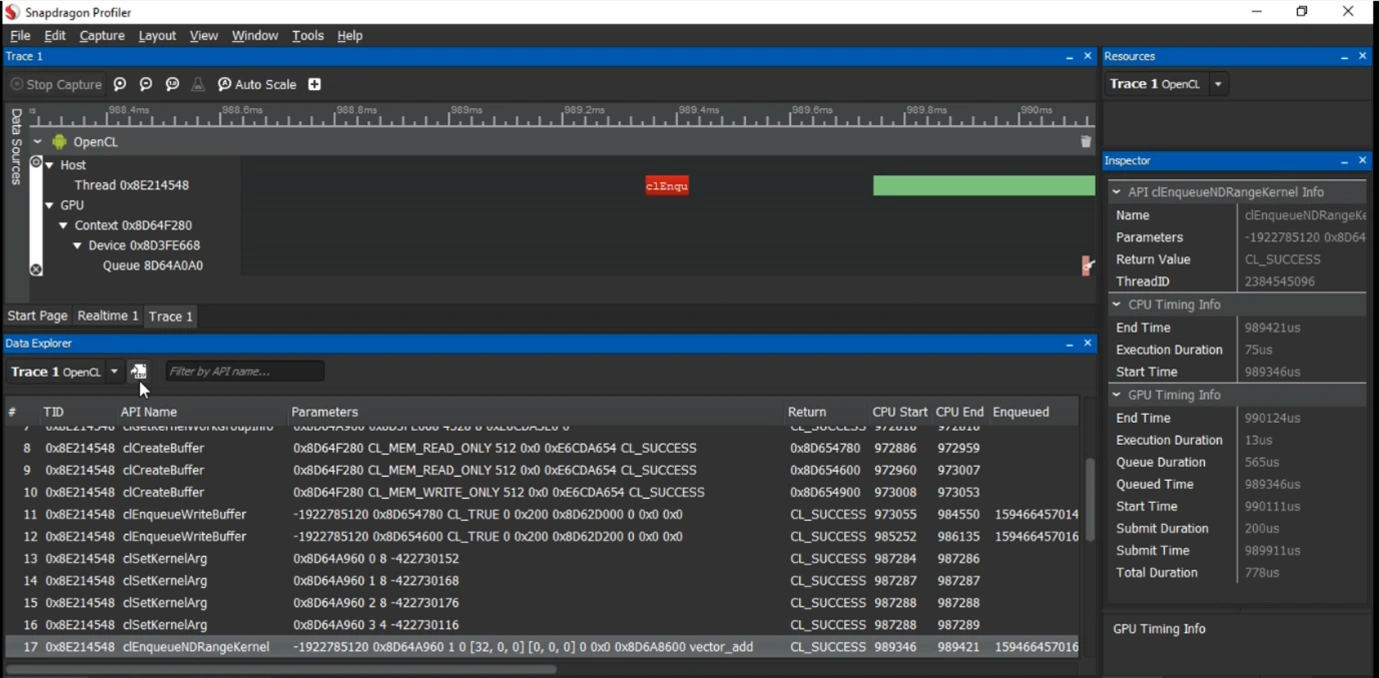
We will now explore the profiling for a Qualcomm chipset. The Snapdragon Profiler is a tool provided by Qualcomm for performance analysis. Using it, developers can analyse and optimize applications on the devices with Snapdragon processors. The OpenCL application can also be analysed using this tool. It provides performance insights of CPU, GPU, and DSP activity, helping developers identify bottlenecks in areas like power, memory, and other to improve application performance.
The image given below shows the profiling data when executed with a vector addition OpenCL application.
OpenCL Use Cases and Future Scope
OpenCL’s future is challenged by other vendor specific options like CUDA, Vulkan but its portability makes it valuable for developers. It can be used in heterogeneous computing (CPUs, GPUs, etc.) for AI, scientific computing, and large-scale data processing.
OpenCL is increasingly being used to power AI workloads and speed up large language models (LLMs) across a wide range of GPU platforms. For example, Qualcomm has demonstrated an OpenCL backend for llama.cpp, enabling good inference across GPUs without CPU fallback. OpenCL code can run on a variety of hardware, including Nvidia GPUs, although Nvidia GPUs are often associated with CUDA. It puts OpenCL in demand for cross-platform AI deployment, especially on non-NVIDIA hardware like AMD or Intel GPUs.
• Scientific and High-Performance Computing:
OpenCL contributes heavily to scientific and complex computations, also speeding up tasks like simulation, and physics engines. With future for more data and numerical computations, it remains a tool in high demand for scientific research and data analysis.
• Graphics, and Computer Vision:
OpenCL is widely used in graphics, multimedia, and computer vision applications. Many tools like Adobe Photoshop rely on it for image processing, rendering, and real-time effects. Many enhancements in graph-based vision can expand OpenCL’s role in AR/VR and computer vision technologies.
• Specialized hardware acceleration:
OpenCL enables developers to write code that takes advantage of the specific architectures of different devices, including GPUs and other specialized hardware, for computations that require high throughput.
Conclusion
OpenCL is a flexible framework to use the full potential of a heterogeneous computing system. By enabling developers write portable, parallel code that runs across CPUs, GPUs, DSPs, and other accelerators, OpenCL opens the door to high-performance computing on a wide range of platforms.
Many optimization techniques can be used with OpenCL for a better performance. As the demand for cross-platform, parallel computing continues to grow, OpenCL remains a great skill and technology for developers aiming to push the boundaries of what is possible it plays a significant role in heterogeneous computing and is evolving to meet future demands.