
As the world adjusts to modern cloud computing, organizations are quickly moving toward Infrastructure as Code (IaC) to maintain the automation of their infrastructure provisioning. Manual deployments are not only more difficult, but also prone to errors, hard to replicate consistently across different environments or regions, and typically much slower. This is where Terraform enters the picture.
Terraform, from HashiCorp, is one of the most used open-source IaC tools available. Terraform allows DevOps engineers to define their infrastructure in declarative configuration files known as Terraform manifests. These manifests detail the resources we want to specify in a structured manner (compute instances, networking, databases, and permissions). Once written, we can reuse the same code to deploy a compatible infrastructure provisioning in separate regions or different cloud providers (e.g., AWS, Azure).
Terraform Security: Three Simple Steps to Manage the Infrastructure Lifecycle When Using Terraform:
- terraform init: Initializes the working directory and downloads provider plugins.
- terraform plan: Shows what changes take place and what is created, modified, or destroyed.
- terraform apply: Carries out the changes and provisions the infrastructure defined. After executing the terraform apply command, it is important to run security checks to ensure that no sensitive information is exposed or misconfigured.
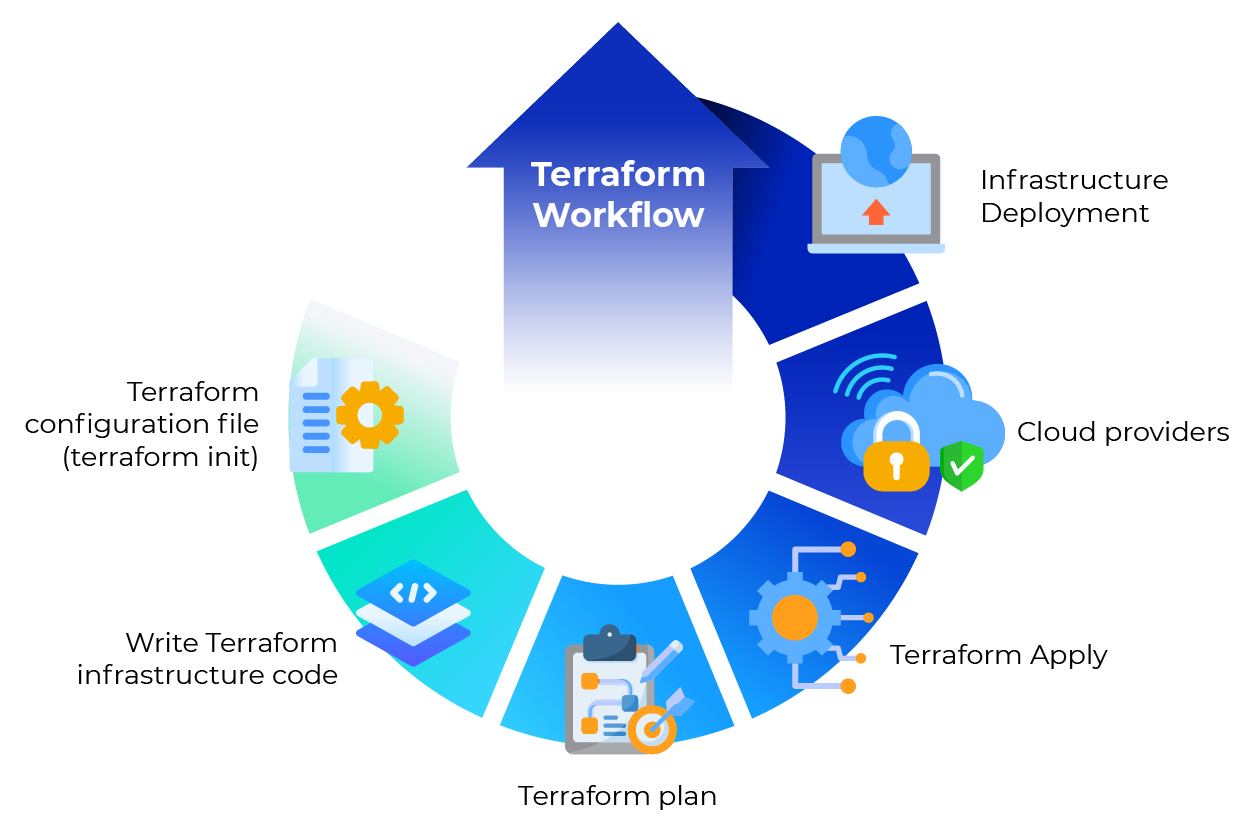
Figure 1: Terraform Workflow
This simplicity and automation are key reasons to use Terraform for infrastructure provisioning; however, they also introduce a new set of security challenges. Terraform is used to deploy important infrastructure at scale. Even a minor misconfiguration can expose sensitive systems to attackers or leak secrets to unintended areas. This is why it’s crucial to prioritize Terraform security best practices.
In this blog, we are going to deep dive into Terraform security, some risks, and best practices for securing infrastructure.
Introduction to Infrastructure as Code
Infrastructure as code (IaC) has revolutionized the way organizations manage infrastructure, especially in cloud environments. By defining cloud infrastructure using machine-readable definition files, teams can automate the provisioning and management of resources such as virtual machines, networks, and databases. This approach not only streamlines the development process but also significantly reduces the risk of human error, which is a common source of security vulnerabilities.
With infrastructure as code, users can version, reuse, and share configurations, making it easier to maintain consistency across multiple environments and cloud providers. Tools like Terraform, a widely adopted open-source tool, empower organizations to manage infrastructure efficiently and securely. By codifying infrastructure, teams can improve their security posture, ensure compliance, and respond quickly to changing business needs—all while minimizing manual intervention and potential mistakes.
Why Security of Terraform is Important?
Infrastructure as Code is useful to improve deployment speed and consistency. However, you can also shift security risk into codes. There can be more risk if you make a mistake with your Terraform configuration that could instantly replicate insecure infrastructure into multiple regions. Here are some examples of risks that can occur in a Terraform environment:
- Misconfigurations: Forgetting to set an S3 bucket to private permission, giving everyone access or having a database that is not encrypted.
- Secret exposure of credentials in Terraform files or Terraform state files, including the risks of hard coded secrets in Terraform files.
- Not using a secured communication channel for communicating between Terraform and cloud providers.
- Uncontrolled management of state files toward an insecure local state or uncontrolled access to existing state leading to state file leak or corruption. It is important to restrict access to state files using strict IAM policies.
Avoid storing secrets directly in configuration or state files. Use dedicated secrets management tools to keep sensitive information secure.
Terraform best practices and standards address vulnerabilities and reduce risks by creating rules and implications, so your infrastructure is secure by design. When configuring IAM roles and policies, always grant only the minimum necessary permissions.
Key Terraform Security Best Practices
1. Secure State Management
Terraform has a state file (terraform.tfstate) that includes information on the existing infrastructure. This is extremely important, as it links resources in code with the actual infrastructure. If malicious actors can access it, they can learn about your infrastructure topology and may even expose sensitive information.
Using remote state and remote state storage is critical to protect my terraform state, as storing state files on a local file increases the risk of accidental exposure or loss. Remote state storage solutions, such as S3, provide secure, centralized management and facilitate collaboration.
Best Practices to Secure Terraform State:
- Store the state remotely: Never keep the state on a local machine. Always utilize a remote backend (AWS S3, Azure Blob, or Google Cloud Storage) for remote state storage to avoid storing sensitive data in a local file or source control.
- Enable encryption: Ensure that the state is encrypted both at rest and during transit (i.e. S3 server-side encryption). Encrypting remote state storage protects sensitive infrastructure data.
- Implement access controls: Limit the control of reading and modifying the state files. Ensure that Identity and Access Management (IAM) roles and policies have the least privileges (principle of least privilege) and implement strict access control.
- Enable versioning: Enable versioning in your bucket (like S3) and roll back to a previous state if you found that it was violated.
- Lock state files: Use state locks (AWS uses DynamoDB) to prevent race conditions when multiple engineers run Terraform at the same time.
Additionally, manage aws credentials and aws accounts securely to prevent unauthorized access. Regularly review IAM policies to ensure only the minimum necessary permissions are granted. Secure aws resources and security groups by reviewing configurations for misconfigurations and ensuring proper access control. Reducing the attack surface by limiting access and permissions further protects your infrastructure.
If versioning or remote back ends are not available, make sure to store your state files with a version control system (like GIT) and ensure limited access. However, avoid including sensitive information in source control.
2. Identify Vulnerabilities Early
Terraform code should be treated the same as application code (reviewed, tested, and scanned for vulnerabilities) before entering the deployment pipeline. Static code analysis tools and other tools or other resources can assist in identifying misconfigurations, insecure defaults, or policy violations. Use pull requests in source control workflows to enforce code review and policy checks, ensuring that all changes are validated before being merged.
3. Store Secrets Securely
Never store secrets or sensitive values directly in Terraform code or state files. Use a secrets management tool, such as AWS Secrets Manager or Vault, to store secret values securely and avoid storing secrets in state files. Leverage sensitive state management by marking outputs as sensitive and using Terraform’s built-in support for sensitive data to prevent accidental exposure.
When exporting sensitive values, do so carefully and avoid exposing them in logs or outputs. Use input variables and secure provider configuration to pass secrets and credentials securely, rather than hardcoding them. Be aware of the risks of exposing private key or secret key information and never hardcode such sensitive data in your configuration.
4. Employ Reputable Communication Protocols
Always use secure provider configuration and avoid exposing sensitive information in provider blocks or configuration files.
5. Mandate Code Review
Review all terraform modules and pre built modules for security and compliance before use. This ensures that reusable infrastructure code does not introduce vulnerabilities. Use terraform cloud for policy enforcement and secure state management, benefiting from automated policy checks and encrypted state storage.
6. Testing Terraform Code
Test your Terraform code in production environments to prevent security issues and ensure that changes do not introduce vulnerabilities.
Tools to help detect vulnerabilities inside Terraform:
- Terrascan – an open-source tool to detect violations in security and compliance in Terraform code.
- Checkov – scans Terraform and other IaC templates to identify misconfigurations against preset policies.
- TFSec – another static analysis scanner for Terraform security scanning.
Other tools and other resources can also be integrated into CI/CD pipelines to enhance security checks, such as additional security scanners and validation frameworks.
Running these tools within the CI/CD pipeline ensures that misconfigurations are identified before they make it to production. When using these tools, leverage pull requests and source control to coordinate code changes, enforce policy checks, and maintain security throughout the development workflow.
Summary
Terraform is one of the widely used tools for Infrastructure as Code and automated deployments. Therefore, it is essential to keep Terraform code as secure as possible to minimize attack vectors and protect cloud infrastructure. By following security best practices, you can significantly reduce the attack surface and help safeguard your systems.
So, we should focus on Terraform stages before applying it to infrastructure. After writing the Terraform configuration file, put it in a safe place with versioning, then write infrastructure codes. After each build, review code and detect potential vulnerabilities, focusing on secrets and noticing changes using the Terraform plan. Apply changes after that to a particular cloud provider. It is especially important to maintain strong security controls in production environments to prevent breaches and ensure compliance.