
An Introduction to Micro-ROS
Micro-ROS is a streamlined version of the widely used Robot Operating System (ROS), specifically designed for embedded systems and microcontrollers. It adds many key ROS 2 features to microcontrollers (MCUs) like nodes, publish/subscribe, client/service, node graph, and lifecycle management.
 The micro-ROS agent enables seamless communication between the micro-ROS nodes on MCUs and standard ROS 2 systems, allowing the micro-ROS nodes to be accessed using the same tools and APIs as regular ROS nodes.
For more information go through Micro-ROS.
Micro-ROS supports various microcontrollers, allowing embedded systems to use ROS2 and its features.
Porting Micro-ROS on any Controller
This blog post focuses on enabling the development of robotics applications on constrained hardware platforms, such as STM32, ESP32, Arduino, and Raspberry Pi boards. These platforms are widely used due to their excellent performance and low power consumption. Micro-ROS can run on this hardware, providing the core functionality of ROS 2, including publisher-subscriber communication, custom messages, and services.
In this guide, we walk you through the process of porting Micro-ROS onto a controller, and demonstrate how to create a publisher, subscriber with custom messages and services for your application.
We specifically implemented Micro-ROS on the STM32H743VIT6 model, though this setup can be adapted for any microcontroller board.
We have outlined all the necessary steps to develop custom Micro-ROS firmware for the STM32, including setting up Micro-ROS, creating a custom agent, and defining custom messages and services.
Additionally, the setup information we used, along with the example provided, is outlined below:
- ROS Version: Humble
- Host OS: Ubuntu 22.04
- Microcontroller Board: STM32H743VIT6 (Cortex-M7)
- Build Environment: CMake
- Application: FreeRTOS-based interface
The Required Setup
The following will be needed to get started with Micro-ROS on STM32:
- STM32 Development Board (e.g., STM32F4, STM32F7, or STM32H7 series)
- Micro-ROS-Setup package on host pc
- ROS 2 setup on a host PC (Ubuntu preferred 22.04, ROS version: humble)
- Serial communication (USB, UART, CAN, etc.) to evaluate the communication between STM32 and the host PC
- CMake set up for code build
Steps for porting Micro-ROS on the STM32 board
1. Create generic micro-ROS firmware to build libraries
- It will create firmware/ directory in the current path.
cd uros_ws/mkdir src/
clone git repo: https://github.com/micro-ROS/micro_ros_setup.git
cd uros_ws/
colcon build && source install/setup.bash
ros2 run micro_ros_setup create_firmware_ws.sh generate_lib
2. Custom message and service setup
The advantages of using a custom message and service are:
- When our application requires specific data that is not available in the standard messages, we can use custom messages and services. This approach allows us to define exactly the data needed for the application, excluding unnecessary fields that standard ROS messages might include but are not relevant to our use case.
- Using custom messages and services also helps minimize the amount of data transferred over the ROS2 network, optimizing network usage. This is particularly important in resource-constrained environments like micro-ROS.
- For more details on how to create custom messages and services, please refer to this link. Additionally, an example is provided below, which we have used in our application.
If the application does not require any specific data outside of the standard ROS2 messages and services, you can skip the step of creating custom messages.
Steps for custom setup:
- Create a ROS2 CMake package inside uros_ws/firmware/mcu_ws/uros/.
- The Micro-ROS setup will build every package inside firmware/mcu_ws/.
- To create a ROS2 package for the Micro-ROS application, you can refer to this link.
- Once the package is created, you can add your custom message and service files inside custom_pkg/msg and custom_pkg/srv.
- Then, edit CMakeLists.txt and package.xml accordingly.
3. Once all the packages are downloaded, we need to create a few files to cross-compile a custom static library and a set of header files.
- Two essential files that we need are the Toolchain file and the Colcon meta file.
touch stm32h7xx_toolchain.cmake
touch stm32h7_colcon.meta - For an example of the colcon.meta file, refer to this link.
- The Toolchain file is used to configure the cross-compilation environment.
- The toolchain file needs to be customized for our interface when we are compiling static libraries for our application.
- Here is an example of how to create a toolchain file.
Toolchain File Example
- We have created toolchain file common for Micro-ROS build and controller project build.
- Here are our toolchain file contents for stm32 as well as Micro-ROS build.
- You can include flags according to your application requirements.
- To define your board specifics, you can set the following compilation flags.
set(CMAKE_SYSTEM_PROCESSOR “arm” CACHE STRING “”) // target platform architectureset(CMAKE_CROSSCOMPILING 1) // to use cross compilation
set(CMAKE_SYSTEM_NAM “Generic” CACHE STRING “”) // type of system
// Cmake compiler flags
set(CMAKE_TRY_COMPILE_TARGET_TYPE STATIC_LIBRARY)
set(TOOLCHAIN_PREFIX “arm-none-eabi-“)
set(CMAKE_C_COMPILER “${TOOLCHAIN_PREFIX}gcc”)
set(CMAKE_ASM_COMPILER “${TOOLCHAIN_PREFIX}gcc”)
set(CMAKE_CXX_COMPILER “${TOOLCHAIN_PREFIX}g++”)
set(CMAKE_AR “${TOOLCHAIN_PREFIX}ar”)
set(CMAKE_LINKER “${TOOLCHAIN_PREFIX}ld”)
set(CMAKE_OBJCOPY “${TOOLCHAIN_PREFIX}objcopy”)
set(CMAKE_RANLIB “${TOOLCHAIN_PREFIX}ranlib”)
set(CMAKE_SIZE “${TOOLCHAIN_PREFIX}size”)
set(CMAKE_STRIP “${TOOLCHAIN_PREFIX}ld”)
- MCU Flags are set to specify the CPU architecture, runtime libraries, and define executable formats.
set(MCPU “-mcpu=Cortex-M7”) // specify cpu architectureset(MFPU “-mfpu=fpv5-d16”)set(MFLOAT_ABI “-mfloat-abi=hard”) // application binary interface
set(RUNTIME_LIBRARY “–specs=nano.specs”)
set(RUNTIME_LIBRARY_SYSCALLS “–specs=nosys.specs”)
set(CMAKE_EXECUTABLE_SUFFIX “.elf”)
set(CMAKE_EXECUTABLE_SUFFIX_C “.elf”)
set(CMAKE_C_COMPILER_WORKS 1 CACHE INTERNAL “”)
set(CMAKE_CXX_COMPILER_WORKS 1 CACHE INTERNAL “”)
- -DCLOCK_MONOTONIC=0: This flag needs to be defined for Micro-ROS build process.
- When compiling for the controller board, clear the MICROROSFLAGS since the controller board supports CLOCK_MONOTONIC and using the -DCLOCK_MONOTONIC=0 flag would result in issues or incorrect behaviour.
-
set(MICROROSFLAGS “-DCLOCK_MONOTONIC=0 -D’__attribute__(x)='” CACHE STRING “” FORCE) //when compiling Micro-ROS# set(MICROROSFLAGS “”) //when compiling controller board
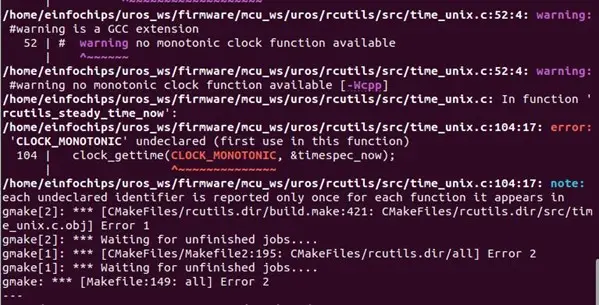
- We encountered an issue when the MICROROSFLAGS flag was not defined during the Micro-ROS build process. Therefore, ensure that it is properly defined in your CMakeLists.txt.
- Some flags need to be initialized for your specific controller and build platform.
- In this case, we are using the ARM Cortex-M7 architecture and the CMake build platform. Therefore, the following flags are set, which are necessary for the C and C++ libraries. These flags ensure that the correct compilation settings are applied for the target system.
set(CMAKE_CXX_FLAGS_INIT “${MCPU} -std=c++14 -ffunction-sections -fdata-sections \ ${RUNTIME_LIBRARY} ${MFPU} ${MFLOAT_ABI} ${MICROROSFLAGS} -Wall -g -fno-rtti” CACHE \ STRING “” FORCE)set(CMAKE_C_FLAGS_INIT “${MCPU} -std=gnu11 -ffunction-sections -fdata-sections \ ${RUNTIME_LIBRARY} ${MFPU} ${MFLOAT_ABI} ${MICROROSFLAGS} -mthumb -Wall -g \ -Wno-implicit-function-declaration” CACHE STRING “” FORCE)
set(CMAKE_FIND_ROOT_PATH_MODE_PROGRAM NEVER)set(CMAKE_FIND_ROOT_PATH_MODE_LIBRARY ONLY)
set(CMAKE_FIND_ROOT_PATH_MODE_INCLUDE ONLY)
set(CMAKE_BUILD_TYPE Debug)
set(__BIG_ENDIAN__ 0)
4. Once you have both files ready, just run the build step in the micro-ROS build system:
$(pwd)/my_custom_toolchain.cmake $(pwd)/my_custom_colcon.meta
- We are using the absolute path of the current working directory, i.e., $(pwd), so that the build script can be executed from any location.
5.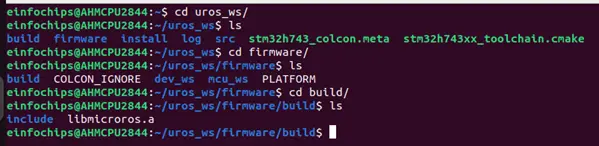
It creates firmware/ directory and builds the libmicrooros.a library inside the build folder
6. Copy the build folder into the include directory of your board project repo.
Include the header files path and the library path in building the environment (e.g., CMakeLists.txt); add the library path you need for the application, you can add it as in the example given below:
#microROSset(UROS_INCLUDE_PATH “firmware/build/include”)
set(UROS_INCLUDES ${CMAKE_CURRENT_LIST_DIR}/${UROS_INCLUDE_PATH}/
${CMAKE_CURRENT_LIST_DIR}/${UROS_INCLUDE_PATH}/rcutils/
${CMAKE_CURRENT_LIST_DIR}/${UROS_INCLUDE_PATH}/rcl
${CMAKE_CURRENT_LIST_DIR}/${UROS_INCLUDE_PATH}/rcl_action
${CMAKE_CURRENT_LIST_DIR}/${UROS_INCLUDE_PATH}/rosidl_runtime_c
${CMAKE_CURRENT_LIST_DIR}/${UROS_INCLUDE_PATH}/rcl_interfaces
${CMAKE_CURRENT_LIST_DIR}/${UROS_INCLUDE_PATH}/rmw_microxrcedds
${CMAKE_CURRENT_LIST_DIR}/${UROS_INCLUDE_PATH}/rosidl_typesupport_interface
${CMAKE_CURRENT_LIST_DIR}/${UROS_INCLUDE_PATH}/uxr
${CMAKE_CURRENT_LIST_DIR}/${UROS_INCLUDE_PATH}/std_msgs
…
…
${CMAKE_CURRENT_LIST_DIR}/${UOS_INCLUDE_PATH}/eic_demo_interface)
set(UROS_INCLUDES “${UROS_INCLUDES}” PARENT_SCOPE)
include_directories(${UROS_INCLUDES})
- Add the library path as shown below in CMakeLists.txt
target_link_libraries(${PROJECT_NAME} ${CMAKE_CURRENT_LIST_DIR}/ \third-party/firmware/build/libmicroros.a)
7. Once all the packages are included, we can add the custom interfaces for the controller application. You can find ready-to-use code related to this concept for simple publisher and subscriber in the following directories:
These repos contain example implementations for publishing and subscribing topics in a Micro-ROS environment.
Application Example Code
1. Include headers
#include <eic_demo_interface/msg/cmd_vel.h>#include <eic_demo_interface/srv/get_time.h>
#include <rcl/error_handling.h>
#include <rcl/rcl.h>
#include <rclc/executor.h>
#include <rclc/rclc.h>
#include <rmw_microros/rmw_microros.h>
#include <rmw_microxrcedds_c/config.h>
#include <uxr/client/transport.h>
2. Create the publisher and subscriber
rcl_publisher_t publisher;rcl_subscription_t subscriber;
eic_demo_interface__msg__CmdVel velocity_data;
eic_demo_interface__srv__GetTime_Request req_msg;
eic_demo_interface__srv__GetTime_Response res_msg;
rcl_client_t client;
int64_t num_of_req = 1;
3. Add Allocators
Advantages of using custom allocators
- In this configuration, we are running a Micro-ROS application within a FreeRTOS task. We assign memory to the FreeRTOS allocator to manage memory. This allocator provides essential functions for allocating, deallocating, reallocating, and zero-initializing memory, which are crucial for efficient memory management in the embedded systems running FreeRTOS.
- By using custom memory management functions, like microros_allocate, microros_deallocate, the system can optimize memory allocation according to the specific needs of the Micro-ROS application. This approach ensures that memory management is adapted to the unique constraints and requirements of the embedded environment.
- If FreeRTOS is not being used, the default allocator can be used instead. For other custom allocators, options like the standard C library allocator or static memory allocators can be implemented. For more information on using custom allocators, refer to this link.
Custom setup
- The allocator object wraps the dynamic memory allocation and deallocating methods used in Micro-ROS.
- We can modify the default allocator with our own FreeRTOS allocator:
rcl_allocator_t freeRTOS_allocator = rcutils_get_zero_initialized_allocator();freeRTOS_allocator.allocate = microros_allocate;
freeRTOS_allocator.deallocate = microros_deallocate;
freeRTOS_allocator.reallocate = microros_reallocate;
freeRTOS_allocator.zero_allocate = microros_zero_allocate;
- One must define these four functions for memory allocation.
- Here, rcl_allocator_t configures a custom memory allocator (freeRTOS_allocator) for Micro-ROS running on FreeRTOS.
4. Add external transport in the client application
Advantages of using custom transports
- The micro-ROS middleware, eProsima Micro XRCE-DDS, provides a user API that allows interfacing with the lowest level transport layer at runtime, which enables users to implement their own transports in both the micro-ROS Client and micro-ROS Agent libraries.
- Standard ROS2 transports like DDS (Data Distribution Service) are designed for larger, more powerful systems and may be too heavy for embedded systems. Custom transports allow us to choose a communication protocol that best fits the capabilities of our device.
- Set a custom transport according to your application, You can refer to this GitHub repo for creating custom transport functions.
For this setup, we have selected the USB as the communication transport between the controller and the host. In general, four functions must be implemented, and the behaviour of these functions may vary depending on the chosen transport mode.
Here we are using the USB as a transport, as given below:
usb_transport_open,
\ usb_transport_close, usb_transport_write, usb_transport_read);
- One must define these four functions for sending and receiving data from the transport
- For more information you can refer to this link
5. Init nodes
// create init_optionsrclc_support_init(&support, 0, NULL, &freeRTOS_allocator);
// Create executor
rclc_executor_t executor;
executor = rclc_executor_get_zero_initialized_executor();
// executor init
rclc_executor_init(&executor, &support.context, 2, &freeRTOS_allocator));
// create node
rclc_node_init_default(&node, “test_node”, “”, &support);
Advantages of using an executor:
- Executors are used to manage and control the execution of tasks (nodes and their callbacks).
- They are a core part of the communication and processing model in ROS 2, helping to manage multiple tasks concurrently in a real-time or multi-threaded manner.
Create the publisher and subscriber with a custom message type
// 1. Initialize Publisherrclc_publisher_init_default(&publisher, &node, \
ROSIDL_GET_MSG_TYPE_SUPPORT(eic_demo_interface, msg, CmdVel), “pub_topic”);
// 2. Initialize Subscriber
rclc_subscription_init_default( &subscriber, &node, \
ROSIDL_GET_MSG_TYPE_SUPPORT(eic_demo_interface, msg, CmdVel), “sub_topic”);
// 3. Add Subscriber to Executor
rclc_executor_add_subscription(&executor, &subscriber, &sub_msg, &subscription_callback, \ ON_NEW_DATA));
Subscriber callback:
void subscription_callback(const void* msgin) {// Cast received message to used type
const eic_demo_interface__msg__CmdVel* msg = (eic_demo_interface__msg__CmdVel*)msgin;
// Process message
printf(“Received: %ld”, msg->data);
6. Create client on controller side to get data from service:
rclc_client_init_default( &client, &node, \ROSIDL_GET_SRV_TYPE_SUPPORT(eic_demo_interface, srv, GetTime), “get_time”);
// 7. Add Client to Executor
rclc_executor_add_client(&executor, &client, &res_msg, client_callback);
// 8. Initialize Request Message for Client
eic_demo_interface__srv__GetTime_Request__init(&req_msg);
7. Callback function to be called when the service is available:
void client_callback(const void* response_msg) {eic_demo_interface__srv__GetTime_Response* msgin = \ (eic_demo_interface__srv__GetTime_Response*)response_msg;
printf(“RESPONSE: TIME = %ld”, msgin->time_ms_res);
// check service response data received or not
if (msgin->time_ms_res == 0) {
printf(“Invalid data received “);
}
return;
}
8. While loop or For loop for publishing data and calling service
for (;;) {rclc_executor_spin_some(&executor, RCL_MS_TO_NS(100));
rcl_publish(&publisher, &velocity_data, NULL);
rcl_send_request(&client, &req_msg, &num_of_req);
velocity_data.left_rpm++;
}
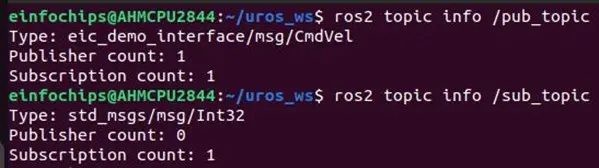
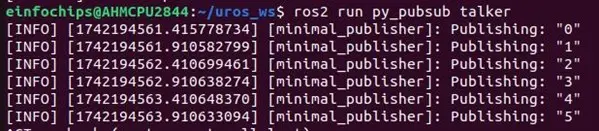
9. You can check the publisher and subscriber by creating a simple publisher and subscriber, here we have checked with the ROS2 python package.
10. Create simple service file to check response
- source ros2 custom message/service package and run service as shown below:

This is how you can create a custom interface for Micro-ROS on a controller board according to your application needs.
Conclusion
In conclusion, porting Micro-ROS to a microcontroller with custom interfaces allows you to leverage the power of ROS2 in embedded systems, enabling efficient communication and control even in resource-constrained environments.
By selecting appropriate transport protocols, defining custom messages and services, and integrating them with the hardware, you can create a tailored solution that meets the specific needs of your application. This flexibility helps optimize performance and ensures that the microcontroller-based system can efficiently interact with the broader ROS ecosystem.
References
https://micro.ros.org/docs/overview/features/
https://micro.ros.org/docs/tutorials/advanced/create_new_type/
https://micro.ros.org/docs/tutorials/advanced/create_custom_static_library/
https://github.com/micro-ROS/micro_ros_setup/tree/humble
https://micro.ros.org/docs/tutorials/advanced/create_custom_transports/
https://github.com/micro-ROS/micro_ros_stm32cubemx_utils/tree/humble/extra_sources/microros_transports