
Numerical computing is at the heart of transformative applications in AI and finance. In AI, it’s driving innovations such as fraud detection, predictive modeling, and autonomous decision-making. In finance, it enables real-time risk analysis, algorithmic trading, and personalized investment strategies. Industries like security are leveraging numerical methods for threat detection and adaptive response systems, while medical devices rely on high-precision computations for diagnostics, imaging, and patient monitoring.
xtensor plays a critical role in these domains by offering a high-performance C++ framework with NumPy (Numerical Python)-like syntax, lazy evaluation, and SIMD acceleration. Its support for both fixed and dynamic arrays, along with seamless Python interoperability, makes it ideal for building efficient, scalable solutions in environments where speed, control, and reliability are essential.
What is xtensor?
A C++ package called “xtensor” is used for multi-dimensional array numerical computation. Motivated by NumPy in Python, it provides:
- Expression templates for lazy evaluation
- For element-wise processes, broadcasting
- Header-only architecture for simple integration
- Julia, R, and Python bindings
Its clear syntax and fast performance make it perfect for scientific computing in C++.
How do You Install xtensor and Set It Up in a C++ Project?
1) Install using vcpkg (Suggested for Windows and Visual Studio users)
- If vcpkg is not installed, install it:
git clone https://github.com/microsoft/vcpkg.git
cd vcpkg
./bootstrap-vcpkg.sh # linux/macos
.\bootstrap-vcpkg.bat # windows - Set up xtensor:
./vcpkg install xtensor
- Integrate xtensor with your project:
- Make use of CMake
find_package(xtensor CONFIG REQUIRED)
target_link_libraries(your_target PRIVATE xtensor) - Alternatively, for automatic Visual Studio integration, use “vcpkg integrate install.”
- Make use of CMake
2. Use conda for installation (an excellent choice for Python/C++ hybrid workflows)
- If you use xtensor-python or are working in a scientific computing environment, conda is ideal.
- Steps to follow:
- If Miniconda or Anaconda is not already installed, install it.
- Set up a new environment:
conda create -n xtensor_env xtensor -c conda-forge
conda activate xtensor_env - Check the headers in your environment to confirm installation:
ls $CONDA_PREFIX/include/xtensor
- Use by pointing to the conda environment paths in your C++ code or in conjunction with CMake.
3. Build from source (for custom builds or complete control)
- We are setting up the xtl dependency for xtensor. Because it offers the necessary utilities and data structures that xtensor depends on to work, xtl is essential for xtensor in C++.
- As a dependency, xtl provides the fundamental building blocks and standard tools needed for xtensor to function properly and efficiently. Using xtl for more general-purpose C++ utilities, this modular approach enables xtensor to concentrate on its core numerical array capabilities.
- Follow the instructions outlined below:
git clone https://github.com/xtensor-stack/xtl.git
cd xtl
mkdir build
cd build
cmake .. -DCMAKE_INSTALL_PREFIX=”path/to/xtensor_install”
cmake –build . –config Release –target installgit clone https://github.com/xtensor-stack/xtensor.git
cd xtensor
mkdir build
cd build
cmake .. -DCMAKE_INSTALL_PREFIX=” path/to/xtensor_install” -DCMAKE_PREFIX_PATH=” path/to/xtensor_install”
cmake –build . –config Release –target install - As it is header-only, you can include xtensor directly:
#include “xtensor/xarray.hpp”
What are the Features of xtensor?
xtensor includes numerous features, some of which are listed below:
- Operations on Arrays:
- Arithmetic element-wise: auto result = arr1 + arr2 * 2;
- Universal functions, such as exp, sin, and cos.
- Using STL compatibility, reshape, resize, fill, and transform
- Expression and Broadcasting Templates:
- Broadcasting resembles NumPy:
xt::xarray a = {{1, 2, 3}, {4, 5, 6}};
xt::xarray b = {10, 20, 30};
auto c = a + b; // b is broadcast across rows - Expression templates enhance performance by avoiding temporary allocations
- Indexing and Slicing:
- To slice, use xt::view:
auto row = xt::view(arr, 1); // second row
auto sub = xt::view(arr, xt::range(0,2), xt::range(1,3)); - Using arr(i, j) or arr[{i, j}] for indexing
- To slice, use xt::view:
- Lazy Evaluation:
- Deferred operations till needed:
auto expr = a + b * sin(c); // not computed yet
double val = expr(2); // computed on access - To enforce evaluation, use xt::eval()
- Deferred operations till needed:
- Broadcasting resembles NumPy:
Advanced Topics
- Extensibility and Customization:
- Define unique adapters and containers
- Extend with expression types of your own
- To enable SIMD acceleration, configure using macros such as XTENSOR_USE_XSIMD. By offering a unified, vendor-neutral method of using Single Instruction, Multiple Data (SIMD) instructions across various microprocessor architectures, the C++ wrapper library XSIMD enables library authors to create a single algorithm that is automatically compiled and runtime optimized for the capabilities of the processor in use
- The incorporation of C++ Qualities:
- STL compatibility: algorithms and iterators
- Compile-time optimizations via template metaprogramming
- It effortlessly utilizes C++17/20 features
- Optimizing Performance:
- Use xsimd for SIMD, OpenMP or TBB for parallelism, and avoid using views in performance-critical loops due to inlining constraints
1. Potential Use Cases
- The field of scientific computing:
- Linear algebra and numerical analysis, matrices, signal processing, statistical modeling, image and signal processing, physics and numerical simulations, machine learning, and deep learning
- Interoperability:
- Bindings:
- xtensor-python: arrays in NumPy
- xtensor-r: arrays in R
- xtensor-julia: arrays of Julia
- The buffer protocol in Python can be used for zero-copy data sharing
- Bindings:
- Case Studies:
- Xeus-cling is used in Jupyter notebooks
- Integrated into scientific simulation engines
- Replaces NumPy in high-performance C++ modules
2. An Example
- Now let us write an example of image processing using OpenCV and xtensor
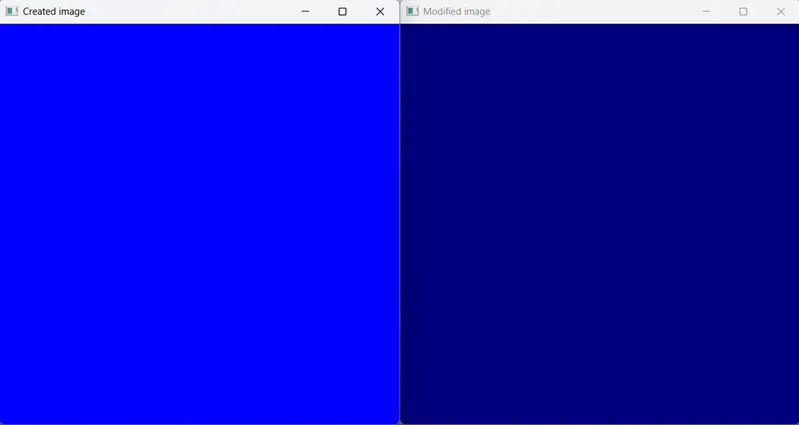
- OpenCV will be used to build a 500×500 image, which xtensor will then save in a xarray. This image will be altered, and the values and images are shown before and after the alteration for comparison
- CMakeLists.txt file:
cmake_minimum_required(VERSION 3.10)
project(my_video_processing)set(CMAKE_CXX_STANDARD 14)
set(CMAKE_BUILD_TYPE Debug)# Find OpenCV package
find_package(OpenCV REQUIRED)# Find xtensor package
# Setting CMAKE_PREFIX_PATH with a single path
set(CMAKE_PREFIX_PATH “path to your install prefix”)
find_package(xtensor REQUIRED)# Add executable
add_executable(my_video_processing_app main.cpp)# Link OpenCV libraries
target_include_directories(my_video_processing_app PRIVATE ${OpenCV_INCLUDE_DIRS})
target_include_directories(my_video_processing_app PRIVATE ${xtensor_INCLUDE_DIRS})
target_link_libraries(my_video_processing_app PRIVATE ${OpenCV_LIBS} xtensor) - Main.cpp file:
#include <opencv2/opencv.hpp>
#include
#include <xtensor/containers/xarray.hpp>
#include <xtensor/containers/xadapt.hpp>
#include <xtensor/io/xio.hpp> // For printing xtensor arrays (optional)
#include <xtensor/views/xview.hpp> // For advanced viewing (optional)int main()
{
bool bresultPrinted = false;
// Create a dummy cv::Mat
cv::Mat mat_image(500, 500, CV_8UC3, cv::Scalar(255, 0, 0));
while (true)
{
// Display the original image
cv::imshow(“Created image”, mat_image);// Define the shape for the xarray
std::vector shape = {
static_cast(mat_image.rows),
static_cast(mat_image.cols),
static_cast(mat_image.channels())
};// Adapt the cv::Mat data to an xt::xarray
xt::xarray xarray_image = xt::adapt(
mat_image.data,
mat_image.total() * mat_image.channels(),
xt::no_ownership(),
shape
);// Print xarray details before and after modification
if (bresultPrinted == false)
{
// Print a value from the xarray to verify
std::cout << “Value of xarray_image before: ” << xarray_image << std::endl;//Modify the xarray (e.g., set all values to half their original value)
for (auto element =0; element<xarray_image.size(); element++)
{
xarray_image[element] = xarray_image[element] * 0.5;
}//Create a new cv::Mat from the modified xarray
cv::Mat modified_image(xarray_image.shape()[0], xarray_image.shape()[1], CV_8UC3, xarray_image.data());// Display the modified image
cv::imshow(“Modified image”, modified_image);// Print a value from the xarray to verify
std::cout << “Value of xarray_image after: ” << xarray_image << std::endl;// Set the flag to true to avoid re-printing
bresultPrinted = true;
}// Wait for ‘q’ key press for 30ms. If ‘q’ is pressed, break the loop
if (cv::waitKey(30) == ‘q’)
{
std::cout << “Exiting…” << std::endl;
break;
}
}
return 0;
} - Output on console window:
Value of xarray_image before: {{{255, 0, 0},
{255, 0, 0},
{255, 0, 0},
…,
{255, 0, 0},
{255, 0, 0},
{255, 0, 0}},
{{255, 0, 0},
{255, 0, 0},
{255, 0, 0},
…,
{255, 0, 0},
{255, 0, 0},
{255, 0, 0}},
{{255, 0, 0},
{255, 0, 0},
{255, 0, 0},
…,
{255, 0, 0},
{255, 0, 0},
{255, 0, 0}},
…,
{{255, 0, 0},
{255, 0, 0},
{255, 0, 0},
…,
{255, 0, 0},
{255, 0, 0},
{255, 0, 0}},
{{255, 0, 0},
{255, 0, 0},
{255, 0, 0},
…,
{255, 0, 0},
{255, 0, 0},
{255, 0, 0}},
{{255, 0, 0},
{255, 0, 0},
{255, 0, 0},
…,
{255, 0, 0},
{255, 0, 0},
{255, 0, 0}}}
[ INFO:0@0.212] global window_w32.cpp:3002 cv::impl::Win32BackendUI::createWindow OpenCV/UI: Creating Win32UI window: Modified image (1)
Value of xarray_image after: {{{127, 0, 0},
{127, 0, 0},
{127, 0, 0},
…,
{127, 0, 0},
{127, 0, 0},
{127, 0, 0}},
{{127, 0, 0},
{127, 0, 0},
{127, 0, 0},
…,
{127, 0, 0},
{127, 0, 0},
{127, 0, 0}},
{{127, 0, 0},
{127, 0, 0},
{127, 0, 0},
…,
{127, 0, 0},
{127, 0, 0},
{127, 0, 0}},
…,
{{127, 0, 0},
{127, 0, 0},
{127, 0, 0},
…,
{127, 0, 0},
{127, 0, 0},
{127, 0, 0}},
{{127, 0, 0},
{127, 0, 0},
{127, 0, 0},
…,
{127, 0, 0},
{127, 0, 0},
{127, 0, 0}},
{{127, 0, 0},
{127, 0, 0},
{127, 0, 0},
…,
{127, 0, 0},
{127, 0, 0},
{127, 0, 0}}} - The output images are:
References & Community
-
xtensor-stack/xtensor on GitHub
-
xtensor documentation
-
NumPy to xtensor cheat sheet
-
https://docs.opencv.org/4.x/
-
https://github.com/opencv/opencv
Conclusion:
xtensor combines the expressive power of NumPy with the performance and control of C++, making it an ideal choice for developers working on high-performance, real-time, or embedded applications. Its compatibility with Python and support for modern C++ features allow for clean, efficient code—extending numerical computing beyond Python into domains where C++ excels.