
This blog provides a brief introduction to inductive touch sensing technology based on Cypress’s CY8C40T series PSoC (Programmable System-on-Chip) microcontrollers, which are designed for advanced sensing applications. Inductive sensing is a robust, reliable alternative solution to conventional capacitive touch, with the ability to operate on thick panels, provide high resolution, and resist noise, contaminants, and static magnetic fields, making it ideal where durability, metal overlay compatibility, and resistance to moisture or noise are challenging. The main concern of documents is the architecture, key features, use cases, and performance benefits—including reduced average power consumption enabled by the CY8C40T platform’s design—of implementing inductive sensing on the CY8C40T platform.
Introduction to Touch Sensing
Touch sensing technologies have become integral to the way users interact with modern devices, spanning everything from smartphones and tablets in consumer electronics to control panels and interfaces in industrial applications. These technologies enable intuitive, responsive, and user-friendly experiences by allowing users to control devices through simple touch gestures. The two primary touch sensing technologies are capacitive and inductive sensing. Capacitive sensing operates by measuring changes in capacitance when a conductive object, such as a finger, comes into contact with or near the sensor surface. In contrast, inductive sensing detects changes in inductance caused by the presence or proximity of conductive objects, such as metal or a human finger, without requiring direct contact. Understanding the differences and applications of capacitive and inductive sensing is essential for engineers and designers aiming to create reliable and effective touch interfaces for a wide range of environments and use cases.
Inductive Sensing Fundamentals
Inductive sensing technology is based on the principle of electromagnetic induction, making it a robust and versatile solution for touch sensing in challenging environments. In this technology, a sensor coil generates an electromagnetic field. When a conductive object, such as a finger or a metal target, approaches or interacts with the sensor, it disturbs the electromagnetic field, inducing a current that the sensor can detect. This change in the electromagnetic field allows the sensor to register touch or proximity events without requiring physical contact. Inductive sensing is particularly advantageous in applications where traditional capacitive touch sensing may be compromised by environmental factors or material constraints, such as metal overlays or exposure to moisture. By leveraging the fundamental properties of electromagnetic induction, inductive sensors provide reliable operation across a variety of materials and conditions, making them an ideal choice for industrial, automotive, and other demanding applications.
Capacitive Sensors and Their Limitations
Capacitive sensors are widely adopted in consumer electronics, medical devices, and other applications due to their high sensitivity and accuracy in detecting touch. These sensors work by measuring changes in capacitance when a conductive object, like a finger, interacts with the sensor surface. However, capacitive sensors can be susceptible to noise and interference, which may affect their reliability and accuracy, especially in harsh environments. Factors such as humidity, temperature fluctuations, and the presence of liquids can further impact their performance. In some cases, additional components like shielding or filtering circuitry are required to maintain stable operation, adding complexity and cost to the design. Despite these challenges, capacitive sensors remain a popular choice for many applications, but their limitations highlight the need for alternative technologies, such as inductive sensing, in environments where robust and reliable touch detection is critical.
Problem Statement
Capacitive touch sensors are very critical to managing performance when it comes to environmental conditions like moisture, dirt, or electromagnetic noise. Additionally, they struggle when used under metal or thick overlays—common in industrial, automotive, and medical interfaces. These critically managed parameters need alternative solutions that can have easy calibration and maintenance solutions, where the integration of additional sensors can enhance system function and simplify maintenance.
Proposed Solution
Inductive touch sensing is a contact-less user interface technology that uses an inductive sensor to detect changes in inductance. The Cypress CY8C40T family integrates Inductive Sensing (LDC) hardware with the PSoC 4 architecture, enabling touch input even through non-conductive covers and a wide range of metal surfaces, ensuring reliable operation.
Working Principle
Inductive sensing works on an electromagnetic coupling principle between a sensor coil and the metal/highly conductive object to be detected. Any disturbance in the electromagnetic field induced by the sensor coil with the metal part causes the electromagnetic energy to transfer into the metal part as shown in Figure 1. This is the moment when the eddy current principle occurs because of the motion of the metal part. The eddy current flowing in the metal target induces reverse electromagnetic field on the sensor coil, reducing the effective inductance of the sensor coil.
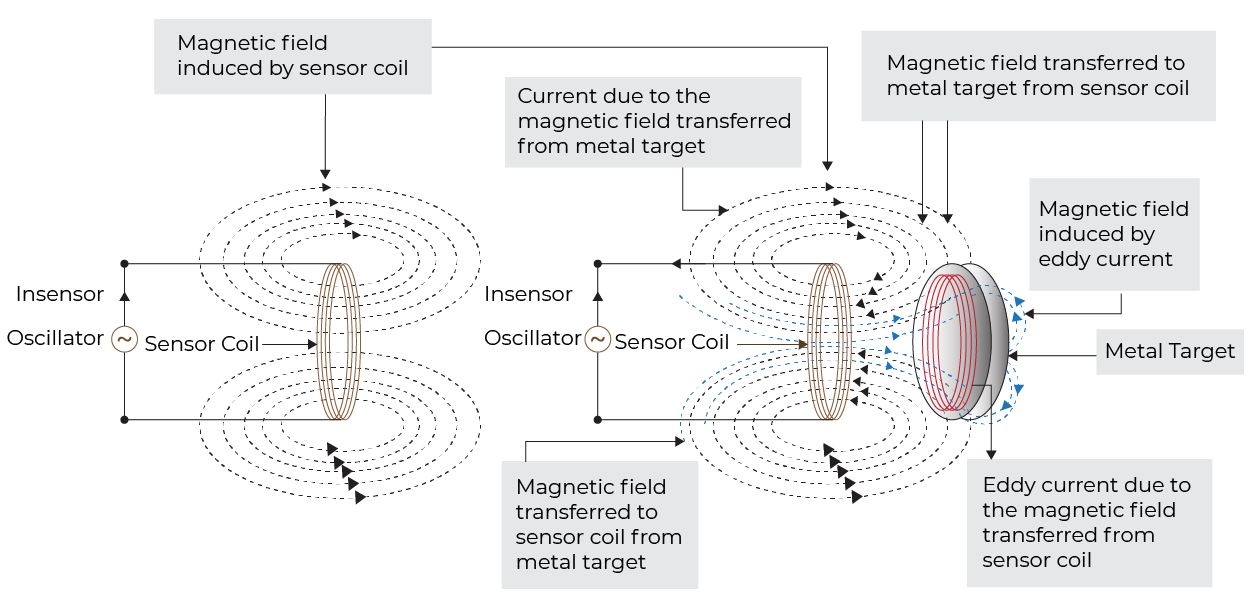
Inductive sensing is a contact-less method used to detect metallic objects by generating and monitoring electromagnetic fields. Here is a step-by-step breakdown of how it works:
- AC Current in a Coil:
- A high frequency AC current flows through a copper sensor coil in the sensor PCB (printed circuit board).
- The rapid change in the coil current generates an oscillating magnetic field around the sensor coil.
- Presence of a Metal Object:
- When a conductive (metal) object enters this magnetic field, eddy currents are induced in the object.
- Eddy Currents and Reverse Fields:
- A magnetic field is generated in the opposite direction of the original magnetic field due to the eddy current. This opposition leads to a change in the coil’s inductance and/or oscillator amplitude.
- Detection Circuit:
- The changes in induction are detected by the sensor’s electronic circuit.
- Sensors always observe the changes and when they go above the threshold, they generate the relevant output.
Technical Features
- Force detection – for multi-level force triggers.
- Supports both single touch and multi touch detection for advanced user interfaces.
- Inherently liquid tolerant.
- Works with gloves.
- Enables hermetically sealed HMIs (Human Machine Interfaces).
- Enables metallic surface HMIs.
- Cost effective.
- Removes the need for cut-outs for metal enclosures.
- Sensor output provides reliable feedback for touch and proximity events.
Advantages of Inductive Sensing
- Direct inductance measurements.
- The ISX method measures the inductance directly without using a resonant capacitor, simplifying the sensor design.
- High resolution is important for sensing under metal.
- Resolution is defined by internal high frequency clock sources (46MHz) and sampling time.
- Broad operating frequency range.
- This enables selection of frequency specific to the applications and enables simpler design for EMC (Electromagnetic Compatibility).
- The sensor excitation frequency can be the same for similar sensors.
- Better sensitivity than the resonance method. Compared to mutual capacitance and mutual capacitive sensing techniques, inductive touch sensing offers advantages in environments with metal surfaces or where water resistance and immunity to ghost touches are critical.
- Lower temperature drift than the resonance method.
- Flexible power consumption control. Maintaining a stable voltage supply is important for consistent sensor performance and reliable operation.
Proximity Sensing with Inductive Sensors
Proximity sensing using inductive sensors offers a reliable, non-contact method for detecting metallic objects in a wide range of applications. Inductive sensors generate an electromagnetic field through a coil, and when a metallic object enters this field, it induces a current that the sensor detects. This approach is especially valuable in industrial automation, automotive applications, and other scenarios where physical contact is undesirable or impractical. Inductive sensing technology excels in harsh environments, providing robust detection even in the presence of dust, moisture, or liquids—conditions that can challenge capacitive sensing. The sensing range of inductive sensors can be tailored by adjusting parameters such as coil size, number of turns, and operating frequency, allowing for flexible integration into various applications. Additionally, inductive sensors can reliably detect metal objects through non-conductive overlays, making them an ideal choice for applications requiring durability, reliability, and resistance to environmental interference.
Use Cases
- Proximity of metal detection.
- Replacing mechanical open/close switches.
- Buttons (industrial keypads and ON/OFF buttons).
- Rotation detection (rotary encoders, flow meters, fan speed RPM detection, rotary control knob).
- Linear encoders.
- Spring compression detection.
- Replacement for the hall sensor + magnet attachment sensing.
Block Diagram
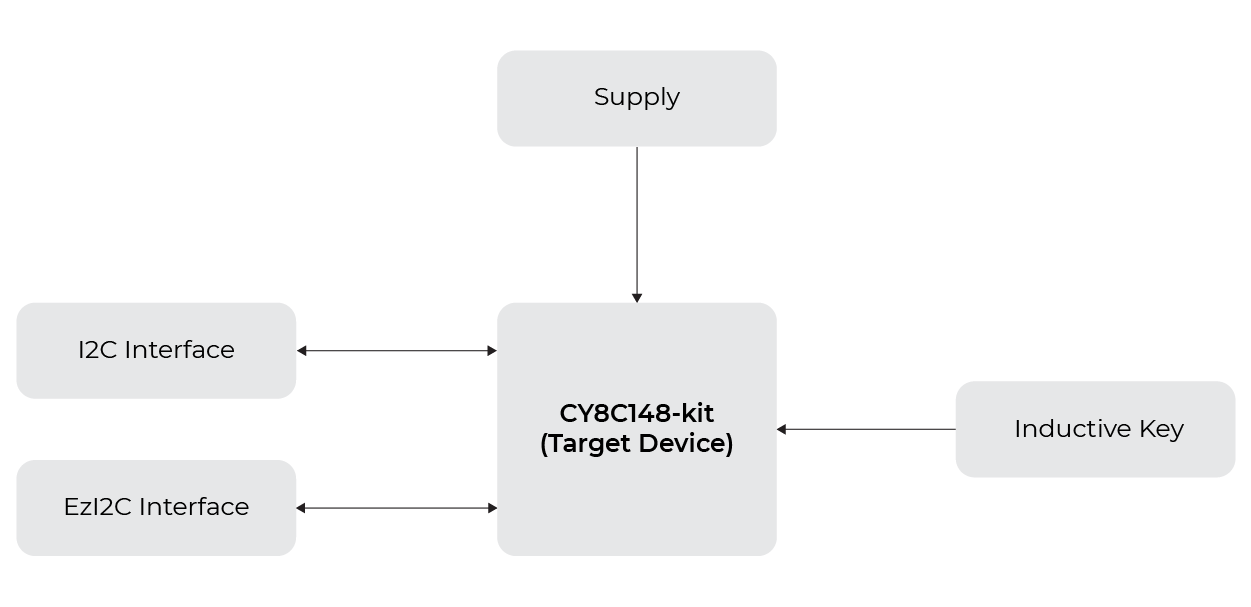
LC Tank Circuit for Inductive Key
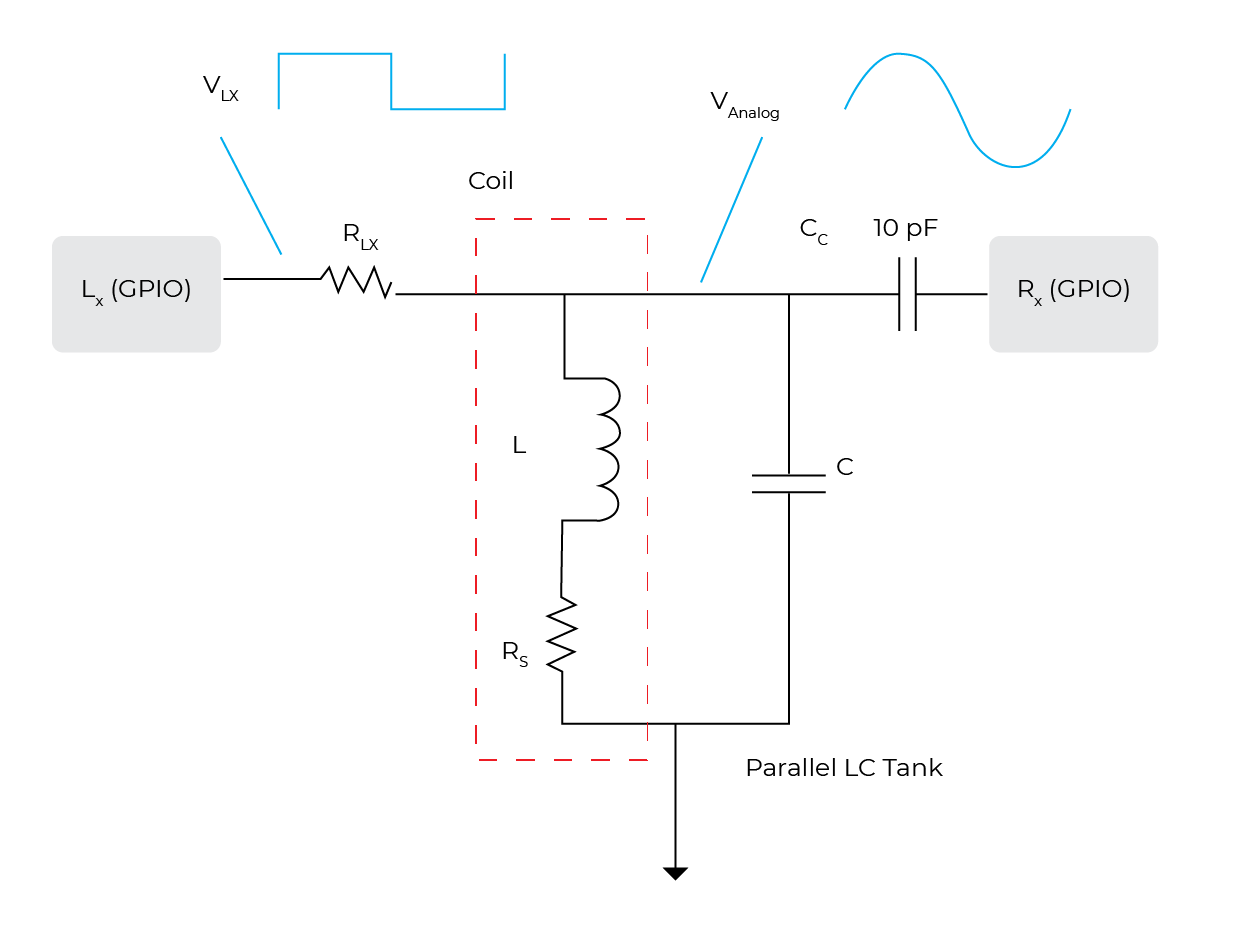
Inductive Key Sample Circuit Diagram

Sensor Layout
A long PCB trace on an FR4 or a Flexible Printed Circuit (FPC) board can form an inductive button/proximity sensor.
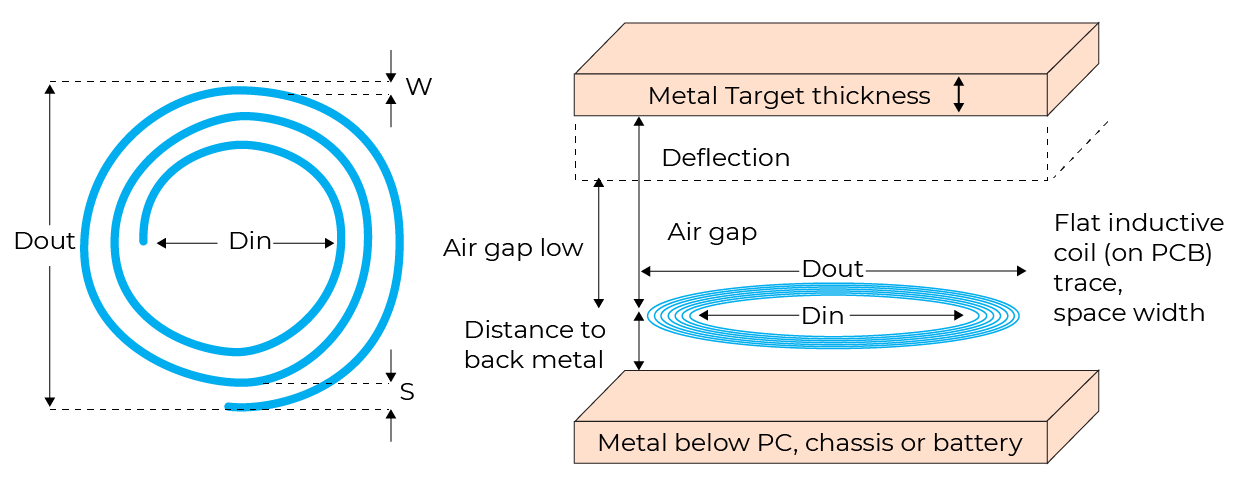
Layout recommendation
| Parameters | Recommendation |
| PCB material | FR4 or Flexible |
| PCB Layers | 2 |
| Sensor size | 15-25 mm |
| Sensor Shape | Circular or Octagonal |
| Number of turns | 25-60 |
| Overlay Material | Aluminum/stainless steel |
| Overlay thickness | 0.3-0.4mm |
Overlay Material Mechanical Properties
| Overlay material | Young’s modulus [GPA] (Lower the better) |
Electrical conductivity [S/m] (Higher the better) |
Relative magnetic permeability (Lower the better) |
| Copper | 130 | 59.77×10⁶ | 0.999994 |
| Aluminum (AL6061-T6) | 68.9 | 36.9×10⁶ | 1.000022 |
| Stainless steel (SS304) | 200 | 1.67×10⁶ | 1.01 – 1.05 |
| Regular steel | 200 | 2×10⁶ | 200 – 1000 |
| Phosphor bronze | 110 | 8.97×10⁶ | 1.005 |
| Titanium | 105 | 2.4 x10⁶ | 1.00005 |
| Ferrite | Not flexible | 10-5 | 10 – 20 000 |
Calibration Parameter
| Parameter | Description | Recommended Values |
| SNR | Signal-to-Noise Ratio (SNR) is a measure that compares the level of a desired signal to the level of background noise. It is usually expressed in decibels (dB). A higher SNR means a clearer or stronger signal relative to the noise that implies better quality or reliability. | 5:1 |
| Finger threshold | The finger threshold parameter is used along with the hysteresis parameter to determine the sensor state as follows:
ON = Signal > (Finger Threshold + Hysteresis) OFF = Signal ≤ (Finger Threshold – Hysteresis)
Note that “Signal” in the above equations refers to: Signal = Raw Count – Baseline. |
80 percent of the signal when the sensor is touched.
|
| Noise threshold | Sets a signal limit, below which a signal is considered as noise. Raw count limit above which the baseline is not updated.
In other words, the baseline remains constant as long as the raw count is > baseline + noise threshold, unless an Enable sensor auto-reset is selected. |
30 percent of the signal. Because of most of the proximity solutions, the speed of human hand movement is slower to control algorithms, keeping this threshold as low as possible, except when liquid tolerance is required.
|
| Negative noise threshold | The raw count limit below which the baseline is not updated for the number of samples specified by the low baseline reset parameter.
The negative noise threshold prevents the baseline from decreasing in response to repeated high-amplitude negative noise spikes in the raw count, often originating from sources like ESD events. The baseline is not updated for the number of samples specified by the Low baseline reset parameter. |
40 percent of the signal.
|
| Low baseline reset | The maximum number of samples above which the baseline is reset to the current raw count, if the raw count of all these samples is abnormally below the negative noise threshold.
If a finger is placed on the sensor during device startup, the baseline initializes a high raw count value. When the finger is removed, the raw count falls to a lower value. In this case, the baseline should track low raw counts. The low baseline reset parameter helps handle this event. It resets the baseline to a low raw count value when the number of low samples reaches the low baseline reset number.
Note: After the finger is removed from the sensor, the sensor does not respond to finger touches for low baseline-reset time. |
30 percent of the signal. |
| Hysteresis | Value used in addition to thresholds as mentioned below to prevent the sensor status output from toggling due to system noise.
Sensor state is reported:
Hysteresis is not available for the low power widget. |
10 percent of the signal. |
| ON debounce | This parameter defines the number of consecutive scans a sensor must remain active for the system to register an ON state. Debounce ensures that high-frequency, high-amplitude noise does not cause false detection.
|
3 percent of the signal. |
SNR Measurement
The initial step in measuring the SNR involves monitoring the raw count values from each sensor under two conditions: OFF and ON. The OFF state refers to when the target object is absent and not influencing the sensor, while the ON state represents when the target object is present and actively detected. To obtain reliable SNR data, it is recommended to log a minimum of 3000 samples for each condition.
Another important consideration is the source of the signal. When measuring the SNR, it is crucial to use the worst-case ON and OFF scenarios. For example, if the system is designed to detect the presence of a metallic target in proximity, the SNR measurement should be performed with the target positioned at the maximum specified distance from the sensor to simulate the weakest detectable signal.
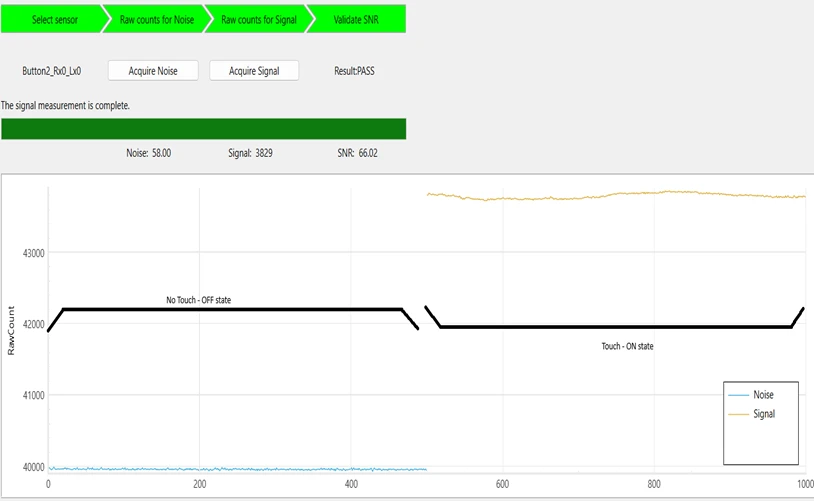
SNR measurement using CAPSENSE™ Tuner [ TOOL: Modus toolbox]
SNR Measurement Steps
Follow these steps to calculate the SNR with the help of CAPSENSE™ Tuner:
- Connect the hardware to the system running ModusToolbox™.
- Open CAPSENSE™ Tuner and switch to the SNR measurement tab.
- Select the proximity sensor in the Widget Explorer window and click Acquire Noise.
- After the noise is acquired, bring the target object in the proximity range of the sensor, and then click Acquire Signal. Ensure that the target object remains above the proximity loop if signal acquisition is in progress.
Manual Tuning Steps
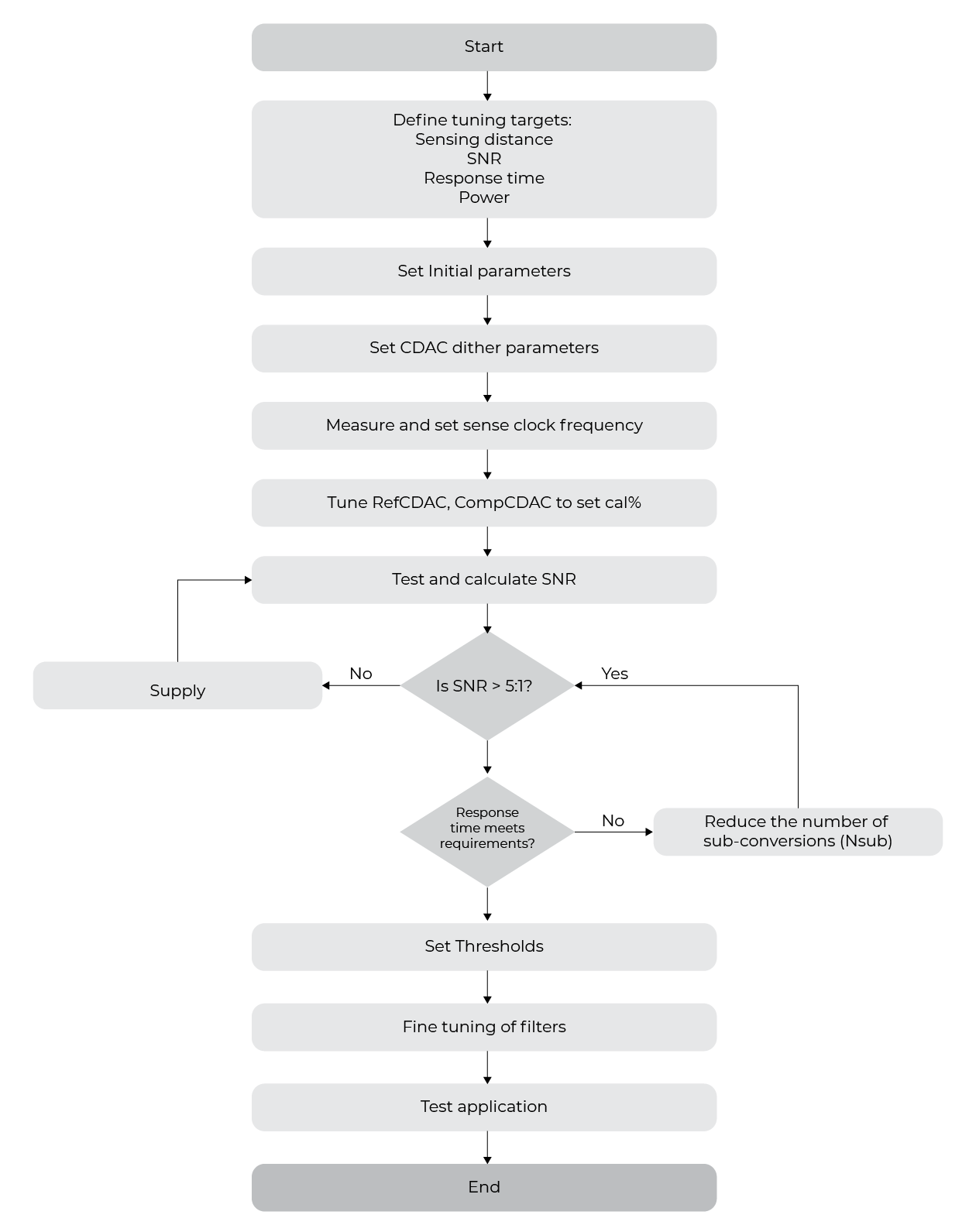
The tuning procedure for the ISX™ sensor design can be explained in the following stages:
- Set the initial parameters.
- Measure sensor inductance.
- Set the CDAC (Capacitive Digital-to-Analog Converter) dither parameter.
- Set sense clock frequency – Lx.
- SNR, power, and refresh rate need fine tuning.
- Tune threshold parameters.
Tuning Algorithm
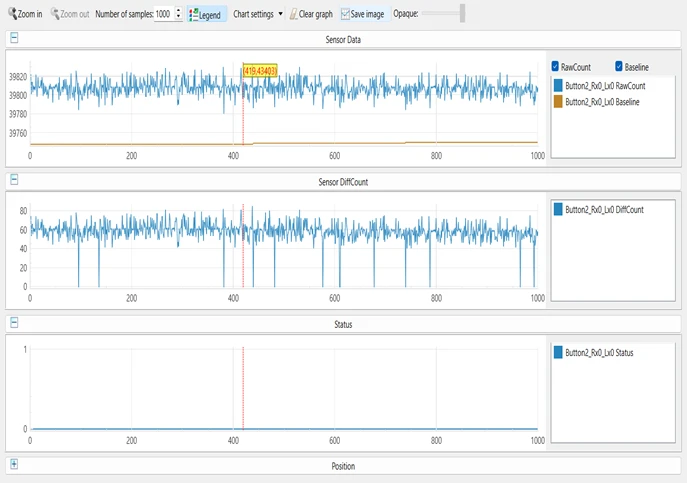
Tuning Results
- Figure 1:
- Raw 1 – Raw count and baseline
- Raw 2 – Difference of both count
- Raw 3 – State of button
- Conclusion: As per the image, the button is in No touch state. That is why Raw 3 shows OFF STATE.
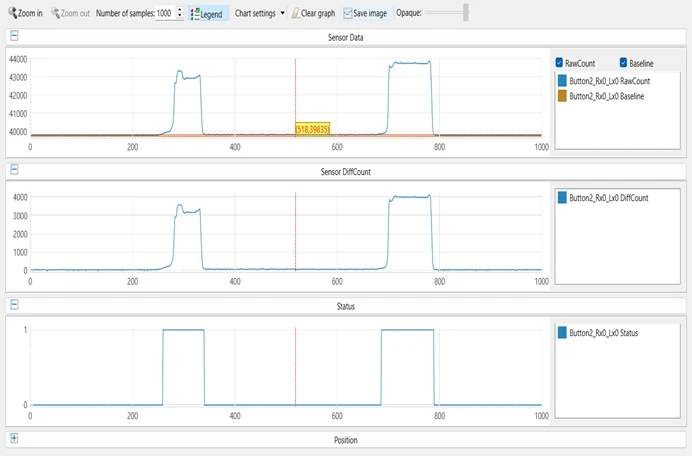
- Figure 2:
- Raw 1 – Raw count and baseline
- Raw 2 – Difference of both count
- Raw 3 – State of button
- Conclusion: As per the image, the button has been touched two times. That is why Raw 3 shows ON STATE twice.
Conclusion
Inductive touch sensing with the CY8C40T series offers a durable, cost-effective, and versatile user interface solution for challenging environments. With Cypress’s integrated development tools and robust sensing IP, designers can deploy next-generation touch interfaces with minimal hardware complexity.
References
- Cypress AN92239 – “Getting Started with Inductive Sensing”
- Cypress AN239751 – ” ISX Design Guide”
- CY8C40xxT Datasheet
- Cypress CapSense and LDC technical documentation