
Supervisory Control and Data Acquisition (SCADA) systems are fundamental to today’s industrial automation world. They provide the ability to monitor, control, and acquire data from distributed Sensors, RTUs and IDEs with various geographical isolation, supporting critical infrastructures which include electric power grids, water distribution and wastewater treatment, oil and gas pipelines, and transportation systems.
As SCADA systems evolved from serial to IP-based communications, the need for a reliable, interoperable, and secure protocol quickly became apparent. This is where a Distributed Network Protocol (DNP) comes into play.
The DNP3, or the Distributed Network Protocol Version 3, is an open protocol standard that is popularized to enable reliable unified communication between control centers (masters) and remote terminal units (RTUs) or intelligent electronic devices (IEDs).
Unlike older protocols that lacked standardization or support for modern networking features, the DNP3 offers:
- Event-driven reporting (reducing bandwidth usage)
- Time-stamped data for sequence-of-events recording
- Secure authentication (SA V5)
- Support for file transfer and configuration updates
- Compatibility across multi-vendor equipment
Due to the growing demands for SCADA systems to provide real-time performance, remote firmware upgrades, and security of data, DNP3 has emerged as a vital protocol for system reliability and interoperability at scale.
What is the DNP Protocol?
The DNP3, short for Distributed Network Protocol 3, is a group of communication protocols for process automation systems and is commonly found in utility applications in both the water and electricity sectors. DNP3 was developed in the 1990s to address North American requirements for utility automation and SCADA systems. The DNP3 originally aimed at enabling efficient communication amongst many different data acquisition and control devices.
SCADA (Supervisory Control and Data Acquisition) systems consist of several main components, such as RTUs, control centers, and intelligent electronic devices (IEDs). The DNP3 is critical to SCADA systems as it establishes a communications path between SCADA master stations (typically referred to as control centers) and remote terminal units (RTUs) and intelligent electronic devices (IEDs). The DNP3 allows master stations and RTUs or IEDs to communicate using a reliable and flexible protocol.
In contrast, communication between the master stations is achieved through ICCP (Inter-Control Center Communications Protocol) protocols conforming to IEC 60870-6, which are specifically used for inter master station communications. Other protocols that can fulfill the same type of communications may be the legacy Modbus protocol or, more recently, IEC 61850. GE Harris Canada played a key role in developing IEC 60870-5-based protocols specifically catered to North American requirements, ensuring reliable communication in harsh environments and addressing challenges such as electromagnetic interference, aging components, and poor transmission media in utility automation systems.
How Does the Distributed Network Protocol (DNP) Work?
The DNP3 operates on a master-slave (or master-outstation) model. DNP3 provides a lightweight means of transporting simple data values with a high degree of integrity, making it ideal for utility and industrial automation systems. Computers communicate using the DNP3 protocol by exchanging data and commands between master stations and outstation devices, ensuring reliable connectivity and control. The DNP3 is a layered protocol designed for SCADA systems to provide communication between:
- Master stations (Control centers): Request data or send commands.
- Outstations (RTUs, PLCs, IEDs): Respond to requests and send unsolicited data if configured.
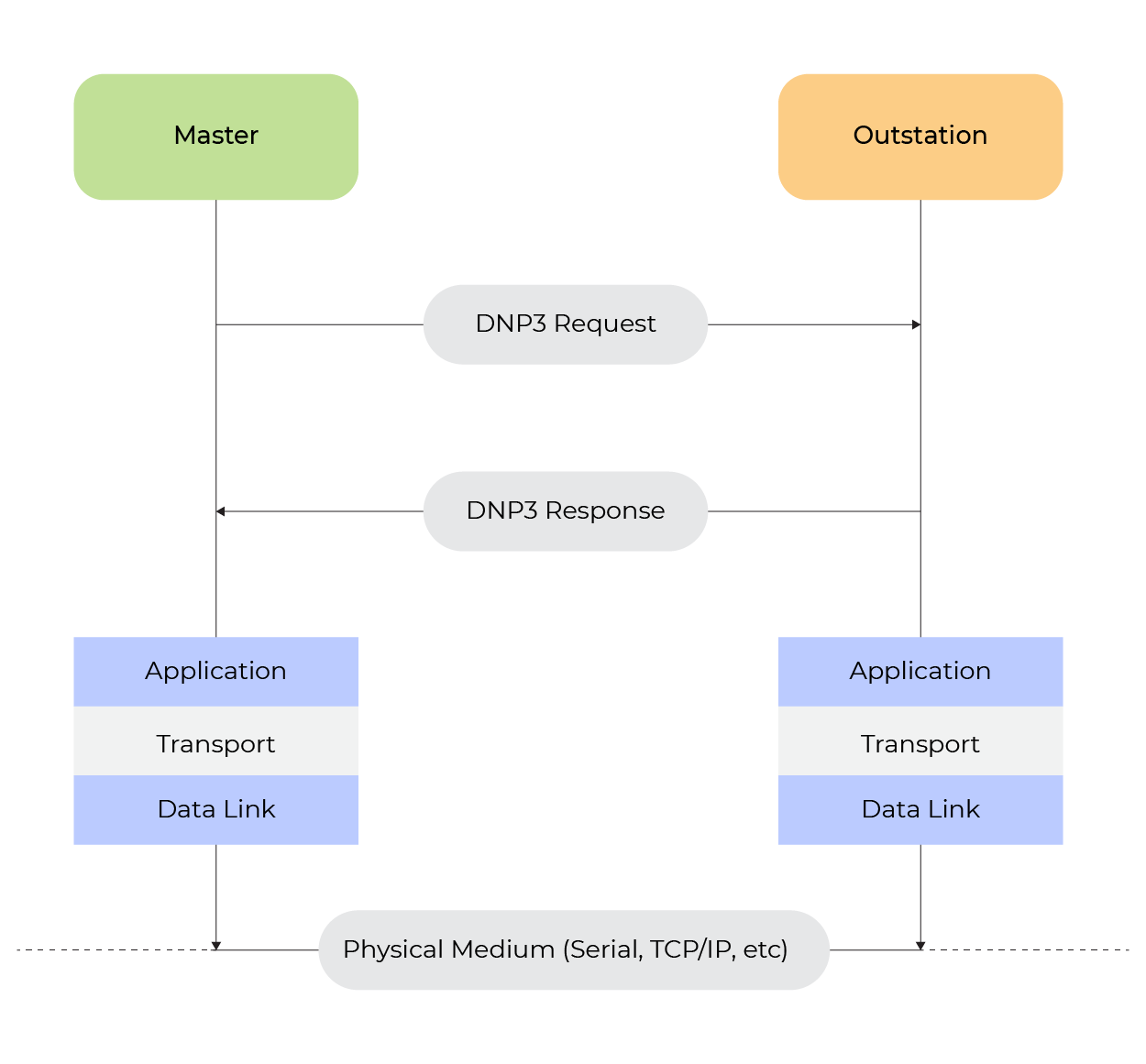
fig. Basic Flow of DNP Request-Response
Low-Level Behavior
1. Data Link Layer
- Provides reliable point-to-point communication over an unreliable medium. It adds framing, error checking (CRC), sequence control, and acknowledgment handling.
- Link control is a key function at this layer, ensuring reliable communication through error detection, data fragmentation, and robust connection management.
- Frames application-layer data into link-layer packets
- Provides ACK/NAK for confirmed messages
- Detects and discards corrupted frames (via CRC)
| Field | Size | Description |
| Start Bytes | 2 | Always [0x05] [0x64] |
| Length | 1 | Number of bytes after length field |
| Control | 1 | Frame type and direction |
| Destination Address | 2 | Address of the receiving device |
| Source Address | 2 | Address of the sending device |
| CRC | 2 | 16-bit CRC for error checking |
2. Transport Layer
- The DNP3 transport layer breaks down large application layer messages into smaller chunks to fit the data link frame size limits.
- For each data link frame, the transport layer inserts a 1-byte transport control header.
- This transport control byte performs two key roles: Message framing and frame sequencing
- The function code also includes a rolling frame sequence number which increments each frame and allows the receiving transport layer to detect dropped frames.
3. Application Layer
- Manages data representation, object modeling, and service functions. The application layer defines functions and generic data types for SCADA applications, enabling standardized data exchange. The DNP3 protocol also defines the rules and data structures for communication between devices, ensuring interoperability and robustness.
- This is where actual device data (like binary inputs, analogs, counters, files) is defined and transferred.
- Each object includes:
- Qualifier: Specifies range/indexing (e.g., 0x17 = 1-byte start/stop index)
- Index: Logical identifier of the data point
- Value: Actual payload (e.g., ON/OFF, voltage, temperature)
| Field | Description |
| Function Code | Read, Write, Select, Operate, File Transfer |
| IIN (Internal Indication) | Status of outstation |
| Object Headers | Define which data objects are included |
| Data Objects | The actual values or commands |
Database Organization
In DNP3, data is organized into different types. Each type is a group of objects, which includes:
- binary inputs (single-bit read-only values)
- binary outputs (single bit values whose status maybe read, or maybe pulsed or latched directly or through SBO type operations)
- analog inputs (multiple-bit read-only values)
- analog outputs (multiple bits values whose status maybe read, or that maybe controlled directly or through SBO type operations)
- counters
- time and date
- file transfer objects
- and others.
For each group of objects, or data type, there can be one or more data points. A data point is a single value that belongs to the specific type of object group. Within each object group, there are also different variations.
An object group variation is used to show how data can be specified differently within the same group. For example, variations in analog inputs let data be sent as 16-bit signed integers, 32-bit signed integers, or 32-bit floating point numbers.
As mentioned earlier, an application layer message can include several object headers. Each object header tells you which object group it refers to, which variation it uses, and which range of points it covers. Some function codes in the header say that object data comes after the header, while in others there is no data in the message; instead, multiple object headers follow each other one after another. For instance, a read request message only has object headers that show which object groups, variations, and point ranges are being read. A read response message includes both object headers and the actual data that was requested.
In DNP3 protocol operations, the master station can perform an integrity poll, which is a mechanism to request a comprehensive report of current data and buffered events from the outstation. This integrity poll ensures data integrity and synchronization by prompting the outstation to send all static data and events, supporting reliable system monitoring.
The DNP3 allows object point ranges to be specified in a variety of ways. For request messages, object point ranges may consist of:
- A request for a contiguous range of points beginning with a specified starting point and ending with a specified stopping point.
- A request for all points of the specified object group.
- A request for a maximum quantity of points.
- Or a list of requested points.
For response messages, object point ranges are usually either a continuous range of points or a list of points. If the response includes a list of points, each data object is preceded by a point number. The number of points on the list is also included as part of the object point range.
DNP2 vs DNP3: A Technical Comparison
The DNP3 is widely used when it comes to the DNP Protocol. It is important to know how DNP2 has evolved into DNP3. This evolution introduced several important enhancements in SCADA communications. The table below provides a clear comparison of DNP2 and DNP3 across their key features.
| Feature | DNP2 | DNP3 (IEEE 1815) |
| Standardization | Proprietary, limited adoption | Open and a widely adopted standard |
| Communication | Polling only | Polling, event-based, and unsolicited responses |
| Data Model | Basic, limited object support | Rich object groups and multiple variations |
| File Transfer | Not supported | Supported with read/write and integrity checks |
| Security | No authentication or encryption | Supports Secure Authentication (DNP3-SA) |
| Transport Layer | No fragmentation | Can fragment and reassemble messages |
| Network Compatibility | Serial only | Serial, TCP/IP, and UDP |
Table. Difference between DNP2 and DNP3
The Need for File Transfer
1. Firmware Updates
With the DNP3 protocol, we can remotely update multiple out-station devices. This allows utilities to efficiently deploy new firmware versions, apply patches, or fix vulnerabilities without needing on-site intervention.
2. Configuration File Management
For multiple IDEs and RTUs, we can send multiple configuration files to configure custom parameters for our application and needs. This is particularly useful for modifying control settings or synchronizing configurations across several field devices.
3. Log and Event Data Retrieval
The outstation can store the logs of event or fault data. Through the DNP3 file transfer, we can also retrieve those files remotely. These files can be used for analysis, diagnostics, or record-keeping purposes.
File Transfer Using the DNP3
In our recent enhancements to SCADA communication, we successfully added file transfer over the DNP3 protocol between a master station and an outstation device. The file transfer feature is described in the DNP3 File Transfer specification which allows reliable transport of a binary and/or text file using DNP3 object-based command messages.
The capability of the DNP3 to transfer files is implemented via Object Group 70. This object group is specifically reserved for file transfer operations. Mapping data to specific object groups and variations ensures that file data maintains its context and meaning during transfer.
- Group 70 has two key variations:
- Variation 1 is used for sending file commands (open, close, delete, and get file info).
- Variation 2 is used for transporting the actual file data (i.e., the raw binary chunks).
All operational file transfers are implemented using standard DNP3 application layer function codes.
In this implementation, the following capabilities were enabled:
- Sending files from the master to the outstation (i.e., binary firmware update, configuration data)
- Receiving files from the outstation (i.e., log files, status reports)
- file comparison using MD5 checksums.
Workflow of File Transfer
- The master initiates a binary file transfer by sending a WRITE command that contains a Group 70, Variation 1 object with a command OPEN. This command has the filename, access mode (i.e., write), file type (i.e., binary or text), and any other option(s), such as expected file size.
- When the open operation is completed successfully, the outstation will respond with a unique File Handle ID. This File Handle ID will be used to identify that file session in all the future commands.
- The master will then send the binary file data in chunks using an additional WRITE command. Each chunk contains a Group 70, Variation 2 object. This object will include the file handle, an offset indicating where the data belongs within the file, and then the raw binary data for that chunk. No encoding occurs; the binary content is sent as if it exists.
- The outstation will receive each chunk. It will seek the correct offset to write the data using the offset provided and write the raw data to its local file system or memory.
- Once the entire file is transmitted, the master will send another WRITE command with a Group 70, Variation 1. This command type will be CLOSE. It informs the outstation to close the file and flush any remaining buffers.
- The DNP3 lower layers (especially the data link layer) ensure reliability using CRC checks and require acknowledgment responses for each sent transmission. If any chunk does not receive an acknowledgment, the master will automatically resend the chunk.
Real-World Application: Implementing File Transfer over the DNP3
We are utilizing the AM335x processor from Texas Instruments as the outstation device. The DNP3 protocol stack running on the board is from Triangle MicroWorks, Inc., version 3.29. The version has complete support for the file transfer operations defined in the DNP3 standard.
On the master side, we used ASE2000 Version 2. It is widely used as a DNP3 simulation and as a testing tool. ASE2000 provides a GUI-based interface to send file-related commands such as:
This setup allows us to initiate and complete the entire file transfer cycle over a TCP/IP connection between ASE2000 (master) and the AM335x board (outstation).
Outstation Configuration
To allow file transfer on the AM335x outstation, the DNP3 stack (Triangle MicroWorks v3.29) provides several hooks that need to be implemented by the application. These hooks are invoked whenever the master requests a file command (i.e., open, read, write).
In our case, we enabled file support by defining the following macro during compilation:

This macro allows file-related command processing to be executed within the stack. After enabling, the stack invokes the application-level functions whenever the requested file operations are needed.

This function is called to read a block of data from an open file related to the specified file handle. The implementation follows these steps:
- Retrieves a file descriptor using an internal lookup (_findFileDesc(handle)).
- It checks if that file is open and accessible.
- It reads up to block size bytes from the buffer pBuf using fread.
- If the end of the file is reached (feof), the function sets the pLast flag to TRUE.
Similarly, the write operation uses:

This function handles writing incoming file data. And write the appropriate file on the outstation. It works as follows:
- It uses the file handle to identify the destination file using _findFileDesc.
- It validates that the file is currently open and checks that the incoming block size does not exceed the allowed block size.
- It writes the data from pBuf to the file using fwrite.
- Ignores the last flag (but it can be used to trigger finalization logic, e.g., close or validate).
These functions are where the application interfaces with the real file system on the AM335x. It also enables true disk I/O under DNP3.
Master Configuration:
On the master side, we used ASE2000 Version 2, a widely adopted DNP3 protocol simulator that provides a graphical interface for sending and observing detailed DNP3 frames. ASE2000 V2 simplifies the process of constructing and transmitting file transfer requests in compliance with the DNP3 standard. These are the steps to configure ASE2000 V2 for DNP Protocol:
Step 1:
From the File → Select Protocol menu in ASE2000 V2, select DNP LAN/WAN.
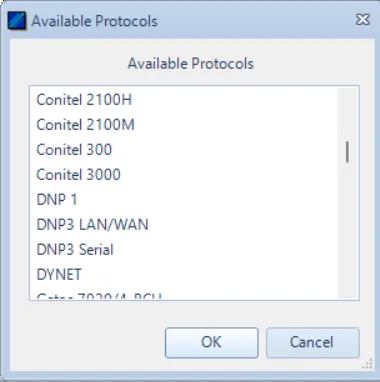
After selecting DNP LAN/WAN you will get this interface which has different DNP functions.

These are file operations supported by the DNP 3 and other functions.
Step 2:
From Tools -> Properties, select Protocol tab and change the destination value according to your outstation value. Click OK to save configuration.
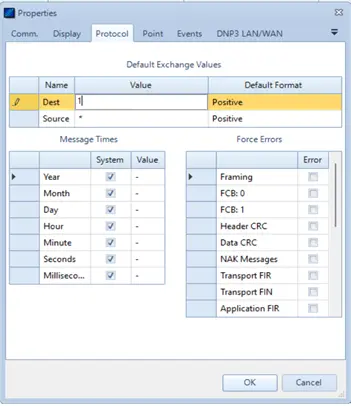
Step 3:
From Mode -> Task Mode. Switch to task mode.

Interface will change as below.
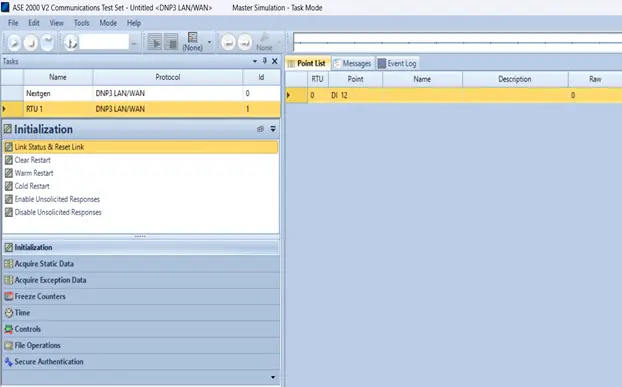
Insert outstation IP address beside the Connect Button shown in the above image.
Step 4:
From Task Pane select File Operation option.
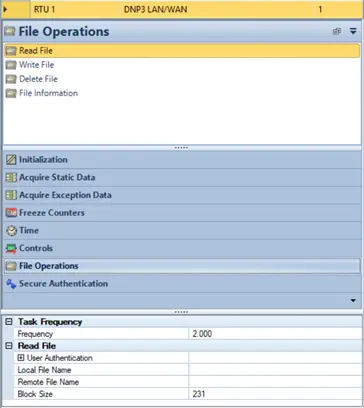
These are the File operations that can be performed using ASE2000 V2. In this example we will perform two operations:
- Read File: Reading a log file from an outstation device.
- Write File: Sending a binary for a firmware update.
Read File Operation:
The target is to get the log file stored in the outstation device (in this case is AM335x Ti Processor) to our Master (Windows Machine). The file name is log.txt and its path with the md5sum is given below:

Select the Read File option and fill out the details below as requested.
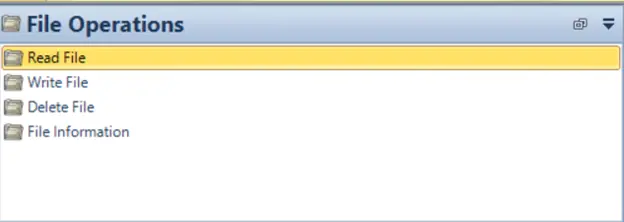

In the Local File Name option, mention the path and new file name as shown above. In the Remote File Name option, mention the path of log.txt in the outstation device.
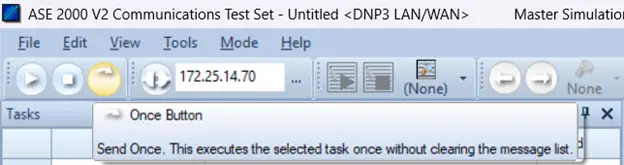
After that clicking on the Once Button Transfer will start. Wait for the transfer to be completed. Then compare the md5sum of the file.

The file will be saved with the same md5sum in the Master (Windows machine).
Write File Operation
In this case, test_firmware is the target file we need to send to out-station (AM335X Ti Processor). The path and md5sum are shown in the image below:

Select the Write File option and fill out the details below as requested.
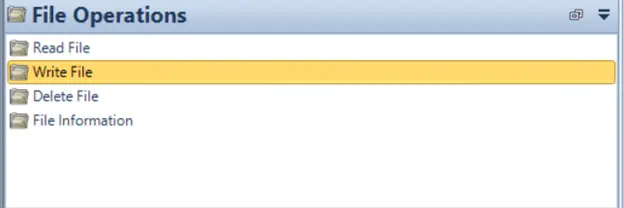
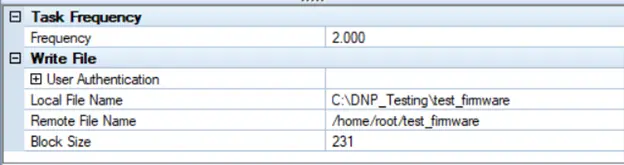
In the Local File Name option, mention the path and new file name as shown above. In the Remote File Name option, mention the path of test_firmware in the outstation device.
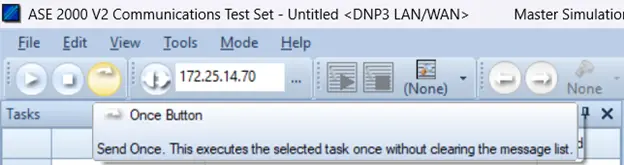
After clicking on the Once Button, the transfer starts. Wait for the transfer to be completed. Then compare the md5sum of the file.

This file is now saved at the mentioned path with the same md5sum.
Conclusion
This blog details the working of the DNP3 protocol in detail and the practical implementation of file transfer using the DNP3. A few concepts of how the DNP3 supports file operations, such as open, read, write, and close have also been explored. A real-world implementation using a TI AM335x processor, Triangle MicroWorks DNP3 stack (v3.29) as the outstation, and the ASE2000 V2 as the master has also been detailed here.
The file transfer capability was enabled on the outstation and configured with the underlying file system, allowing the device to process file commands sent from the master. Using ASE2000 GUI, we completed and verified file transfers and then returned to final state on the outstation and master showing full transfer cycles of upload and download over the DNP3.
This exercise demonstrates that a DNP3 file transfer can be used reliably in SCADA applications such as distribution of firmware, retrieval of logs, and other similar use cases to allow remote configuration updates.