
Anyone working with Spring Boot microservices understands the difficulties that process involves. Every developer who has ever tried to create new code and sent it to the test environment (QA) and Live environment (Prod) has had to guess code which code version may actually be running at the other end.
Annoying as it is, it happens to every single developer. A simple version endpoint can stop all that confusion and prevent wasted time. A version endpoint also helps monitor and manage a running application by providing clear version details for operational awareness.
Sometimes the QA team finds a bug, but when the computer is checked, the code works fine. When rechecking everything, it is common to discover that the server is running an incredibly old version! Hence, a version endpoint is extremely helpful.
On the other hand, one could use Spring Boot’s basic approach that uses BuildProperties. In this article we list all the library versions, dependency versions, and everything else the app uses. This extra data is grabbed automatically when the app is built using Gradle Runtime Classpath. For software applications, tracking these dependencies and updates is crucial for maintaining security and ensuring compatibility.
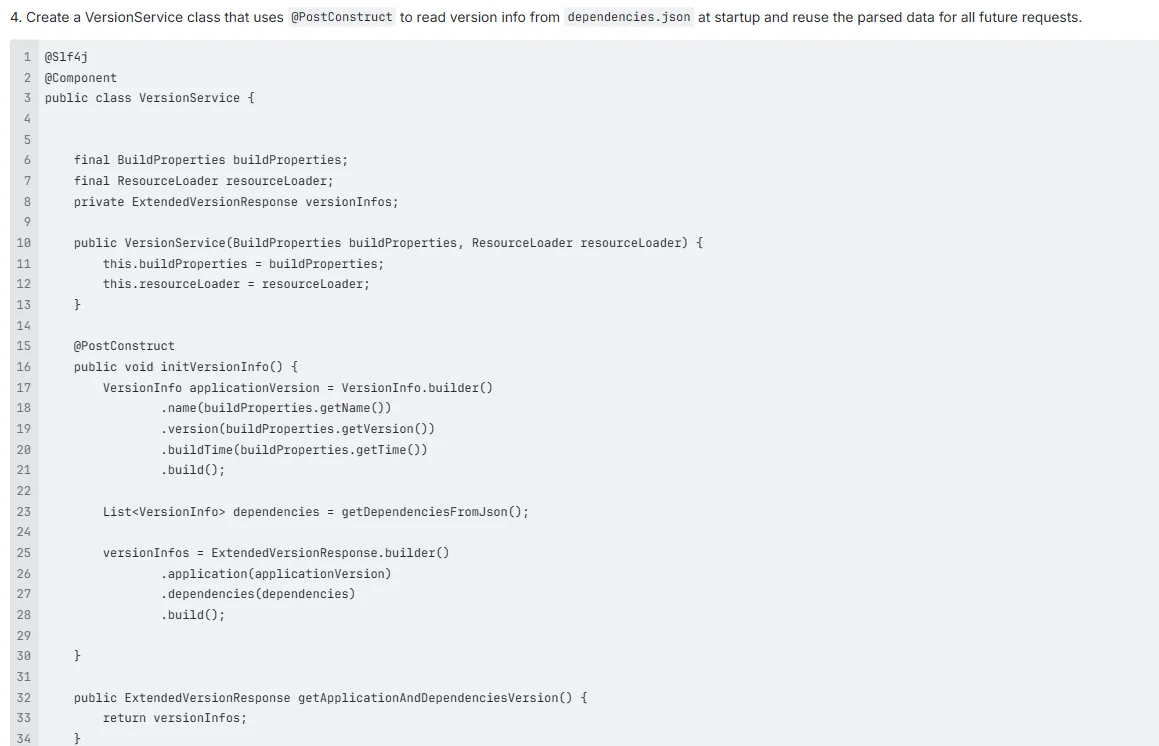
To make it faster, we set up the code to read this version of information only once when the app starts. Then, it reuses that info for every request. That makes the endpoint extremely quick. The application context is used to store and manage this version information, allowing efficient access throughout the application’s lifecycle.
We start with the basic Spring Boot, and then we also explore two other ways to make the version’s visibility much better, such as exposing /version or /info as http endpoints to provide operational information. When exposing such endpoints, be careful not to include sensitive information that could compromise security.
The Need for an API Versioning Endpoint
What exactly is the endpoint version?
It is a simple link, like /version or /info. Version numbers can also be included directly in the api’s url (for example, /api/v1/version) for clear versioning and easier management of different API versions. In Spring Boot, you can configure the base path for these endpoints, which changes where they are accessible in your application’s URL structure.
It provides information about the key things of the app’s code:
- App Name
- Version Number
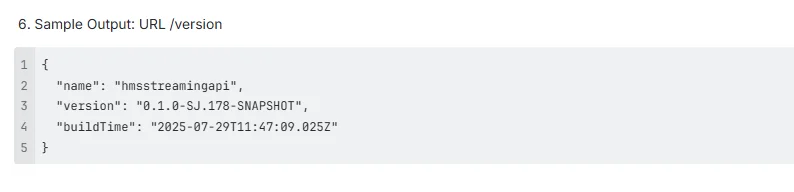
- Build Time
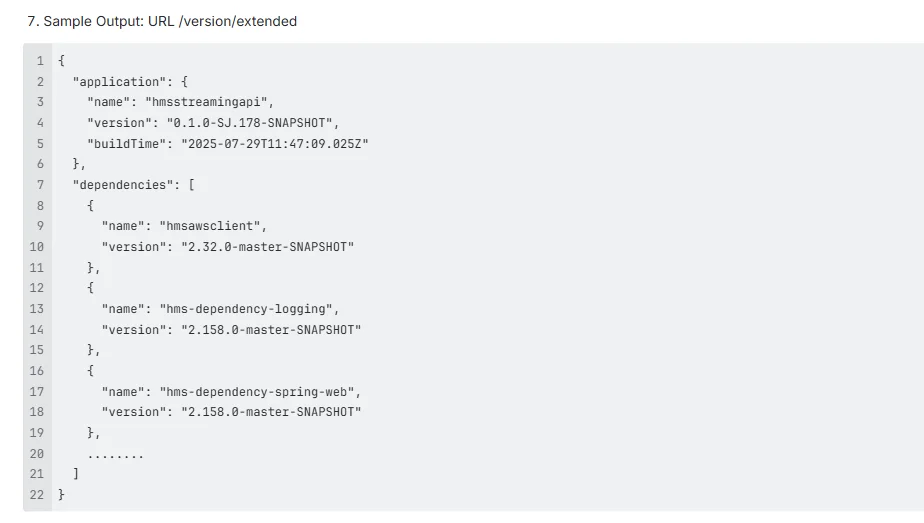
- Dependency versions (the code libraries used)
Other endpoints can provide additional operational data, such as metrics or configuration details. Various endpoints exposed by Spring Boot Actuator help monitor and manage the application by offering access to health, metrics, and other management information.
While this seems insignificant, it is actually particularly important.
New code is deployed often and the endpoint helps the team confirm that the right code made it to the server. One can track versions easily across Dev, QA, and Production.
When there is a problem, knowing the version helps fix bugs faster. It is the app’s ID card. When the question is about which version is running, the /version endpoint has the answer at the ready. Knowing the health status of the application is also critical for debugging and maintenance.
The Need for a Custom Approach in Spring Boot
Spring Boot already makes it easy to display basic details using the BuildProperties. However, while this provides built in support for exposing build and version information, it is limited to the current service’s metadata. Additional beans defined in the application context, such as custom InfoContributor beans, can be used to expose more information. For more advanced monitoring and management features, consider using Spring Boot Actuator, which offers a wide range of actuator endpoints out of the box. This is why we need to build our own solution, often by creating custom endpoints.
When an app is built (with Gradle or Maven), it creates a little file named build-info.properties. This file holds the app name, the version, and the time it was made. It can easily display this on a /version link, which can be exposed as a dedicated actuator endpoint. For a small project, this works well.
The Catch
When the application gets bigger, and when using many different microservices, this simple setup quickly becomes useless.
The BuildProperties only understands the version of the current service. It however does not know the other important details like:
- The versions of external libraries (dependencies).
- The versions of any shared modules used.
So, this is why a custom approach is required. By defining custom endpoints, you can expose additional metadata and extend the functionality of your application.
By adding some smart logic to the project setup (usually in Gradle), it is possible to automatically pull in much richer information when the code is built. One can include things like the Git commit ID and a full list of dependency versions. Git information can be exposed via the endpoint using maven and gradle plugins, and managed with the spring boot starter parent and spring boot maven plugin for easier build setup. When exposing sensitive information, use spring security to restrict access to the version endpoint to authorized users only.
Configuration is managed through application properties. For example, you can use the following properties to customize the endpoint and control what information is exposed. Always ensure compatibility with your boot version and spring boot version, and consider upgrading to the latest version to benefit from new features and security improvements.
This makes version tracking reliable and consistent across all the services. As an added bonus, it is a huge time-saver for debugging.
In short, BuildProperties is fine for the simpler things, but a custom version endpoint—implemented as an actuator endpoint—provides deep, automated control. It turns a simple info link into a powerhouse for managing the services.
To get started, check out a sample project that demonstrates these concepts. For further details on configuration and security, refer to the official Spring Boot documentation.
Efficient Version Data Loading: Read Once and Reuse
We want the version endpoint to be fast, one that does not slow down the whole application.
In many older apps, every time someone checks the /version link, the service has to go read a file (like MANIFEST.MF or dependencies.json). This works but imagine if there are thousands of people checking that link every minute. That file reading happens over and over again! That is a huge waste of time and power (I/O operations).
The Smart Way Out: Caching
In this method, we read the version data only once when the application first starts up. After that, we keep the data ready in memory to use for every single request that comes later. Similar caching techniques are used in Spring Boot to efficiently expose health indicators and health groups, ensuring quick access to operational data.
Here is a simple plan:
- Create a special class called VersionService.
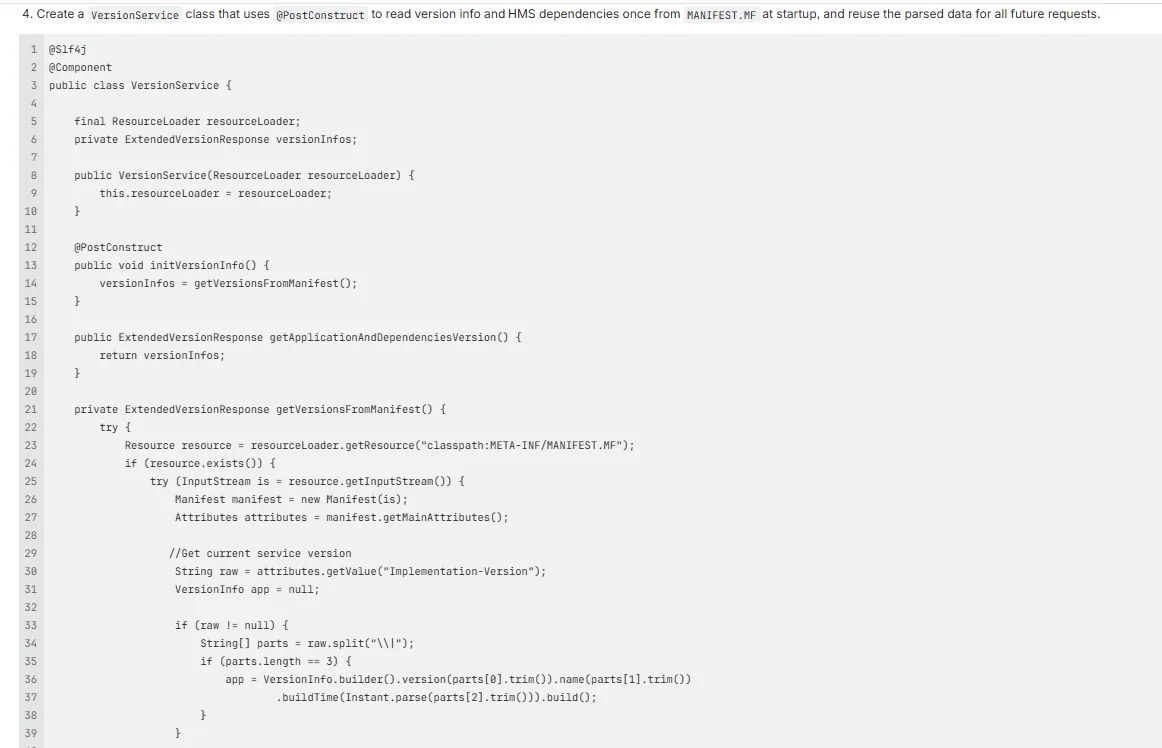
- Use a Spring Boot trick called @PostConstruct. This tells the service to run this code one time, as the application starts.
- In the startup code, we read the version details from the file (MANIFEST.MF or dependencies.json).
- Store that information in a special place, named the ‘versionCache’ in the application’s memory. Custom groupings of health checks, such as custom group and health groups, can also be managed and cached in a similar way for efficient health monitoring.
So, when someone hits /version, the service does not read a file; it just checks the ‘versionCache’. The information exposed by the version endpoint can also include different values and other mappings, similar to how actuator endpoints provide a variety of metrics and links to related operational data.
This simple change makes the endpoint super-fast and light. It is really helpful if there is high traffic or a lot of services talking to each other. In addition, scheduled tasks and their status can also be monitored via dedicated endpoints, ensuring visibility into automated operations.
When exposing operational data, the version endpoint and others like the sbom actuator endpoint can provide a software bill of materials, which may include details about the operating system, libraries, and dependencies used in the application. The response from these endpoints handles http status code and http requests appropriately, giving clear feedback on version and health status.
To configure which endpoints are exposed, you can use the following configuration in your application properties, and refer to the following table for a structured overview of available settings and health indicators. Spring Boot’s approach to exposing operational data is technology agnostic, making it flexible and adaptable for different environments and technology stacks.
Best Practices for API Versioning
Implementing effective API versioning in your Spring Boot application is essential for long-term maintainability and a smooth developer experience. Here are some best practices to help you manage your API versions with confidence:
- Adopt a Consistent Versioning Strategy: Decide early on how you want to version your API—whether it’s through URI versioning (e.g., “` /api/v1/resource), custom header versioning (e.g., using an “` X-API-VERSION
header with a custom media type). Consistency across your endpoints makes your API easier to use and maintain.
- Document All Changes Clearly: Every time you introduce new features, deprecate endpoints, or make breaking changes, update your API documentation. This helps clients understand what’s new, what’s changed, and how to migrate between versions.
- Support Multiple Versions Simultaneously: Don’t force clients to upgrade immediately. By supporting multiple API versions, you give consumers the flexibility to transition at their own pace, reducing friction and potential disruptions.
- Use Semantic Versioning: Adopt semantic versioning (MAJOR.MINOR.PATCH) for your API. This communicates the impact of changes—major versions for breaking changes, minor for new features, and patch for bug fixes.
- Thoroughly Test Each Version: Before releasing a new version, ensure it’s thoroughly tested. Automated tests for each version help catch regressions and guarantee that both new and existing features work as expected.
By following these best practices for api versioning—whether you’re using uri versioning, request parameter versioning, custom header versioning, or content negotiation—you’ll create a robust, future-proof API that’s easy for clients to adopt and trust.
Common Pitfalls in API Versioning
While api versioning is a powerful tool for evolving your Spring Boot application, there are several common pitfalls to avoid:
- Inconsistent Versioning Approaches: Mixing different versioning strategies (like using URI versioning for some endpoints and header versioning for others) can confuse clients and complicate maintenance. Stick to a single, well-documented approach for your api.
- Poor Documentation: Failing to document version changes, deprecated endpoints, or migration paths can leave clients in the dark. Always keep your API documentation up-to-date with every version.
- Introducing Breaking Changes Without Warning: Breaking changes can disrupt client applications and erode trust. Always communicate breaking changes clearly, and provide migration guides when possible.
- Dropping Support for Older Versions Too Soon: Removing support for older api versions before clients have had a chance to migrate can result in lost users and broken integrations. Maintain older versions for a reasonable period and announce deprecations well in advance.
- Insufficient Testing: Not thoroughly testing new versions can introduce regressions and unexpected behavior. Each version should be tested independently to ensure stability and reliability.
By being aware of these pitfalls and proactively addressing them, you can ensure your api versioning strategy remains effective and user-friendly as your Spring Boot application evolves.
Security Considerations
The Options
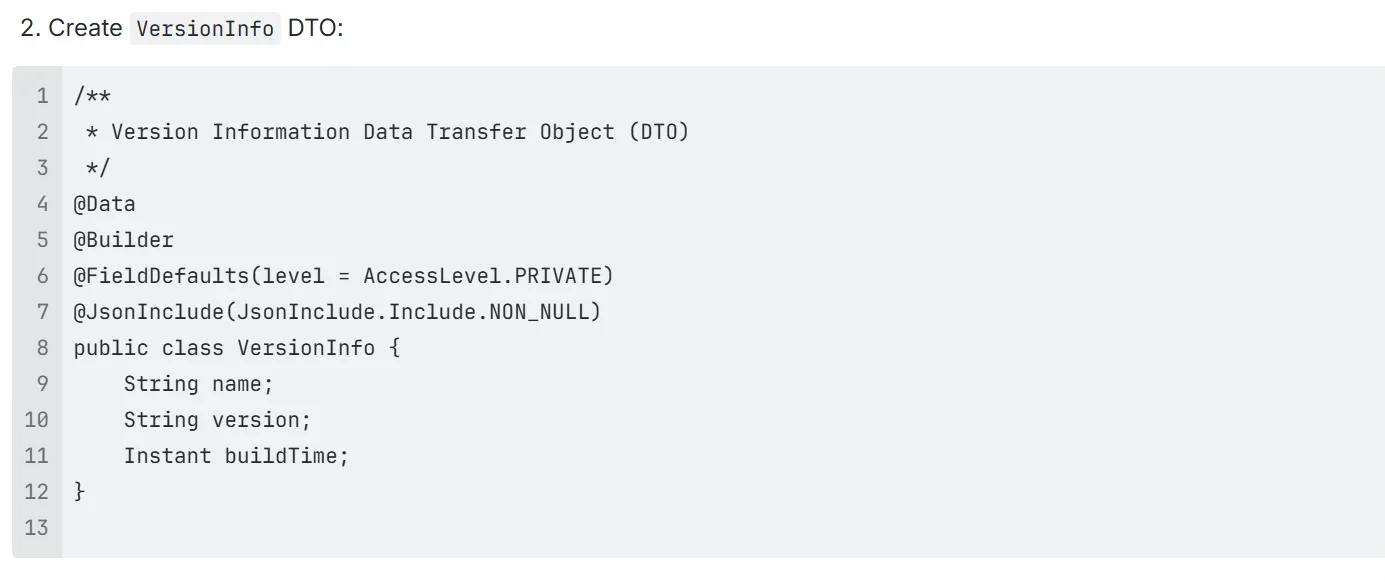
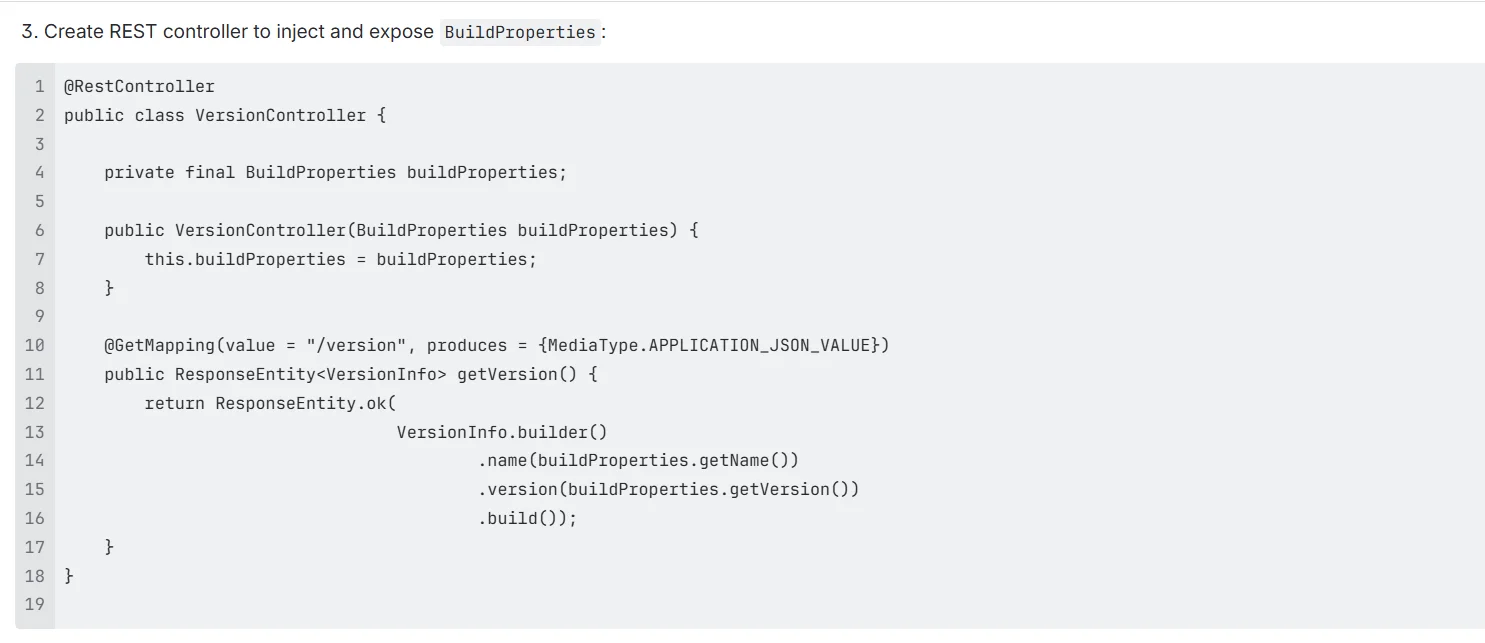
A. Using BuildProperties (Spring Boot Built-In)
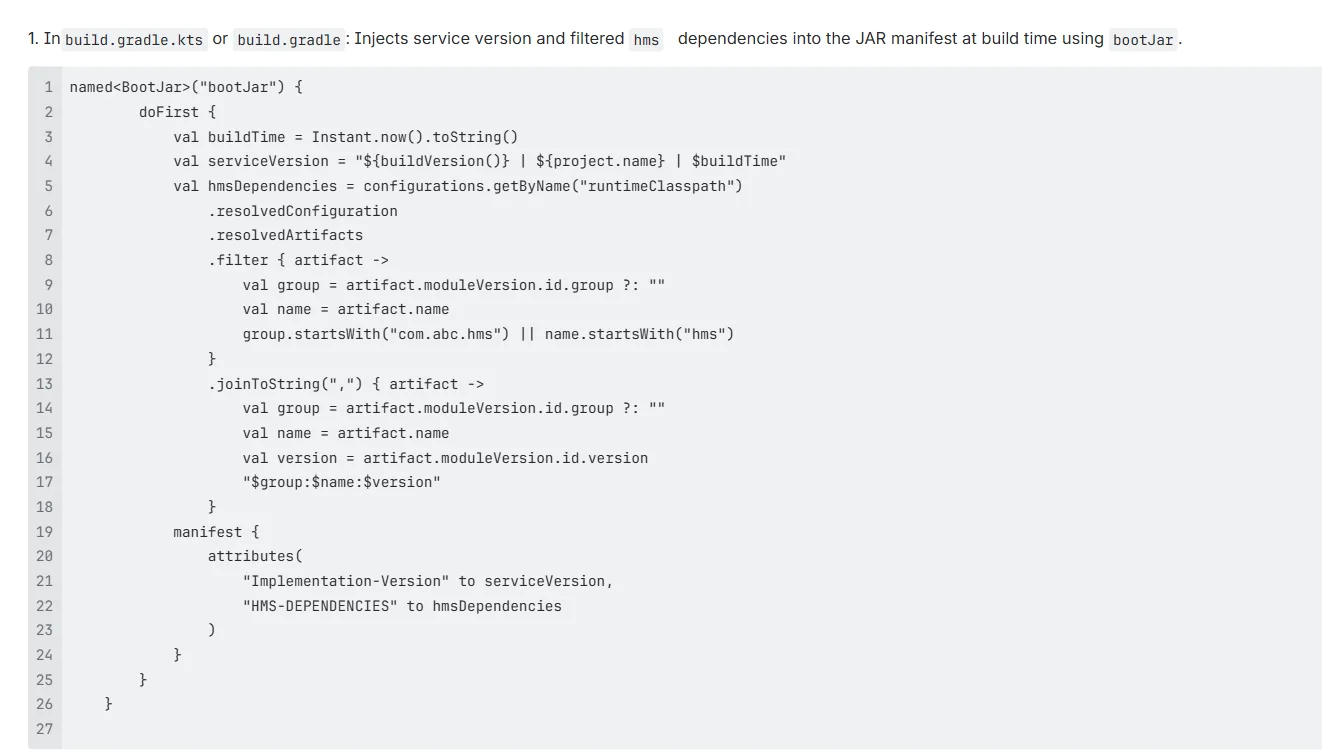
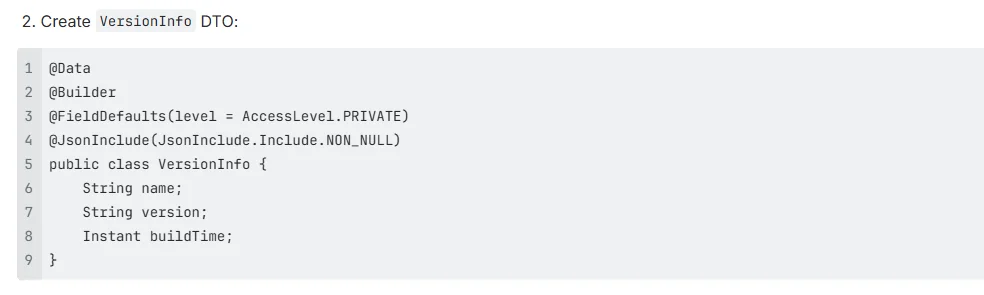
B. Custom Gradle Logic to Inject Dependency Versions into MANIFEST.MF file, loaded at runtime using Spring boot.
C. Custom Gradle logic to generate dependency JSON, loaded at runtime using Spring boot
[A] Using BuildProperties (Spring Boot Built-In):
- Use Spring Boot’s BuildProperties class to expose service metadata like:
Application name
Version
Build timestamp - This approach relies on Spring Boot’s spring-boot-gradle-plugin to auto-generate a build-info.properties file during build time.
- A standard and reliable way to expose service version via REST using Spring Boot’s BuildProperties.
[1] The Implementation


[2] Pros and Cons of BuildProperties Approach
- Pros:
- Simple, clean, and officially supported by Spring Boot.
- No parsing needed; the values are strongly typed.
- Cons:
- Only supports basic info (version, name, time).
- Only exposes the current service’s version, however, if we want to fetch the Implementation-Versions from internal modules or dependencies, this approach will not work.
[B] Custom Gradle Logic to Inject Dependency Versions into MANIFEST.MF
In this approach, we connect two separate worlds: the build setup (that’s Gradle) and the running app (Spring Boot). This is a key piece of the puzzle.
The Spring Boot’s existing BuildProperties system, is not adequate. When we need to show everything and not just the service version, but all the other library versions (the runtime dependencies).
It is smart, but a little bit difficult too. Instead of a separate file, one has to write all the version info into the MANIFEST.MF file.
The Process:
- The Gradle Helper: We add a new, special job, a custom task right into our Gradle build file. This thing runs only when one builds the project.
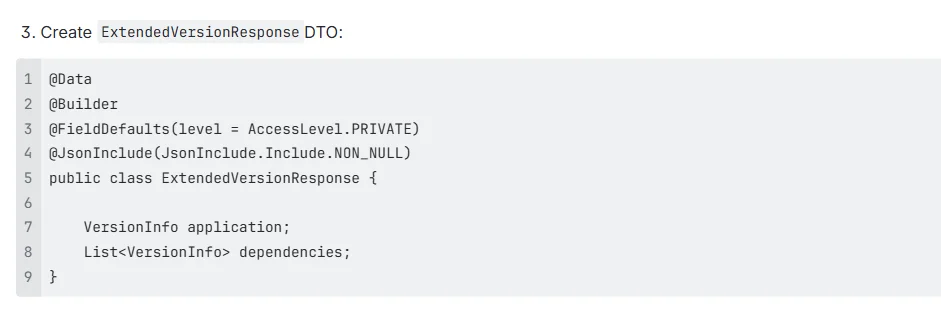
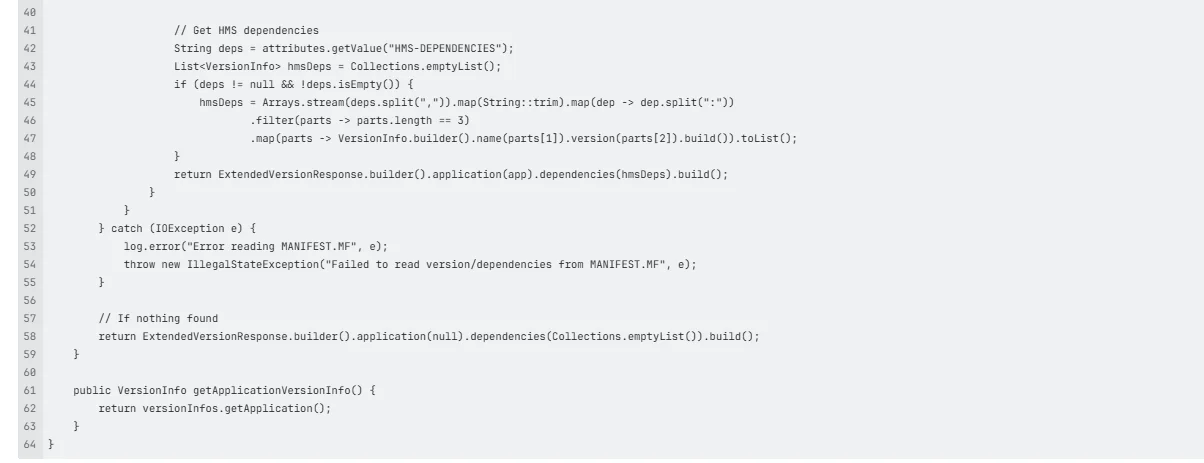
- Making the List: What does this helper do? It looks across the project (at the runtimeClasspath) and gathers all the versions that is being used. Instead of a new file, it takes that long list and shoves it into the MANIFEST.MF file under a special, custom tag (like HMSDEPENDENCIES).
- App Startup Time: When the Spring Boot app finally starts up, the VersionService kicks in. The @PostConstruct trick runs immediately.
- Grabbing the Data: It uses Spring’s tools to quickly look inside the running application’s JAR file and read the data directly from the MANIFEST.MF file. It finds the custom tag and pulls out the list.
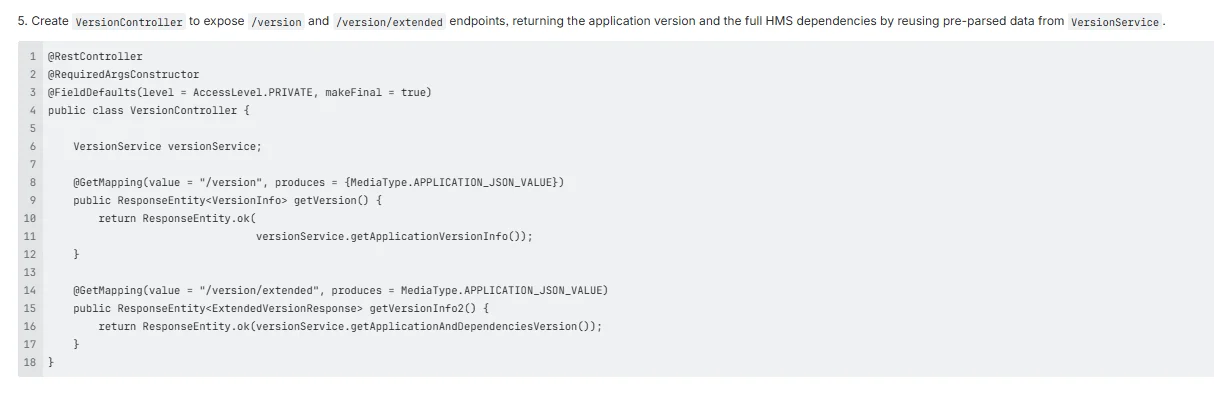
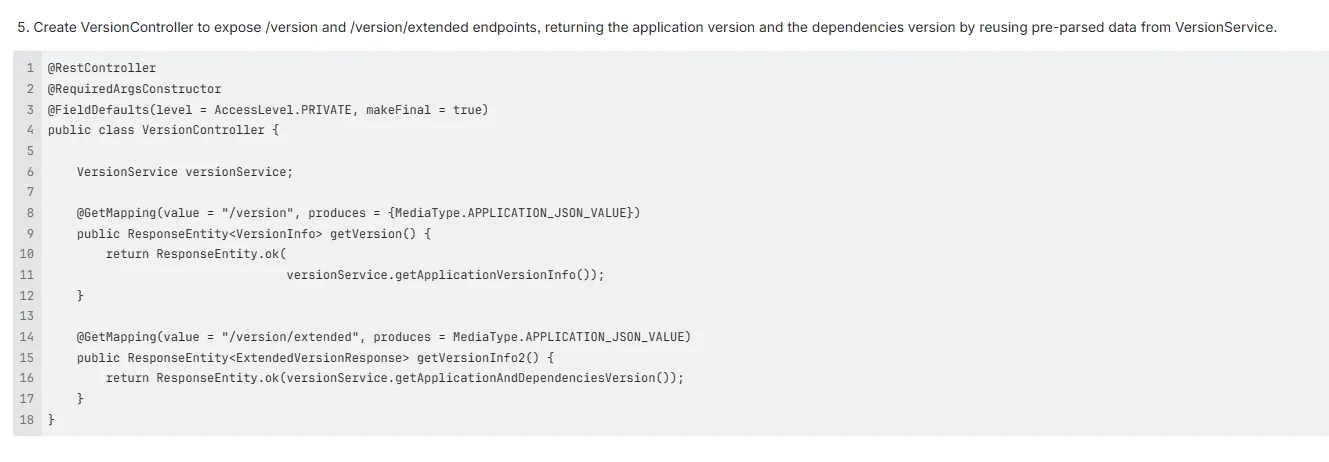
- Final Output: Now, the VersionService has everything it needs: the service version and the full dependency list. It then pushes all this combined data out to the links, like /version and /version/extended.
This method works well because the service carries its own version of an ID card inside its main file. The JSON file approach is much cleaner and easier to manage.
[1] The Implementation:
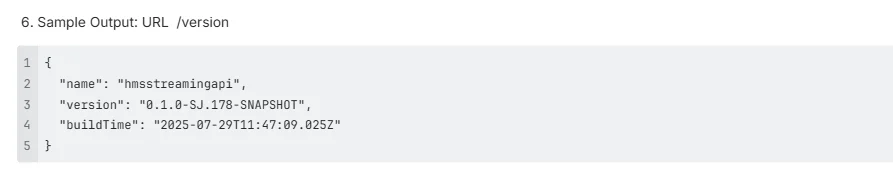
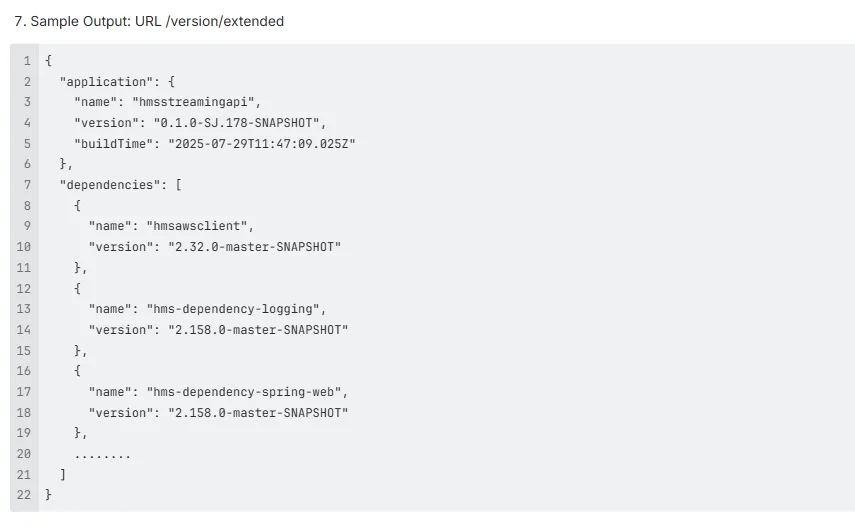
[2] Pros and Cons of the Custom Gradle Logic to Inject Dependency Versions into the MANIFEST.MF approach:
- Pros:
- Allows full customization and supports both the application version and filtered dependency versions.
- Captures the exact build-time and runtime dependency info which would not be possible when using the BuildProperties.
- Useful for traceability and internal audits.
- Cons:
- Requires manual string parsing from MANIFEST.MF.
- The manifest has size limits and it is risky if too many dependencies are added.
[C] Custom Gradle Logic to Generate Dependency JSON, Loaded at Runtime Using Spring.
This is the second approach used. It is a smarter one, rather than using a MANIFEST.MF, we just write all the version information in a separate JSON file and read it at runtime.
The Process
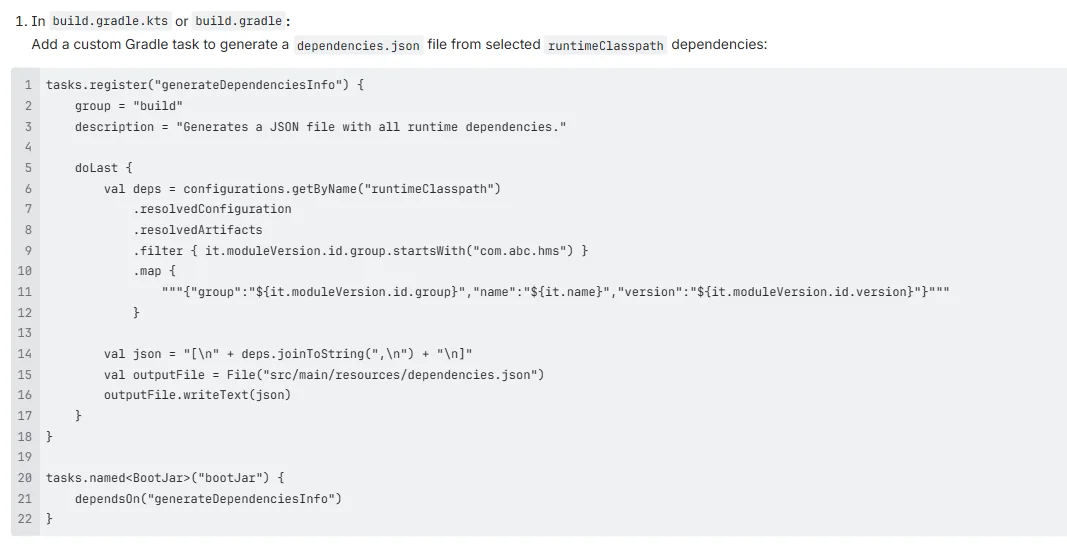
- The Gradle Helper: We add a new, special job, a custom task right into the Gradle build file. This thing runs only when you build the project.
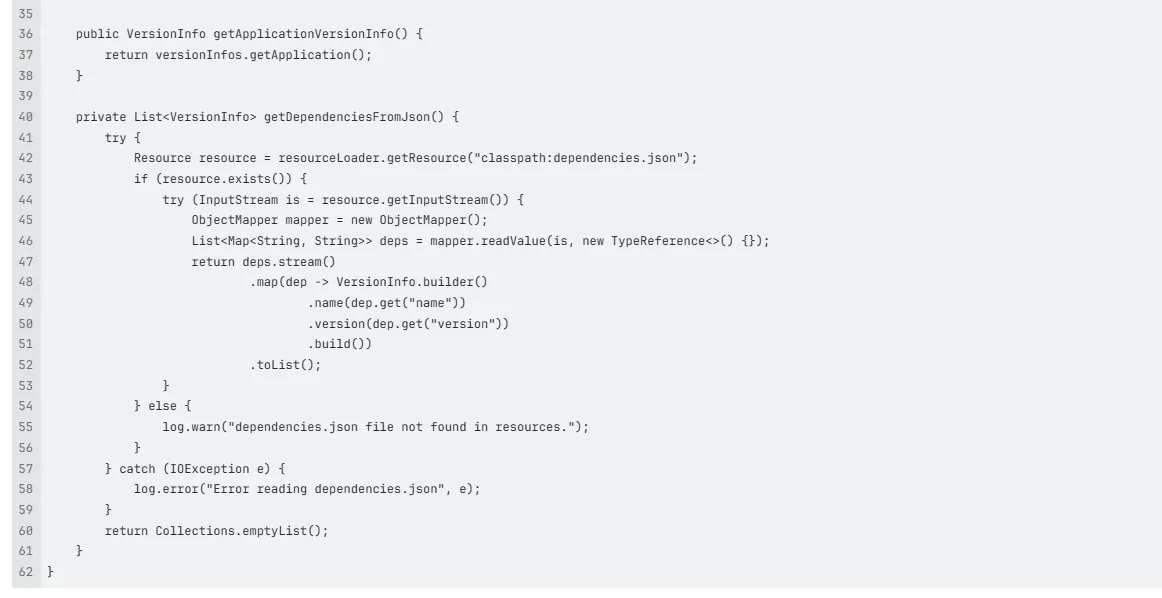
- Making the List: What does this helper do? It looks across the whole project, figures out all the important dependencies that are actually being used, and creates a clean, simple list with their versions. It saves that list into a file. Think of it as a dependencies.json file.
- App Startup Time: Then the Spring Boot app finally starts up, and the VersionService—kicks in. The @PostConstruct trick runs immediately.
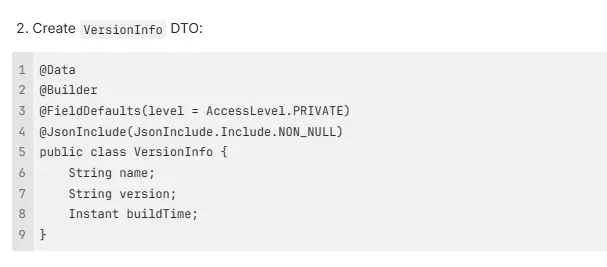
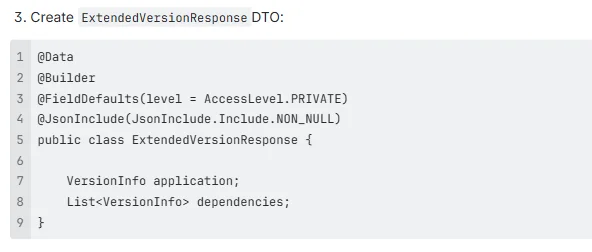
- Grabbing the Data: It uses Spring’s tools to read the data quickly and easily from that dependencies.json file that was made earlier.
- Final Output: The VersionService has everything that is needed: the service version and the full dependency list. It then pushes all this combined data out to the links, like /version and /version/extended.
This whole process is extremely efficient. We use the information created when one builds the code (the build-time) and make it totally visible when the app is running (runtime). It provides a structured, perfect view straight from the API.
[1] The Process:
[2] Pros and Cons of a Custom Gradle-generated Dependency JSON Approach:
- Pros
- Allows full customization and supports both the application version and the filtered dependency versions.
- Data is parsed once at startup, reused on each request.
- Useful for traceability and internal audits.
- No manifest size limit issues.
- JSON is easy to inspect, validate, or share externally.
- Cons
- Requires custom Gradle logic to generate a dependencies.json file.
- Slight increase in startup time due to JSON parsing.
- Requires creation of a separately Json file.
Conclusion
Exposing the version information in Spring Boot can be as simple or detailed as required. For the basic build details, BuildProperties is the easiest and cleanest choice. If one needs dependency-level metadata, adding custom fields to the MANIFEST.MF works well at build time. For maximum flexibility, generating a dependencies.json file through Gradle and loading it at runtime provides full control over what is exposed.
To sum-up:
- BuildProperties → simple and built-in
- MANIFEST.MF → good for build-time metadata
- Custom JSON → best for flexibility and detailed version endpoints
By understanding these approaches, you can design a version endpoint that fits both the application’s requirements and the team’s long-term maintenance goals.