

In the software development environment, timely and reliable delivery of high-quality products is crucial.
AWS CI/CD pipelines accelerate software development by automating and streamlining the entire software delivery process, from code submission to deployment.
Continuous Integration and Continuous Deployment (CI/CD) are at the heart of modern DevOps practices, enabling teams to automate the building, testing, and deployment of code. AWS provides a set of managed services that make C I/CD pipelines easier, scalable, and secure. AWS CodePipeline, CodeBuild, and CodeDeploy are core services that help organizations automate the software delivery lifecycle.
Importance of CI/CD
Manually deployments can be slow, error-prone, and hard to scale as a project grows. In the absence of automation, teams often face the following problems:
- Inconsistent builds and mismatched environments
- Rolling out new features delays deployment
- Higher chance of bugs and production issues
- Expanding DevOps practices across multiple teams is also difficult
By implementing Continuous Integration and Continuous Deployment (CI/CD), new code is automatically built, evaluated, and deployed.
Getting Started with DevOps Adoption
For organizations that are just starting to use DevOps, it is best to start small. They should begin by automating the build and deployment of a single application or service. The code should be stored in Git for version control, automated builds should be set up with AWS CodeBuild, and release process should be managed using AWS CodePipeline.
AWS CI/CD Overview
AWS offers a set of services that make it easier to automate the software delivery process.
Continuous delivery is a key part of the CI/CD process, enabling automated and reliable deployment of code changes to production environments.
The Code Pipeline helps define and manage the steps that the code goes through, from source to build, test, and deploy. The pipeline consists of distinct deployment phases, such as build, testing, and deployment, each automated for efficiency. It provides the flexibility to set up workflows with multiple stages so that the changes can move through a pipeline smoothly.
AWS CDK (Cloud Development Kit) can be used to automate infrastructure deployment and pipeline setup, making it easier to define and manage pipelines as code.
- CodeBuild is a fully managed AWS build service. CodeBuild compiles source code, runs unit tests, and produces artifacts that are ready to deploy on the Cloud.
- CodeDeploy is a fully managed AWS build service that automates application deployments to AWS EC2, AWS S3, AWS Lambda functions, or Amazon ECS services.
- These services allow one to implement a fully automated, end-to-end CI/CD pipeline in the AWS ecosystem.
Challenges Solved by AWS CI/CD
AWS CI/CD solves many common challenges that organizations face:
- Deployment Mistakes: AWS CI/CD reduces manual deployment time and build errors and hastens the process.
- Slow-release Cycles: AWS CI/CD pipelines are automatically triggered whenever code changes are made, speeding up the delivery process.
- Testing Gap: With AWS CodeBuild integration, AWS CI/CD ensures automated unit, integration, and end-to-end testing, filling any gaps in the testing process and improving code quality. As code moves through the pipeline, more aspects of quality, such as validation and verification, are progressively checked to ensure robust software delivery.
- Scalability: AWS CI/CD uses serverless architecture, which automatically manages high build-load by scaling feature without needing a manual setup.
Each stage of the pipeline is responsible for validating a certain aspect of the code to ensure high quality before deployment
Architecture and Workflow
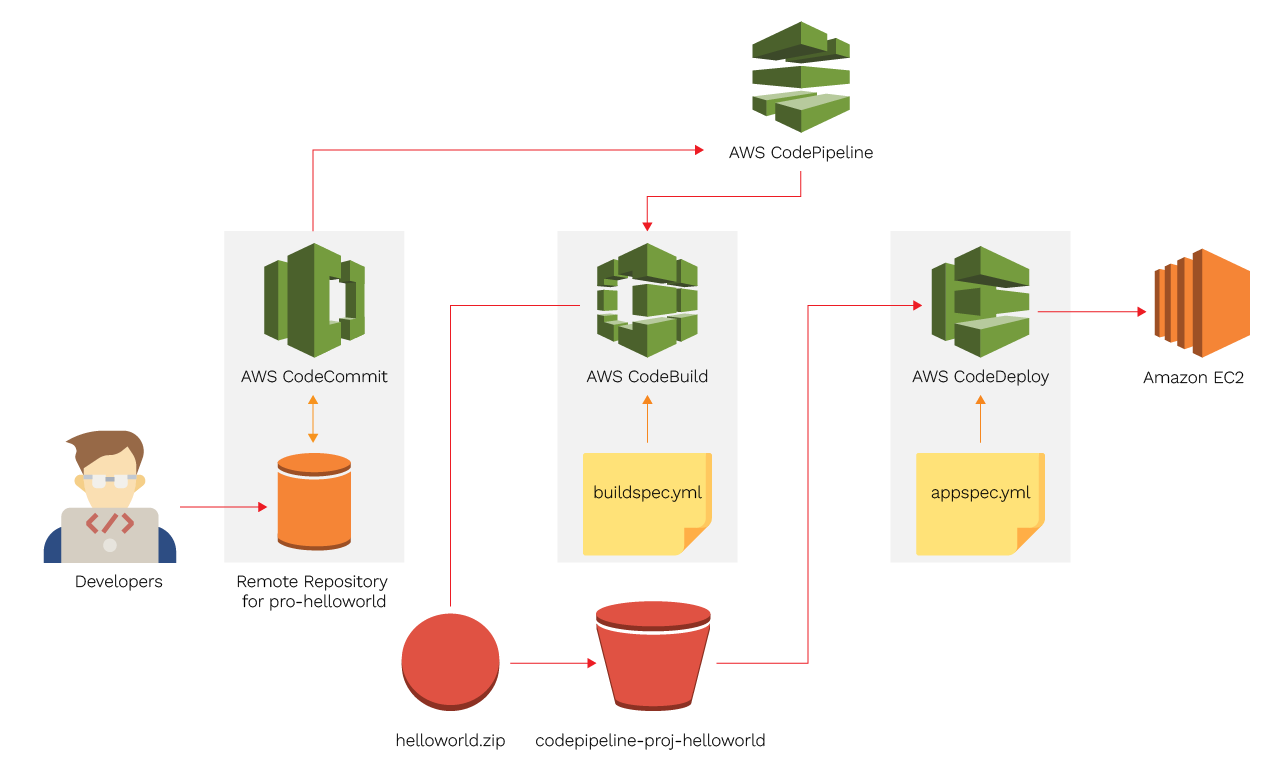
This is how a typical AWS CI/CD pipeline looks:
Source Repository → CodePipeline → CodeBuild → CodeDeploy → Monitoring
Explanation of the Stages:
- Source Stage: CodePipeline retrieves the most recent code from a source repository (Bitbucket, GitHub, or CodeCommit).
- Build Stage: CodeBuild compiles the code, runs automated tests, and packages and artefacts.
- Deploy Stage: Code Deploy installs the developed artifacts to AWS services like Lambda, EC2, ECS, or S3.
- Monitoring: Integrate CloudWatch, SNS, or other tools for alert and performance tracking.
Build Servers and Environments
In traditional CI/CD setups, dedicated build servers are responsible for compiling source code, running tests, and packaging artifacts. Managing these servers often requires manual configuration, ongoing maintenance, and scaling to handle varying workloads. With AWS CodeBuild, these challenges are eliminated by providing a fully managed, cloud-native build environment that automatically provisions the necessary resources for each build.
AWS CodeBuild supports a wide range of build environments, allowing you to define custom runtime settings, environment variables, and even use your own Docker container images. This flexibility ensures that your builds are consistent and reproducible, regardless of the underlying infrastructure. You can easily specify the build environment in your buildspec.yml file or through the AWS Management Console, tailoring each build to the needs of your application.
For teams working with multiple environments—such as development, staging, and production—AWS services make it simple to manage environment-specific configurations. You can use environment variables, parameter stores, or secrets managers to inject the right settings at each stage of the pipeline. This approach not only streamlines the delivery process but also enhances security by keeping sensitive information out of your source code.
By leveraging managed build servers and environments in AWS, you gain the ability to scale builds on demand, integrate with other AWS services like Amazon ECR for container images, and ensure that your CI/CD pipeline remains robust and efficient. This modern approach accelerates software development, reduces operational overhead, and supports easy rollbacks and disaster recovery strategies, making it ideal for teams aiming to deliver new features quickly and reliably.
A Step-by-Step Example
1. Set Up the Source Repository
- Use AWS CodeCommit or connect an external repository like GitHub
- Key application code and build specifications (buildspec.yml) are in the repository
2. Create a CodeBuild Project
- Define your build environment, runtime, and build commands
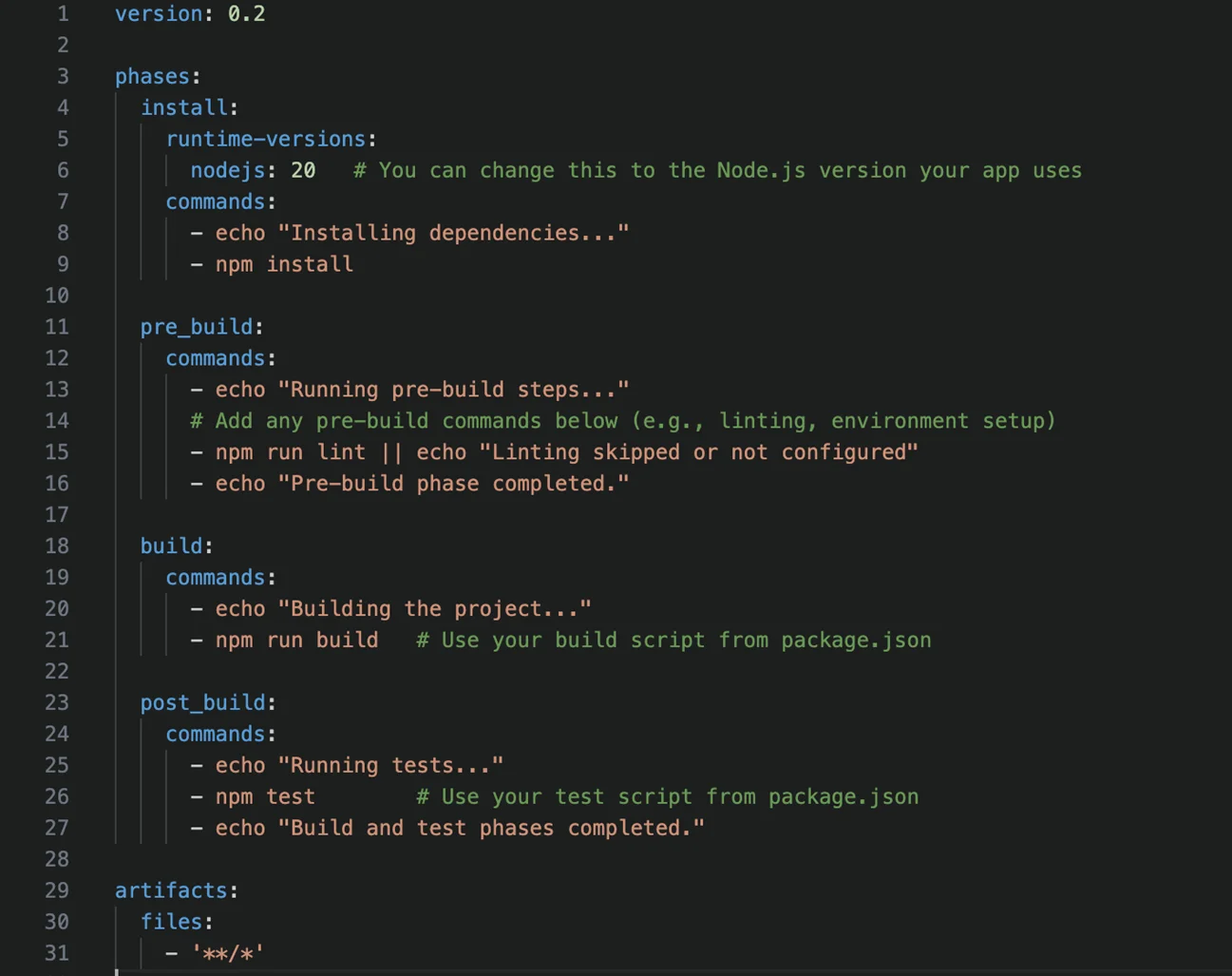
- Here is an example of buildspec.yml configuration for a Node.js application

3. Create a CodePipeline
- Create a new pipeline launch CodePipeline in the AWS Management Console
- Set up phases: Source → Build → Deploy
- For the source provider pick Bitbucket, GitHub, or CodeCommit
- For the build provider incorporate CodeBuild
4. Deploy Artifacts
- Select one of the target environments from below:
- Amazon EC2, Amazon ECS, AWS Lambda or Amazon S3
- Configure auto-scaling, environment variables, and rollback strategies as needed
Security in AWS CI/CD Pipelines
Every step of the CI/CD process incorporates security, and this is known as DevSecOps. AWS services support security enforcement by:
- Using IAM roles and least-privilege permissions for CodePipeline, CodeBuild, and CodeDeploy.
- Managing secrets through AWS Secrets Manager or Parameter Store instead of using hardcoding credentials.
- Enabling artifact encryption and S3 bucket policies to protect build.
- Integrating security scans or static code analysis tools (like SonarQube) into CodeBuild phases.
These practices ensure compliance and protect applications from any vulnerabilities early in the delivery cycle.
Benefits of AWS CI/CD
- Automation: With every code change, the build, test, and deployments run automatically.
- Faster Release Cycles: Time spent by a developer on manual deployments also decreases.
- Scalability: AWS services automatically manage high loads on peak development.
- Security: AWS IAM roles and permissions control each service in the pipeline.
- Reliability: Integrate CloudWatch and SNS service for monitoring and alerting for pipeline failures.
- Cost Efficiency and ROI: Automated pipelines reduce the manual effort and minimize downtime and lower infrastructure costs. AWS is a pay-as-you-go pricing model which helps businesses save a lot of money on compute and maintenance expenses.
Best Practices
- Multiple Environments: Builds, tests, and deployments run automatically with every code change
- Automated Testing: Integrate the unit and end-to-end tests in CodeBuild.
- Notifications: Use CloudWatch and SNS for monitoring pipeline execution.
- Rollback Strategies: Use automatic rollback steps for deployment failure.
- Infrastructure as Code: For reproducibility, define pipelines as code using AWS CloudFormation or CDK.
- GitHub Actions: Automate workflows and deployments in CI/CD pipelines, especially when integrating with AWS services.
- High Availability and Disaster Recovery: Use CodeDeploy for blue/green deployments and multi-region strategies to ensure zero downtime.
Conclusion
CI/CD directly improves customer satisfaction and the user experience by increasing release frequency, decreasing deployment errors, and guaranteeing consistent quality.
AWS CodePipeline, CodeBuild, and CodeDeploy provide a fully managed, scalable, and secure way to implement CI/CD for modern applications. By automating the build, evaluation, and deployment process, development teams can focus on writing high-quality code while ensuring faster delivery cycles and consistent releases.