
An Overview: Understanding the Google AppSheet for No Code App Development
A common experience is that of tedium and difficulty when working with Excel or Google Sheets, especially when there are a large number of entries, and one must find specific ones, scroll, filter, and share them often. Managing business processes in a traditional excel spreadsheet can be inefficient, especially when handling complex calculations, functions, or trying to maintain version control across a team.
What if one could magically turn that exact spreadsheet into a simple app? An app that works perfectly on a phone, one that the whole team can use together, and it could even be checked offline! It is now possible! The best part is that one does not need to be a developer to make it happen. Google AppSheet lets anyone with a spreadsheet create their own simple, custom app; no coding required at all. Google AppSheet works simply as creating a spreadsheet. As a low code development platform and code platform, AppSheet enables users to convert excel spreadsheets and turn excel data into web apps and mobile apps quickly and easily.
Preparing Your Data for AppSheet
Before you dive into creating your first app, it’s essential to get your data ready. Whether you’re working with Google Sheets, Microsoft Excel, or even a CSV file, organizing your existing data is the foundation for a successful mobile app. Make sure your spreadsheet is tidy—use clear headers in the first row, keep your columns consistent, and avoid empty rows or merged cells. This makes it much easier for AppSheet to understand and convert your data into an app.
AppSheet supports a variety of data sources, so you can connect not only Google Sheets and Excel files but also other formats if needed. Once your data is uploaded, the data tab within AppSheet lets you view, edit, and manage your information directly. This means you can tweak your data structure or make quick updates without leaving the platform. Taking a little time to prepare your data now will save you headaches later and help you create an app that’s both functional and user-friendly.
Google AppSheet
Google AppSheet helps one build powerful applications and automations that enhance productivity without requiring any knowledge of coding. It is an extremely quick and efficient way to create applications.
It has the following benefits:
- Free to start: Up to ten users can make use of it before having to acquire access through the paid version.
- Works everywhere: It can be used on the Android, iPhone, or the web.
- Make it yours: One can add filters and buttons as per the requirement.
AppSheet fills the gap between spreadsheets and using an app on the phone or other devices to perform a task.
Step 1: Upload your data
You can start by uploading your original spreadsheet, including files from Microsoft Office such as Excel. AppSheet allows you to import data from your spreadsheet, whether it’s a list of inventory, resources for your team, or any other information. If your data includes date fields, AppSheet can import and keep them synchronized for accurate tracking.
Example 1: Inventory management has eased immensely. From a messy Excel file filled with a massive amount of data to being able to check the stock just by tapping the phone!
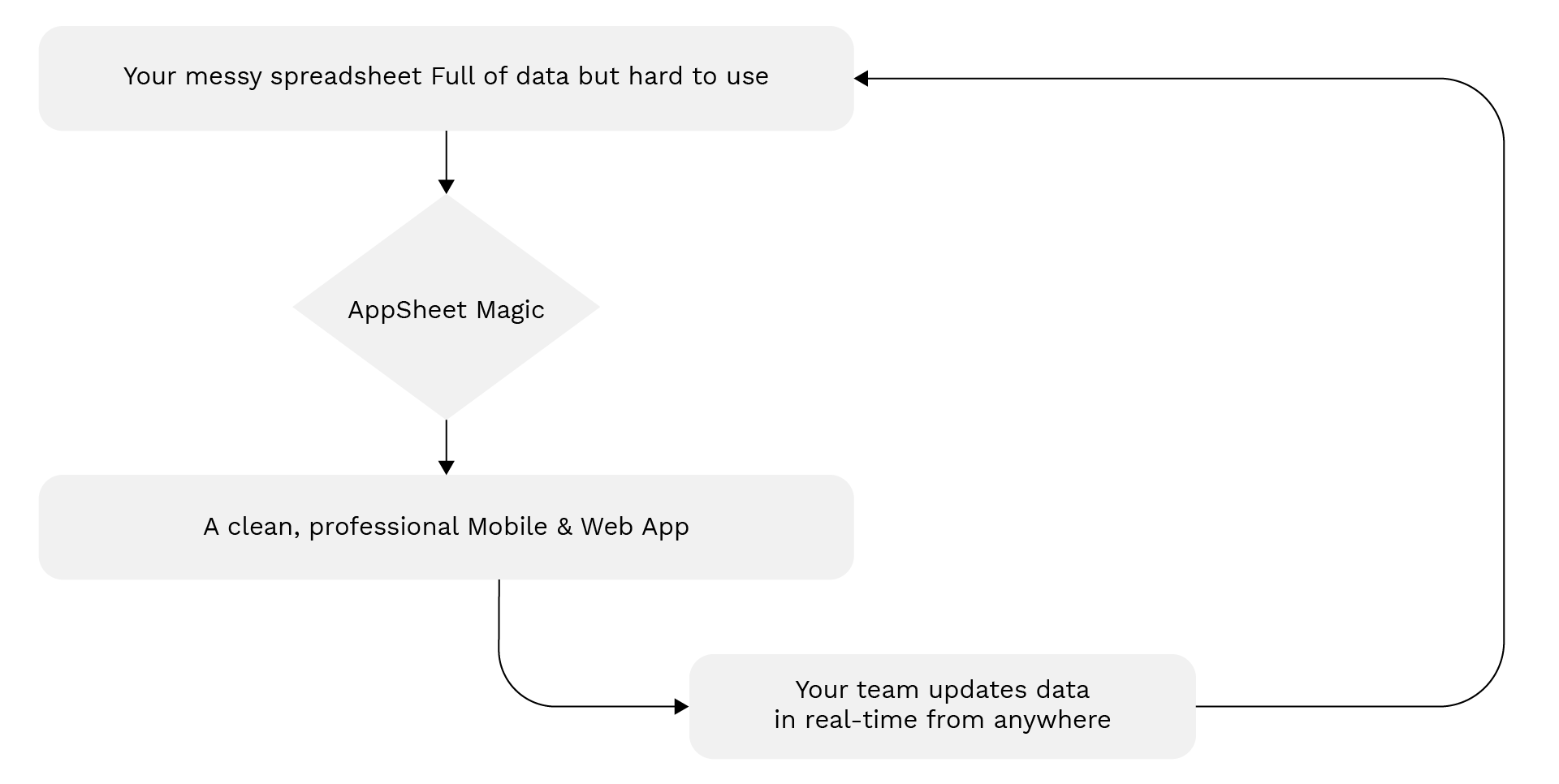
Example 2: A shop owner who was managing stock in a spreadsheet can now easily convert it into an app and update the stock from his phone while still working in the shop.
Create An App using AppSheet
- Step 1:
- Get your data ready.
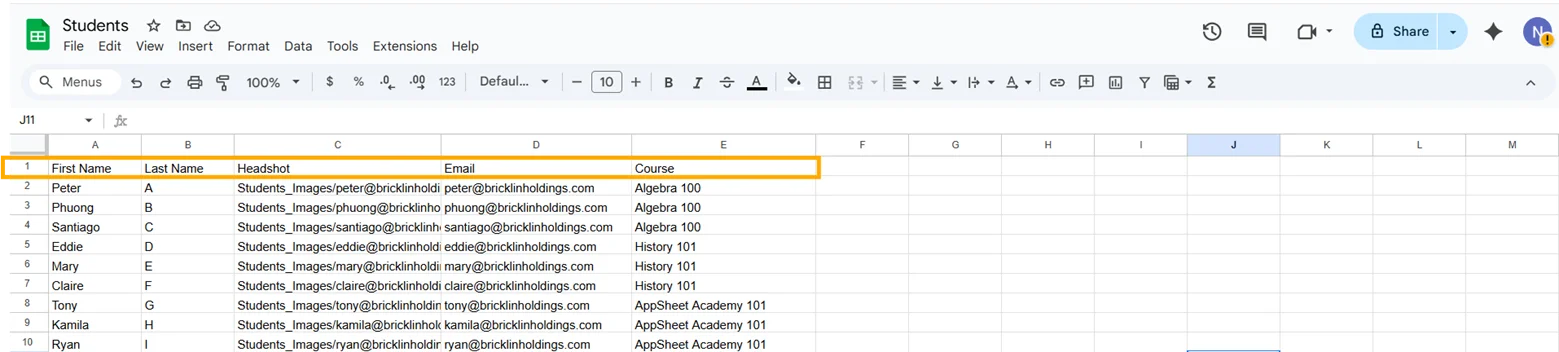
- Put the info into a Google Sheet, it could be a list of students, groceries, a comic book hoard, or any other data.
- Upload it to Google Drive.
- Use the first row for labels like “Name,” “Amount,” “Price,” etc.

- Step 2:
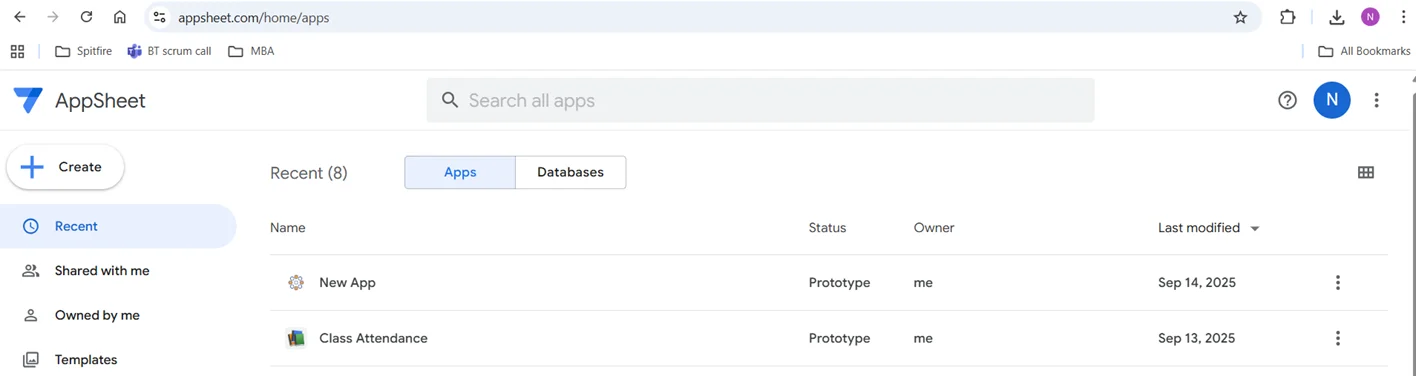
- Sign-in to AppSheet
- Hop over to www.appsheet.com and sign-in with a Google account.
- The dashboard is very user-friendly and easy to use.

- Step 3:
- Create the App.
- Hit Create → App → Start with the existing data.
- Select the spreadsheet and name the new app.
- Step 4:
- Explore the newly created App
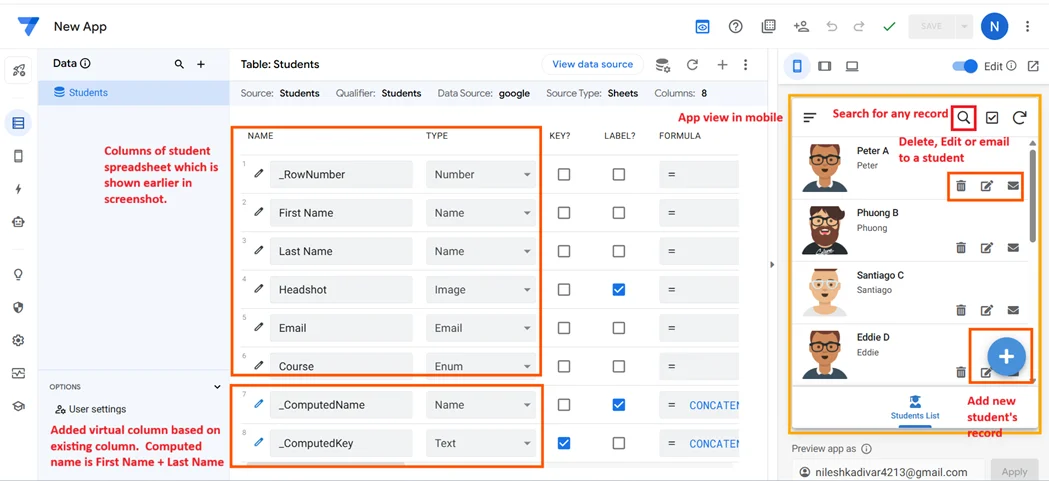
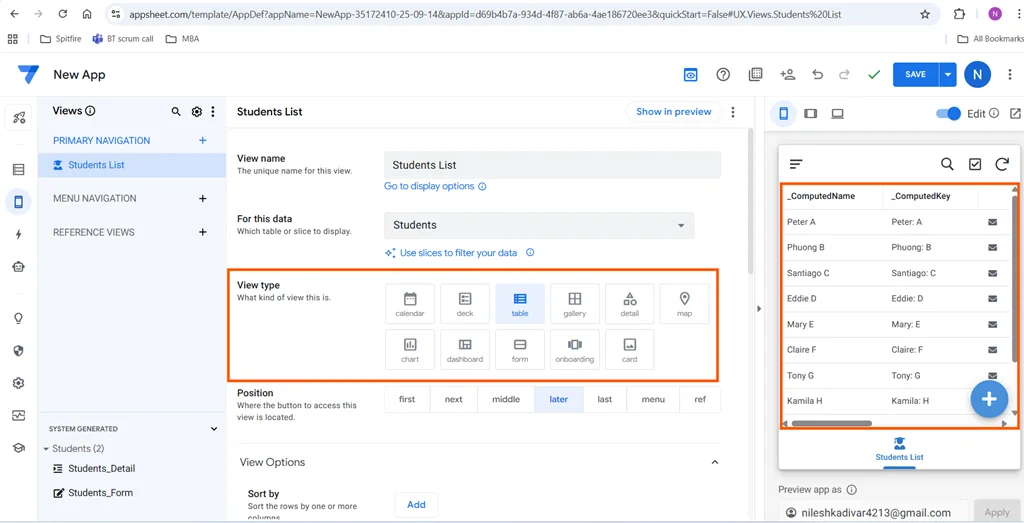
- AppSheet auto creates forms, tables, and different “views.” One can see buttons to add, delete, edit, and search for anything.
- Try adding a record. It is fairly simple.

Data Entry and Management in Your App
One of the biggest advantages of using AppSheet is how it streamlines data entry and management. Instead of relying on static spreadsheets, you can create interactive forms and interfaces that make it easy for multiple users to add, edit, or review data from any device. This is perfect for teams who need to collaborate or for businesses that want to collect information from customers or employees on the go.
AppSheet also offers powerful workflows and automation tools. You can set up automatic notifications, approvals, or data updates, reducing the need for manual tasks and minimizing errors. With these features, managing your app’s data becomes a breeze, freeing up your time to focus on what matters most—growing your business or improving your processes.
Working with Excel Files in AppSheet
If you already have important data stored in Excel spreadsheets, AppSheet makes it incredibly easy to turn those files into powerful apps. Simply import your Excel file, and AppSheet will help you create apps that bring your data to life. You can edit your data, customize how it’s displayed, and add advanced functionality—all without writing a single line of code.
This seamless integration means you don’t have to start from scratch. You can convert your existing spreadsheets into dynamic apps that are accessible on any device, making it easier to manage information, collaborate with your team, and unlock new possibilities for your data.
Key Features for Everyday Use
AppSheet comes with powerful features that even beginners can use. It offers cool things like advanced data configurations and user-friendly innovations. It is possible to:
- Customize to your needs and preferences: Lists, cards, maps, calendars, etc. can be customized.
- Automate the boring bits: Auto-reminders, texts, emails can be automated.
- Use the Offline mode: Add stuff online. It will be synced later.
- Access and Controls: Set up access controls and permissions, including security controls such as privacy levels and user roles. Employees can clock in, but only you see all the data.
- Compatibility with the other Google products: Connects with Google Drive, Gmail, Calendar, and more.

Real-Life Use Cases
- Home life: Take control of the budget, shopping, or chore chaos
- Clubs: Track members, events, and attendance
- Small business: Entry of sales, customers, and inventory, sending reminders becomes effortless
- Students: Subject-wise entry for marks obtained, checking the overall graph in a particular subject, assignments, projects, deadlines, etc.
- Personal: Workout logs, reading trackers, a “to watch” list of TV programs
All of it starts with a boring spreadsheet. The AppSheet makes it easy to work with and quick.
Use Cases for AppSheet
AppSheet isn’t just for simple lists or basic data collection—it’s a versatile platform that can handle a wide range of business processes and automation needs. For example, you can build business apps to track inventory, manage customer relationships, or automate sales workflows. Companies use AppSheet to streamline everything from employee onboarding to project management, reducing manual work and improving efficiency.
Whether you’re looking to automate repetitive tasks, gather data from the field, or create custom dashboards for your team, AppSheet adapts to your business needs. Its flexibility makes it a go-to solution for organizations of all sizes looking to modernize their processes and boost productivity.
Publishing Your App
After you’ve built and customized your app, sharing it with others is simple. AppSheet lets you publish your app to a variety of platforms, including web, mobile, and even desktop environments. With just a few clicks, you can deploy your app and invite users to access it—whether they’re on a smartphone, tablet, or computer.
Publishing your app ensures that your team, customers, or community can benefit from your creation right away. Plus, you can update and manage your app as your needs evolve, keeping everyone on the same page and making sure your data stays secure and accessible.
Benefits of Using AppSheet vs Spreadsheets
- Save your sanity: Data entry is faster and less error-prone.
- Zero coding: No coding knowledge is necessary.
- Fewer mistakes: It catches mistakes almost instantaneously.
- Great optics: Cards, lists, maps, whatever is required can be presented attractively.
- Mobile-first: No more pinching and zooming is required.
- Stress-free sharing: There is no more guesswork with reference to the version.
- Safe and secure: It is a Google product and has built-in safety.
- Team-friendly: Everyone is on the same page.
Conclusion
Spreadsheets have become redundant while AppSheet is a total lifesaver today. Anyone who can use a Google Sheet, can build an app. It is honestly that simple, no tech wizardry is required.
Hence, whether one is trying to organize family expenses, do society event management, or get their small business under control, AppSheet fully supports it all. So, next time, instead of using Excel, use Google AppSheet for better efficiency and more functionality.