
1. An Overview
Running a managed Amazon EKS cluster is not free‑tier eligible, but many real‑world architectures can still be learned and implemented using K3s on EC2. In contrast, using AWS EKS as a managed service provided by cloud providers offers simplified management and reduced operational overhead, but with less direct control compared to a self-managed setup.
In this blog, we build an EKS‑like architecture using: – K3s (lightweight Kubernetes) – Private EC2 instances – Public Application Load Balancer (ALB) – Ingress / NodePort exposure – Session Manager instead of SSH
This architecture represents a DIY approach to Kubernetes, giving you more control and customization than managed services offered by cloud providers. This mirrors the manner in which the production of EKS clusters are designed.
This is a self-managed Kubernetes deployment, as opposed to relying on managed services from cloud providers.
2. Final Architecture
Internet
|
v
Public ALB (80 / 443)
|
Target Group (NodePort / Ingress)
|
Private Subnets
|
K3s EC2 Nodes (No Public IP)
|
NGINX Pods
|
NAT Gateway (Outbound Only)
Key Design Principles
- No public IPs on EC2
- No SSH access required
- Only ALB is internet‑facing
- Kubernetes exposed via ALB
- Security groups are configured to control network access to the EC2 instances, allowing only necessary traffic between the ALB, worker nodes, and other cluster components.Shape
3. AWS Free Tier Services Used
All these services are provisioned within your AWS account in the public cloud.
| Service | Purpose |
| VPC | Network isolation |
| EC2 (t3.micro) | K3s nodes |
| ALB | Public ingress |
| NAT Gateway | Outbound internet |
| CloudFormation | Infrastructure as Code |
| SSM Session Manager | Secure access
|
ShapeThese AWS resources form the foundation for deploying Kubernetes clusters on AWS.
4. Stack 1 – Network + ALB Load Balancer (CloudFormation)
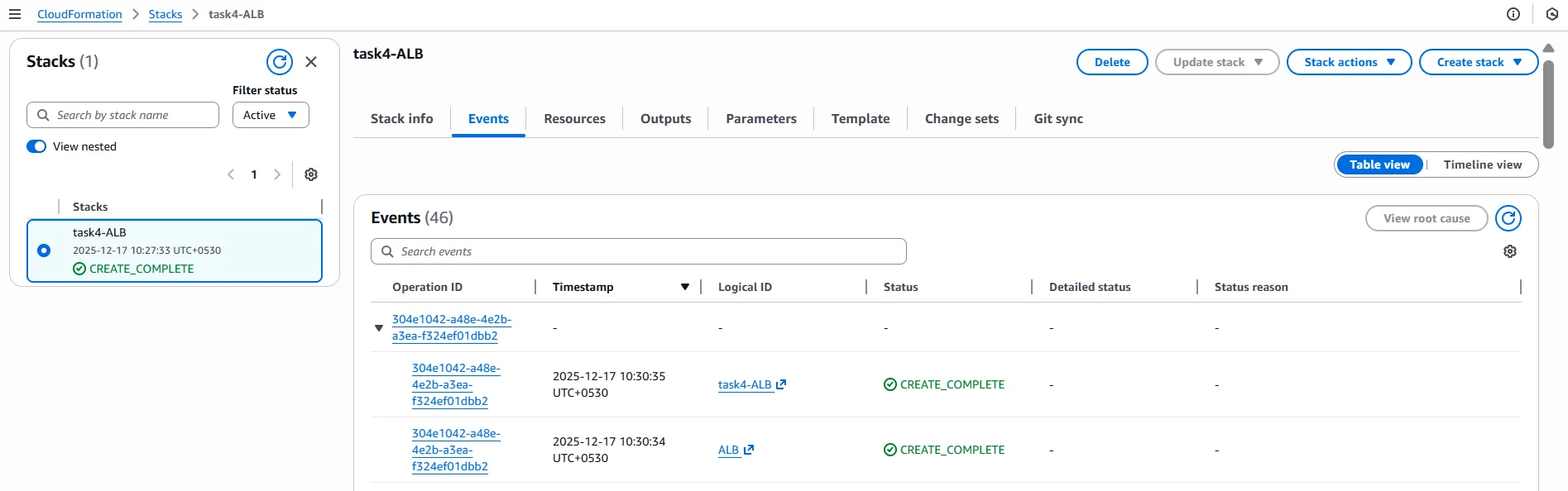
Network and ALB stack successfully created using CloudFormation.
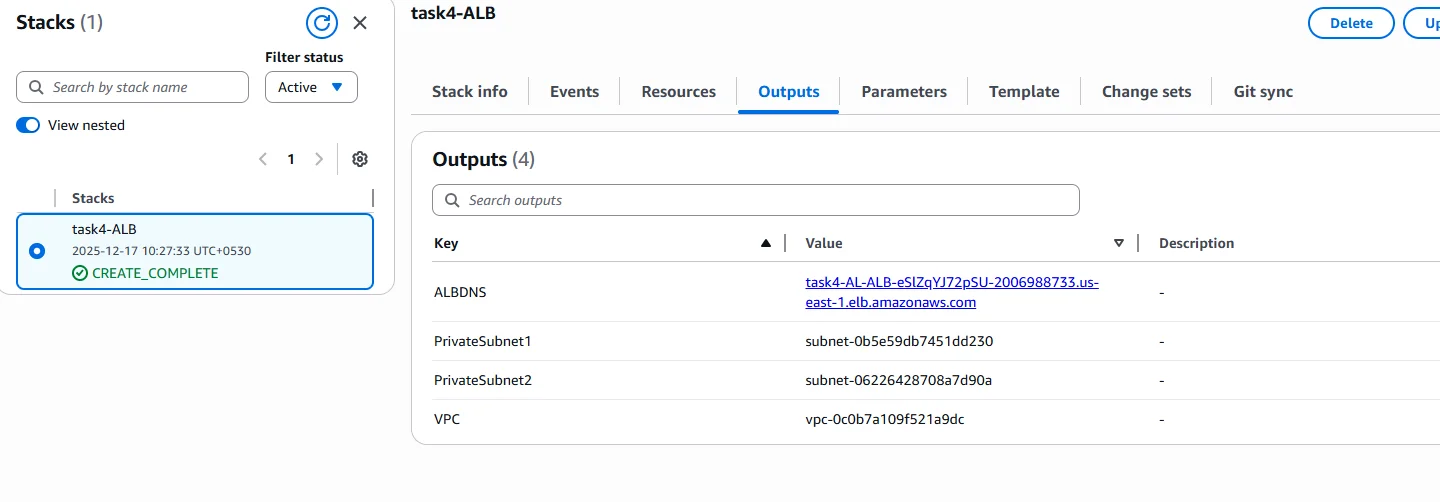
This stack creates: – VPC – Public and private subnets (multi‑AZ) – Internet Gateway – Public ALB – Target Group
This template is fully executable and can be deployed directly from the AWS console.
Description: VPC with Public ALB and Private Subnets for K3s free tierParameters:
VpcCIDR:
Type: String
Default: 10.0.0.0/16Resources:
VPC:
Type: AWS::EC2::VPC
Properties:
CidrBlock: !Ref VpcCIDR
EnableDnsSupport: true
EnableDnsHostnames: trueIGW:
Type: AWS::EC2::InternetGatewayIGWAttach:
Type: AWS::EC2::VPCGatewayAttachment
Properties:
VpcId: !Ref VPC
InternetGatewayId: !Ref IGWPublicSubnet1:
Type: AWS::EC2::Subnet
Properties:
VpcId: !Ref VPC
CidrBlock: 10.0.1.0/24
AvailabilityZone: !Select [0, !GetAZs ”]
MapPublicIpOnLaunch: truePublicSubnet2:
Type: AWS::EC2::Subnet
Properties:
VpcId: !Ref VPC
CidrBlock: 10.0.2.0/24
AvailabilityZone: !Select [1, !GetAZs ”]
MapPublicIpOnLaunch: truePrivateSubnet1:
Type: AWS::EC2::Subnet
Properties:
VpcId: !Ref VPC
CidrBlock: 10.0.11.0/24
AvailabilityZone: !Select [0, !GetAZs ”]
MapPublicIpOnLaunch: falsePrivateSubnet2:
Type: AWS::EC2::Subnet
Properties:
VpcId: !Ref VPC
CidrBlock: 10.0.12.0/24
AvailabilityZone: !Select [1, !GetAZs ”]
MapPublicIpOnLaunch: falseALB:
Type: AWS::ElasticLoadBalancingV2::LoadBalancer
Properties:
Scheme: internet-facing
Subnets:
– !Ref PublicSubnet1
– !Ref PublicSubnet2
5. Stack 2 – Private EC2 Running K3s
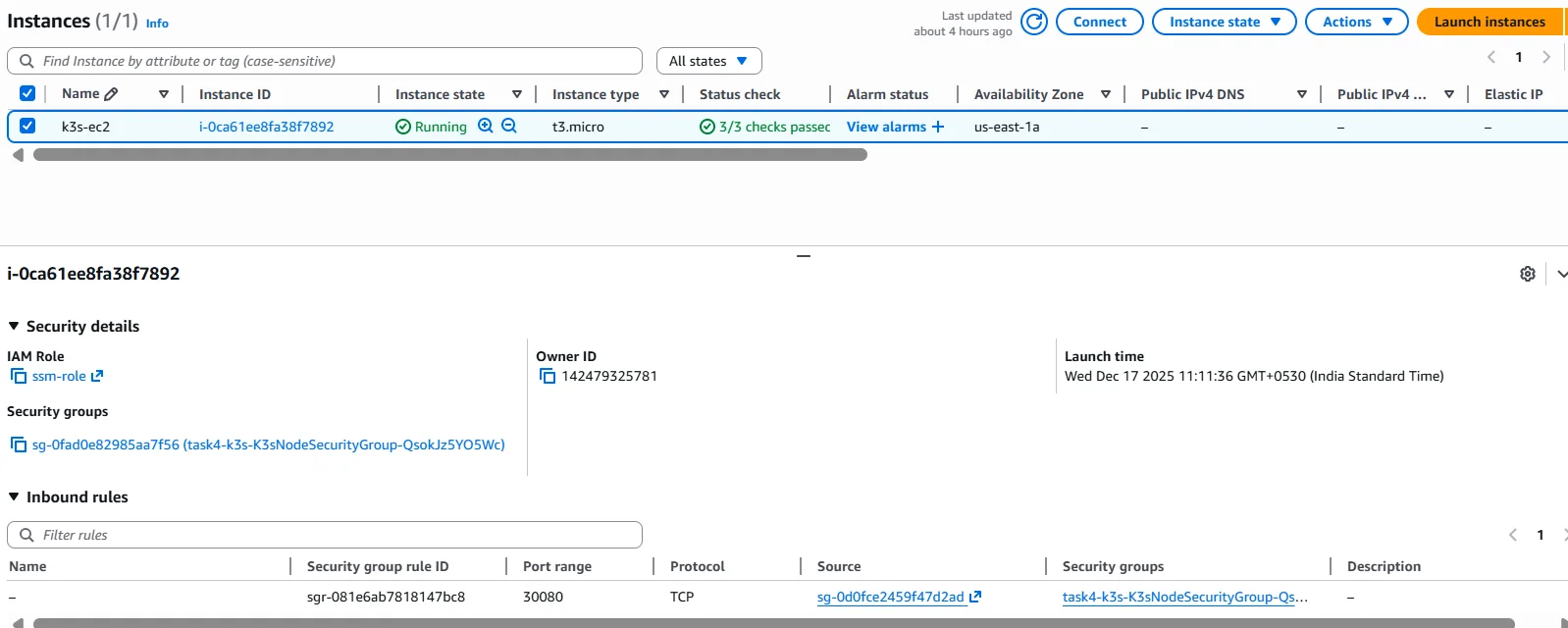
K3s EC2 instance running in a private subnet with no public IPv4 address.
K3s uses lightweight container runtimes such as containerd to run pods efficiently on the EC2 instance. Within the K3s setup, the API server and other control plane components are managed directly on the instance, providing full control over the cluster’s architecture.
6. Secure Access Using Session Manager (No SSH)

VPC Interface Endpoints (SSM, EC2Messages, SSMMessages) > VPC interface endpoints required for the Session Manager connectivity without internet or SSH.
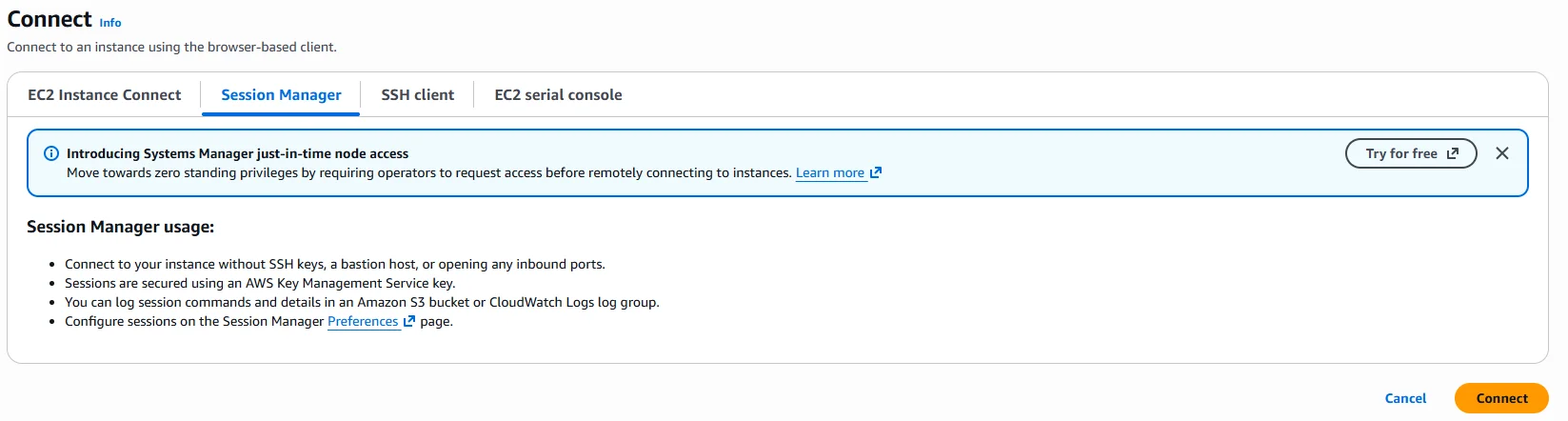

Session Manager Connected Terminal > Secure shell access to private EC2 using AWS Session Manager.
Why not SSH?
- No port 22 exposed
- No key management
- Fully audited access
Required VPC Endpoints
| Endpoint | Purpose |
| ssm | Instance registration |
| ec2messages | Command delivery |
| ssmmessages | Interactive shell |
How the Session Manager Works
- EC2 boots with SSM Agent
- EC2 connects outbound on port 443
- AWS Console initiates session
- An encrypted WebSocket tunnel is created
- The result is a shell and no inbound access is required
7. Single Bootstrap Script (Everything Automated)

kubectl get nodes > K3s node successfully registered and in Ready state.
This script: – Installs K3s – Deploys NGINX – Exposes via NodePort 30080 – Optionally applies ingress
set -ecurl -sfL https://get.k3s.io | INSTALL_K3S_SKIP_SELINUX_RPM=true sh –
sleep 30k3s kubectl apply -f – <<EOF
apiVersion: apps/v1
kind: Deployment
metadata:
name: nginx
spec:
replicas: 2
selector:
matchLabels:
app: nginx
template:
metadata:
labels:
app: nginx
spec:
containers:
– name: nginx
image: nginx
ports:
– containerPort: 80
EOFk3s kubectl apply -f – <<EOF
apiVersion: v1
kind: Service
metadata:
name: nginx-nodeport
spec:
type: NodePort
selector:
app: nginx
ports:
– port: 80
targetPort: 80
nodePort: 30080
EOF
8. Register EC2 to ALB Target Group
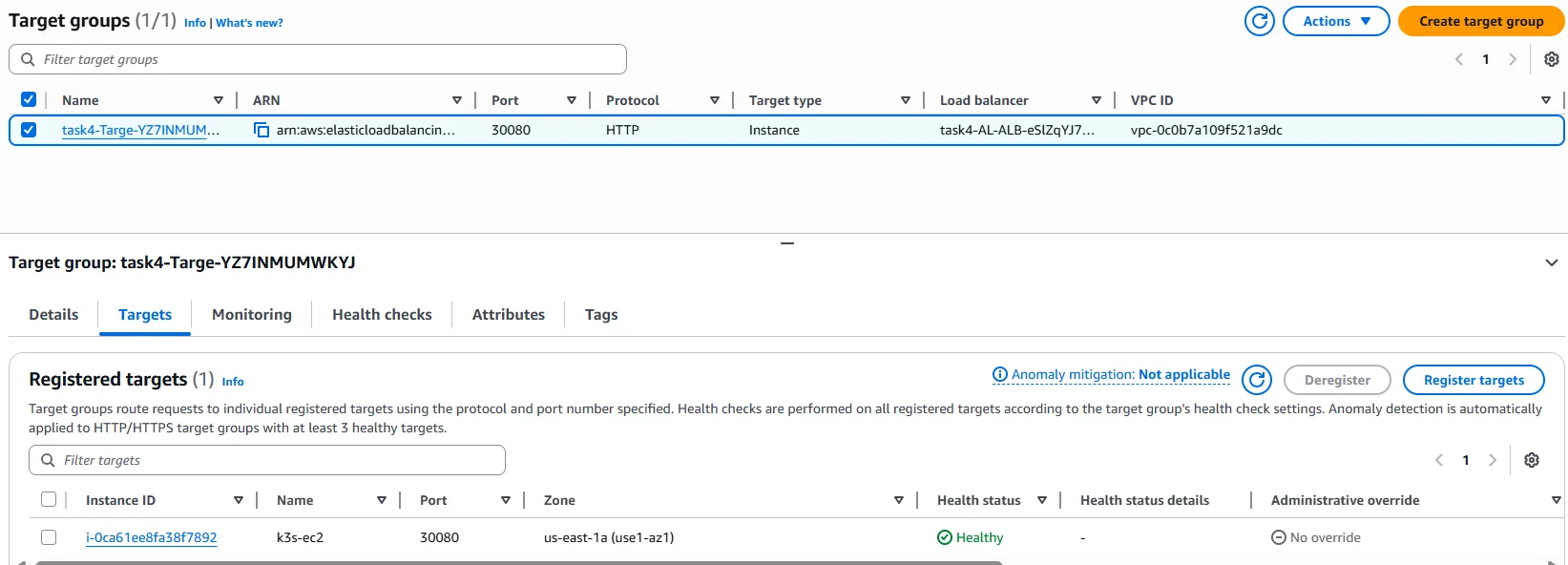
ALB target group showing healthy EC2 instance on NodePort 30080.
- Target type: Instance
- Port: 30080
- Health check path: /
Once healthy, traffic flows:
ALB → EC2:30080 → K3s → NGINX Pod
High Availability and Scalability with K3s on AWS
K3s makes it easy to deploy high-availability and scalable Kubernetes clusters on AWS, even when working within the constraints of the free tier. As a lightweight, CNCF-certified Kubernetes distribution, K3s is designed to minimize operational overhead while delivering robust features for running Kubernetes in production environments. By leveraging AWS services such as EC2 instances, Elastic Block Store (EBS), and Elastic Load Balancer (ELB), you can build a resilient Kubernetes control plane that automatically recovers from failures and supports seamless scaling.
K3s supports multi-node control plane setups, enabling automated upgrades and self-healing capabilities that reduce the administrative burden on development teams. This means you can focus on deploying and managing containerized applications, rather than worrying about the underlying infrastructure management. Integration with AWS load balancers ensures that your Kubernetes services remain highly available and can handle increased traffic as your workloads grow. Whether you’re running Kubernetes clusters for development, testing, or production, K3s on AWS provides a flexible and scalable foundation that adapts to your needs.
EKS Cluster Comparison: K3s vs. EKS
When considering how to run Kubernetes clusters on AWS, two leading options are K3s and Amazon EKS. Both offer a managed Kubernetes service experience, but they differ in their approach to cluster management, cost efficiency, and feature set.
K3s is a lightweight, certified Kubernetes distribution that gives you full control over your cluster configuration and infrastructure. It provides a high-availability control plane, supports automated upgrades, and offers self-healing capabilities—all while keeping resource usage and costs low. This makes K3s an attractive choice for users who want to optimize costs, avoid vendor lock-in, and maintain flexibility in their Kubernetes environment.
Amazon EKS, on the other hand, is a fully managed Kubernetes service that abstracts away much of the operational complexity. EKS provides a scalable and secure control plane, integrated AWS security features, and automated upgrades, making it ideal for organizations that prioritize compliance capabilities and want to minimize ongoing management. EKS is designed for high availability and production workloads, but it comes with additional costs for the managed control plane and may introduce some vendor lock-in.
Ultimately, the choice between K3s and EKS depends on your priorities: K3s offers cost efficiency and complete control, while EKS delivers a hands-off, managed Kubernetes experience with robust security features and seamless integration with other AWS services.
Edge Computing Possibilities with K3s
K3s opens up a world of possibilities for edge computing by enabling lightweight, scalable Kubernetes clusters to be deployed at the edge of your network. Its minimal resource requirements and simple deployment process make it ideal for running Kubernetes in environments where traditional, resource-intensive distributions would be impractical.
With K3s, you can bring the power of Kubernetes to edge computing scenarios such as industrial automation, smart cities, and retail analytics. This allows you to process data in real time, deploy machine learning models closer to the source, and manage IoT applications efficiently. K3s supports a wide range of edge computing use cases, providing high availability and scalability even outside the traditional data center. By leveraging Kubernetes at the edge, organizations can achieve faster response times, improved reliability, and greater flexibility in managing distributed workloads.
9. Final Validation
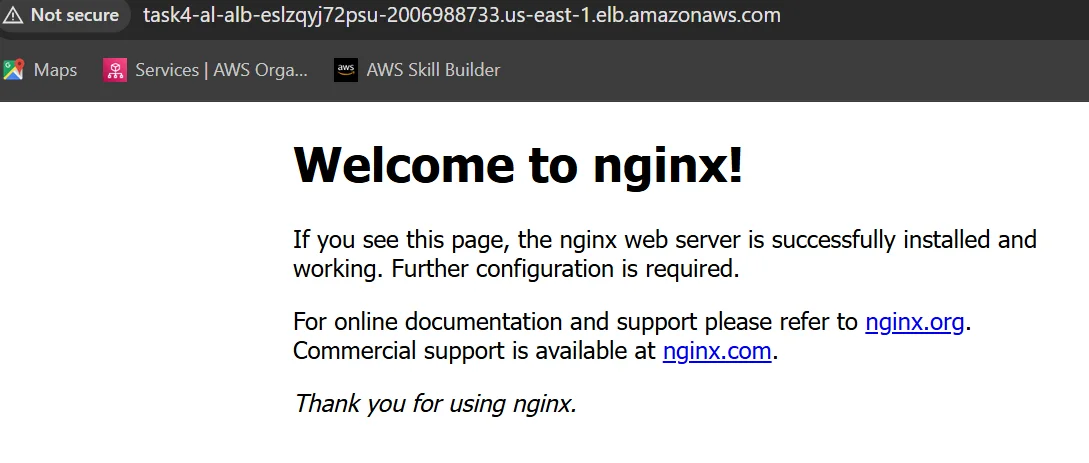
NGINX application successfully accessed through public ALB DNS.
curl http://<ALB-DNS-NAME>
You should see the NGINX welcome page.
10. Conclusion
This setup demonstrates: – EKS-like architecture without EKS cost – Private Kubernetes nodes – Secure, production-grade access – Real-world ALB + Kubernetes integration
Questions and Answers (K3s + ALB + Private EC2)
Q1. Why use K3s instead of EKS?
Answer: Amazon EKS control plane is not free-tier eligible. Amazon Elastic Kubernetes Service (EKS) is AWS’s fully managed Kubernetes offering, providing automated management, scalability, and integration with AWS services. K3s is a lightweight, CNCF-certified Kubernetes distribution that allows us to implement the same architectural patterns: private nodes, public ALB, and ingress at zero control-plane cost. K3s is one of several kubernetes distributions available for AWS. For container orchestration, AWS also provides Amazon Elastic Container Service (ECS) as another managed option. When choosing between managed (EKS) and self managed (K3s) Kubernetes solutions, consider cost optimization, operational complexity, and the level of control required. Selecting the appropriate kubernetes version is also important for compatibility and security.
Q2. Why are the EC2 instances private?
Answer: Private EC2 instances improve security by preventing direct internet access. All inbound traffic is routed through the ALB, and the administrative access is handled using AWS Session Manager instead of the SSH. Cost optimization should also be considered when deciding between managed and self managed Kubernetes infrastructure.
Q3. How does traffic flow from the internet to the Kubernetes pods?
Answer: Traffic flows from the internet to the public ALB, then to the EC2 instances in private subnets via the ALB target group. From there, Kubernetes services route the traffic to the appropriate pods.
Q4. What is a NodePort and why was it used?
Answer: A NodePort exposes a Kubernetes service on a fixed port on each node. It was used here to allow the ALB to forward traffic to the K3s cluster. In production, a NodePort is typically used only to expose an ingress controller.
Q5. What is Ingress and how is it different from a NodePort?
Answer: Ingress provides Layer-7 HTTP routing, path-based routing, and TLS termination. The NodePort works at Layer-4 and exposes individual ports. Ingress is preferred for production workloads.
Q6. Why is ALB used instead of exposing EC2 directly?
Answer: ALB provides a single public entry point, health checks, high availability across AZs, and integration with AWS security features. It prevents direct exposure of EC2 instances.
Q7. How do you access a private EC2 instance without SSH?
Answer: Using AWS Systems Manager Session Manager. The EC2 instance connects outbound to AWS SSM endpoints over HTTPS, allowing secure, audited shell access without opening port 22.
Q8. What VPC endpoints are required for the Session Manager?
Answer: Three interface endpoints are required: –
- com.amazonaws.<region>.ssm – for instance registration
- com.amazonaws.<region>.ec2messages for command delivery
- com.amazonaws.<region>.ssmmessages for interactive sessions
Q9. What happens if the port 22 is removed from the security group?
Answer: SSH access is blocked, but the application continues to work normally. The Session Manager access is unaffected, making this a recommended security practice.
Q10. How is the outbound internet access handled for private EC2?
Answer: The outbound access is handled via a NAT Gateway, allowing the instance to download packages and container images without exposing it to inbound internet traffic.
Q11. Is this architecture production-ready?
Answer: Yes, the architecture mirrors production EKS designs. With enhancements like TLS, autoscaling, and ingress-only exposure, it can be safely used in real environments. This setup allows you to build your own cluster and manage kubernetes infrastructure directly, giving you full control over your self managed environment. Be sure to select the appropriate kubernetes version to ensure compatibility and security.
Q12. What are the main security benefits of this design?
Answer: – No public IPs on EC2 – No SSH access – ALB-only inbound traffic – IAM-based access control – Full audit logging via CloudTrail
Public Documentation References
- AWS Documentation – Application Load Balancer https://docs.aws.amazon.com/elasticloadbalancing/latest/application/introduction.html
- AWS Documentation – Systems Manager Session Manager https://docs.aws.amazon.com/systems-manager/latest/userguide/session-manager.html
- AWS Documentation – VPC Interface Endpoints https://docs.aws.amazon.com/vpc/latest/privatelink/what-is-privatelink.html
- K3s Official Documentation https://docs.k3s.io/
- Kubernetes Official Documentation – Services & Ingress https://kubernetes.io/docs/concepts/services-networking/