

Developers working on Angular projects get fed up with having to shoehorn everything into RxJS
For a very long time, RxJS has been the go-to library for most issues related to reactiveness in Angular applications.
Loading spinner needed? Observables.
A value needs to be derived from two other values? Observables again.
User Interface (UI) needs to be updated on state changes? You guessed it right, Observables.
This solved many issues, but it also created many more since developers started solving simple problems involving local state management with complex streams. This is something that happens in most applications.
With Angular Signals now integrated into the framework, the decision is no longer about choosing between Signals and RxJS. It is about selecting the right tool for the specific use case.
In many real-world Angular applications, a hybrid approach is used to accomplish different tasks.
1. Signals work better with local state
A Signal is a reactive value that Angular can track directly. When the value changes, Angular automatically updates the relevant parts of the UI.Older Angular patterns often relied on change detection mechanisms. Signals move things closer to precise UI updates, making the component state easier to maintain.
Real example: Shopping cart total
If a component needs to monitor things such as:
- cart items
- tax percentage
- total price
Signals are the best choice.
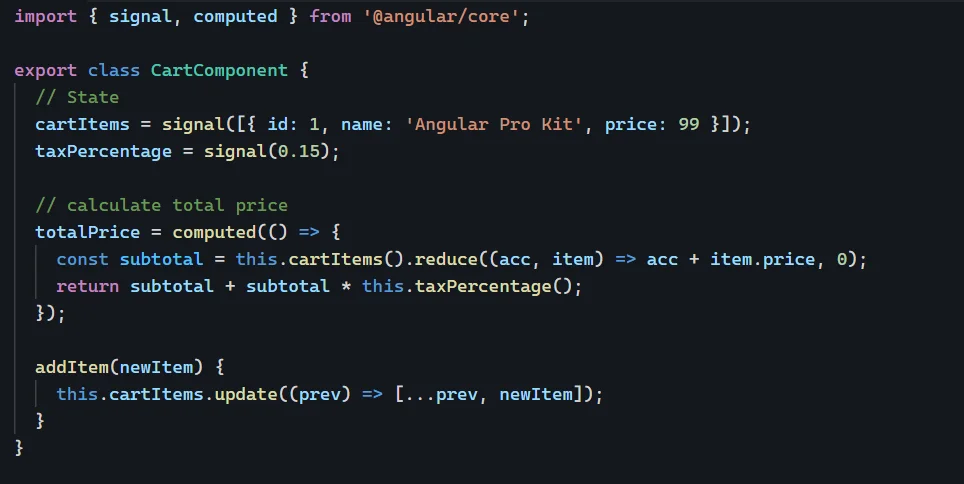
For example, cart item details can be stored in a the Signal, and values like the total can be derived using the computed() function. Since this is synchronous data already in memory, Signals help avoid unnecessary Observable chains for simple state logic.Signals work well for component state, derived values, UI flags, and internal component interactions.
2. RxJS still wins for asynchronous behavior in reactive programming
Signals are powerful, but they do not replace everything.
They are best at representing the current value but not designed to handle complex asynchronous timing and event coordination. This is why we are still using RxJS to handle such challenges.
RxJS is useful when we work closely with things like:
- debouncing user input
- cancelling in-flight requests
- retrying failed calls
- combining multiple asynchronous data sources
- reacting to WebSockets or other event streams
Real example: Live search
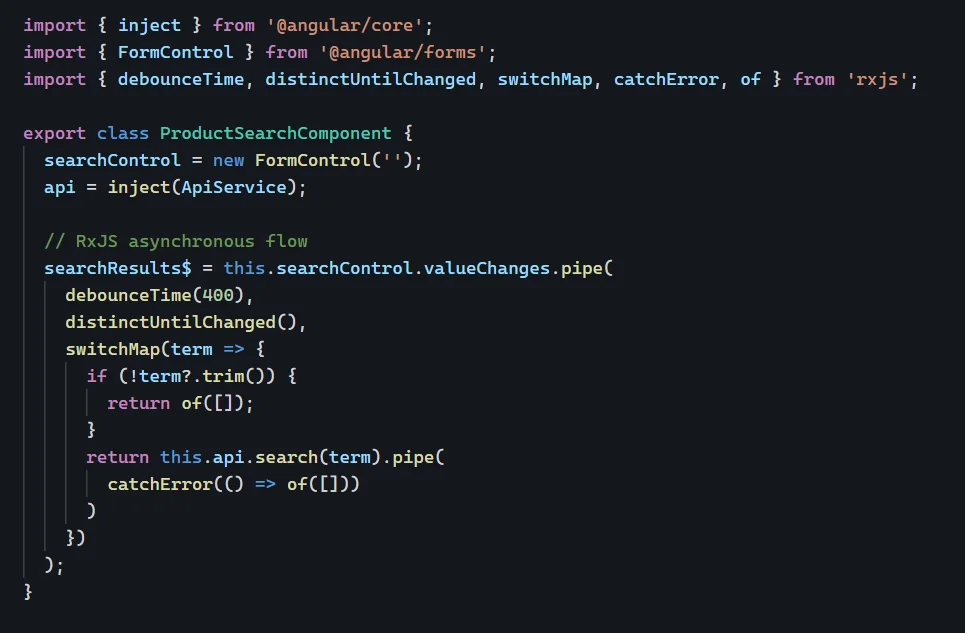
A search box is one of the clearest cases for RxJS.
When a user types, we usually want to:
- wait until firing a request
- avoid duplicate values
- cancel the ongoing request if a new value is detected
- keep UI up to date with the latest results
RxJS is built to tackle similar problems
3. The Comparison: Choosing Your Weapon
| Feature | Angular Signals | RxJS |
| Mental model | Current value | Values over time |
| Best for | Local UI state, derived values, component state | HTTP flows, user input streams, WebSockets, asynchronous coordination |
| Complexity | Lower | Higher |
| Template usage | total() | total$ | asynchronous |
| Consistency | Glitch-free | Stream-based |
In simple words:
- Use Signals when working with state
- Use RxJS for asynchronous operations
This doesn’t cover every scenario, but it’s a strong general guideline.
4. The “Golden Rule” of Architecture
In real-world applications, using a single tool for everything usually causes majority of the problems.
Let’s assume some scenarios:
- RxJS is used in services to manage HTTP requests, stream composition, and other asynchronous operations
- The results can then be converted into Signals in the component layer, allowing the UI to work with a simpler reactive model, often replacing a BehaviorSubject-based UI state pattern in Angular applications, and keeping the component logic cleaner
Let’s Meet “toSignal()” – the bridge between RxJS and Signals
This is one approach for creating a cleaner bridge from stream-based service data to signal-based component state.
It allows you to convert an asynchronous stream value into a simple value, so UI can utilize it without the Asynchronous Pipe headache.
It helps components manage it well, in case of several dependencies due to reactive values.
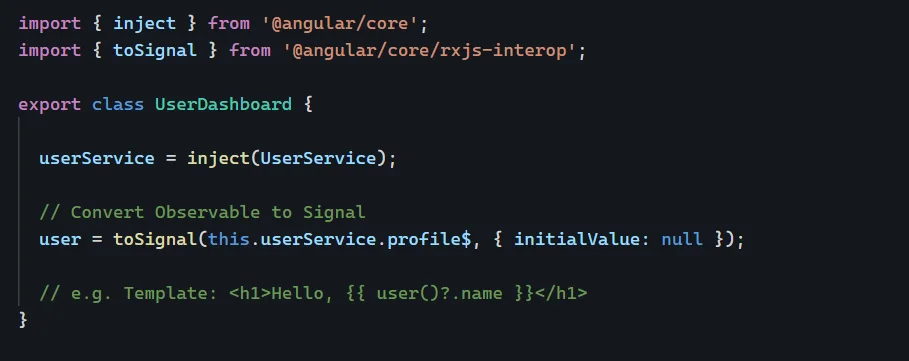
Let’s break down the process to understand more:
Service handles the stream values → component utilizes the Signal → template reads the value
This separation feels natural when the application grows faster.
5. Data Flow
Another aspect that separates Signals from RxJS and does not get enough attention is the clarity of data flow.
- Signals (Linear Data Flow): This type of data flow is quite simple and “pull-based.” When a signal is read, Angular registers the current reactive context as a consumer through an observer pattern-like mechanism. It is easy to trace the origin and derivation of a value using getters. This makes state management easier and more intuitive for developers to work with. Angular tracks signal dependencies during reactive contexts, which helps determine what should update.
- RxJS (Stream-based Flow): Data flow passes through a sequence of “push-based” operators. It works perfectly for dealing with events; at times it might become difficult to trace data flow, especially when nested streams are involved.
Simply put:
- Signals – linear and easy to understand data flow.
- RxJS – multidimensional and powerful, but hard to understand data flow.
Dependencies can be dynamic in Angular applications, so the framework can decide based on what was actually read during the latest computation.
That is why Signals are often preferred for managing local UI state, while RxJS is better suited for orchestrating complex asynchronous workflows.
6. How to avoid getting in trouble
One risk the developers run into is using the computed() function for a task that it was never meant to do.
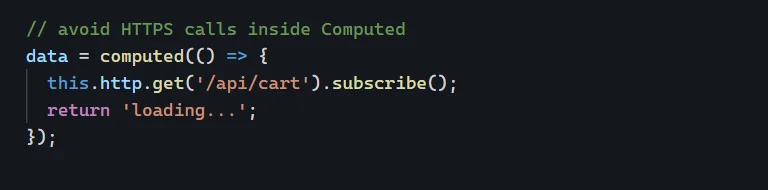
A Computed Signal always needs to be kept pure. This means that the computed() function must calculate a value from one or several Signals and only return these values.
It should not:
- Perform an application programming interface (API) call
- Write to localStorage
- Use any third-party libraries
- Perform expensive calculations that are not reactive in nature
If we add side effects in computed() functions, the code becomes unpredictable and challenging to troubleshoot.
Use effect() for synchronization
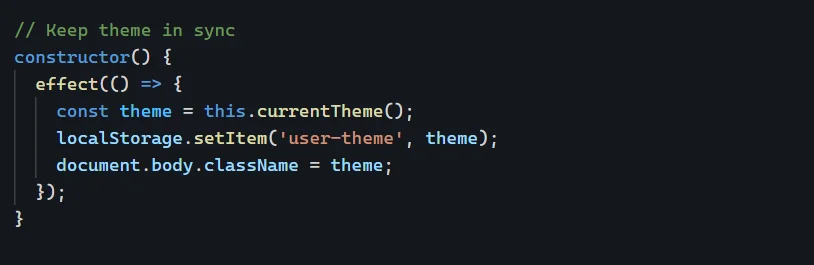
For cases when changes need to be detected outside the Angular and synchronized, the effect() function can be used.
Some good examples are provided below:
- save theme object to the localStorage
- update a chart
- sync a state with analytics or logging
There are a few reactive models that keep state management clean and structured:
- signal() for state
- computed() for derived values
- effect() for side effects
7. Why Signals are relevant to Performance and change detection
Besides being just syntactically cleaner, Signals provide an improved model for rendering.
Knowing precisely how various pieces of the UI rely on particular Signals, Angular can send granular notifications that alert only the relevant consumers when a signal’s value changes, do less unnecessary checking, and render only the updated bits.
This becomes extremely useful in large-scale applications that have:
- complex tree structures of components
- frequent UI updates
- a multitude of states involved
- UI performance constraints
Use trackBy in ngFor so repeated element rendering does not become slow.
Here, Signals become a perfect choice for Angular, as it is moving toward a zoneless approach.
Signals help applications function without Zone.js, which can enhance performance, and they provide the means to trigger change detection more deliberately, reduce the time change detection runs, and avoid common performance issues.
The key point is not that Signals automatically make every application faster. Rather, they enable Angular to update the UI in a more precise and targeted way.
Signals help Angular become efficient in updating the UI, and those gains should be evaluated in production builds, not just during development.
8. Use of Signals
Signals are preferred when the state is:
- local to a component or feature
- synchronous
- easy to compute based on other variables
- strongly related to the process of rendering
In practice, Signals are natively typed, which improves IDE support and reduces errors in local UI state.
Examples of such situations:
- toggle a modal dialog
- keep track of the selected tab
- calculate some totals
- sort/filter an in-memory list
- publish simple shared UI state
They also work well for managing user idle state and limiting data access to what the UI actually needs.
When the problem involves figuring out what to render, then Signals may be used.
9. When to use RxJS for data streams
RxJS is a better tool to use when your code deals with:
- time
- cancellation
- concurrency
- multiple asynchronous sources
- event streams
Common use cases:
- HTTP request flows
- live search
- polling
- WebSocket
- drag, scroll, or resize streams
- combine and prepare new dataset from multiple APIs
In cases where the issue relates to the way events evolve in time, RxJS works well.
10. The thumb rule
There is an option that should be the default approach for most team setups in Angular projects, while still allowing exceptions based on the use case. It goes like that:
Apply “RxJS” for asynchronous programming and Signals for UI-related matters.
This approach gives you the strengths of both, without forcing either one into use cases where it doesn’t naturally fit.
It also makes code more balanced and helps achieve clearer communication between service logic and application components through:
- less Observable ceremony in components
- better separation of concerns
- clear and readable templates
- simpler local state management
11. What’s the takeaway?
Good Angular developers know that adopting Angular Signals is essentially about choosing the right reactive programming model, not attempting to replace RxJS entirely.
Rather, they are using both depending on the scenario:
- RxJS should be used for asynchronous coordination and events management
- Signals help with local state management and reactive updates
- Using both allows making the application development process more concise, manageable, and performance oriented
This is the key difference between modern and traditional Angular architectures, and the idea points to the future of Angular through modern reactive programming practices: choose the right reactive model based on the level of reactivity required in each case.
Know More@ https://www.einfochips.com/services/digital-engineering/mobility-solutions-and-services/
Frequently Asked Questions- Angular Signals vs RxJS
- Does Angular Signals replace RxJS completely?
No, it does not replace it completely. Signals are the best option for managing the synchronous local UI and derived values. RxJS remain for asynchronous operations. - When could I use Signals instead of RxJS?
We could use Signals for synchronous operations such as sorting, filtering, and component-level state management that directly affect rendering. - Are Signals better for performance?
It can improve performance by enabling change detections, updating only affected UI instead of re-checking the component trees. - Is RxJS still relevant after Signals?
Yes, of course. It is used to manage event-driven and asynchronous programming. Signals are add-ons rather than replacements for RxJS.