
Support teams are the unsung heroes of any organization. They serve as a vital bridge between customers, stakeholders, and operational teams. In today’s fast-paced business environment, support is not just the final step in a process – it is an ongoing commitment to quality, reliability, and continuous improvement. They are the first line of trust, ensuring that clients and users feel heard, valued, and cared for. Their insights often uncover gaps, highlight opportunities for improvement, and guide organizations toward smarter decisions.
In many ways, support is where plans meet reality. While strategies are designed for efficiency and growth, support teams handle the unexpected – the edge cases, the unique customer needs, and the human side of service delivery. This makes their role not just operational, but deeply strategic. They are not just “problem-solvers” but partners in resilience and innovation.
Why Support Teams Matter
Support teams keep systems running, users satisfied, and businesses moving forward. They provide real-world feedback that transforms good software into great software, ensuring that development efforts align with actual user needs rather than assumptions.
Support teams often collaborate with business partners to ensure seamless service delivery and to complement the company’s offerings.
Support teams are especially critical in information technology environments, where troubleshooting and maintaining IT systems is essential for smooth business operations.
Introduction to Support Teams
Support teams are the backbone of any organization’s customer service strategy, playing a crucial role in maintaining high levels of customer satisfaction and ensuring the smooth resolution of technical issues. A well-organized support team is made up of dedicated support personnel who bring a wealth of technical expertise to the table, enabling them to tackle complex issues that customers may encounter. These teams are responsible for managing every aspect of customer interactions, from the initial inquiry to the final resolution, ensuring that each customer receives personalized support tailored to their needs.
To achieve this, support teams rely on advanced customer service software and customer support software, which streamline the management of support tickets and enhance overall service management. By leveraging the best customer service software, support teams can efficiently track, prioritize, and resolve support requests, ensuring that no issue goes unnoticed. This not only improves support processes and support operations but also leads to higher customer satisfaction by delivering timely and effective solutions. Ultimately, the primary mission of a support team is to provide exceptional customer support, turning every interaction into an opportunity to build trust and loyalty.
7 Key Roles of Support Teams in Modern Development
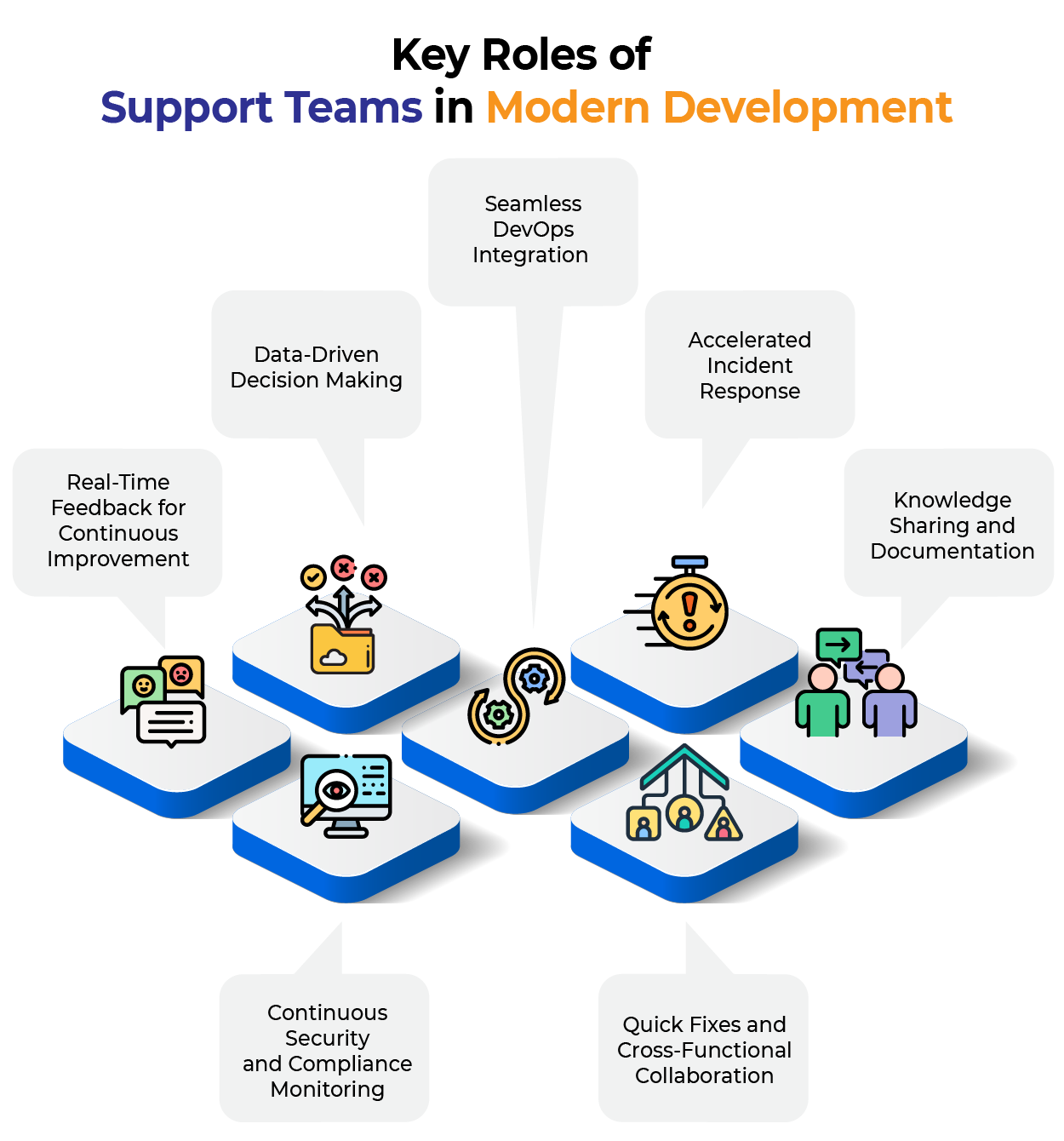
1. Real-Time Feedback for Continuous Improvement
Support engineers capture customer issues, bugs, and suggestions as they occur, creating a direct feedback loop for the development team.
Example: When a customer reports difficulty downloading invoices, the support team logs errors in tools like Zendesk, creates a Jira ticket for developers, and provides regular status updates to both customers and product owners throughout the resolution process.
2. Data-Driven Decision Making
Support teams provide crucial analytics about ticket frequency, common feature requests, and recurring issues. By leveraging real time data, support teams deliver up-to-date analytics that allow for immediate insights into ticket trends and recurring problems. This data helps Scrum masters and product owners prioritize backlogs based on actual user pain points.
Example: If 30% of tickets relate to data mismatches, it signals the need for UI performance improvements or query optimization. When multiple users experience downtime, support teams can monitor hardware and server resources to help development teams identify and resolve issues quickly. If Support requests increased by 40% post-release, Support team will raise a flag that will help project manager to put focus on the deployed ticket and prioritize it.
3. Seamless DevOps Integration
Modern support tools like ServiceNow and Zendesk integrate directly with DevOps platforms like Jira, enabling seamless conversion of customer tickets into actionable tasks for faster bug resolution and complete traceability.
Example: When a customer reports an issue, the support team logs a customer ticket in Zendesk → the customer ticket automatically creates a Jira bug → gets assigned to a developer → fix is pushed via Git → deployed through change management across Development, SIT, QA, UAT, and Production environments → support closes the customer ticket.
4. Accelerated Incident Response
Support teams often detect production issues first through logs, monitoring, or user complaints. They use monitoring tools like Grafana and work with Application Programming Interface (APIs) via Swagger to compare and update critical data. Analytics tools like Power BI and Tableau help analyze traffic patterns related to marketing efforts, offers, and events.
Their role in incident triage, escalation, and resolution is critical for system recovery, requiring close collaboration between support, development, QA, and DevOps teams. Rapid problem resolution is essential to restore systems quickly and minimize downtime.
5. Knowledge Sharing and Documentation
Support teams build comprehensive FAQs, troubleshooting guides, and knowledge base articles that reduce future support load while enabling user self-service. This documentation helps developers understand recurring issues quickly and shortens onboarding time for new team members.
Example: Creating “Top 10 Errors and Fixes” documents based on support history provides valuable reference material for the entire organization.
6. Continuous Security and Compliance Monitoring
Support teams often identify security-related issues including data breaches, privacy concerns, and insecure APIs. To maintain security best practices, support teams enforce limited access for non-support team members, ensuring that only authorized personnel can view sensitive systems and data. This early detection helps DevOps teams respond rapidly with security patches, ensuring continuous compliance.
Example: When support engineers notice unusual requests from unknown IP addresses, they can quickly identify potential security threats like unauthorized access attempts or malicious scripts.
7. Quick Fixes and Cross-Functional Collaboration
Support teams handle immediate fixes, configurations, user creation, data validation, monitoring processes, and access management. Collaboration tools help support teams coordinate with other departments and share critical information efficiently, ensuring smooth communication and faster problem resolution. They maintain critical records and remind teams about important updates including third-party security patches, certificate renewals, version changes, and stakeholder contact information.
Example: Support teams maintain backup plans for critical scenarios – having payment gateway contact details ready, preparing handover documentation for new vendors, and setting reminders for annual certificate updates.
Key Features of Customer Support
Modern customer support software is designed to equip support teams with a robust set of tools for managing customer inquiries, support tickets, and technical issues across various channels. One of the core features is ticket management, which allows support agents to organize, prioritize, and track the progress of each support request from start to finish. Omnichannel support is another essential feature, enabling customers to reach out through their preferred communication channels, be it email, chat, phone, or social media—while ensuring a seamless and consistent experience.
A comprehensive knowledge base and self-service options empower customers to find answers to common questions on their own, reducing the volume of routine support tickets and freeing up support agents to focus on more complex issues. Personalized assistance is made possible through CRM integration, which gives support teams instant access to relevant customer data, allowing them to tailor their responses and resolve issues more effectively. Advanced analytics and reporting tools help identify trends and measure the effectiveness of support operations, ensuring continuous improvement. By carefully evaluating these key features, organizations can select the best customer support software to enhance their customer experience, streamline support processes, and resolve issues efficiently.
Strategic Impact
Support teams serve as the communication bridge between product owners, customers, and engineering teams. To maximize their strategic impact, organizations should carefully evaluate their support models and resource allocation, ensuring they align with business needs and goals. This collaboration is essential for successful products because:
- Faster Iterations: Quick issue reporting enables faster delivery cycles.
- User-Centric Development: Quality input about evolving user needs helps agile and DevOps teams respond to changes effectively.
- System Stability: Continuous monitoring of live systems with early issue flagging.
- Reduced Feedback Loops: Quick validation of features and fixes.
Addressing Modern Challenges
During the maintenance phase, regression testing requires significant time and effort. With limited development and testing resources, automation testing becomes crucial. When different modules are developed by various contractors, comprehensive training documents ensure smooth handovers.
Support teams help manage these challenges by providing technical support, immediate assistance, and guidance for upgrades and updates. Organizations may also use outsourced support for specialized components or services that require external expertise, such as printer support or vendor software assistance. They serve as the voice of end users, feeling their pain and articulating it through tickets, communication, tracking, and issue prioritization.
Trends in Customer Support
The field of customer support is rapidly evolving, with new trends shaping the way organizations interact with and assist their customers. One of the most significant developments is the integration of artificial intelligence (AI) and machine learning (ML)v into support operations. These technologies enable support teams to automate responses to routine inquiries, identify patterns in support data, and resolve issues more quickly, allowing human agents to focus on complex problems that require a deeper understanding.
Another major trend is the rise of omnichannel support, which allows customers to connect with support teams through multiple channels—such as chat, email, phone, and social media—ensuring a consistent and convenient experience. Personalized support is also gaining traction, as support teams leverage customer data and analytics to offer tailored solutions that boost customer satisfaction and foster long-term loyalty. As organizations strive to improve their support operations and reduce costs, staying ahead of these trends is essential for delivering exceptional customer support and driving business growth. By embracing new tools and technologies, support teams can enhance the overall customer experience, resolve issues more efficiently, and position themselves as key contributors to organizational success.
Bottom-Line Benefits
Effective support teams deliver measurable value:
- Minimize Downtime: Proactive monitoring and quick response.
- Boost Security: Traffic tracking and threat identification.
- Stay Updated: Continuous system maintenance and upgrades.
- Preventing Major Breakdowns: Early identification of critical issues.
- Enhance Performance: Data analytics and optimization insights.
- Improve Efficiency: Streamlining support operations and reducing resolution times through automation, AI capabilities, and real-time tools.
- Improve User Experience: Removing broken links, SEO optimization.
- Support Growth: Enabling innovation and competitive advantage.
- Cost Reduction: Preventing expensive system failures.
Hidden Costs of Neglecting Support
Neglecting or under-staffing the support team can severely impact both internal operations and customer experience. The consequences can be severe:
- Increased Workload
Support issues often divert engineering activities away from core development, slowing innovation, and reducing focus on strategic initiatives. In such cases, iteration ratios may rise due to rework and unplanned tasks. - Reduced Productivity and Delayed Release
Lack of self-serve documentation, lack of issue tracking, constant interruptions, and repetitive meetings adversely impact productivity. Without automation, support teams are forced to spend excessive time on routine tasks, further reducing productivity and delaying releases. - Communication Breakdown Risks
Misinterpretation and incomplete feedback lead to incomplete deliverables, especially when solutions are delivered by multiple teams. - Poor Issue Tracking and Resolution
Developers might not document fixes, leading to knowledge loss, recurring issues, and reduced maintainability. - Customer Dissatisfaction
Billing problems or outages lead to unhappy customers. They may put negative reviews on social media, leading to reputation loss. It may result in the loss of existing customers, sales, and revenue. - Issue Escalation
Minor problems can quickly spiral into bigger issues, leading to longer downtimes, operational inefficiencies, and potential legal or compliance issues.
Peak Your Performance using the Dashboard
Support teams can deliver better service through the use of multiple dashboards. We can configure alerts or notifications for critical events. When such incidents occur, the support team will use these dashboards to investigate the issue, identify the root cause, and take appropriate corrective actions in coordination with the necessary resources.
Dashboards are to monitor actual data and take business decisions to optimize performance, save money, and to monitor performance.
Incident and Ticket Management Dashboard
Purpose: Track open tickets, priority issues, and Service Level Agreement (SLA) compliance.
Key Metrics:
- Total open tickets
- Tickets by priority/severity
- Average resolution time
- SLA breaches (count & % trend)
- Top recurring issue categories
- Ticket aging (0–4 hrs, 4–8 hrs, 8+ hrs)
Tools:
- Jira Service Management dashboard
- ServiceNow performance analytics
- Power BI with Zendesk/Freshdesk API

Total Resolved unresolved issue tickets
System Health, Availability Dashboard
Purpose: Show status of infrastructure and services.
Key Metrics:
- Server uptime and response time.
- CPU, memory, disk usage (trend lines).
- Service availability (API status, DB connections).
- Alert count in the last 24 hours.
- Ongoing maintenance windows.
Tools:
- Grafana (Prometheus, Azure Monitor, CloudWatch data)
- Datadog for real-time infra monitoring

Monitoring Traffic on Website

Monitoring Storage Account
User Access, Security Dashboard (Relevant to Identity Security)
Purpose: Monitor authentication of health of the system and suspicious activity.
Key Metrics:
- Failed login attempts (trend + location).
- MFA (Multi Factor Authentication) challenge success/fail rates.
- Risky sign-ins detected.
- Privileged role activations (via PIM – Privileged Identity Management).
- Account lockouts in the last 24 hours.
Tools:
- Microsoft Entra ID (Azure AD) Sign-in Logs
- Azure Monitor Workbook for Identity Protection
- Splunk or Sentinel dashboards

Failed Login Attempt Report 1
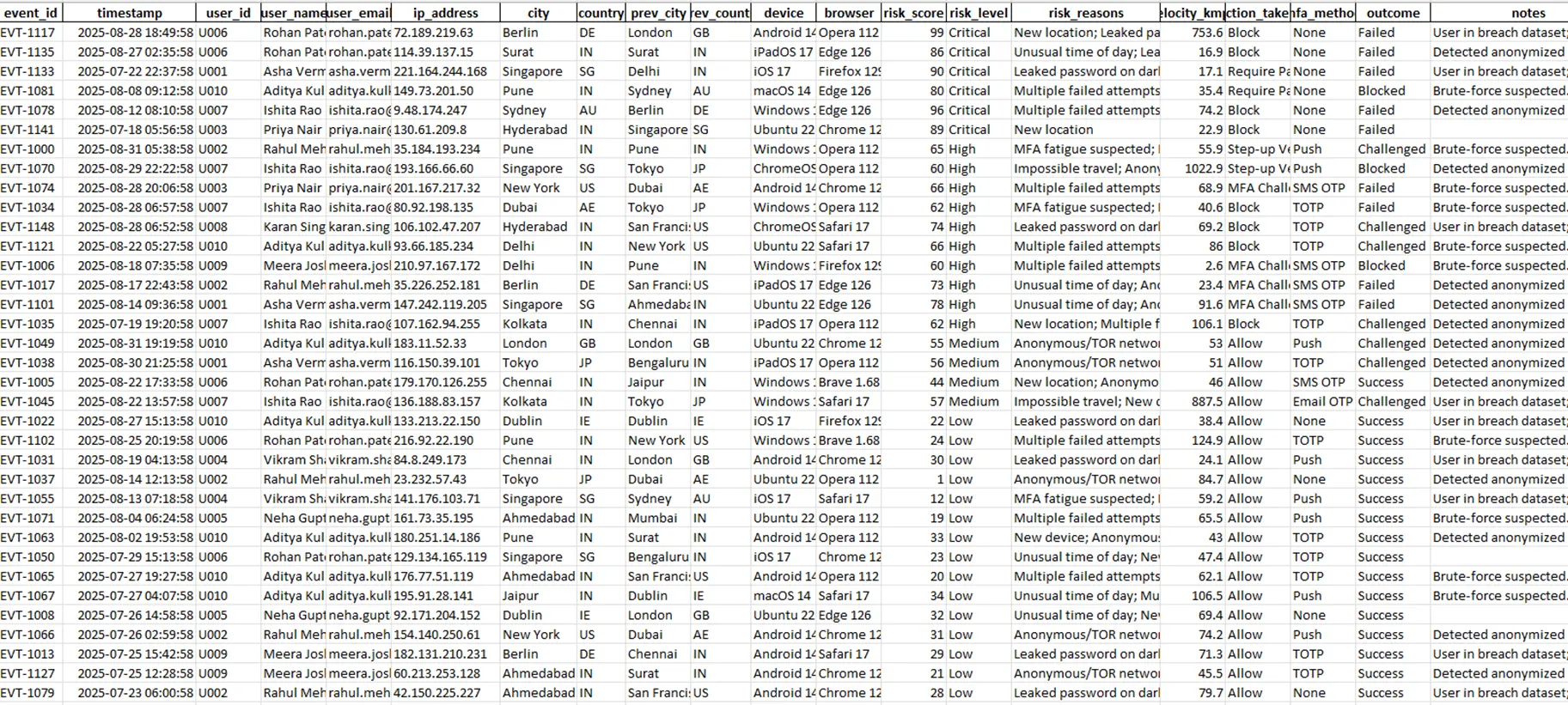
Sample Report – Risky Sign 1
Customer Satisfaction Dashboard
Purpose: Measure service quality and user happiness.
Key Metrics:
- Customer Satisfaction Score (CSAT) trends.
- Number of negative feedback cases.
- Average handling time per agent.
- First-contact resolution rate.
Tools:
- Power BI pulling survey results from Freshdesk/Zendesk
- Excel dashboard with automated refresh

Support Team Performance Dashboard
Purpose: Track workload balance and agent productivity.
Key Metrics:
- Tickets handled per agent per day.
- Average resolution time per agent.
- Escalations per agent.
- Overtime hours logged.
Tools:
- ServiceNow analytics
- Jira Service Management reports
- Power BI with agent performance dataset
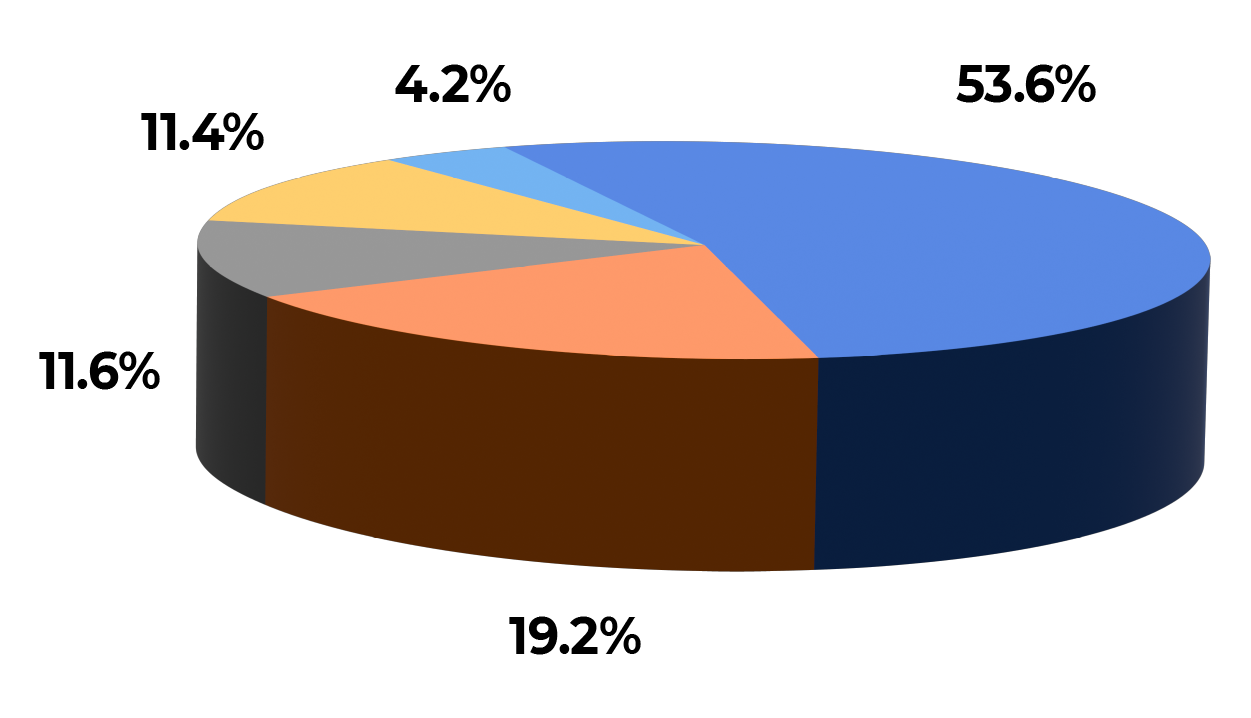
Escalation Per Agent
Conclusion
In today’s competitive software landscape, support teams are not just problem-solvers – they are strategic partners in delivering and evolving software. They are essential for providing reliable IT services and resolving technical problems that require varying levels of technical knowledge, from basic troubleshooting to complex issue resolution.
By bridging users, product owners, and engineers, support teams help organizations move faster, stay focused, and deliver exactly what users need. They also leverage other tools and automation to handle repetitive tasks, freeing up time to address more complex customer needs.
The support team truly is the backbone of long-term software success, transforming user feedback into actionable improvements that drive continuous innovation and growth