1. Why CUDA Matters in Automotive Computing
Modern autonomous driving and ADAS platforms demand massive real-time processing power to interpret data from multiple sensors: cameras, radars, LiDAR, IMU, GNSS — operating simultaneously. These sensors generate a large volume of data as information per second, which must be processed timely to enable perception, localization, planning, and control. Modern autonomous vehicles rely on advanced computers equipped with specialized hardware to handle these tasks. Conventional CPUs, even with multiple cores, are not designed to handle highly parallel data-intensive workloads efficiently. This is where NVIDIA’s Compute Unified Device Architecture (CUDA) becomes important.
CUDA is a programming tool that helps developers exploit parallelism via GPU cores. It is specific to Nvidia platforms like NVIDIA Drive Orin for parallel computing. Drive Orin is a powerful automotive system that combines fast CPU clusters, an Ampere-based GPU, and special Deep Learning Accelerators (DLAs) into one platform. Using CUDA, developers can easily spread tasks—like image processing, running neural networks, and sensor fusion—across these different processing units. CUDA programming leverages the GPU’s numerous smaller cores to accelerate artificial intelligence workloads, including deep learning and perception tasks. This mixed approach ensures that Drive Orin provides real-time, reliable AI performance needed for safety-critical automotive applications, while meeting both efficiency and safety standards. The GPU, originally designed for graphics rendering such as 3D graphics, visualization, and real-time rendering, now powers both graphics and compute-intensive applications in automotive systems.
| Features | NVIDIA Drive Orin |
| Platform | CPU: 12 A78 (Hercules) ARM64 GPU: 2048 CUDA Cores, 32 Streaming Multiprocessors, each SM contains 64 cores Hardware Accelerators: Deep Learning Accelerators (DLA), Programmable Vision Accelerator (PVA), Optical Flow Accelerator (OFA) Performance: Capable of delivering 254 INT8 TOPS Safety: ISO 26262 (FUSA) complaint Interfaces: 16 GMSL Cameras, Ethernet (2-10Gb, 10-1Gb, 6-100Mb), 6 CAN, 1 LIN |
Introduction to Autonomous Vehicles
Autonomous vehicles, often referred to as self-driving cars, are transforming the landscape of modern transportation by integrating advanced driver assistance systems (ADAS) and fully autonomous driving features. These vehicles depend on a sophisticated combination of sensors, high-performance computing hardware, and intelligent software to interpret their surroundings and make real-time driving decisions. Technologies such as machine learning and deep learning are at the core of this revolution, enabling vehicles to process vast amounts of sensor data and adapt to complex road scenarios. The NVIDIA Drive AGX platform stands out as a critical enabler in this space, delivering the high performance computing power required for autonomous driving. By leveraging the capabilities of NVIDIA Drive, developers can build robust systems that support everything from basic ADAS functions to the most advanced, fully autonomous driving applications, ensuring both safety and efficiency on the road.
NVIDIA Drive AGX Overview
NVIDIA Drive AGX is a purpose-built, high-performance computing platform designed to accelerate the development and deployment of autonomous vehicles. Its scalable architecture supports a wide range of autonomous driving applications, from active safety features to automated parking and hands-off driving. At the heart of the platform is the Drive AGX Thor system-on-chip (SoC), which delivers over 1,000 INT8 TOPS of AI performance, making it ideal for processing the massive data streams generated by modern vehicles. The Drive AGX platform seamlessly integrates hardware and software, including advanced AI capabilities, to enable real-time perception, planning, and control. With support for a variety of sensors and a flexible, scalable design, NVIDIA Drive AGX empowers automakers and developers to create safe, reliable, and high-performance autonomous vehicles that can adapt to a broad range of driving scenarios.
Optimized Energy Efficiency
Energy efficiency is a key factor in the design and operation of autonomous vehicles, as it directly impacts driving range, system reliability, and overall vehicle performance. NVIDIA Drive AGX is engineered to deliver high performance computing for demanding driving tasks while minimizing power consumption. Its energy-efficient architecture, combined with advanced cooling solutions, ensures that the platform can handle complex computations without generating excessive heat or draining the vehicle’s battery. By using less energy, Drive AGX enables autonomous vehicles to travel longer distances and perform a wider range of driving tasks—such as real-time perception, decision-making, and control—without compromising on safety or computational performance. This balance of power and efficiency is essential for the next generation of smart, sustainable vehicles.
End-to-End Safety and Security
Safety and security are paramount in autonomous vehicles, where the ability to detect and respond to hazards in real time can mean the difference between a safe journey and a critical incident. NVIDIA Drive AGX addresses these challenges with a comprehensive suite of safety and security features. The platform incorporates redundant systems and fault-tolerant hardware to ensure continuous operation, even in the event of component failures. Its safety-certified operating system, NVIDIA DriveOS, rigorously validates and verifies all system components to meet the highest industry safety standards. Additionally, Drive AGX integrates an advanced sensor suite—including cameras, radar, and lidar—to provide a complete, 360-degree view of the vehicle’s environment. These features work together to enable autonomous vehicles to anticipate and react to potential hazards, ensuring the highest levels of safety and reliability on the road.
2. The CUDA Programming Model
CUDA extends the familiar C/C++ programming language to execute compute-intensive workloads on NVIDIA GPUs. The CUDA programming model is built on a hierarchical structure of threads, blocks and grids that allows developers to map large-scale data operations efficiently onto the GPU’s thousands of cores. Each thread handles a small part of workload independently while threads bundled in a group called block work together using shared memory and synchronization. Cores are organized in a grid; this enables GPU to use matrix like communication in the form of various rows and columns.
Thread Hierarchy Overview
Thread – A lightweight process acting as smallest unit of execution. It performs operations on a single data element.
Block – A group of threads that executes the same kernel, shares data via shared memory, and synchronizes their execution.
Grid – A collection of blocks executing the same kernel function in parallel.
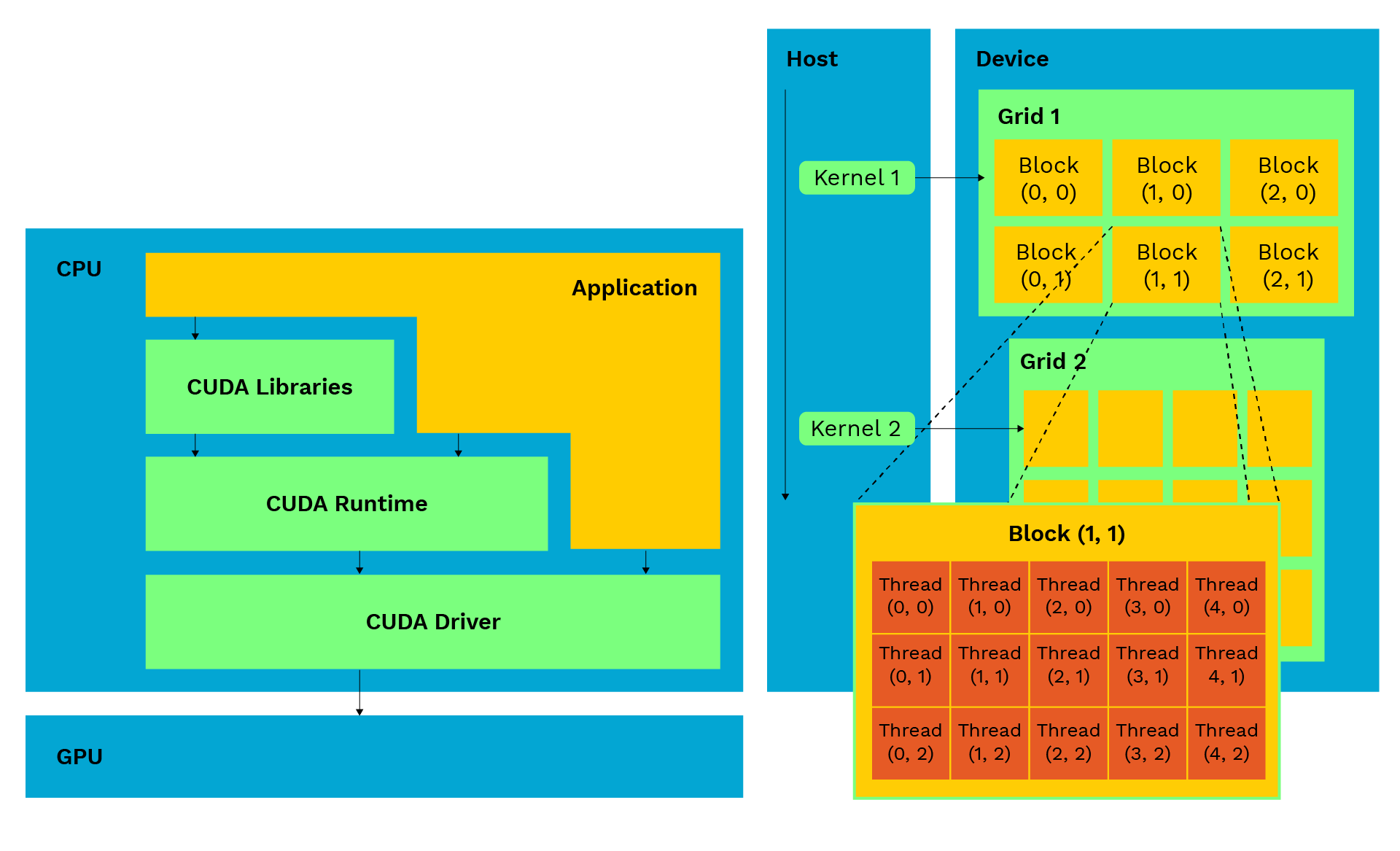
Each thread identifies its work item using built-in indices such as blockIdx, threadIdx, and blockDim. For example: int i = blockIdx.x * blockDim.x + threadIdx.x; This formula assigns a unique index i to each thread, allowing it to process a specific portion of the dataset.
I am developing a simple CUDA kernel that performs element by element addition of two vectors using parallel threads:
int i = blockIdx.x * blockDim.x + threadIdx.x;
if (i < N) C[i] = A[i] + B[i];
}
int main() {
// Allocate memory and launch kernel
vectorAdd<<<(N + 255) / 256, 256>>>(A, B, C, N);
}
3. Streaming Multiprocessors and GPU Architecture
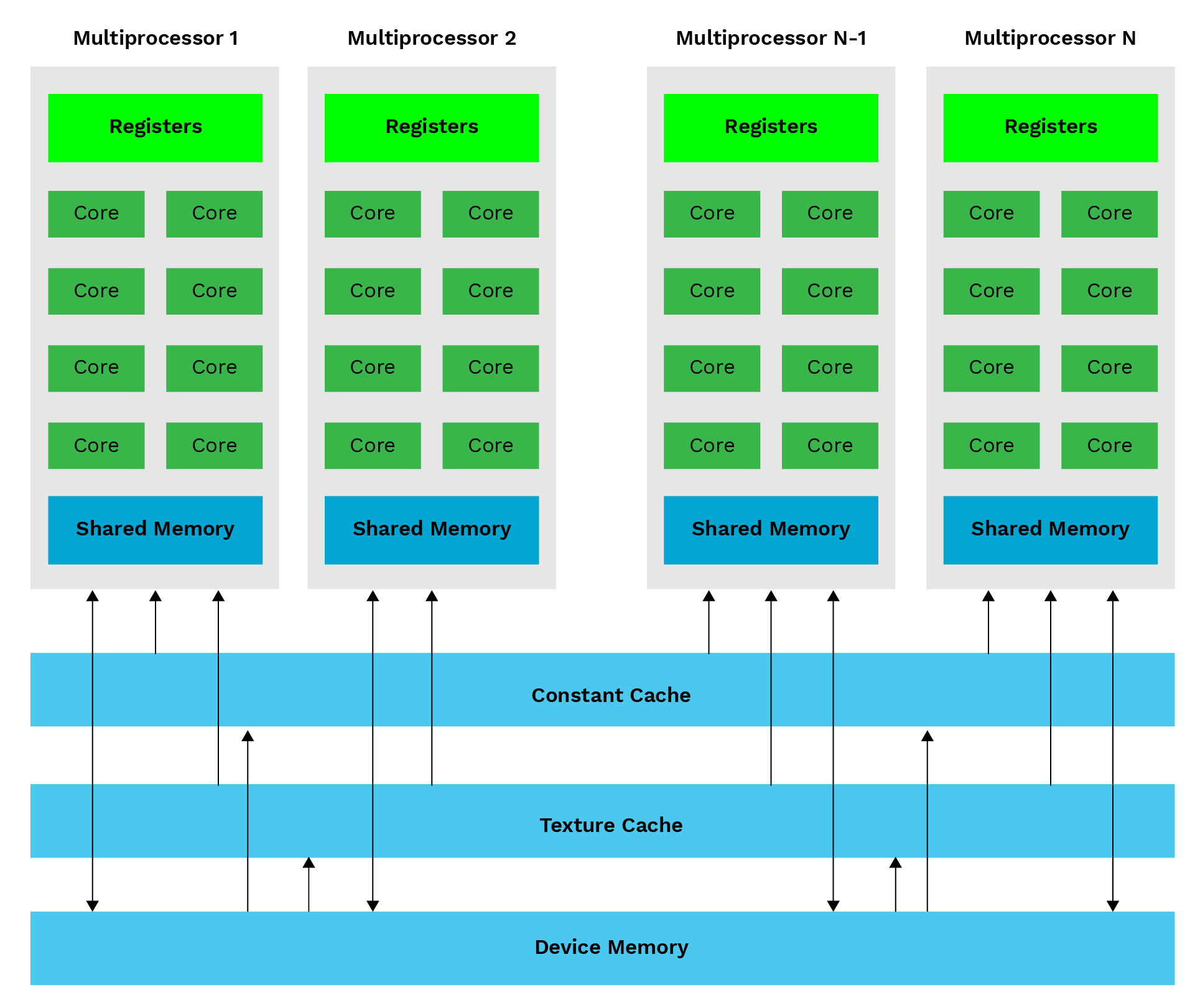
CUDA’s performance is driven by the architectural design of NVIDIA GPUs. Each GPU has cores that act as Streaming Multiprocessor (SM) and contains numerous SMs that perform tasks independent of each other and create a highly parallel computing environment. The SM acting as a processor contains a set of CUDA cores, registers, shared memory, and warp schedulers that coordinate the execution of threads. Every SM can execute multiple thread blocks concurrently that are limited by available registers, shared memory. The NVIDIA Ampere GPU on Drive Orin contains several such SMs, each capable of processing thousands of threads. In the world of CUDA Programming, a “warp” is a group of 32 threads that execute the same instruction simultaneously on a GPU. The warp scheduler manages these threads, ensuring efficient parallel execution.
Why It Matters for Automotive Applications
In ADAS and autonomous driving tasks like lane detection, object tracking, and sensor fusion, many data streams need to be processed at the same time and within strict time limits. Drive Orin’s GPU architecture allows multiple tasks to run in parallel, with different thread groups (warps) performing specific tasks. For example, Camera Feature is processed by one group while the other group (warp) runs neural network calculations. By intelligently balancing compute-intensive tasks with memory-heavy processes, Drive Orin delivers consistent, reliable performance even in environments that generate large volumes of sensor data. With CUDA’s flexible thread management and automatic scheduling, Drive Orin has become a powerful platform for advanced automotive computing.
4. CUDA Memory Hierarchy Deep Dive
Overview of the CUDA Memory Hierarchy:
Registers—In the memory hierarchy, registers are the fastest form of memory. They reside within each SM, making this memory exclusively dedicated to that specific SM. These are very limited in numbers owned by one thread at a time. Also, the most frequently used data is kept in registers.
Shared Memory—On-chip memory shared by all threads in a block, offering low-latency access. Ideal for sharing intermediate results or reused data, reducing global memory access, and improving kernel performance.
Global Memory—The largest memory space, accessible by all threads and the host CPU. Its location is outside the GPU with high latency during access. For performance, applications are designed in such a way that access frequency is reduced. This is done by local coaching and block access.
Constant and Texture Memories—These are two special types of GPU memories that are read-only (the program can look at the data but cannot change it), and use caching (a mechanism for fast, temporary storage). Constant memory holds data that never changes throughout program execution; good to hold constant values. Texture Memory is a special read-only cache optimized specifically for accessing data that is organized in a 2D or 3D grid. It is highly required for programs that work with images or videos, particularly vision-related tasks. When a thread asks for a pixel in an image, the Texture Cache does not just grab that single pixel; it intelligently pulls in a whole 2D block of surrounding pixels and stores them in the fast, on-chip cache (Spatial Locality).
Optimizing Memory Access: Coalescing
To achieve peak throughput, developers must ensure memory coalescing — a technique where threads in the same warp access consecutive memory addresses, enabling the GPU to handle multiple requests as a single transaction. This improves bandwidth utilization, while uncoalesced access patterns increase latency and reduce performance. Optimizing memory access patterns helps reduce bottlenecks in data throughput, which is critical for real-time applications.
The performance of a CUDA application depends on both computation and efficient memory use. NVIDIA GPUs, like those on the Drive Orin platform, have a layered memory system that balances speed, size, and flexibility, with each layer offering different trade-offs in speed, capacity, and accessibility.
Coalescing occurs when all 32 threads ask for data that is lined up right next to each other in the computer’s memory. The GPU acts smart and combines these 32 different tiny requests into one single transfer request. The GPU’s data path (bandwidth) is used perfectly, leading to peak performance.
Memory Optimization on Drive Orin
In automotive applications like sensor fusion or lane detection, a high volume of data is being generated and stored continuously in the memory to be processed by the GPU. The access to this stored data from the GPU side with performance is priority.
Developers achieve this by:
- Shared Memory Tiling: This is like breaking a big piece of work (like an image) into small, manageable pieces (tiles), and loading each piece into the GPU’s fastest, on-chip scratchpad
(Shared Memory). Threads working nearby can quickly reuse the same data from this fast, local spot. - Register Blocking: It involves storing the most critical numbers or variables—the ones used repeatedly in the program in the GPU’s absolute fastest memory (i.e., Registers).
- Texture Memory: It allows the GPU to efficiently sample images (look up pixels) for vision tasks like lane detection because it is optimized to cache neighboring pixels, speeding up any task that analyzes a region of an image.
- Data Alignment: Arranging data in the memory so that it starts and ends exactly on the preferred boundary like lining up on 32-, 64-, or 128-byte chunks to ensure optimal memory coalescing. Ensuring the GPU can fetch a large chunk of data for an entire group of threads (warp) in one single, efficient transaction.
To achieve peak throughput, developers must ensure memory coalescing — a technique where threads in the same warp access consecutive memory addresses, enabling the GPU to handle multiple requests as a single transaction. This improves bandwidth utilization, while uncoalesced access patterns increase latency and reduce performance.
These techniques can deliver 2X to 5X performance improvements without altering the algorithm, ensuring Drive Orin meets real-time ADAS deadlines.
5. Writing and Running CUDA Applications on Drive Orin
Developing CUDA applications for Drive Orin involves writing device code, compiling it using NVIDIA’s CUDA compiler (nvcc), and profiling it with Nsight tools.
Developers cross-compile applications on a host machine and deploy them on the Drive Orin target.
Compilation Procedure: nvcc -arch=sm_87 -O3 lane_detection.cu -o lane_detection
** sm_87 –> Orin GPU architecture.
**-O3 –> flag enables optimization.
6. Profiling and Optimization Using NVIDIA Nsight
Once your CUDA application is functional, the next critical step is profiling and optimization. Even well-written kernels may not fully utilize the GPU’s potential. Profiling helps you identify these inefficiencies and tune your application for maximum throughput and real-time performance — a necessity for ADAS and autonomous driving workloads on NVIDIA Drive Orin.
NVIDIA provides Nsight Systems tools for performance analysis. Nsight Systems gives a system-wide timeline view of your application. It displays:
- Kernel launches and execution timelines
- Memory transfers between CPU and GPU
- Synchronization points and API calls
- CPU–GPU concurrency analysis
This bird’s-eye view helps developers identify whether the CPU or GPU is the bottleneck, detect idle GPU periods, and verify if kernels and data transfers are properly overlapped. On Drive Orin, where CPU cores often handle safety-critical logic in parallel with GPU tasks, Nsight Systems ensures both domains operate efficiently in tandem.
Common Optimization Techniques for Drive Orin
To achieve low-latency, high-performance tuning on Drive Orin, developers utilize both CUDA programming features and hardware capabilities. Key strategies include:
- Using CUDA Streams: Overlapping kernel execution with data transfers and running concurrent tasks, especially useful in multi-sensor ADAS systems like camera and radar fusion.
- Reducing Global Memory Access: Caching frequently used data in shared memory to avoid high-latency global memory transactions.
- Maximizing Warp Occupancy: Balancing resource utilization (registers, shared memory) by adjusting block size and grid dimensions. Warp occupancy refers to the ratio of active warps to the maximum number of warps that a Streaming Multiprocessor (SM) can support on a GPU.
Nsight Workflow on Drive Orin
- Run the baseline kernel and record profiling data using Nsight Systems.
- Identify hotspots — kernel calls with the highest latency.
Results You Can Expect
- 2–3× reduction in kernel execution time
- Higher GPU occupancy (80–90%)
- Reduced CPU–GPU idle gaps
- Lower power consumption, improving thermal stability for in-vehicle deployment
These optimization techniques not only improve performance but also enhance the scalability of CUDA applications, allowing them to efficiently handle increasing data and workload demands as system requirements grow.
Through consistent profiling and iterative optimization, developers ensure their ADAS workloads — such as lane detection, sensor fusion, and path planning — meet real-time, deterministic performance goals under varying automotive conditions.
7. Iterative GPU Development Cycle for Performance Optimization
Developing CUDA applications for NVIDIA Drive Orin involves an iterative process to balance compute efficiency, memory utilization, and latency optimization. This cycle ensures real-time performance for ADAS and autonomous driving systems and includes the following stages:
Algorithm: Define the computational problem and identify parallelizable tasks, such as image filtering, convolution, or matrix operations, which are well-suited for GPU acceleration. CUDA is also widely used in scientific computing for tasks such as simulations and large-scale data analysis.
Kernel Implementation: Translate the algorithm into CUDA kernels, selecting grid and block configurations based on data size and GPU capabilities (e.g., the number of Streaming Multiprocessors on Drive Orin).
Profiling and Measurement: Use tools like NVIDIA Nsight Systems to measure kernel execution time, memory throughput, and warp occupancy.
Optimization: Refine kernels and data structures to improve memory locality, reduce register pressure, and maximize SM occupancy.
Validation: Ensure output correctness by comparing GPU results with a CPU reference implementation. For safety-critical applications like ADAS, correctness and determinism are as critical as performance.
This iterative approach allows developers to progressively refine their CUDA code, leveraging Drive Orin’s heterogeneous computing capabilities to meet strict real-time performance and latency requirements.
8. Unified Memory in CUDA for Simplified Data Management
Data transfer between CPU and GPU is a major performance challenge in heterogeneous systems, used in automotive. Drive Orin offers unified memory, creating a single address space that both the CPU and GPU can access seamlessly. This is enabled by PICx at the lower layer, which simplifies data sharing and reduces the need for manual memory management. Previously, developers had to manage data transfers using cudaMalloc, cudaMemcpy, and manual IPC methods for synchronization between host and device memory. With common memory, CUDA handles data migration between CPU and GPU memory pages as required by the running application.
Example: Using Unified Memory
int N = 1 << 20;float *A, *B, *C;
// Allocate unified memory accessible by both CPU and GPU
cudaMallocManaged(&A, N * sizeof(float));
cudaMallocManaged(&B, N * sizeof(float));
cudaMallocManaged(&C, N * sizeof(float));
// Launch kernel on GPU
vectorAdd<<<(N+255)/256, 256>>> (A, B, C, N);
cudaDeviceSynchronize(); // Wait for GPU to finish
// Free unified memory
cudaFree(A);
cudaFree(B);
cudaFree(C);
In this example, the CUDA runtime system automatically manages data movement between CPU and GPU, eliminating the need for manual copies.
In Drive Orin’s heterogeneous architecture, unified memory enables efficient sharing between its CPU, GPU, and DLAs — all within the same high-bandwidth memory subsystem. This makes it a cornerstone for designing maintainable, high-performance ADAS software pipelines.
9. CUDA Streams for Concurrent Execution
The GPU’s default setting is to process tasks one after the other, like waiting in a single-file line. To make the GPU even faster, developers use a technique called CUDA streams. Streams allow the GPU to run multiple jobs concurrently, such as working on different parts of an image or moving data from the CPU to the GPU while a previous calculation is still running. By letting these tasks operate independently across the GPU’s processing units (SMs), streams keep the entire GPU busy, greatly maximizing its utilization and squeezing out extra performance.
Example: Concurrent Kernel Execution Using CUDA Streams
cudaStream_t stream1, stream2;// Create two CUDA streams
cudaStreamCreate(&stream1);
cudaStreamCreate(&stream2);
// Launch two independent kernels on separate streams
kernelate<<<grid, block, 0, stream1>>>(…);
kernelB<<<grid, block, 0, stream2>>>(…);
// Synchronize streams before proceeding
cudaStreamSynchronize(stream1);
cudaStreamSynchronize(stream2);
Here, kernelA and kernelB can execute concurrently, provided sufficient hardware resources are available. This is particularly beneficial for real-time ADAS systems, where multiple perception pipelines (e.g., camera, LiDAR, and radar) must be processed in parallel.
By leveraging CUDA streams, developers can design highly parallel, real-time pipelines on Drive Orin — ideal for multi-sensor fusion, lane detection, and object tracking in next-generation ADAS systems.
Machine Learning for ADAS
Machine learning is at the heart of advanced driver assistance systems (ADAS) in autonomous vehicles, enabling them to interpret complex environments and make intelligent decisions. NVIDIA Drive AGX provides developers with a powerful suite of machine learning tools and frameworks, including the CUDA programming model, to accelerate the creation and deployment of sophisticated ADAS solutions. With its high performance computing capabilities and support for large datasets, Drive AGX allows developers to train, test, and refine machine learning models rapidly and efficiently. This enables autonomous vehicles to continuously improve their ability to detect obstacles, predict traffic patterns, and avoid crashes, ultimately enhancing safety and performance. By leveraging the full range of CUDA-enabled features, developers can unlock new levels of capability and reliability in ADAS, paving the way for safer and more intelligent vehicles.
10. Case Study – CUDA-Accelerated Video Stream on Drive Orin
We conducted an experiment to show how much faster the GPU (using CUDA) is, compared to the CPU for a common task like processing a video.
Task: We built a program that takes a video stream, converts the color frames into grayscale (black and white), and then displays the results. This is a basic step in many automotive vision systems (lane detection).
Step 1: CPU only: Execute the program using only CPU. The CPU is fast at general tasks, but it had to process each pixel in the video frames sequentially.
Step 2: GPU accelerated: We then changed the grayscale conversion part of the code to run on the GPU using CUDA.
CUDA is able to use thousands of tiny GPU cores to process many different pixels simultaneously.
The Result: By shifting the hard work (pixel calculations) to the GPU, we dramatically increased the total amount of video data the system could handle (throughput).
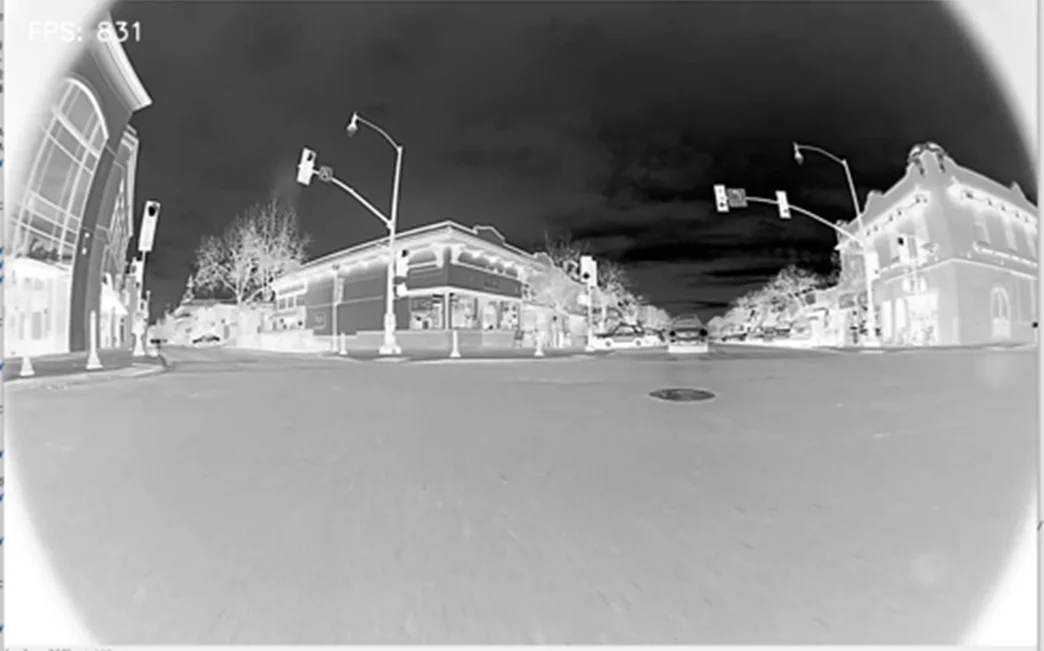
The comparison table and NVIDIA Nsight tool screenshots confirm that this “mixed approach” (heterogeneous acceleration) led to huge performance gains, necessary for the Drive Orin to handle real-time video feeds.
A video pipeline is implemented to evaluate the performance of the NVIDIA Drive Orin platform, in a heterogeneous environment. The pipeline included reading video frames from memory, grayscale conversion, and real-time frame rendering. Initially, the implementation ran purely on the CPU, processing each frame sequentially. We then parallelized the grayscale conversion kernel using CUDA to offload pixel-level computations to the GPU. This allowed thousands of CUDA threads to operate on different pixels. Below is the comparison table and profiling screenshots from NVIDIA Nsight:


NVIDIA Nsight profiling – On CPU

NVIDIA Nsight profiling – On CPU

CPU
GPU
The results show a substantial improvement in frame rate and latency reduction on the GPU implementation. The Nsight profiling timeline further illustrates efficient overlap between kernel execution and memory transfers, confirming optimal use of Drive Orin’s heterogeneous architecture. The image comparison (CPU vs GPU) visually demonstrates faster, smoother video processing at higher frame rates — validating CUDA’s role in enabling real-time video analytics for ADAS applications.
11. Conclusion and Future Directions
CUDA is the key to unlocking the full power of the NVIDIA Drive Orin GPU for self-driving cars. It allows you to process huge amounts of data with low latency and high throughput (handle lots of data at once), required for autonomous driving with safety. Drive Orin uses the powerful Ampere GPU and CUDA’s ability to run many tasks at once; even very complex vision programs can run in real-time. CUDA will continue to be essential as it brings together the most critical requirements of self-driving software, including AI inferencing, sensor fusion (combining data from cameras, radar) By using special tools like Nsight, developers can adjust the software’s performance, ensuring the car is always safe and responsible, the most important quality for the next generation of autonomous vehicles.
References
- NVIDIA CUDA Toolkit Documentation – https://docs.nvidia.com/cuda/
- NVIDIA Nsight Systems User Guide – https://docs.nvidia.com/nsight-systems/
- NVIDIA Drive SDK Developer Guide – https://developer.nvidia.com/drive
- CUDA Programming Guide – https://docs.nvidia.com/cuda/cuda-c-programming-guide/
- Irina Mocanu “An_INTRODUCTION_TO_CUDA_Programming”
- David B. Kirk “NVIDIA CUDA software and GPU parallel computing architecture”