
An Overview
Asynchronous programming can significantly reduce the wait time in processing large amounts of data by enabling concurrent execution of different tasks, such as network requests and file operations, without blocking. Asynchronous programming is a form of concurrent programming that allows the Python program to manage multiple asynchronous operations efficiently.
Suppose the assignment is to read a hundred API endpoints and collect their responses to create a database. If each GET call requires 1 second, that will mean a wait time of 100 seconds (about 3 minutes) for the process to complete. With asynchronous operations, such as fetching data from multiple endpoints concurrently, the event loop can manage other async tasks at the same time, drastically reducing the total wait time.
What is Concurrent Asynchronous Programming?
Imagine a list of a billion numbers, and we need to find the sum of the entries. One way to find the sum would be to take an entry at a time and add it to a predefined result which was initiated as zero. This approach is similar to traditional synchronous code, where each operation is performed one after another, potentially leading to inefficiencies when dealing with I/O-bound tasks.

Fig. 1
However, this summing up process can be sped up. One way would be to break down the list into fragments. Then multiple new threads could be started, and each fragment assigned to one thread. Each thread would calculate the sum of the allocated fragments in parallel time. The results can then be agglomerated over all the threads. Such parallel execution would make the summing process consume much less time than the earlier simpler approach.
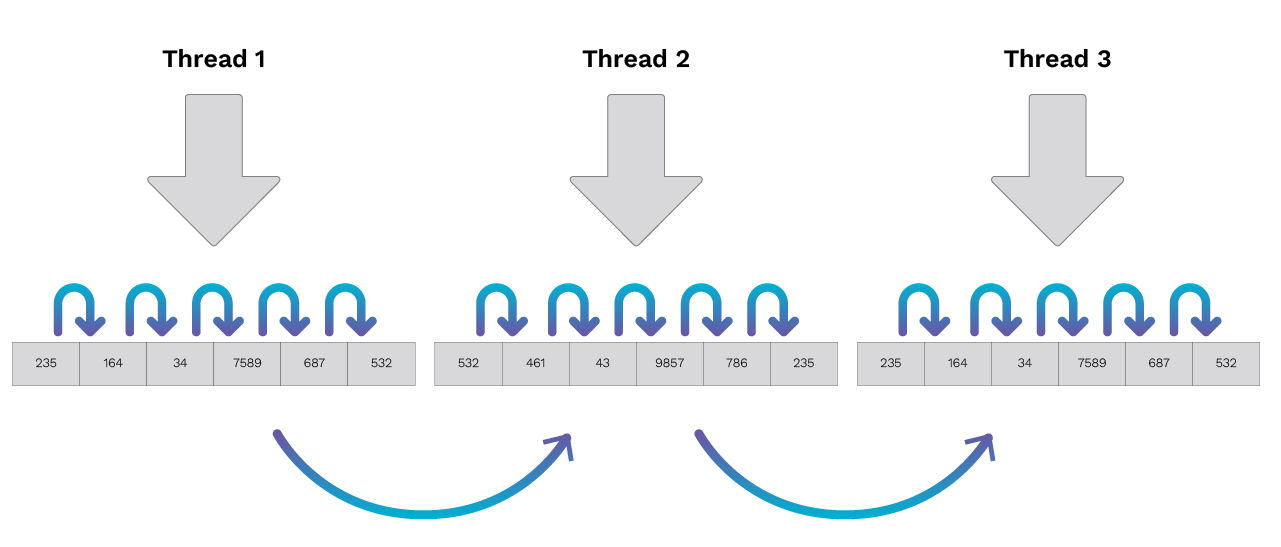
Fig. 2
This would be a good example of concurrent programming. It would be analogous to multiple chefs, each cooking different dishes.
Now consider the API problem mentioned at the beginning of the blog. Remember that we are waiting 0.1 seconds for each GET call to take place. In the synchronous version, each request is made one after another, causing the total wait time to add up and resulting in a much longer execution time. In contrast, the asynchronous version leverages async code to initiate multiple GET calls without waiting for each to finish before starting the next. This allows us to use the idle time to make more GET calls from the remaining URLs, and we can then wait for the GET results as they come in, while still making the GET calls. In the best-case scenario, assuming the time taken for making the get call to be insignificant, the total time can be brought down to about 1 second from the original 3 minutes.
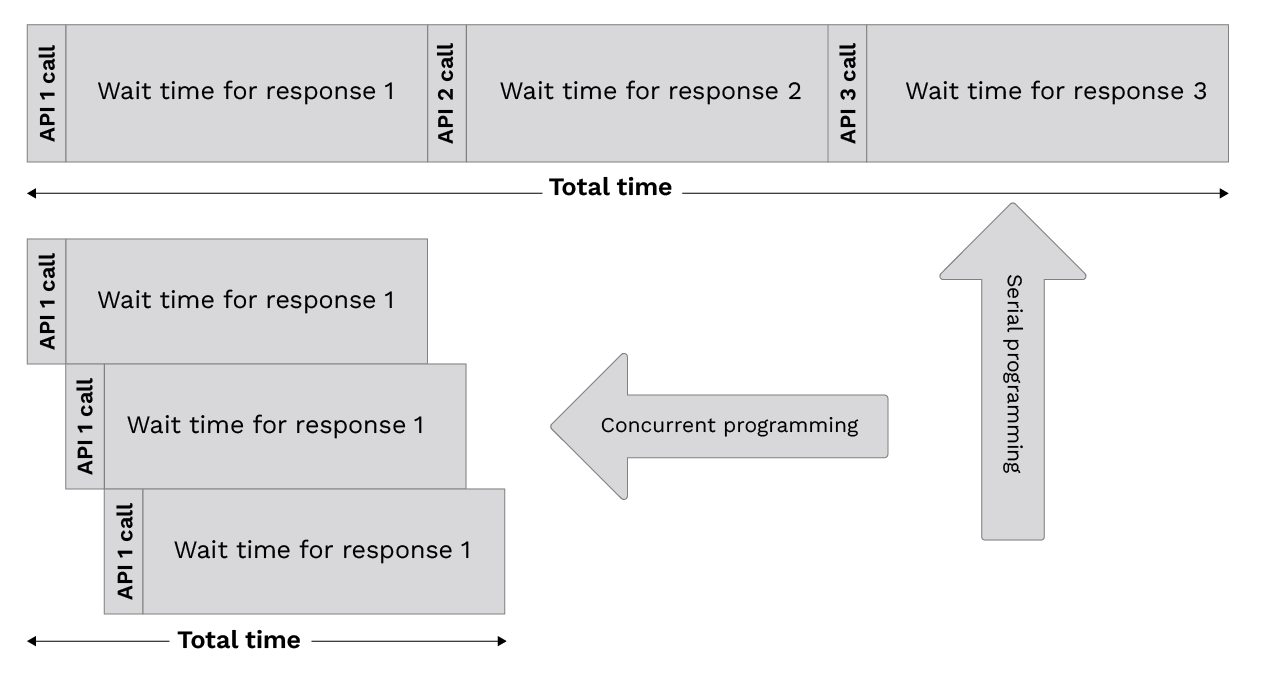
Fig. 3
This is yet another example of concurrent programming called Asynchronous programming or Cooperative Multitasking. A good analogy to asynchronicity is a single chef cooking multiple dishes. The chef can chop onions while the soup is boiling, then prepare the vegetables while the onions are being cooked and so on. So, the chef does not have to be idle waiting for any ‘input’ and ‘output operations’ not under his jurisdiction. With asyncio in Python, you can run coroutines concurrently using async code, efficiently managing multiple I/O-bound tasks without blocking the main thread. This is where Asyncio enters the conversation with regards to Python.
Understanding Event Loops
In Python asynchronous programming, the event loop is the heart of the entire operation. The event loop is responsible for managing and scheduling multiple tasks concurrently, all within a single thread. Instead of creating multiple threads to handle different operations, the event loop efficiently switches between tasks, ensuring that no single task blocks the execution of others. This allows developers to write asynchronous code that can handle multiple I/O-bound operations—such as network requests or file operations—without the overhead of managing multiple threads.
When you use Python’s asyncio library, the event loop keeps track of all the asynchronous tasks and determines when each task should run. As one task waits for an I/O operation to complete, the event loop can switch to another task, making sure the program continues to make progress. This approach enables you to run tasks concurrently, improving the efficiency and responsiveness of your applications. By leveraging the event loop, you can write asynchronous code that scales well and handles multiple tasks at once, all while keeping your codebase simple and manageable.
Coroutine Functions
Coroutine functions are the building blocks of asynchronous code in Python. Defined using the async def syntax, a coroutine function allows you to write code that can pause its execution at certain points and let other tasks run in the meantime. This is achieved using the await keyword inside the coroutine function, which tells Python to suspend the function’s execution until the awaited task is complete.
For example, when you define an asynchronous function with async def, you’re creating a coroutine function that can be paused and resumed by the event loop. This makes it possible to write non-blocking code that efficiently handles multiple operations at once. The async def syntax not only makes your code more readable but also enables you to take full advantage of Python’s asynchronous programming capabilities. By using coroutine functions and the await keyword, you can write asynchronous code that is both efficient and easy to maintain.
Best Practices for Async Programming
To fully harness the power of asynchronous programming in Python, it’s important to follow a set of best practices that ensure your code is efficient, scalable, and maintainable. Start by defining your asynchronous functions with the async def syntax, which allows you to use the await keyword to pause execution until a specific asynchronous operation is complete. This approach helps you write code that is both readable and non-blocking.
When running your asynchronous code, use asyncio.run() to manage the event loop. This function ensures that the event loop is properly started and closed, preventing common issues that can arise from manual event loop management. Avoid using time.sleep() in your asynchronous code, as it will block the entire event loop and halt all other tasks. Instead, use await asyncio.sleep() to create non-blocking delays that allow other tasks to run concurrently.
To achieve concurrency and improve performance, use asyncio.create_task() to schedule multiple coroutines to run at the same time. This enables your program to handle multiple tasks concurrently, such as making several network requests or processing multiple files. For running several coroutines and collecting their results, asyncio.gather() is a powerful tool that simplifies your code and enhances readability.
Error handling is also crucial in asynchronous programming. Use try-except blocks within your coroutine functions to catch and handle exceptions, ensuring your code remains robust and reliable even when unexpected issues occur.
Asynchronous programming with the asyncio library can lead to significant improvements in performance, especially for I/O-bound applications like web servers and network requests. However, for CPU-bound tasks, such as heavy computations or image processing, asynchronous programming may not provide the same benefits due to Python’s Global Interpreter Lock (GIL). In these cases, consider using multiprocessing or other approaches.
By following these best practices—using async def and await, managing the event loop with asyncio.run(), creating tasks with asyncio.create_task(), and handling errors effectively, you can write asynchronous code that is efficient, scalable, and easy to maintain. This makes Python async programming an excellent choice for building high-performance applications that need to handle multiple tasks concurrently.
What is Asyncio Library?
According to the official python documentation , “Asyncio is a library to write concurrent code using async/await syntax”. The async await syntax can also be seen in Typescript. This syntax requires the code to have asynchronous infrastructure. For the example below, we use HTTPX which is an asynchronous library for dealing with APIs. The script downloads 150 names from Rick and Morty using the URL rickandmortyapi.com. It has been taken from this YouTube video by TechWithTim giving a primer to the library.
import asyncio
async def get_data(client, url):
resp = await client.get(url)
return resp.json()[‘name’]
async def main():
async with httpx.AsyncClient() as client:
tasks = []
for i in range(1, 150):
url = f”https://rickandmortyapi.com/api/character/{i}”
tasks.append(get_data(client, url))
characters = await asyncio.gather(*tasks)
for c in characters:
print(c)
asyncio.run(main())
The beauty of HTTPX is that it can also be used as a serial library. If used in this manner, it will work too. Here is the script for making the API calls in a serial.
for i in range(1, 150):
url = f”https://rickandmortyapi.com/api/character/{i}”
response = httpx.get(url)
print(response.json()[‘name’])
A more significant difference being that the latter script takes about 1 minute 7 seconds, while the earlier script took about 5 seconds to run. That is how using asyncio can bring the execution time significantly. Note that the entire asynchronous operation is done by a single thread. So, time efficiency does not come with threading costs.
Conclusion
Asynchronous programming helps websites avoid racing conditions while dealing with millions of API calls per second. Asyncio plays a crucial role in making python code asynchronous. Asynchronicity does make the code a little more complex due to the handling of error and futures. However, the benefits it bestows upon the application can outweigh the downsides given that the application has to deal with such a large number of operations.