
The very first launch of Visual Studio 2026 marks a milestone event in Visual Studio’s history, setting a new standard for developer productivity and experience. Visual Studio has been part of the developer’s toolkit for as long as most of us can remember. Over the years, it has changed shape with every shift in technology — from desktop apps to the cloud to everything in between. Every developer knows the story of it — those 2 a.m. bug hunts that test your patience, or the pure thrill of watching your build finally succeed after countless hours of trial and error.
Visual Studio 2026 was released shortly before September 2025, and the new version comes across as a bold declaration rather than merely another update. With a stable version that ensures reliability, projects transition seamlessly from previous releases, and any existing project can be opened without issue. The Visual Studio team has focused on delivering improvements faster, with productivity boosts delivered through under the hood improvements and AI-driven tools that extend capabilities and streamline workflows.
Microsoft has been weighing more in favor of time-saving tools for the developers instead of adding features for the sake of it: tighter integrations with GitHub Copilot, smoother support for .NET 10 and C# 14, and a spruced-up, redesigned user experience (UI) that enhances productivity. What is really interesting is that it appears to be fast and responsive, with blazing fast performance and a significant reduction in annoying UI freezes and other annoying UI issues. In fact, more than half of previous UI freezes and performance bottlenecks have been eliminated, according to feedback from a Principal Software Architect. All your favorite extensions remain compatible, and you can update Visual Studio independently, making the primary setup straightforward and ensuring you can start coding immediately after installation.
Visual Studio 2026 is lined up for professional developers who work with code for most of their day; their intention in viewing it is probably to get rid of some friction in managing complex projects. Its capabilities extend what developers can do, and the stable version ensures a reliable experience. It has never made big and exciting changes, but it has made the task of programming faster and smarter in its daily iterations. Simply put, it feels like Microsoft finally wants Visual Studio to be a true ally — not a burden developers have to carry on their shoulders every day. Take full advantage of the new features and enjoy the seamless transition, thanks to the dedicated efforts of the Visual Studio team.
Introduction to Studio 2026
Visual Studio 2026 marks a major Visual Studio release, representing a pivotal moment in Visual Studio’s history. Shaped by extensive feedback from the developer community, this new version is designed to meet the needs of today’s power users and advanced developers. As a senior global solutions architect, staying current with the Visual Studio team’s innovations is crucial for leveraging an intelligent developer environment that keeps pace with modern software demands.
One of the most immediately highlighted aspects of Visual Studio 2026 is its beautifully modern UI redesign. The fresh and crisp UI delivers an effortless vibe, making even massive projects and enterprise-scale repos feel lightweight and manageable. This new version isn’t just about looks—it’s packed with several performance improvements, including a built-in performance coach that helps you optimize your workflow and get the most out of your hardware. Whether you’re wrangling enterprise-scale codebases or just want a more responsive experience, Visual Studio 2026 is engineered to help you work smarter and faster.
Installing and Setting Up Visual Studio 2026
Getting started with Visual Studio 2026 is refreshingly straightforward. Whether you opt for the free Community edition or invest in a stand-alone professional license, the installation process is streamlined to get you coding with minimal friction. The setup wizard guides you through a few brief questions, checks your extension compatibility—including those that might be out of support—and ensures your environment is ready for action.
Once installed, you’ll discover a flexible new settings system that centralizes configuration and makes it easy to manage everything from authentication credentials for MCP servers to your most commonly used settings. For principal software engineers and principal software architects, this unified settings system is a game-changer, allowing you to tailor Visual Studio 2026 to your workflow and team requirements. Updating Visual Studio is now a breeze, with automatic monthly updates that deliver fresh features, design tweaks, and productivity boosts—so you’re always working with the latest tools without sacrificing stability.
1. Smarter, Faster, Leaner: Latest Performance Enhancements and Upgrades
Let’s be honest, every time an Integrated Development Environment (IDE) update drops, the word “performance improvements” gets thrown around. But the overall experience of Visual Studio 2026 runs smoother, with blazing fast performance that you’ll notice in your daily work—especially if you are used to juggling giant projects that usually slow everything to a crawl.
What’s Changing?
- Faster Startup Times: Startup is faster—not lightning fast—but sufficiently faster that can kick start your work soon. The IDE loads key components more efficiently by deferring less important services until after the initial launch, so you can start coding and loading solutions faster, even with large or complex projects.
- Optimized Memory Use: Smart garbage collection and resource handling reduce IDE memory usage and switching between projects doesn’t cause a heavy lag. It is not perfect, but it significantly reduces those “time to restart the IDE” moments and cuts down on annoying UI freezes by more than half.
- Improved Build System: The most notable difference for me was the improvement in build times. The new system appears to operate with greater efficiency and intelligence. It just does not recompile everything unnecessarily and properly uses your CPU cores so that builds finish faster than just claiming that they do.
- Faster Branch Switching: If you use Git quite frequently, it is much easier to switch branches. Even for the big repos, it no longer freezes your environment when jumping from one branch to another. It is faster, smoother, and reduces the sense that version control is a bottleneck.
- Under the Hood Improvements: Numerous under the hood improvements contribute to speed, efficiency, and overall responsiveness, making the IDE feel more agile and reliable.
Overall, these are not flashy features, but they make daily coding less frustrating. If you live in Visual Studio for hours on end, the 2026 update is one of those “you just feel the difference” upgrades. Profiling performance tools are now more integrated, helping you quickly identify bottlenecks and optimize your code for even better results.
Real-world Example:
If you have ever worked on a huge project, think endless microservices or massive enterprise systems, you know how painful long build times can get. Waiting for hundreds of projects and thousands of files to compile kills momentum fast. Visual Studio 2026 excels at wrangling enterprise scale repos, handling massive codebases with improved performance and responsiveness.
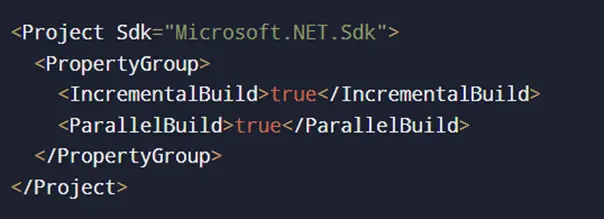
That is where Visual Studio 2026 makes a difference. The new build system is smarter about figuring out what is changed instead of rebuilding everything from scratch. It is more aware of dependencies, so it focuses only on the parts that need attention. Combined with better CPU core utilization and genuine incremental builds, the overall compile time becomes significantly shorter. It is the kind of behind-the-scenes upgrade that is not flashy, but you definitely notice once you start using it.
Thanks to these upgrades, developers can focus on delivering improvements faster, with less waiting and fewer interruptions.
2. What’s New in Visual Studio 2026: New Features for Everyday Coding?
- The primary focus of Visual Studio 2026 is to ensure the tools understand how you work, rather than simply adding more items to a feature list. AI-driven tools are now deeply integrated, enhancing the coding experience by streamlining workflows, surfacing insights, and reducing friction during development.
- Highlights Include:
- Code Suggestions Powered by AI: Instead of the usual autocomplete suggestions, it tries to adapt to your personal coding habits and give suggestions best suited for your coding style. The completions and refactoring suggestions follow the way you write instead of serving up generic boilerplate. AI-driven tools accelerating development workflows help you resolve issues faster and keep your momentum. It feels less like a rigid tool and more like a coding friend that is genuinely paying attention.
- Better Python and JavaScript Support: Debugging is smoother if you spend time with Python and JavaScript. Editing is noticeably smoother, enabling you to make and test adjustments without frequent restarts or concerns about the tooling falling out of sync.
- Cloud-native Tools: For anyone who works with cloud setups, having Docker and Kubernetes just baked into the IDE is quite something. The act of spinning containers or poking inside your cloud environment no longer feels like stepping out of your workflow; it is just there.
- Intelligent Paste: A minor feature that took me by surprise was how much I liked Intelligent Paste. Let us suppose you have a piece of code from different projects or from the web, it will blend in with your programming style and naming conventions by itself. This way it saves you a lot of time since you do not have to find and fix those awkward variables or waste time doing a complete reformatting later.
- Direct Pull Request Links: Collaboration is improved with direct pull request links, allowing you to review and manage pull requests seamlessly within the IDE.
- Improved Code Coverage Tools: Testing is more robust with enhanced code coverage features, making it easier to analyze and ensure your code is well-tested.
- GitHub Copilot App Modernization: Modernize your applications faster with GitHub Copilot app modernization features, leveraging AI-driven insights and toolchain independence.
- All Your Favorite Extensions: Visual Studio 2026 supports all your favorite extensions from previous versions, ensuring a seamless transition and stable workspace.
- Start Coding Immediately: After setup, you can start coding immediately, thanks to optimized onboarding and compatibility with any existing project.
- These new features and AI-driven enhancements mean the capabilities extend far beyond previous versions, delivering productivity boosts delivered through smarter tools, reduced friction, and actionable surface insights that help you accomplish more in less time.
Code Snippet Example:
Here is an example of how an AI helper might rewrite a method to make it cleaner:

Not only do these suggestions make your code easier to read, but they also use built-in tools to squeeze out better performance.
Cross-Platform Development with Visual Studio Code
Visual Studio 2026 continues to embrace the flexibility that modern developers demand, especially when it comes to cross-platform development. Visual Studio Code remains a top choice for projects that require a modular, component-based approach, and the integration between Visual Studio and Visual Studio Code has never been smoother. With the NimblePros Visual Studio extension, you can transition seamlessly between the two environments, leveraging the strengths of each for different stages of your workflow.
Whether you’re building a .NET solution or working with a specific .NET version, Visual Studio Code offers the customization and agility you need. This flexibility is especially valuable for teams managing diverse tech stacks or targeting multiple platforms. With Visual Studio 2026, you can confidently move between tools, knowing your projects will transition seamlessly and your productivity won’t miss a beat.
GitHub Copilot Integration
GitHub Copilot has quickly become one of the most used features in Visual Studio 2026, and it’s easy to see why. This AI-driven tool accelerates development by weaving AI naturally into your daily workflow, offering real-time code suggestions and improvements without disrupting your focus. With Copilot agent mode, you get instant, context-aware feedback and suggestions that help you write better code and maintain high code quality.
The Copilot badge dropdown puts all the essential features and settings at your fingertips, making it simple to customize your AI-driven development experience. Whether you’re a seasoned professional developer or just starting out, GitHub Copilot helps you reduce friction, catch errors early, and focus on what matters most—building great software. It’s a prime example of how Visual Studio 2026 is using intelligent tools to accelerate and enhance the developer experience.
3. Collaboration and Code Sharing in Visual Studio 2026
- Building software today is a team effort — and many of us are doing it from different cities, time zones, or even continents. Visual Studio 2026 brings some practical upgrades to make that kind of teamwork smoother, whether the team is remote, hybrid, or sitting in the same office. The Visual Studio team has focused on delivering collaboration features that help professional developers work efficiently and reliably together.
Key Changes:
- Enhanced Live Share: Live Share is much more stable than it was previously. Real-time coding sessions are run with less lag and, besides editing code together, you can also do debugging or even terminal sharing, making it much easier for pair programming or troubleshooting with teammates. Projects transition seamlessly between hosts, so you can switch roles or machines without disruption. All your favorite extensions continue to work in collaborative environments, ensuring a familiar and productive workspace.
- GitHub Integration Has Become Even More User-Friendly: Additional improvements have made the GitHub integration more accessible to users. You have a new possibility to handle branches, accept, and work with pull requests, and monitor issues in an entertaining way within the IDE without needing to switch to a browser frequently. The introduction of direct pull request links allows you to review and manage pull requests directly from the IDE, streamlining code reviews and collaboration. The new friction and surface insights provided by AI help surface bottlenecks and reduce obstacles during code sharing and review, making teamwork more efficient.
- Cloud-hosted Dev Environments: One of the most important features for teams that deal with complex setups is the cloud-hosted development cluster. You can launch an entire environment that is fully configured – with its dependencies and everything else – in just seconds, no matter where you are. There is no longer the need to spend hours getting everybody coordinated with local configurations.
- New Release Model: For those who like new features early, the old Preview channel is gone. The new “Insiders Channel” gives monthly builds with fresh updates, while keeping the main release as a stable version so your everyday work is not interrupted. This stable version is crucial for team workflows, ensuring reliability and compatibility across all members.
Example Workflow:
With the improved Live Share, you can pull a teammate into your coding session and tackle that stubborn bug together, all without leaving Visual Studio. As principal software engineer Steve Smith notes, “The new collaboration tools in Visual Studio 2026 have made remote teamwork as seamless as working side by side in the same room.”
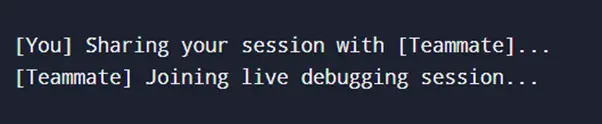
You can both drop breakpoints, walk through the code, and check variables at the same time, making sorting tricky problems faster.
Build Tools and Release Management
Visual Studio 2026 raises the bar for build tools and release management, giving you everything you need to deliver high-quality software quickly and efficiently. The beautifully modern UI redesign isn’t just for show—it’s paired with the latest performance enhancements that let you load solutions faster and work more smoothly, even with large and complex codebases.
The built-in profiler agent helps you pinpoint performance bottlenecks and optimize your code, while the cloud agent allows you to delegate repetitive tasks and focus on the creative aspects of development. Release notes are now more detailed and accessible, keeping you informed about the latest bug fixes, improvements, and new features. Whether you’re managing a massive enterprise project or a nimble startup app, Visual Studio 2026’s build tools and release management features ensure you can deliver updates with confidence and keep your workflow running at peak efficiency.
4. Debugging, Testing, and Code Coverage in Visual Studio 2026 — What’s Better?
- Debugging is one of those things you cannot avoid, it is the part of programming where you either solve the problem or spiral into frustration. In Visual Studio 2026, a few changes make that process less painful and a bit more insightful.
- Improvements Expected:
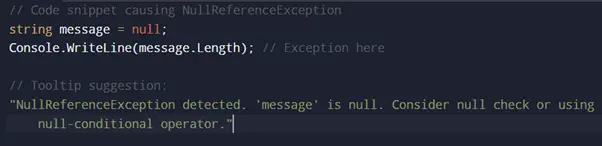
- Smarter Exception Analysis: For starters, exceptions are explained better. Instead of just dumping an error message in your lap, the debugger now gives extra context — why it probably happened, what variables might be involved, and ideas for fixing it. That alone saves back-and-forth guesswork.
- Integrated AI-powered Bug Detection: There is also a quiet AI assistant running in the background that suggests possible bugs or bad patterns as you code. It is not that it pushes itself during coding, but it is a way to notice and correct subtle errors that could appear at any moment more easily, rather than when they are deeply hidden in the project. AI-driven tools are accelerating the debugging process by surfacing friction and surface insights, helping developers resolve issues faster and with less effort.
- Improved Unit Test Support: Unit testing feels faster this time around. Tests are picked up quickly, parallel runs are smoother, and it hooks into modern testing frameworks without weird compatibility issues. The improved code coverage tools now allow you to analyze test coverage directly within the IDE, ensuring your code is thoroughly tested and highlighting untested areas for immediate attention.
- Enhanced Memory and Async Diagnostics: The memory and async diagnostics have improved. If you have ever wrestled with tracking down a memory leak or figuring out async call chains, these tools make it easier to see what is going on. Profiling performance features are now more deeply integrated, allowing you to quickly identify bottlenecks and optimize your code. Visual Studio immediately highlighted performance bottlenecks during profiling, making it easier to address issues as they arise. Under the hood improvements in debugging and diagnostics have resulted in a faster, more responsive experience, with more than half of common bugs now detected or resolved in less time than before.
Debugging Example:
Hit a NullReferenceException and instead of just saying “something’s null,” the IDE might tell you exactly which variable it thinks caused the problem, right there in the tooltip. That is the kind of feedback that can shave minutes (or hours) off a fix. As Principal Software Engineer Steve Smith notes, “The new debugging features in Visual Studio 2026 surface insights and reduce friction, making it easier than ever to pinpoint and resolve issues quickly.”
5. Looking Ahead: New Languages and Frameworks in Visual Studio 2026
- The tech world changes fast, and every few years, new languages and frameworks pop up that shift how we write software. Visual Studio 2026 is trying to stay out in front of that curve by giving professional developers better tools for what is coming next, not just what we already use. With this release, capabilities extend beyond traditional workflows, allowing users to leverage new frameworks, languages, and AI-driven tools that enhance productivity and streamline development.
- What’s New?
- Early Support for New Language Features: One of the first steps is the sneak peek release of early support for the upcoming language features. The goodies that C# has on the market have already been incorporated and even the languages that are still very new like Rust are being supported with appropriate tools. This implies that there are now multiple manual updates of the editor for one to try the new features. AI-driven tools are integrated into this support, providing intelligent code suggestions and debugging for new languages, and helping with GitHub Copilot app modernization to accelerate adoption and modernization of your codebase.
- AI-assisted Development Tools: AI is now part of the workflow with various tools, not just as an accessory. It can generate boilerplate code, suggest a smarter way of doing the same thing or automate the boring tasks that generally eat up your time. These AI-driven tools ensure that projects transition seamlessly when adopting new frameworks, and capabilities extend to profiling, modernization, and workflow automation.
- Cross-platform and Mobile Development: On the cross-platform side, things are smoother too. Xamarin and .NET MAUI support has been refined, so building apps that run across devices is unified instead of patched together. The primary setup process for new frameworks is now more modular, letting you update Visual Studio independently of your build tools, so you can take full advantage of the latest features without disrupting your existing project.
- Preview Support for C++26 and Standard Libraries: For the C++ crowd, there’s early support for C++26 and the latest standard libraries. It is preview-level for now but already optimized for people building system software or working in game development. Updating Visual Studio meant you can now support new languages and frameworks without affecting your stable toolchains, ensuring that your projects transition seamlessly and remain compatible.
Example: AI-assisted Code Generation
You can even do simple things like type a quick comment and have Visual Studio generate an entire method that fits what you described — a small but surprisingly useful trick that shows where the integrated development environment is heading:
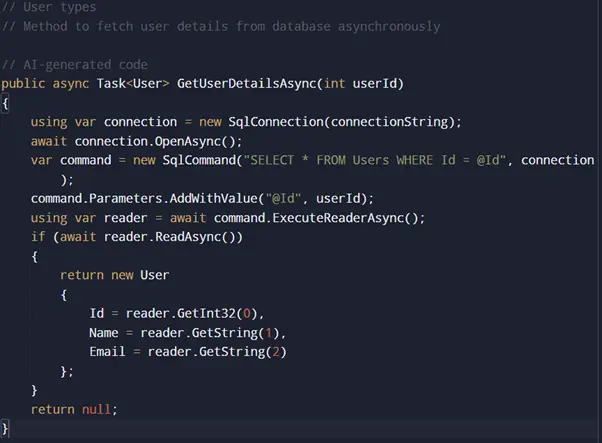
This feature takes a lot of the repetition out of coding, making those typical data access jobs faster and easier. With the new update model, Visual Studio 2026 is delivering improvements faster, so professional developers can always access the latest tools and enhancements. And if you’re working on an existing project, you can be confident that compatibility is maintained as you update Visual Studio to unlock new capabilities.
Conclusion
Visual Studio 2026 does not try to reinvent everything; it just makes a lot of the everyday stuff better. It opens faster, feels lighter, and the new tools fit more naturally into how people build software now.
The AI additions are surprisingly useful. They catch small mistakes, suggest cleaner code, and sometimes even save you from hunting through documentation. It is the kind of help that does not get in your way. It just makes things move along a little smoother. Working with teams is also easier. Between the improved Live Share, better GitHub options, and more reliable cloud setups, it is obvious Microsoft paid attention to how people collaborate these days.
It is not some groundbreaking, life‑changing update, but it is a solid one. If you already spend most of your day inside Visual Studio, you will probably notice things just work better. It feels less like a tool you wrestle with and more like one that finally keeps pace with you.