Organizations and individuals frequently rely on social media platforms such as Facebook, WhatsApp, Instagram, and LinkedIn to announce event updates, and product launches. However, sending repetitive messages to multiple contacts across platforms requires significant manual effort and consumes valuable time. To address this challenge, we developed a Python-based automation framework that streamlines message distribution across major social media platforms by integrating Selenium, ADB, and spreadsheet-driven workflows.
Introduction to Python Automation
The need for this automation arose from a practical communication challenge: sending the same message to a large number of contacts on multiple platforms without repeatedly performing manual actions. Forwarding constraints on platforms such as WhatsApp, along with the repetitive process of searching for contacts, opening chats, attaching media, and sending messages across different applications, highlighted the opportunity for an automated, scalable solution. Automation not only saves valuable time but also makes the workflow simple and efficient.
To eliminate the manual overhead, we engineered a Python-based automation framework capable of performing end-to-end messaging workflows across Facebook, Instagram, LinkedIn, and WhatsApp with minimal human intervention. This framework makes messaging workflows easier and more efficient, streamlining communication tasks.
Overview of Python
Python is a powerful, high-level programming language celebrated for its simplicity and readability, making it a top choice for both beginners and seasoned developers. Whether you’re interested in web development, data analysis, artificial intelligence, or automating the boring stuff, Python offers a flexible foundation to build just about anything. Its clean syntax allows you to focus on solving problems rather than getting bogged down by complex code structures, which is why so many people start their programming journey by learning Python.
One of Python’s greatest strengths is its extensive official documentation. The documentation is packed with tutorials, guides, and reference materials that help you understand the fundamentals, explore advanced features, and troubleshoot issues as you go. If you’re new to Python, the official documentation is an invaluable resource for learning Python step by step, from writing your first script to working with data structures and building web applications.
Python’s popularity also means there’s a vibrant community and a wealth of libraries available, making it easy to find solutions, share code, and contribute to open-source projects. Whether you want to automate tasks, analyze data, or build a web app, Python’s documentation and community support make it easy to get started and keep learning.
Technical Approach
The solution leverages a modular Python script built using:
- Selenium WebDriver for browser automation
- ADB (Android Debug Bridge) for WhatsApp automation
- Excel/CSV integration for structured message distribution
- XPath and CSS selectors for web element interaction
- Chrome WebDriver for platform login and messaging workflows
- Various Python libraries to facilitate automation tasks, such as data processing and API integration
- This stack provides robust functionality, enabling comprehensive web testing, automation of repetitive tasks, and seamless integration with other platforms.
- To maximize the benefits of python automation, it’s important to get familiar with these tools and their workflows.
The framework Operates in Two Phases
Phase 1 — Automated Contact Extraction
The script authenticates into the selected social media platform and retrieves the complete list of connections (friends/followers/contacts) found across multiple pages. The data is then exported into a structured CSV file, with platform-specific attributes such as:

“Here’s a quick demo of how generated excel/csv file would look like for Facebook automation.”
The exported spreadsheet includes two editable fields — Message and Media Path, allowing users to customize messages individually if required. The output generated by the script provides a comprehensive, ready-to-use dataset for further automation steps.
Note: This one is for Facebook. We get almost a similar file for LinkedIn/Instagram automation bot; a few fields may change similar to Instagram. I have added a code to extract the follower count.
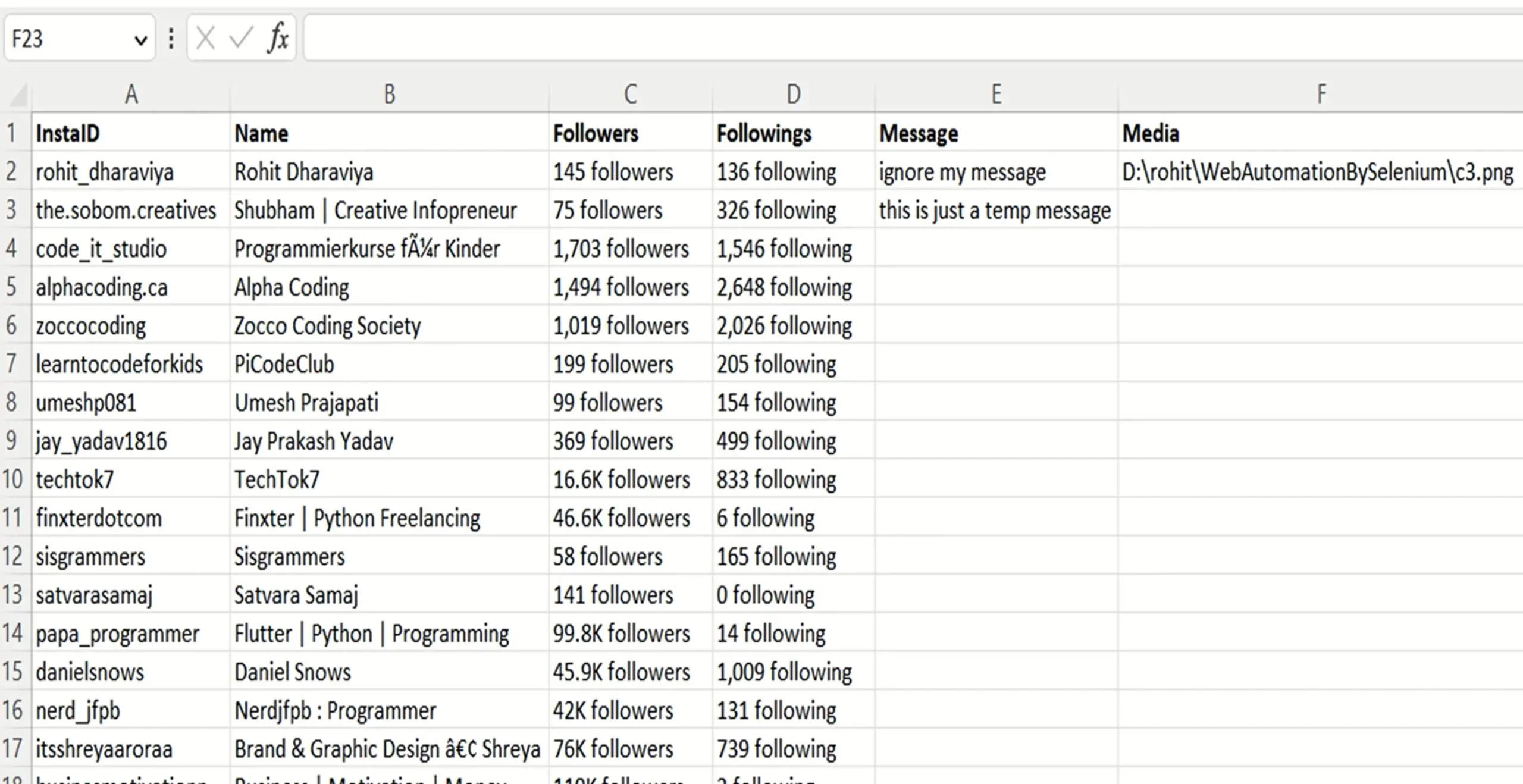
“Here’s a quick demo of how generated excel/csv file would look like for Instagram automation.”
Phase 2 — Automated Messaging Workflow
After message configuration in the CSV/Excel file, the automation workflow executes the following sequence:
- Launches the target platform (browser or WhatsApp app)
- Authenticates the user session
- Identifies the target contact
- Opens the chat interface
- Types or pastes the configured message
- Attaches media when applicable
- Sends the message
The script can process multiple pages to ensure all contacts are found.
The automation proceeds sequentially without human supervision.
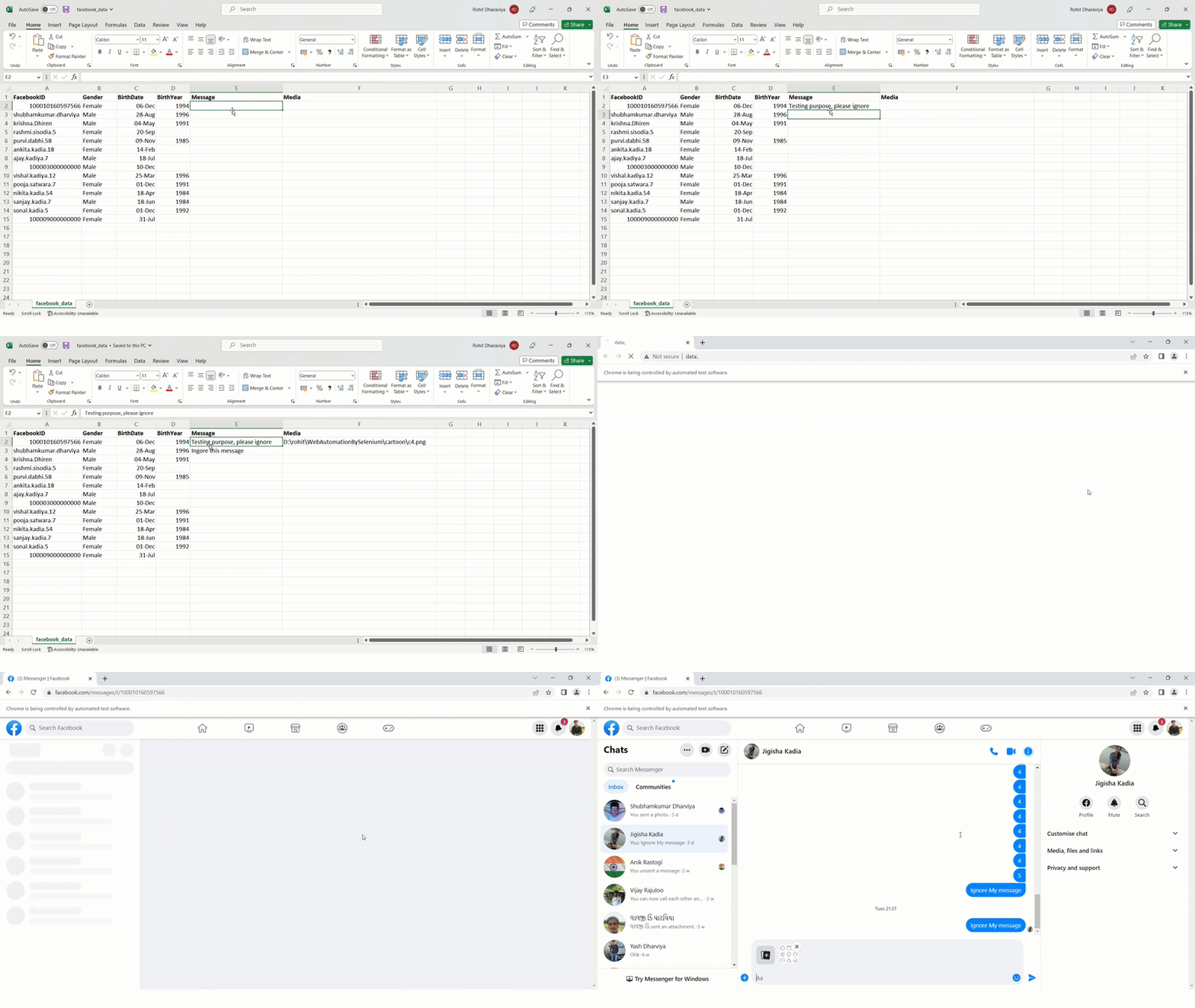
“Here is a quick demo of Facebook messaging.”
No more clicking hundreds of times. Just watch it run!
Python method does the individual task.
- Run script → fetch friends/followers/connections → auto-create CSV.
- Edit CSV → type message (personalize if needed), add media path.
- Run script again → Selenium logs in, finds chat, types message, attaches media, hits send.
- Done → Sit back while automation does the heavy lifting (it does not need monitoring, but you can watch it live if you want to).
Disclaimer and Ethics:
Automation of user interactions is not officially permitted on Facebook, Instagram, LinkedIn, or WhatsApp as outlined in their respective Terms of Service. This automation framework has been developed strictly for educational and research purposes.
Unauthorized bulk messaging or unsolicited communication may lead to account restrictions or bans. Users must ensure responsible usage that aligns with platform policies and applicable data privacy regulations.
How Does Code Work?
Follow these instructions to set up and run your python automation:
- Have Python, Selenium, and the required packages installed on your system.
- Install Google Chrome WebDriver.
- Open a website of your interest, locate the element, and click or give input to an element.
- For Facebook, follow these instructions: open the facebook.com website login page, locate the web element to enter username and password, locate the Login Button element, click on it using Python code, and repeat the same process for the rest of the actions.
After completing these instructions, it is important to perform testing to ensure your automation works as expected.
Here is a link to find various methods to locate different web elements on the webpage:
https://selenium-python.readthedocs.io/locating-elements.html
Learning Python Resources
For developers interested in building or studying the automation framework, the following valuable content is available to help you learn Python automation. To deepen your understanding, read the provided materials and practice by building your own automation projects:
- WhatsApp Automation with Python + ADB + CSV: Learn how to automate WhatsApp messaging using Python and ADB commands. This content is ideal for those who want to read and implement real-world automation solutions.
https://www.udemy.com/course/automate-the-things-with-python-whatsapp-automation/ - Social Media Automation (FB, Instagram, LinkedIn) with Python + Selenium: A complete guide to fetching contacts, sending messages, attaching media, and messaging contacts automatically. Read this content to gain practical skills and practice automation with hands-on projects.
https://www.udemy.com/course/web-automation-by-selenium-webdriver-and-python